Which type of account does an organization create for a user in Apple Business Manager or Apple School Manager?
Show answer and explanation
Correct answer: C
APPLE-DEVICE-SUPPORT Real Exam Questions
214 questions available · Page 1 of 22
Updated Exam DumpsVerified AnswersPass Guarantee
Which type of account does an organization create for a user in Apple Business Manager or Apple School Manager?
Correct answer: C
A user migrated to their new iPhone using a Mac backup of their old iPhone. The user reports their Health and Activity data is missing.
Why is the Health and Activity data missing?
Correct answer: C
Which of these is a Continuity feature?
Correct answer: C
Where in System Settings can you review configuration profiles?
Correct answer: D
What other sharing settings may prevent Screen Sharing from being turned on?
Correct answer: C
Screen Sharing is a feature that allows you to view and control the screen of another Mac on your network.
However, Screen Sharing cannot be turned on if Remote Management is already enabled on your Mac.
Remote Management is a more advanced feature that allows you to remotely manage Mac computers in a commercial or business environment. Remote Management and Screen Sharing are compatible with Virtual Network Computing (VNC), but they cannot be used at the same time. To turn on Screen Sharing, you need to turn off Remote Management first in the Sharing settings of System Settings. The other sharing settings, such as Remote Login, Media Sharing, and Remote Apple Events, do not affect Screen Sharing and can be turned on or off independently.
References:
Turn Mac screen sharing on or off - Apple Support, Share the screen of another Mac - Apple
Support
How do you view log messages grouped by activity in Console on a Mac?
Correct answer: A
Activities is a feature in Console that allows you to view log messages grouped by the activity they are associated with. This helps you focus on specific log messages and allows for a more complete analysis of your Mac. To view activities in Console, you need to click the Activities button in the toolbar (or use the Touch Bar). If the Activities button is dimmed, you need to click Start in the toolbar first. You can then select an activity to see the log messages for that activity, expand or collapse child activities, and view the details of an activity.
References:
= View activities in Console on Mac
Apple Device Support Exam Prep Guide, page 11.
Where are sysdiagnose log files located on iPhone?
Correct answer: A
Sysdiagnose log files are located on iPhone in Settings > Privacy & Security > Analytics & Improvements >
Analytics Data. Sysdiagnose is a tool that collects information from the iPhone and saves it in a log file.
You can use sysdiagnose to troubleshoot general iOS issues or report them to AppleCare. To generate a sysdiagnose log file, you need to press and hold both volume buttons and the side or top button for 1 to 1.5 seconds, then release them. You will see a screenshot and a message that says "Diagnostics are in flight".
Sysdiagnose can take up to 10 minutes to finish. After that, you can find the log file in the Analytics Data section of the Settings app. The log file name will start with "sysdiagnose_" and include the date and time of the generation, the device type, and the iOS version. For example, "sysdiagnose_2024.01.06_17-14- 34
+0500_iPhone_OS_iPhone_19A344.tar.gz".
References:
Using Sysdiagnose to Troubleshoot iOS or iPadOS -- Apple Device Support Tutorials | Apple Training, How to extract sysdiagnose logs for forensic
purposes on iOS | Andrea Fortuna
Select two.
What methods can you use to lock notes in the Notes app?
Correct answers: A, E
In the Notes app, you can lock notes to protect your sensitive information. You can access your locked notes using your device passcode or a custom password. If you have multiple Notes accounts, you choose the locking method for each account (for example, your iCloud account). You can also use Face ID or Touch ID to access your locked notes, if you enable this option in the settings. To lock notes with a custom password, you need to go to Settings > Notes > Password, choose an account, and tap Use Custom
Password. To lock notes with Face ID, you need to go to Settings > Notes > Password, choose an account, and turn on Face ID. To lock or unlock a note, you need to tap the More button and then tap the Lock icon. You can also lock or unlock all notes in the Notes app by tapping the Lock icon in the bottom
toolbar.
References:
Lock your notes on iPhone - Apple Support, How to Lock Your Secrets in the Notes
App (and Why You Should) - Lifehacker
What should you do in the app's Get Info window if your Mac with Apple silicon doesn't recognize a needed app plug-in when you open the app?
Correct answer: B
Some universal apps (apps that don't need Rosetta) include the setting "Open using Rosetta." This setting enables a universal app such as a web browser to use plug-ins, extensions, or other add-ons that do need Rosetta, because they haven't been updated to support Apple silicon. If a universal app doesn't recognize an add-on that you installed for the app, you can quit the app, select this setting, and try again. To do this, you need to open the app's Get Info window and check the box labeled "Open using Rosetta".
References:
If you need to install Rosetta on your Mac - Apple Support, How to force universal Mac apps
to run under Rosetta emulation, How to Launch the Intel Version of a Universal Apple Silicon App
HOTSPOT
Select the setting in the sidebar that you should use to turn on FileVault.
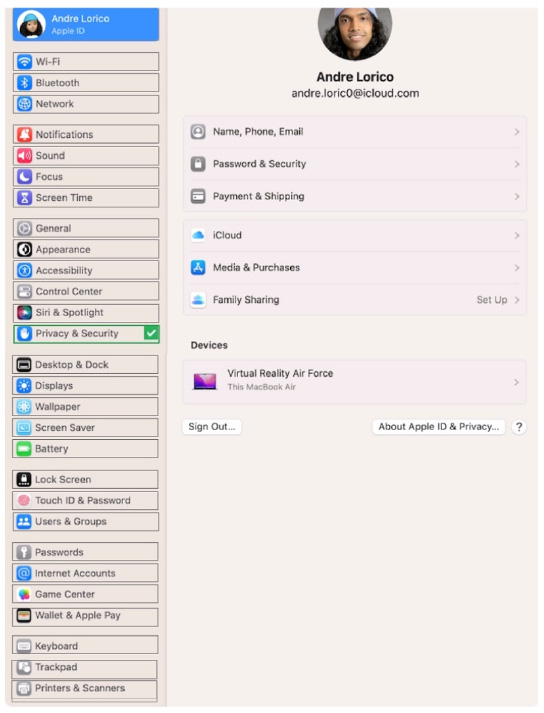
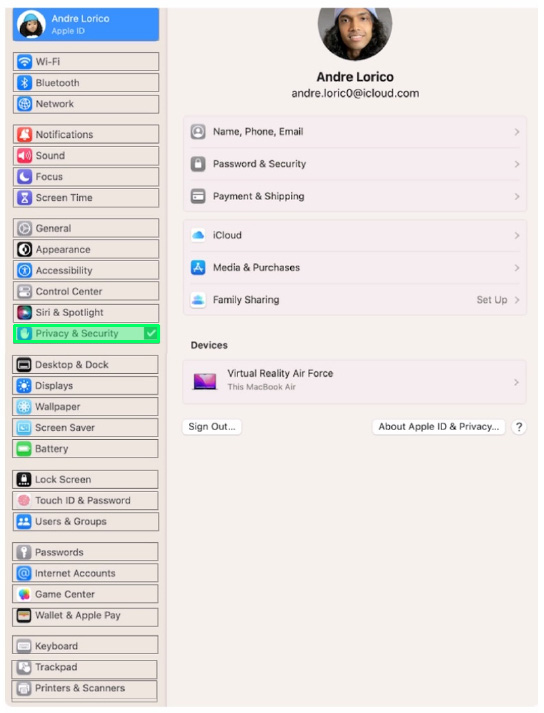
On your Mac, choose Apple menu > System Settings, click Privacy & Security in the sidebar, then click
FileVault on the right. (You may need to scroll down.)
Click Turn On. You might be asked to enter your password.