74-344 Exam Details
-
Exam Code
:74-344 -
Exam Name
:Managing Programs and Projects with Project Server 2013 -
Certification
:Microsoft Certifications -
Vendor
:Microsoft -
Total Questions
:97 Q&As -
Last Updated
:Dec 07, 2021
Microsoft 74-344 Online Questions & Answers
-
Question 61:
You are a new project manager in the software development department. Your company uses Project Server 2013. The software development department has 100 developers that are members of a team named Developers. A generic
resource named developer is also a member of this team Only the generic resource has checked the Team Assignment Pool option in the Team Details section in the Resource page definition. You plan to create a new project, but you do not
know which developers have the availability and proper skills to perform the tasks. You need to create a tasks- assignment process that meets the following requirements:
Let the developers choose which tasks they want to participate in based on their availabilities and skills.
Review and approve the resources assignments.
Use the least amount of time possible.
What should you do?
A. Assign all tasks to yourself and then save and publish the project. Meet with each developer and decide together which tasks the developer wants to participate in. Then delegate the tasks to the developer.
B. Assign all tasks to the Developers team and then save and publish the project. Instruct the developers to add the Team tasks into their Task page and assign themselves the tasks in which they want to participate. You will receive a task approval to accept/reject the assignment.
C. Assign all tasks to the developer generic resource, and then save and publish the project. Instruct the developers to add the Team tasks into their Task page and assign themselves the tasks in which they want to participate. You will receive a task approval to accept/reject the assignment.
D. Instruct all developers to open the project in Project Professional 2013, assign themselves the tasks in which they want to participate, save the project to a local folder, and then email you the project for your revision and approval. -
Question 62:
DRAG DROP
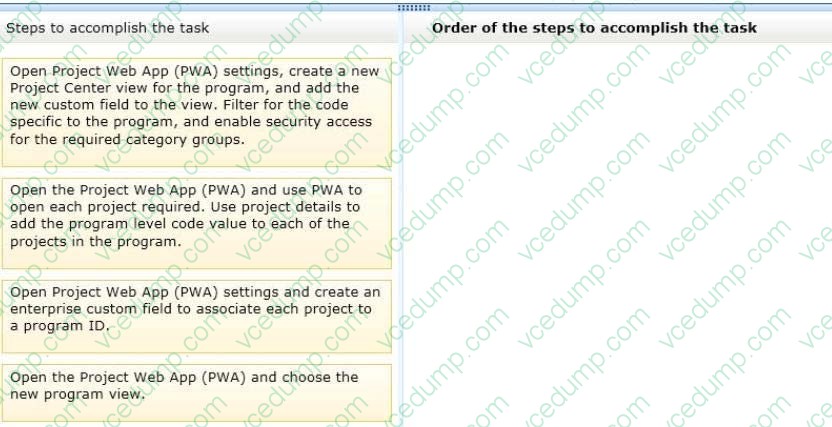
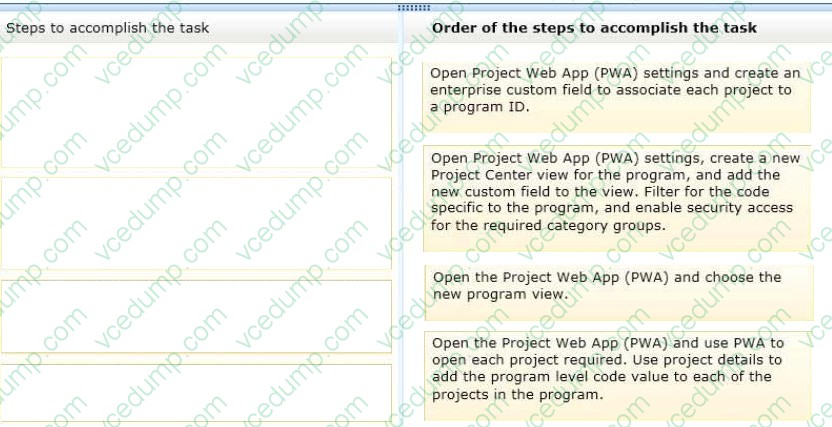
You are a program manager with administrator rights/ and you use Project Server 2013 to implement a data warehouse. You set up your program master project with subprojects for each implementation area. You need to use the Project Center view to create a custom view of the data warehouse projects for your vice president. Which four actions should you perform in sequence? (To answer, move the appropriate four actions from the list of actions to the answer area and arrange them in the correct order.)
Select and Place:
-
Question 63:
You are a project manager who uses Project Server 2013 and Project Professional 2013. You build a project with common tasks for which many resources on your team can be used. Because your resources have responsibilities outside of the project, you would like to have them assign themselves to tasks they are able to complete. You need to configure your resources to enable this method of assigning tasks. What should you do?
A. Open the Build Team From Enterprise dialog box for the project and change each resource on the team to Proposed. Assign the resources. Then have them view their tasks in the My Tasks view and submit changes to the project manager.
B. Create your project in Project Professional 2013 and publish the file without any resources assigned. Inform your team to review the tasks in the Project Web App (PWA) and email you which tasks they are able to work on.
C. Create your project in Project Professional 2013 and then email it to each resource, asking them to add their name to the Resource Field column for each task they feel they could complete.
D. Create a Generic Work resource and assign it to the same team as the other resources. Check the Team Assignment Pool checkbox and assign this resource to the tasks in your project file. Have your resources add team tasks to their My Tasks views for the project and submit for reassignment to the task they are able to work on. -
Question 64:
You are a project manager for an organization that uses Project Server 2013. You have many projects that you schedule and manage. Your organization hires an individual that will be a resource on one of your schedules. You need to use Project Web App (PWA) to add the resource to your schedule as a Team Member so that you can assign them tasks. What should you do?
A. Edit the Project schedule and type in the name of the Resource on a task.
B. Edit the Project schedule and add the new resource in Resource Plan.
C. Edit the Project schedule and add a new task with the name of the Resource on the new task.
D. Edit the Project schedule and add the new resource in Build Team. -
Question 65:
You work for an organization that uses Project Server 2013. You are updating your assigned task information from your Microsoft SharePoint task list. You need to ensure that the appropriate fields are updated. Which three standard fields
can be updated when in SharePoint? (Each correct answer presents a complete solution.
Choose three.)
A. Task Status
B. % complete
C. Predecessors
D. Work
E. Duration -
Question 66:
You are a Project Server 2013 administrator, and you support the Project Management Office (PMO) project managers who need to estimate project hours and costs without knowing the specific resource names. There are options available to accommodate this request when creating resources on Project Server 2013. You need to allow project managers to plan workload and cost from the task level up. What should you do?
A. Create a budget work resource in the resource center and have project managers use the Build Team From Enterprise function to assign the resource at the task level.
B. Create two custom task level fields named Resource Hours and Resources Costs, and add them to the default view so project managers can input their estimations of hours and cost at the task level.
C. Have project managers add resources from the Build Team From Enterprise function when building their projects, and tell them to guess who the resource might be, since the resource can be replaced later by the correct resource.
D. Create a generic work resource in the resource center and have project managers use the Build Team From Enterprise function to assign the generic resources at the task level. -
Question 67:
You are a program manager in the Project Management Office (PMO) of an organization that is implementing Project Server 2013. You plan to include five of your organization's departments in the first rollout of Project Server 2013. You need
to develop a project creation process that meets the following requirements:
Each department must have its own Project Site template. Each department must have its own Project Schedule template. The project creation process needs to be developed in the least amount of time.
What should you do?
A. Create five projects, one for each department. Send the project file via email to the respective department leader. Instruct them to use the project file as a template every time they need to create a new project.
B. Create five Microsoft SharePoint sites and five projects, one for each department. Publish the projects into the respective SharePoint site. Instruct the department leads to create a copy of their SharePoint site and to use the project file as a template each time they need to create a new project.
C. For each department, create one enterprise project template (EPT), one Project Site template, and one project template. Associate the Project Site template and the project template with the EPT.
D. Create a single Microsoft SharePoint site and one project for each department, and then publish the projects into the SharePoint site. Instruct the department leads to create a new sub-site from the SharePoint site and to use the appropriate project file as the template each time they need to create a new project. -
Question 68:
You are a program manager. You use Project Server 2013 and Project Professional 2013 to manage your portfolio which includes master projects and sub-projects. There is a mandatory Enterprise Custom Field called Business Unit that provides lookup values so that project managers can categorize their sub-projects. The Business Unit field has been added to all of the Project Center views. You need to show all projects within Project Center grouped by business unit. Which two actions should you perform? (Each correct answer presents part of the solution. Choose two.)
A. Make sure the Subprojects checkbox is checked in ribbon.
B. Set the Filter option to Filter by Business Unit.
C. Set the view from Summary View to the Detail View.
D. Set the Group by option in the ribbon to Business Unit. -
Question 69:
You are a project manager who uses Project Server 2013. You want to use the Resource Center Availability function and the Assignment Work by Resource view to see the proposed and active projects for a particular resource. However, you are only able to view part of the work load for the resource. You need to view the complete work load for the resource. Which two settings should you verify? (Each correct answer presents part of the solution. Choose two.)
A. That Include proposed bookings is selected
B. That the units chosen are correct
C. That the date range is correct
D. That the resource is selected on the Resource Availability view -
Question 70:
You are a project manager who uses Project Server 2013 and Project Professional 2013. You are managing a project that has already begun. A new change request has been pre- approved, and the director wants to understand the impact to the overall project schedule prior to formally approving the project to include in the project schedule. You add the change request to your project schedule. Your original baseline is Baseline1. You need to include the change request in your baseline to see the impact of your overall project schedule including duration, work, and cost. What should you do?
A. Set Interim plan for the entire project.
B. Set Baseline1 for the selected tasks.
C. Set Interim plan for the selected tasks.
D. Set Baseline1 for the entire project.
Related Exams:
-
62-193
Technology Literacy for Educators -
70-243
Administering and Deploying System Center 2012 Configuration Manager -
70-355
Universal Windows Platform – App Data, Services, and Coding Patterns -
77-420
Excel 2013 -
77-427
Excel 2013 Expert Part One -
77-725
Word 2016 Core Document Creation, Collaboration and Communication -
77-726
Word 2016 Expert Creating Documents for Effective Communication -
77-727
Excel 2016 Core Data Analysis, Manipulation, and Presentation -
77-728
Excel 2016 Expert: Interpreting Data for Insights -
77-731
Outlook 2016 Core Communication, Collaboration and Email Skills
Tips on How to Prepare for the Exams
Nowadays, the certification exams become more and more important and required by more and more enterprises when applying for a job. But how to prepare for the exam effectively? How to prepare for the exam in a short time with less efforts? How to get a ideal result and how to find the most reliable resources? Here on Vcedump.com, you will find all the answers. Vcedump.com provide not only Microsoft exam questions, answers and explanations but also complete assistance on your exam preparation and certification application. If you are confused on your 74-344 exam preparations and Microsoft certification application, do not hesitate to visit our Vcedump.com to find your solutions here.