70-697 Exam Details
-
Exam Code
:70-697 -
Exam Name
:Configuring Windows Devices -
Certification
:Microsoft Certifications -
Vendor
:Microsoft -
Total Questions
:330 Q&As -
Last Updated
:Apr 18, 2020
Microsoft 70-697 Online Questions & Answers
-
Question 51:
You have a computer named Client1. Client1 is joined to an Active Directory domain.
You need to join Client1 to an Azure Active Directory (Azure AD) tenant.
What should you do?
A. From the Local Group Policy Editor, modify the Add workstations to domain policy.
B. From the network adapter properties, modify the DNS suffix.
C. From the System in the Settings app, modify the sign-in options.
D. From System in Control Panel, configure the computer to be a member of a workgroup. -
Question 52:
A company has 100 Windows 10 Enterprise client computers. You need to assign static IPv6 addresses to the client computers. Which Windows PowerShell cmdlet should you run?
A. Set-NetIPAddress
B. Set-NetIPInterface
C. Set-NetTCPSetting
D. Set-NetIPv6Protocol -
Question 53:
You have 100 Windows computers that are managed by using Microsoft Intune.
You need to ensure that when a new critical update is released, the update is approved automatically and deployed to the computers within 24 hours of approval.
What should you do from the Microsoft Intune administration portal?
A. From the Updates node, select Critical Updates, and then modify the Approval settings.
B. From the Admin node, click Enrollment Rules, and then modify the device enrollment rules.
C. From the Admin node, click Updates, and then create a new automatic approval rule.
D. From the Policy node, click Compliance Policies, and then create a new compliance policy.
E. From the Policy node, click Configuration Policies, and then create a new Windows policy. -
Question 54:
You are configuring two Windows 10 Enterprise client computers: A desktop computer named COMPUTER1 and a portable computer named COMPUTER2.
You have the following requirements:
Store all personal data in a folder named Data on COMPUTER1.
Ensure that you can access all personal data from COMPUTER2, even when a network connection is unavailable.
Synchronize personal data between the computers twice a day.
You need to configure the computers to meet the requirements.
Which two actions should you perform? Each correct answer presents part of the solution.
A. From COMPUER2, connect to COMPUTER1 and configure the Data folder to always be available offline.
B. From COMPUTER1, connect to COMPUTER2 and configure the Data folder to always be available offline.
C. In Sync Center, configure a schedule for offline files.
D. From COMPUTER2, map a network drive to the Data folder on COMPUTER1.
E. In Sync Center, set up a new sync partnership. -
Question 55:
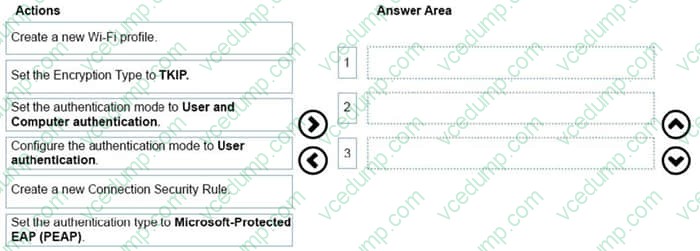
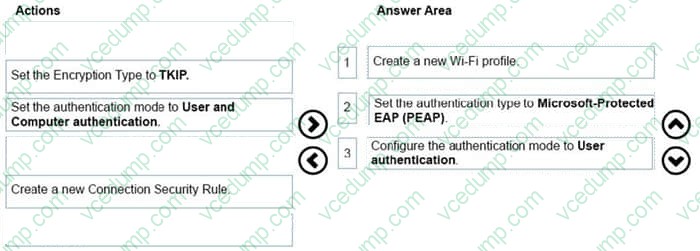
You administer 100 Windows 10 Enterprise laptops in your company network.
You have a wireless access point that requires 802.1x authentication. Authentication requests are forwarded to a RADIUS server.
You need to configure the laptops to connect to the wireless access point. Your solution must ensure that laptops authenticate to the RADIUS server by using stored credentials.
Which three actions should you perform in sequence? To answer, move the appropriate three actions from the list of actions to the answer area and arrange them in the correct order.
Select and Place:
-
Question 56:
DRAG DROP
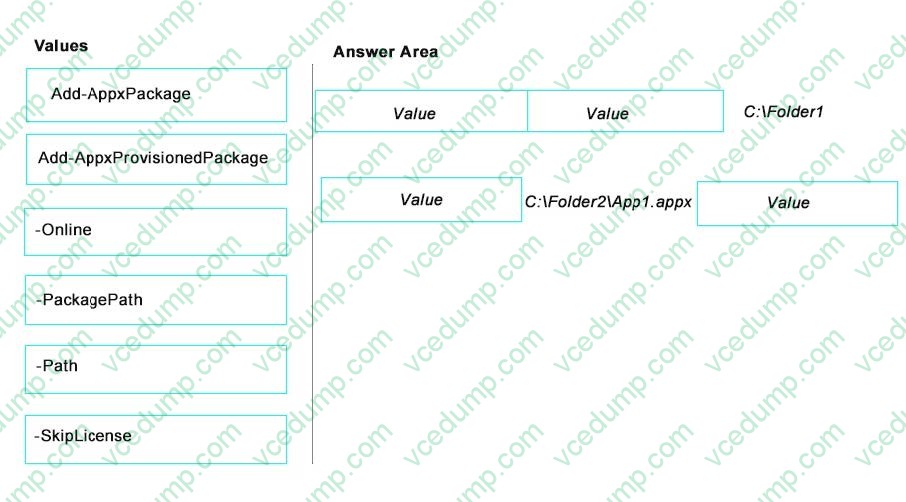
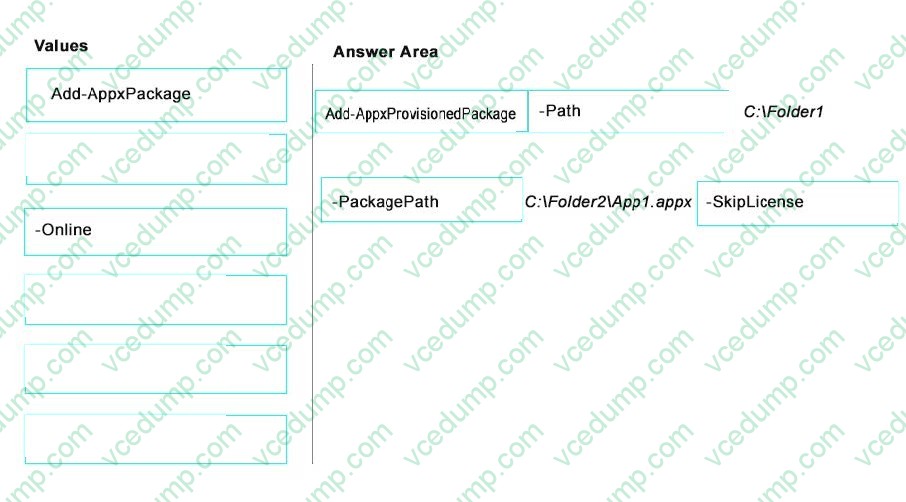
You have a line-of-business universal app named App1. You have an image of Windows 10 Enterprise named Image1.
Image1 is mounted to the C:\Folder1 folder on a Windows 10 Enterprise computer named Computer1. The source for App1 is in the C\:Folder2 folder.
You need to ensure that App1 is included in Image1.
What command should you run on Computer1? To answer, drag the appropriate values to the correct locations. Each value may be used once, more than once, or not at all. You may need to drag the split bar between panes or scroll to view
content.
Select and Place:
-
Question 57:
company installs a line-of-business (LOB) app on a server that runs Remote Desktop Services.
You need to ensure that you can publish the application by using RemoteApp.
What should you do first?
A. Create a personal desktop session collection.
B. Manually assign users to a session host.
C. Create a pooled desktop collection.
D. Automatically assign users to a session host. -
Question 58:
Your network contains an Active Directory domain. All client computers run Windows 10 Enterprise.
Your company uses virtual smart cards.
A user named User1 requires a virtual smart card on a new client computer named Computer1.
Which two actions should you perform? Each correct answer presents part of the solution.
NOTE: Each correct selection is worth one point.
A. Run the tpmvscmgr.exe command.
B. Enroll Computer1 for a certificate.
C. Run the Enable-BitLocker cmdlet.
D. Enroll User1 for a certificate. -
Question 59:
You administer computers that run Windows 8 Enterprise in an Active Directory domain in a single Active Directory Site. All user account objects in Active Directory have the Manager attribute populated. The company has purchased a
subscription to Windows Intune. The domain security groups are synchronized with the Microsoft Online directory.
You create a Windows Intune group that specifies a manager as a membership criterion. You notice that the group has no members.
You need to ensure that users that meet the membership criteria are added to the Windows Intune group. What should you do?
A. Force Active Directory replication within the domain.
B. Ensure that all user accounts are identified as synchronized users.
C. Ensure that the user who is performing the search has been synchronized with the Microsoft Online directory.
D. Synchronize the Active Directory Domain Service (AD DS) with the Microsoft Online directory. -
Question 60:
DRAG DROP
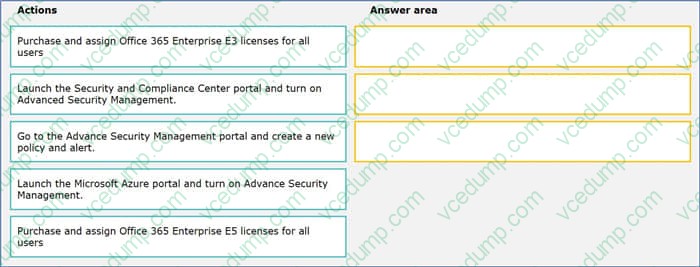
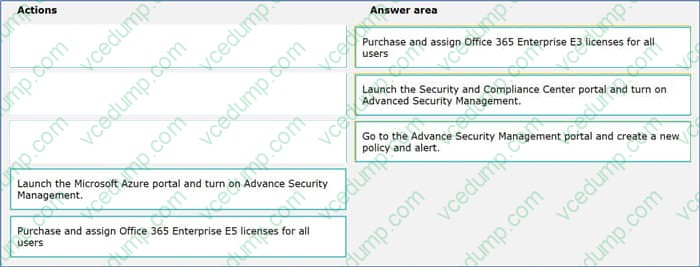
You plan to deploy Microsoft Office 365 for all users in an organization. You have the following requirements:
Users need to utilize Microsoft SharePoint Online.
Use Office 365 Advanced Security Management.
You need to deploy Office 365 to meet the requirements.
Which three actions should you perform in sequence. To answer, move the appropriate actions from the list of actions to the answer area and arrange them in the correct order.
Select and Place:
Related Exams:
-
62-193
Technology Literacy for Educators -
70-243
Administering and Deploying System Center 2012 Configuration Manager -
70-355
Universal Windows Platform – App Data, Services, and Coding Patterns -
77-420
Excel 2013 -
77-427
Excel 2013 Expert Part One -
77-725
Word 2016 Core Document Creation, Collaboration and Communication -
77-726
Word 2016 Expert Creating Documents for Effective Communication -
77-727
Excel 2016 Core Data Analysis, Manipulation, and Presentation -
77-728
Excel 2016 Expert: Interpreting Data for Insights -
77-731
Outlook 2016 Core Communication, Collaboration and Email Skills
Tips on How to Prepare for the Exams
Nowadays, the certification exams become more and more important and required by more and more enterprises when applying for a job. But how to prepare for the exam effectively? How to prepare for the exam in a short time with less efforts? How to get a ideal result and how to find the most reliable resources? Here on Vcedump.com, you will find all the answers. Vcedump.com provide not only Microsoft exam questions, answers and explanations but also complete assistance on your exam preparation and certification application. If you are confused on your 70-697 exam preparations and Microsoft certification application, do not hesitate to visit our Vcedump.com to find your solutions here.