70-697 Exam Details
-
Exam Code
:70-697 -
Exam Name
:Configuring Windows Devices -
Certification
:Microsoft Certifications -
Vendor
:Microsoft -
Total Questions
:330 Q&As -
Last Updated
:Apr 18, 2020
Microsoft 70-697 Online Questions & Answers
-
Question 11:
Note: This question is part of a series of questions that use the same or similar answer choices. An answer choice may be correct for more than one question in the series. Each question is independent of the other questions in this series.
Information and details provided in a question apply only to that question.
You have five computers that run Windows 10. You are the only user who uses the computers. All of the computers are members of the same domain.
You need to ensure that you can access any file on any of the computers over the Internet.
What should you configure?
A. account policies
B. share permissions
C. application control policies
D. NTFS permissions
E. HomeGroup settings
F. software restriction policies
G. Encrypting File System (EFS) settings
H. Microsoft OneDrive -
Question 12:
You work for a company that uses customized applications. The applications are published to 150 Windows 10 Enterprise laptops that are deployed in the field. All users must use the same version of the applications at the same time. You need to deploy and manage the applications updates centrally.
What should you do?
A. Deploy the applications as a Microsoft Application Virtualization.
B. Use System Center Configuration Manager to deploy the application updates to the client.
C. Deploy application updates as a shim through System Center Configuration.
D. Use Intune to deploy the applications with the appropriate settings through the Windows Store.
E. Deploy the applications via RemoteApp.
F. Distribute application updates through work folders.
G. Use System Center Configuration Manager to deploy full installations of the updated applications.
H. Use Intune to deploy the applications through the company portal. -
Question 13:
HOTSPOT
You are setting up a Windows 10 Enterprise computer.
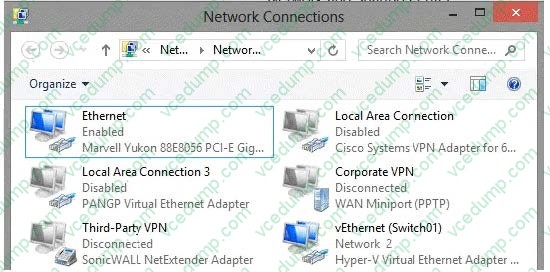
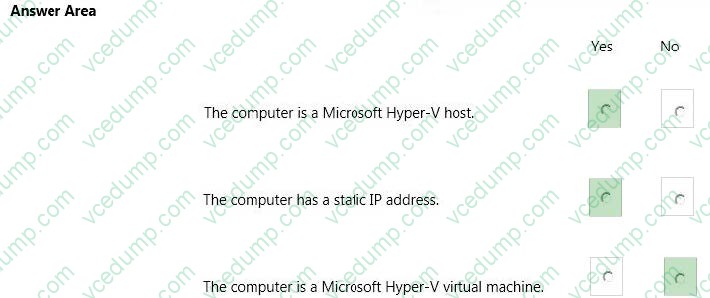
The computer's network connections are shown in the Network connections exhibit. (Click the Exhibit button.)
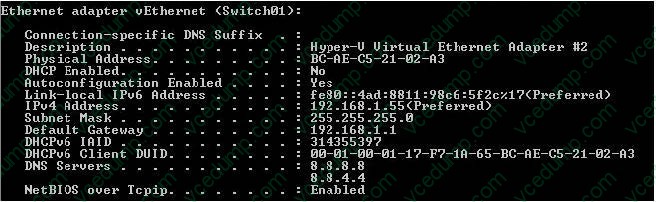
The computer's network settings are shown in the Network Settings exhibit. (Click the Exhibit button.)
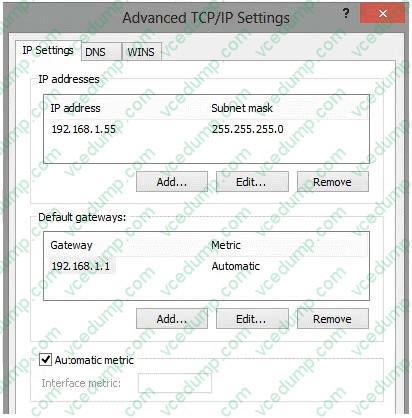
Advanced TCP/IP settings are shown in the Advanced TCP/IP Settings exhibit. (Click the Exhibit button.)
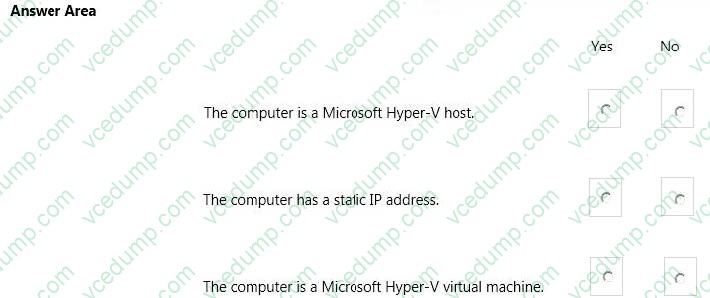
For each of the following statements, select Yes if the statement is true. Otherwise, select No. NOTE: Each correct selection is worth one point.
Hot Area:
-
Question 14:
You are the system administrator for a company. All employees have devices that run Windows 10. Employees store many files on network shares.
You need to ensure that employees keep a copy of files from network shares on their devices, even when the devices are not connected to the company network.
What should you first?
A. Run the SettingSyncHost.exe command.
B. Enable File History.
C. Create a new pool and storage space.
D. Run the Set-FileShare Windows PowerShell cmdlet.
E. Enable Offline Files. -
Question 15:
You support Windows 10 Enterprise desktop computers. Your company has a security policy that controls multiple settings of the desktop through the domain group policy.
The security policy recently was updated to require that access to several built-in Windows 10 Enterprise tools be prohibited to all local users on one of the desktop computers.
You need to implement this new policy.
What should you do?
A. Configure an AppLocker policy.
B. Create a Windows To Go workspace.
C. Configure NTFS permissions.
D. Enable BitLocker. -
Question 16:
A company has Windows 10 Enterprise client computers. The company uses Windows BitLocker Drive Encryption with the data-only option on all client computers.
You delete a file containing highly confidential information from your computer.
You need to clear the free space on the hard drive to minimize the chance of the confidential information being recovered.
Which command should you run on the client computer?
A. diskpart clean
B. manage-bde -w
C. chkdsk /spotfix
D. BdeHdCfg -target c: shrink -
Question 17:
You have a computer named Computer1 that runs Windows 10 Enterprise. You install a Universal app named App1 on Computer1.
You discover that an update for App1 is available.
You need to install the update as soon as possible.
What should you do?
A. Log off and log on to the Computer1.
B. From the Windows Update settings, modify the Choose how updates are delivered setting.
C. From the Windows Update settings, modify the Choose how updates are installed setting.
D. From the Windows Update settings, click Check for updates. -
Question 18:
You have Windows computers that are managed by using Microsoft Intune.
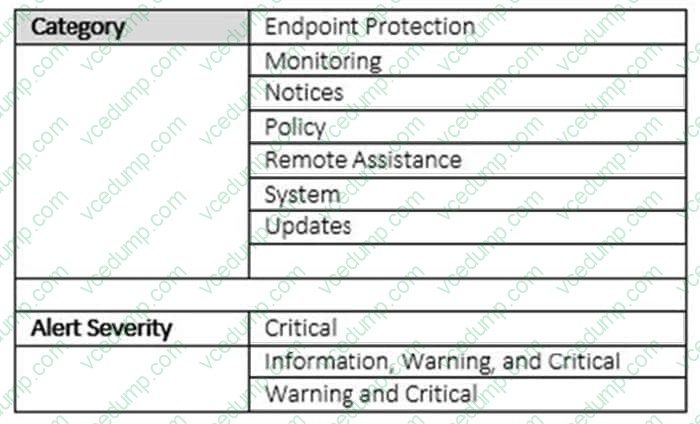
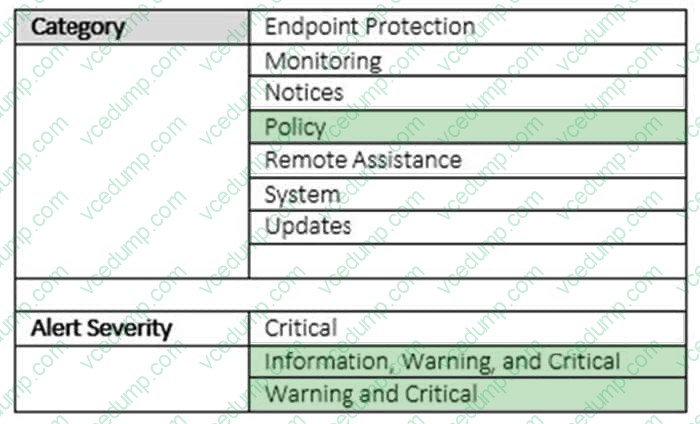
You need to send an email notification to [email protected] when there is a critical Windows update that must be approved.
The solution must minimize the number of email notifications sent.
How should you configure the email notification rule? To answer, select the appropriate options in the answer are.
Hot Area:
-
Question 19:
You are a desktop administrator for a small company and have just upgraded two laptops from Windows 8 to Windows 10 Enterprise.
When the computers were running Windows 8, Backup and Restore was active and was scheduled to back up data files two times a day to an external hard disk.
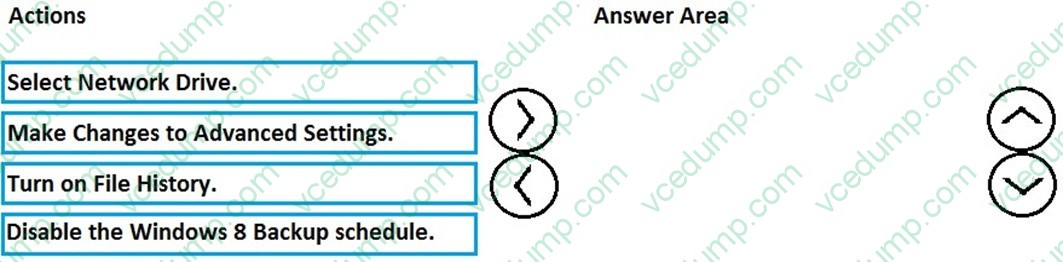
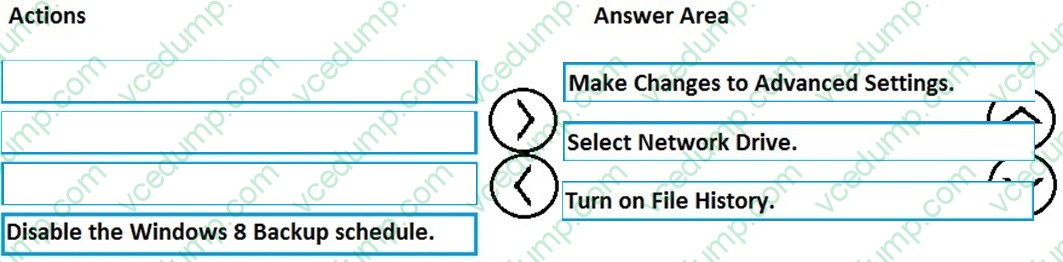
You need to enable File History so that copies of files are saved to a network drive.
Which three actions should you perform in sequence? To answer, move the appropriate three actions from the list of actions to the answer area and arrange them in the correct order.
Select and Place:
-
Question 20:
Note: This question is part of a series of questions that present the same scenario. Each question in the series contains a unique solution that might meet the stated goals. Some question sets might have more than one correct solution, while
others might not have a correct solution.
After you answer a question in this section, you will NOT be able to return to it. As a result, these questions will not appear in the review screen.
Your company uses Microsoft Office 365.
You need to ensure that users are prompted to label and classify documents while they edit documents.
Solution: You enable Microsoft Azure Information Protection.
Does the solution meet the goal?
A. Yes
B. No
Related Exams:
-
62-193
Technology Literacy for Educators -
70-243
Administering and Deploying System Center 2012 Configuration Manager -
70-355
Universal Windows Platform – App Data, Services, and Coding Patterns -
77-420
Excel 2013 -
77-427
Excel 2013 Expert Part One -
77-725
Word 2016 Core Document Creation, Collaboration and Communication -
77-726
Word 2016 Expert Creating Documents for Effective Communication -
77-727
Excel 2016 Core Data Analysis, Manipulation, and Presentation -
77-728
Excel 2016 Expert: Interpreting Data for Insights -
77-731
Outlook 2016 Core Communication, Collaboration and Email Skills
Tips on How to Prepare for the Exams
Nowadays, the certification exams become more and more important and required by more and more enterprises when applying for a job. But how to prepare for the exam effectively? How to prepare for the exam in a short time with less efforts? How to get a ideal result and how to find the most reliable resources? Here on Vcedump.com, you will find all the answers. Vcedump.com provide not only Microsoft exam questions, answers and explanations but also complete assistance on your exam preparation and certification application. If you are confused on your 70-697 exam preparations and Microsoft certification application, do not hesitate to visit our Vcedump.com to find your solutions here.