70-697 Exam Details
-
Exam Code
:70-697 -
Exam Name
:Configuring Windows Devices -
Certification
:Microsoft Certifications -
Vendor
:Microsoft -
Total Questions
:330 Q&As -
Last Updated
:Apr 18, 2020
Microsoft 70-697 Online Questions & Answers
-
Question 41:
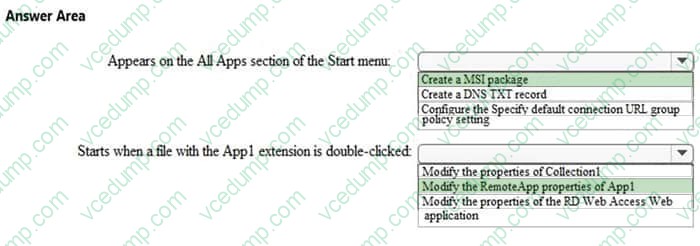
Your network contains a RemoteApp deployment named Deployment1. Deployment1 contains a collection named Collection1. Collection1 contains a RemoteApp named App1.
You can run App1 by connecting to an RD Web Access server named Server1.
You need to ensure that App1 meets the following requirements:
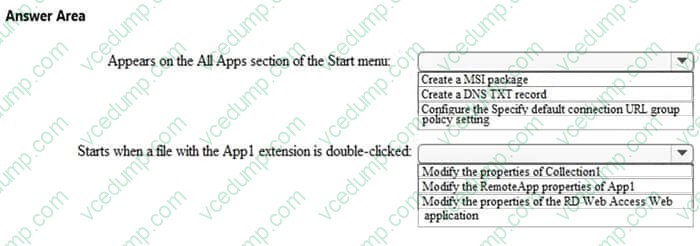
Appears on the All Apps section of the Start menu
Starts when a file with the App1 extension is double-clicked
What should you do for each requirement? To answer, select the appropriate options in the answer area.
Hot Area:
-
Question 42:
You administer a corporate network. Employees use docking stations for Windows 10 devices when the employees are working in their offices.
The wireless adapters of the devices are connected to a specific network. The docking stations are connected to a separate network that uses twisted pair cabling.
You need to ensure that the devices can access all resources from each network using either network adapter.
What should you do?
A. Configure a network bridge.
B. Configure Internet Connection Sharing (ICS).
C. Configure VPN Reconnect.
D. Turn on Network Discovery. -
Question 43:
You administer a Windows 10 Enterprise computer.
The computer is configured to encrypt several folders by using a self-signed Encrypted File System (EFS) certificate.
You need to make a backup copy of the encryption keys.
What should you do?
A. Open the Certificates console and connect to the user account certificates. Export the self-signed EFS certificate from the Trusted People folder to a Canonical Encoding Rules (CER) file.
B. Open the Certificates console and connect to the user account certificates. Find the personal self-signed EFS certificate and export it to a Personal Information Exchange (PFX) file.
C. Open the Certificates console and connect to the user account certificates. Export the personal self-signed EFS certificate from the Trusted Root Certification Authority folder to a Personal Information Exchange (PFX) file.
D. Open the Certificates console and connect to the computer account certificates. Export the self-signed EFS certificate from the Trusted People folder to a Canonical Encoding Rules(CER) file. -
Question 44:
You have an Active Directory domain named contoso.com. You use RemoteApp to make applications available to Android and iOS users. The external DNS zone for contoso.com is shown in the exhibit. (Click the Exhibit button.)
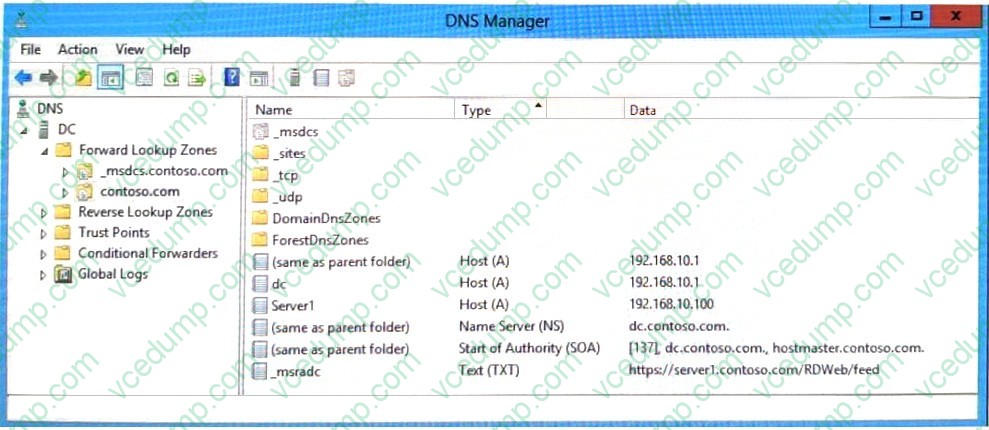
You need to provide a user with the connection URL for the Remote Desktop app on an Android device. Which connection URL should you provide?
A. https://server1.contoso.com/RDWeb/feed/webfeed.aspx
B. server1.contoso.com
C. https://server1.contoso.com/RDWeb/feed
D. _msradc.contoso.com -
Question 45:
You manage a client Windows 10 Enterprise computer named Computer1.
You have a OneDrive synchronized folder that contains .pdf files.
You need to ensure that you can restore previous versions of the .pdf files.
What should you do?
A. Enable File History.
B. Configure System Restore.
C. Configure Computer1 as a trusted PC.
D. Enable Sync your settings on Computer1. -
Question 46:
Note: This question is part of a series of questions that use the same or similar answer choices. An answer choice may be correct for more than one question in the series. Each question is independent of the other questions in this series.
Information and details provided in a question apply only to that question.
You have five computers that run Windows 10. The computers are used for testing and cannot connect to the Internet. You are the only user who uses the computers. All of the computers are members of the same domain.
One of the computers contains a folder named Folder1.
You need to ensure that you can access Folder1 from any of the computers.
What should you configure?
A. HomeGroup settings
B. OneDrive for Business
C. NTFS permissions
D. Encrypting File System (EFS) settings
E. share permissions
F. application control policies
G. account policies
H. software restriction policies -
Question 47:
HOTSPOT
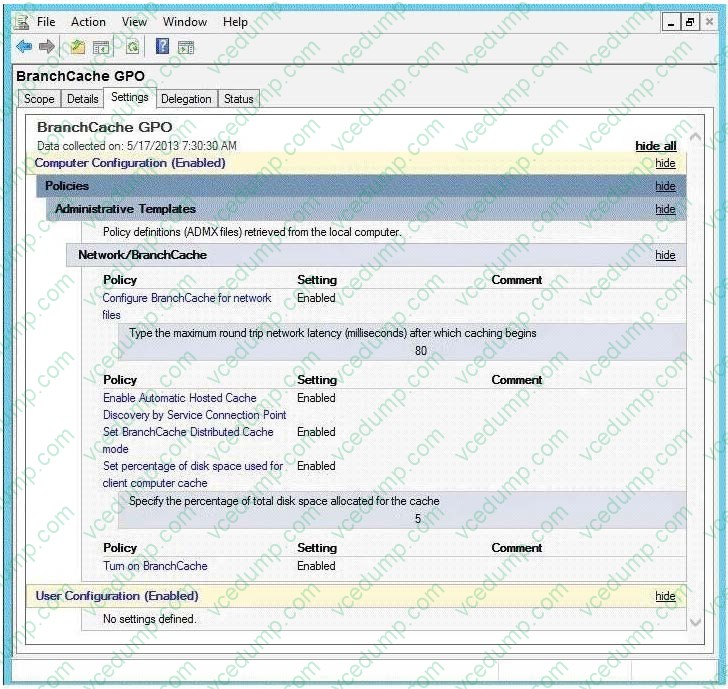
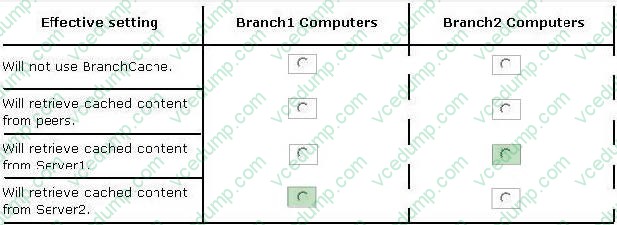
Your company has a main office and two branch offices named Branch1 and Branch2. The main office contains a file server named Server1 that has BranchCache enabled. Branch1 contains a server named Server2 that is configured as a hosted cache server. The average round trip network latency between the offices is 100 milliseconds.
All client computers run Windows 8 Enterprise. All of the computers are joined to an Active Directory domain.
The BranchCache settings of all the computers are configured as shown in the following exhibit. (Click the Exhibit button.)
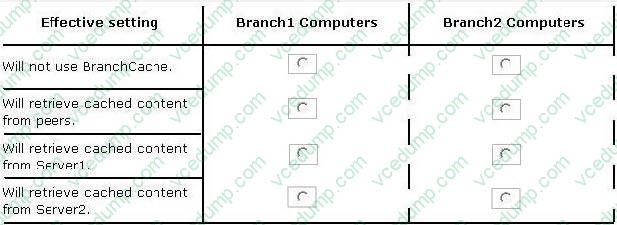
In the table below, identify the effective setting for the client computers in each branch office. Note: Make one selection in each column. Each correct selection is worth one point.
Hot Area:
-
Question 48:
You have an on-premises Active Directory domain and a Microsoft Azure Active Directory. You have a Microsoft Intune subscription that is linked to the Azure Active Directory.
You configure directory synchronization between the on-premises Active Directory and the Azure Active Directory. You import 100 users into the Azure Active Directory.
Users report that they are unable to sigh in to Microsoft Intune. You confirm that each user has a valid Active Directory account and password.
You open the Microsoft Intune Console and see the configuration of User1 as shown in the exhibit. (Click the Exhibit button.)
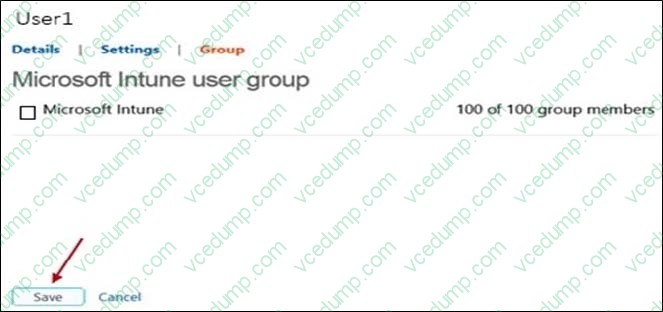
You need to ensure that the users can sign in to Microsoft Intune. What should you do first?
A. Activate the synchronized user accounts.
B. Purchase an Enterprise Mobility Suite subscription.
C. Configure Microsoft Intune for single sign-on.
D. Create a new Security Group in Microsoft Intune named Domain Intune Users. -
Question 49:
DRAG DROP
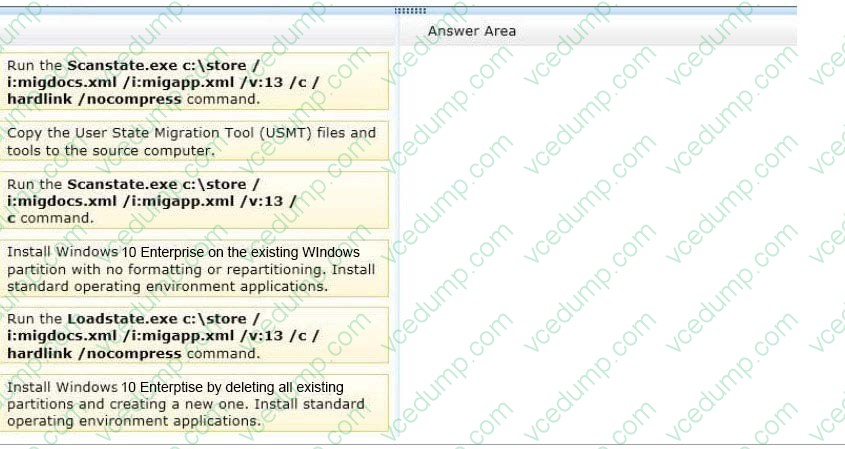
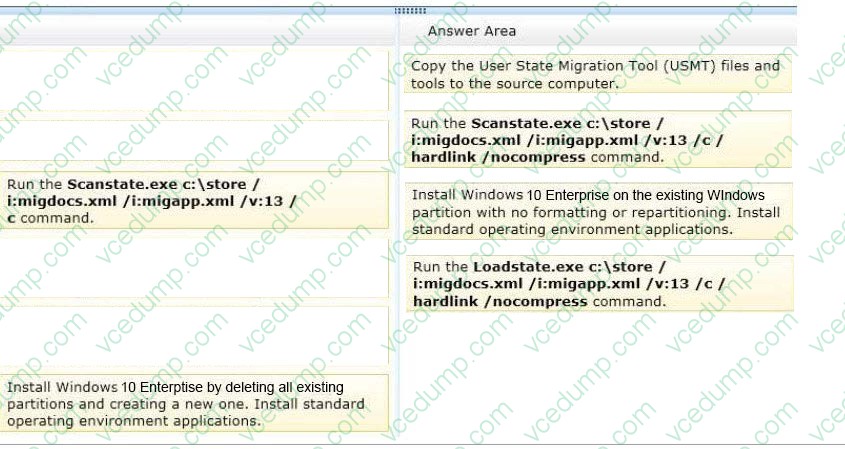
You administer 50 laptops that run Windows 7 Professional 32-bit. You want to install Windows 10 Enterprise 64-bit on every laptop. Users will keep their own laptops.
You need to ensure that user application settings, Windows settings, and user files are maintained after Windows 10 Enterprise is installed.
Which four actions should you perform in sequence?
Select and Place:
-
Question 50:
DRAG DROP
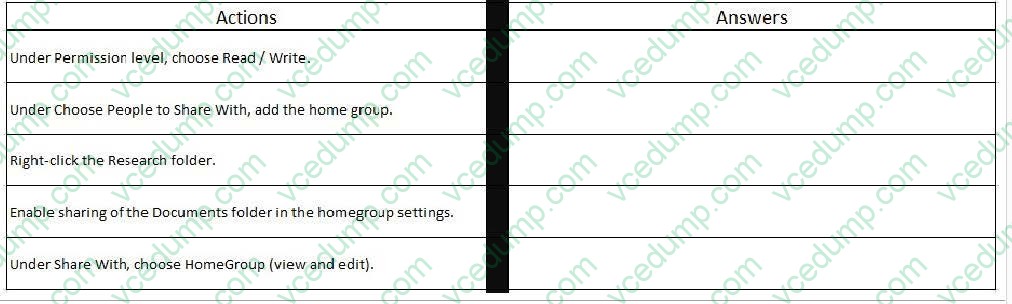
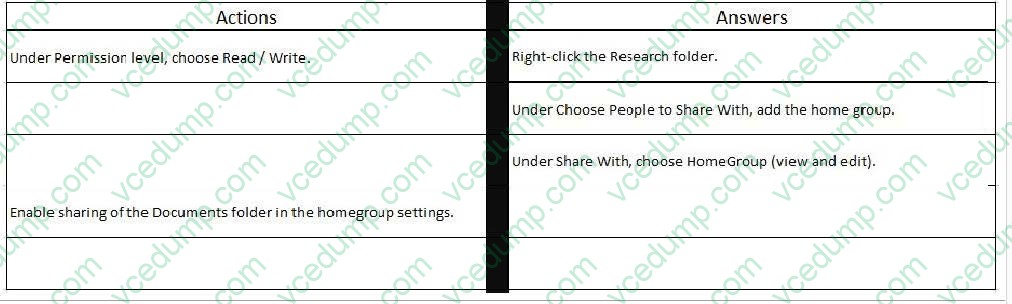
You work for a small company that uses Windows 10 computers. The computers are joined to a homegroup. You want to share an existing folder named Research. It is located in the Documents folder. You need to give users the ability to change the files in this folder. Which three actions should you perform in sequence?
Select and Place:
Related Exams:
-
62-193
Technology Literacy for Educators -
70-243
Administering and Deploying System Center 2012 Configuration Manager -
70-355
Universal Windows Platform – App Data, Services, and Coding Patterns -
77-420
Excel 2013 -
77-427
Excel 2013 Expert Part One -
77-725
Word 2016 Core Document Creation, Collaboration and Communication -
77-726
Word 2016 Expert Creating Documents for Effective Communication -
77-727
Excel 2016 Core Data Analysis, Manipulation, and Presentation -
77-728
Excel 2016 Expert: Interpreting Data for Insights -
77-731
Outlook 2016 Core Communication, Collaboration and Email Skills
Tips on How to Prepare for the Exams
Nowadays, the certification exams become more and more important and required by more and more enterprises when applying for a job. But how to prepare for the exam effectively? How to prepare for the exam in a short time with less efforts? How to get a ideal result and how to find the most reliable resources? Here on Vcedump.com, you will find all the answers. Vcedump.com provide not only Microsoft exam questions, answers and explanations but also complete assistance on your exam preparation and certification application. If you are confused on your 70-697 exam preparations and Microsoft certification application, do not hesitate to visit our Vcedump.com to find your solutions here.