70-697 Exam Details
-
Exam Code
:70-697 -
Exam Name
:Configuring Windows Devices -
Certification
:Microsoft Certifications -
Vendor
:Microsoft -
Total Questions
:330 Q&As -
Last Updated
:Apr 18, 2020
Microsoft 70-697 Online Questions & Answers
-
Question 311:
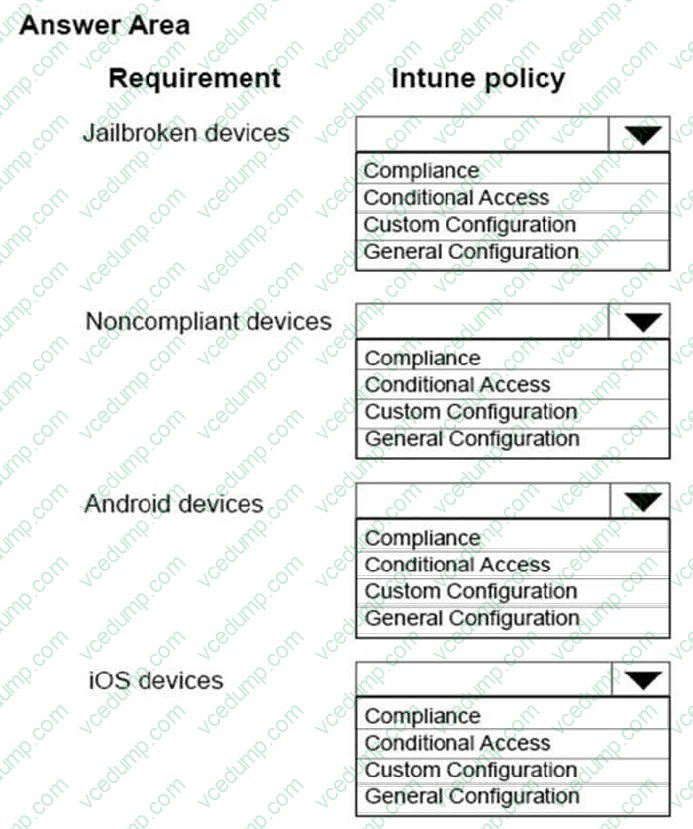
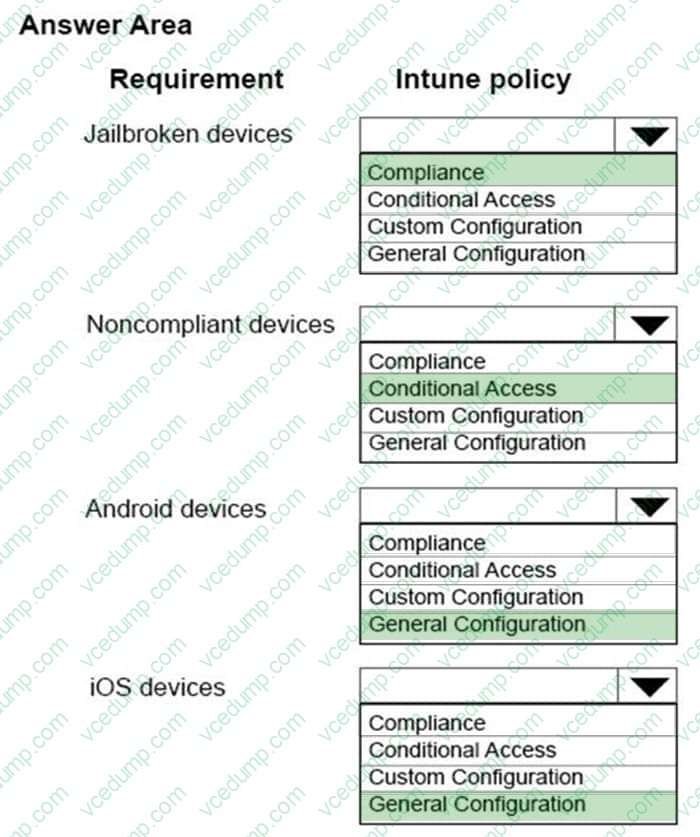
You need to configure Intune policies to meet the following requirements:
Jailbroken devices must be reported.
Noncompliant devices must not be allowed to connect to Microsoft Exchange.
Android devices must have passwords of 8 characters.
iOS devices must have passwords of 8 characters.
What type of policies should you implement? To answer, select the appropriate policy for each requirement in the dialog box in the answer area.
NOTE: Each correct selection is worth one point.
Hot Area:
-
Question 312:
A company has an Active Directory Domain Services domain. All client computers run Windows 10 Enterprise and are joined to the domain. You run the ipconfig command on a client computer. The following output depicts the results.
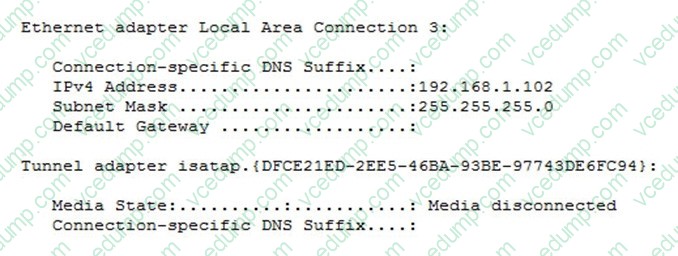
You need to ensure that you can establish a DirectAccess connection from the client computer to the network. What should you do?
A. Configure a static IPv4 address.
B. Remove the computer from the domain.
C. Enable IPV6 on the network adapter.
D. Create a new VPN connection. -
Question 313:
A laptop runs Windows 10 Enterprise. You connect the laptop to a corporate network by using a VPN connection.
The company policy requires all company computers to be restricted from the Internet access while connected to the corporate network.
You need to configure this laptop to ensure that it cannot access the Internet when its VPN connection to the corporate network is active.
What should you do?
A. Configure the VPN connection to use only PPTP
B. In the TCP/IPv4 properties of the VPN connection, enable the Use default gateway on remote network setting
C. In the TCP/IPv4 properties of the VPN connection, disable the Use default gateway on remote network setting
D. Configure the VPN connection to use only L2TP/IPSec -
Question 314:
You have a computer named Computer1 that runs Windows 10 Enterprise. Computer1 is configured to receive Windows updates from the Internet.
You occasionally connect Computer1 to a Wi-Fi network named Network1.
You need to prevent Computer1 from downloading Windows updates while connected to Network1.
What should you do?
A. Configure the Data usage setting
B. Configure the Choose how updates are delivered setting
C. Configure the Wi-Fi Sense setting
D. Set Network1 as a metered connection -
Question 315:
You support Windows 10 Enterprise desktop computers and tablets that are members of an Active Directory domain. The domain includes Active Directory Certificate Services. All users use virtual smart cards to log on to their computers.
A domain user wants to log on to both his desktop computer and his tablet computer by using the same domain user account.
You need to configure the desktop and tablet computers to support two-factor authentication for the same domain user account.
What should you do?
A. Enroll the user for two separate certificates based on the Smartcard Logon template. Install one certificate in a virtual smart card on each of the user's computers/
B. After the user has logged on to one computer, disable the Trusted Platform Module (TPM) on the second computer. Run the tpmvscmgr.exe utility on each of the computers.
C. Issue a temporary physical smart card. Use this smart card for an initial logon on each computer, then disconnect the tablet from the office network and destroy the temporary smart card.
D. Export the private key from the desktop computer. Import the private key to the tablet. -
Question 316:
You have Windows 10 Enterprise client computers. The computers use Microsoft Application Virtualization (App-V) to deploy apps.
You discover that when users sign in to their computer, the App-V client refreshes all of the published packages.
You need to prevent the App-V client from refreshing the published packages at sign-in. The solution must ensure that the users can use App-V applications.
Which Windows PowerShell cmdlet should you run?
A. Set-AppvClientPackage
B. Set-AppvClientConfiguration
C. Set-AppvPublishingServer
D. Set-AppvClientMode -
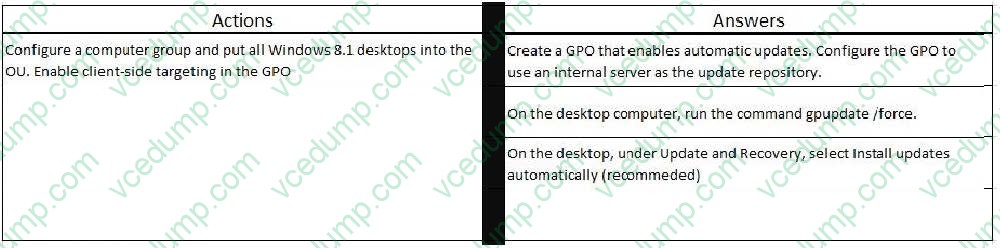
Question 317:
DRAG DROP
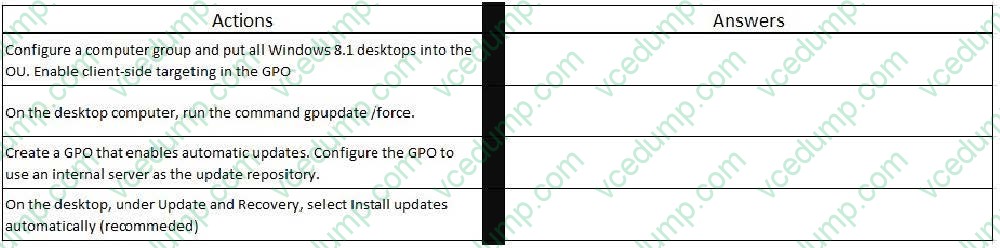
You manage update compliance for Windows 10 desktop computers that are part of a domain. You need to configure new desktops to automatically receive updates from an intranet resource that you manage. Which three actions should you perform in sequence?
Select and Place:
-
Question 318:
You have a Windows Server 2012 R2 server that runs Remote Desktop services.
Users report that they cannot connect to RemoteApp programs. You observe that users do not know the proper connection details to access the Remote Desktop Web Access server.
You need to simplify the process for connecting from Windows 10 devices to the Remote Desktop Web Access server.
What should you create?
A. Connection Manager Administration Kit connection profile
B. Remote Desktop Connection configuration file
C. Windows Remote Management script
D. client configuration file -
Question 319:
You have a computer named Computer1 that runs Windows 10 Enterprise. Computer1 is configured to receive Windows updates from the Internet.
If a user is logged on to Computer1, you need to prevent Computer1 from automatically restarting without the logged on user's consent after the installation of the Windows updates.
What should you do?
A. Enable the Defer upgrades setting.
B. Edit the Automatic App Update scheduled task.
C. Configure the Choose how updates are delivered setting.
D. Configure the Choose how updates are installed setting. -
Question 320:
Note: This question is part of a series of questions that use the same or similar answer choices. An answer choice may be correct for more than one question in the series. Each question is independent of the other questions in this series.
Information and details provided in a question apply only to that question.
You have a computer that runs Windows 10 and is used by 10 users. The computer is joined to an Active Directory domain. All of the users are members of the Administrators group. Each user has an Active Directory account.
You have a Microsoft Word document that contains confidential information.
You need to ensure that you are the only user who can read the document.
What should you configure?
A. Encrypting File System (EFS) settings
B. share permissions
C. account policies
D. application control policies
E. HomeGroup settings
Related Exams:
-
62-193
Technology Literacy for Educators -
70-243
Administering and Deploying System Center 2012 Configuration Manager -
70-355
Universal Windows Platform – App Data, Services, and Coding Patterns -
77-420
Excel 2013 -
77-427
Excel 2013 Expert Part One -
77-725
Word 2016 Core Document Creation, Collaboration and Communication -
77-726
Word 2016 Expert Creating Documents for Effective Communication -
77-727
Excel 2016 Core Data Analysis, Manipulation, and Presentation -
77-728
Excel 2016 Expert: Interpreting Data for Insights -
77-731
Outlook 2016 Core Communication, Collaboration and Email Skills
Tips on How to Prepare for the Exams
Nowadays, the certification exams become more and more important and required by more and more enterprises when applying for a job. But how to prepare for the exam effectively? How to prepare for the exam in a short time with less efforts? How to get a ideal result and how to find the most reliable resources? Here on Vcedump.com, you will find all the answers. Vcedump.com provide not only Microsoft exam questions, answers and explanations but also complete assistance on your exam preparation and certification application. If you are confused on your 70-697 exam preparations and Microsoft certification application, do not hesitate to visit our Vcedump.com to find your solutions here.