70-697 Exam Details
-
Exam Code
:70-697 -
Exam Name
:Configuring Windows Devices -
Certification
:Microsoft Certifications -
Vendor
:Microsoft -
Total Questions
:330 Q&As -
Last Updated
:Apr 18, 2020
Microsoft 70-697 Online Questions & Answers
-
Question 321:
DRAG DROP
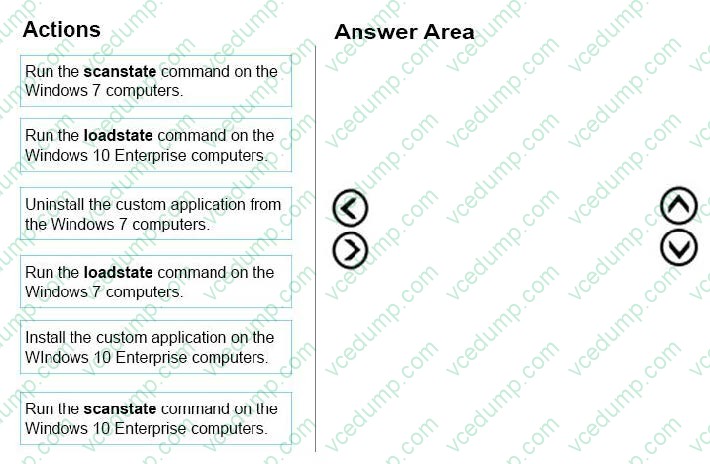
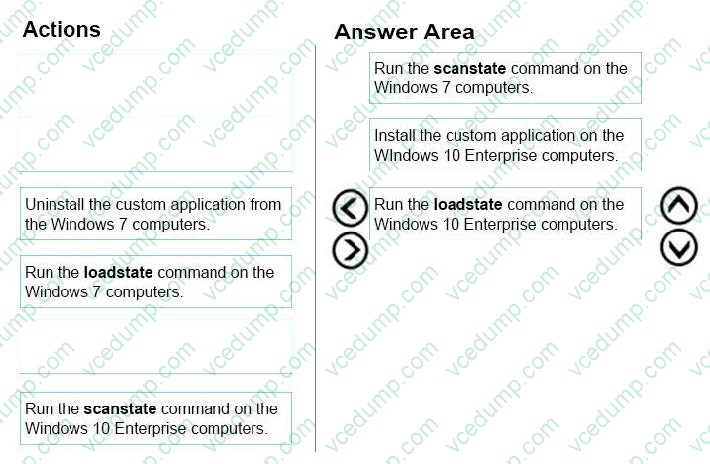
Ten client computers run Windows 7 and a custom application. The custom application is compatible with Windows 10 Enterprise.
You purchase 10 new computers that have Windows 10 Enterprise pre-installed. You plan to migrate user settings and data from the Windows 7 computers to the Windows 10 Enterprise computers. You add the User State Migration Toolkit
(USMT) on a USB flash drive.
You need to ensure that the custom application settings are applied to the Windows 10 Enterprise computers after the migration is complete.
Which three actions should you perform in sequence? To answer, move the appropriate actions from the list of actions to the answer area and arrange them in the correct order.
Select and Place:
-
Question 322:
You are the network administrator for Contoso, Ltd. Many users have Windows 10 Enterprise laptops, and your IT department configures all of them to use BitLocker on all fixed drives.
Many users carry sensitive corporate data on their USB drives.
You need to enable BitLocker for these USB drives.
Which key protector option should you use?
A. a smartcard
B. a startup key
C. TPM+PIN
D. TPM+Password -
Question 323:
DRAG DROP
A company has an Active Directory Domain Services (AD DS) domain.
All client computers run Windows 8.1.
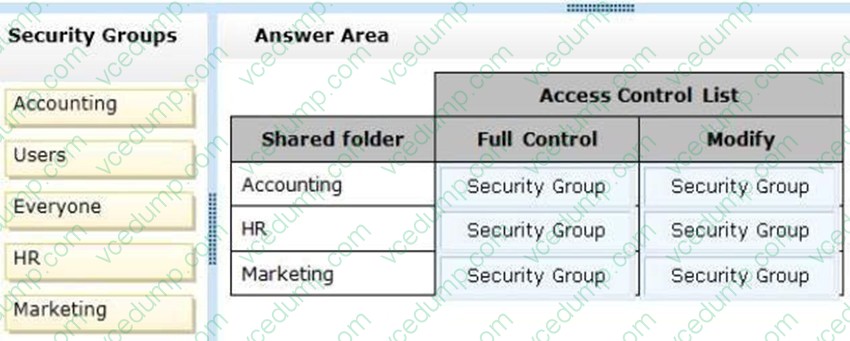
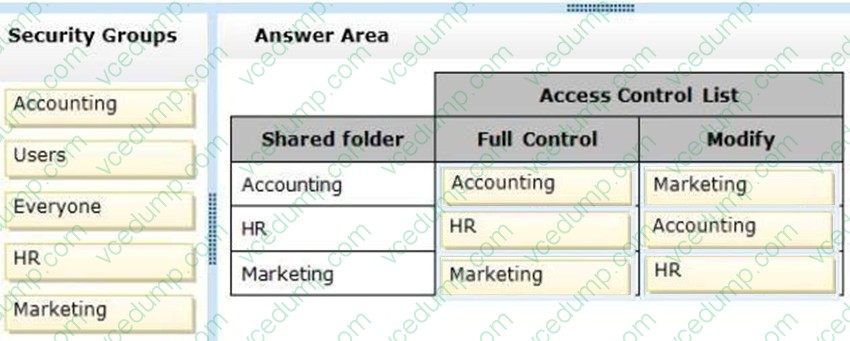
The company has three departments named Accounting, Human Resources (HR), and Marketing. User account objects are stored in their respective departmental AD security groups and have full access to shared folders for each department.
A new company policy requires that the following access rules are in place:
Users must have complete access only to their department's shared folder.
Accounting department users must be able to change files in the HR folder.
HR department users must be able to change files in the Marketing folder.
Marketing department users must be able to change files in the Accounting folder.
You need to comply with the company policy.
Which permissions should you assign? (To answer, drag the appropriate security group or groups to the correct location or locations in the answer area. Security groups may be used once, more than once, or not at all. You may need to drag the split bar between panes or scroll to view content.)
Select and Place:
-
Question 324:
Note: This question is part of a series of questions that present the same scenario. Each question in the series contains a unique solution that might meet the stated goals. Some question sets might have more than one correct solution, while
others might not have a correct solution.
After you answer a question in this section, you will NOT be able to return to it. As a result, these questions will not appear in the review screen.
A company has a forest trust with a partner organization. Users from both organizations log on to devices that run Windows 8.1.
You plan to replace the devices with devices running Windows 10.
You need to migrate user profiles from both forests using the least amount of administrative effort.
Solution: You migrate both profiles simultaneously by using the User State Migration Tool (USMT).
Does the solution meet the goal?
A. Yes
B. No -
Question 325:
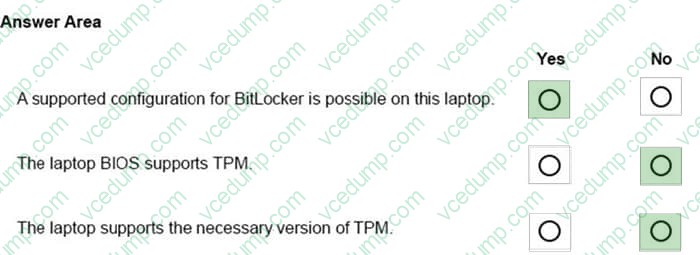
You provide support for a small company. The company purchases a Windows 10 Enterprise laptop for an employee who travels often.
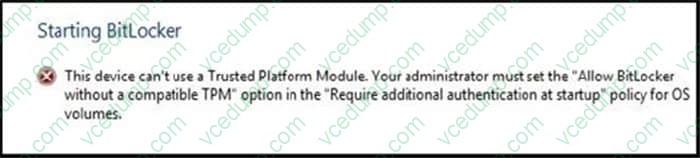
The company wants to use BitLocker to secure the hard drive for the laptop in case it is lost or stolen. While attempting to enable BitLocker, you receive the error message shown in the following image:
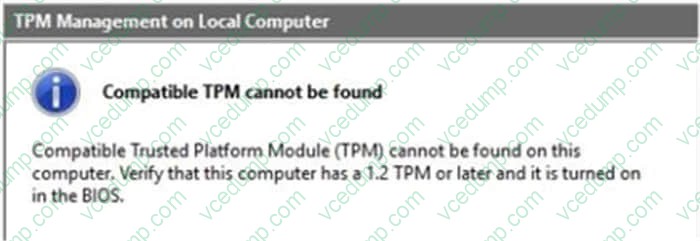
You view the TPM settings, which are shown in the following image:
Finally, you view the BIOS, which is shown in the following image:
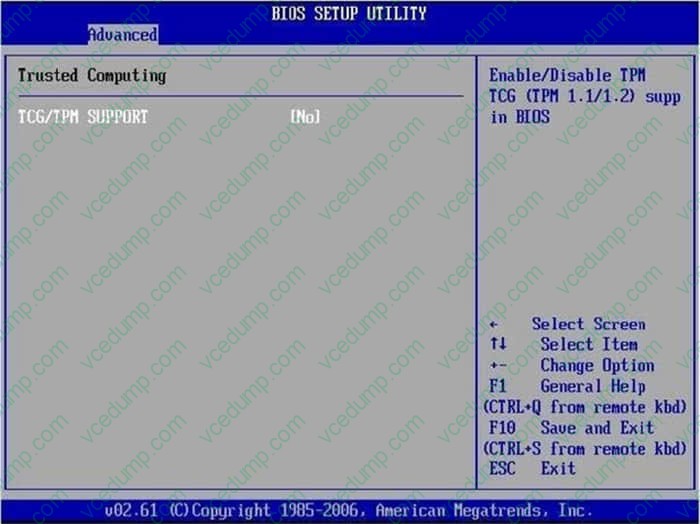
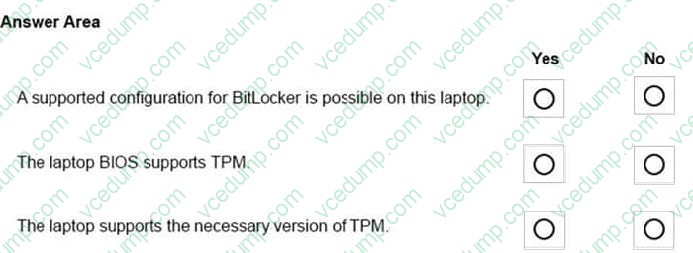
For each of the following statement, select Yes if the statement is true. Otherwise, select No. NOTE: Each correct selection is worth one point.
Hot Area:
-
Question 326:
A company has an Active Directory Domain Services (AD DS) domain. All client computers run Windows 10 Enterprise.
You are configuring security for a portable client computer that does not have a Trusted Platform Module (TPM) chip installed.
You need to configure local Group Policy to turn on Windows BitLocker Drive Encryption on the computer.
Which two actions should you perform? Each correct answer presents part of the solution.
NOTE: Each correct selection is worth one point.
A. Enable the Enforce drive encryption type on operating system drives policy setting.
B. Enable the option to Alow BitLocker without a compatible TPM.
C. Enable the Require additional authentication at startup policy setting.
D. Configure the TPM validation profile to enable Platform Configuration Register indices (PCRs) 0, 2, 4, and 11. -
Question 327:
You administer a group of 10 client computers that run Windows 10. The client computers are members of a local workgroup. Employees log on to the client computers by using their Microsoft accounts.
The company plans to use Windows BitLocker Drive Encryption. You need to back up the BitLocker recovery key.
Which two options can you use? (Each correct answer presents a complete solution. Choose two.)
A. Save the recovery key to a file on the BitLocker-encrypted drive.
B. Save the recovery key in the Credential Store.
C. Save the recovery key to OneDrive.
D. Print the recovery key. -
Question 328:
You have a desktop computer that runs Windows 10 Enterprise. You add three new 3-terabyte disks. You need to create a new 9-terabyte volume. Which two actions should you perform? (Each correct answer presents part of the solution. Choose two.)
A. From Disk Management, create a new spanned volume.
B. From Disk Management, convert all of the 3-terabyte disks to GPT.
C. From PowerShell, run the New-VirtualDisk cmdlet.
D. From Disk Management, bring all disks offline.
E. From Diskpart, run the Convert MBR command.
F. From PowerShell, run the Add-PhysicalDisk cmdlet. -
Question 329:
HOTSPOT
Your network contains an Active Directory domain.
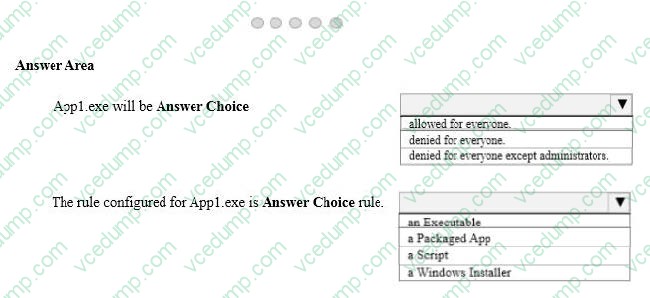
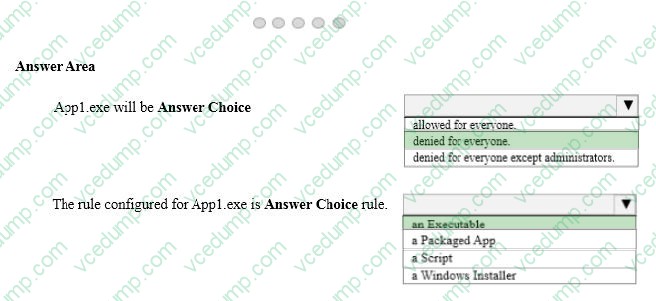
The Default Domain Policy contains the AppLocker settings configured as shown in the AppLocker Settings exhibit. (Click the Exhibit button.)
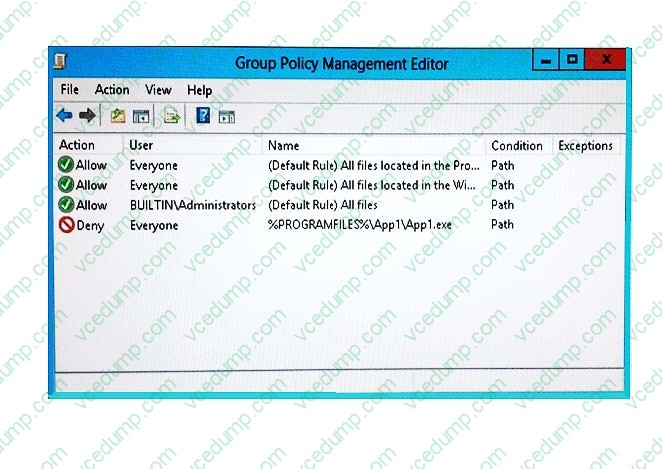
The Default Domain Policy contains the AppLocker properties configured as shown in the AppLocker properties exhibit. (Click the Exhibit button.)
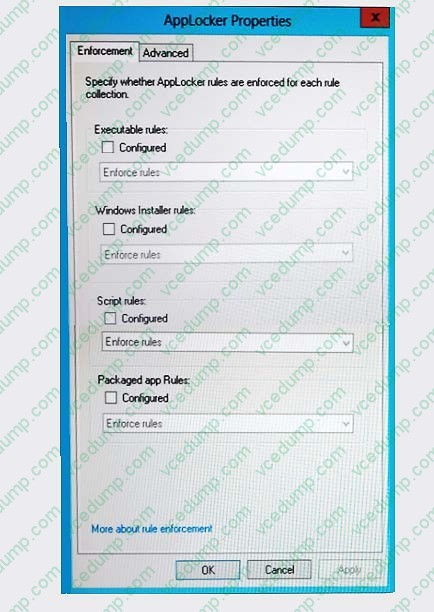
Use the drop-down menus to select the answer choice that completes each statement. NOTE: Each correct selection is worth one point.
Hot Area:
-
Question 330:
Note: This question is part of a series of questions that present the same scenario. Each question in the series contains a unique solution that might meet the stated goals. Some question sets might have more than one correct solution, while
others might not have a correct solution.
After you answer a question in this section, you will NOT be able to return to it. As a result, these questions will not appear in the review screen.
You administer devices in your corporate environment. The company allows employees to bring their own devices (BYOD). All BYOD devices must run Windows 10. For employees who elect to not use BYOD, the company provides a
corporate laptop.
The company has a Microsoft Intune subscription and all BYOD devices have the Intune client installed. None of the BYOD devices are joined to the domain. All the corporate standard devices are managed by System Center Configuration
Manager (SCCM).
You have an application that was developed in house that must be installed on all the BYOD devices.
The application must be installed automatically on the BYOD devices without any user intervention.
Solution: You download and install a sideloading product activation key on all of the BYOD devices. You upload the application to the Intune storage and configure the app deployment action as required install.
Does the solution meet the goal?
A. Yes
B. No
Related Exams:
-
62-193
Technology Literacy for Educators -
70-243
Administering and Deploying System Center 2012 Configuration Manager -
70-355
Universal Windows Platform – App Data, Services, and Coding Patterns -
77-420
Excel 2013 -
77-427
Excel 2013 Expert Part One -
77-725
Word 2016 Core Document Creation, Collaboration and Communication -
77-726
Word 2016 Expert Creating Documents for Effective Communication -
77-727
Excel 2016 Core Data Analysis, Manipulation, and Presentation -
77-728
Excel 2016 Expert: Interpreting Data for Insights -
77-731
Outlook 2016 Core Communication, Collaboration and Email Skills
Tips on How to Prepare for the Exams
Nowadays, the certification exams become more and more important and required by more and more enterprises when applying for a job. But how to prepare for the exam effectively? How to prepare for the exam in a short time with less efforts? How to get a ideal result and how to find the most reliable resources? Here on Vcedump.com, you will find all the answers. Vcedump.com provide not only Microsoft exam questions, answers and explanations but also complete assistance on your exam preparation and certification application. If you are confused on your 70-697 exam preparations and Microsoft certification application, do not hesitate to visit our Vcedump.com to find your solutions here.