70-697 Exam Details
-
Exam Code
:70-697 -
Exam Name
:Configuring Windows Devices -
Certification
:Microsoft Certifications -
Vendor
:Microsoft -
Total Questions
:330 Q&As -
Last Updated
:Apr 18, 2020
Microsoft 70-697 Online Questions & Answers
-
Question 71:
HOTSPOT
Your network contains an Active Directory domain.
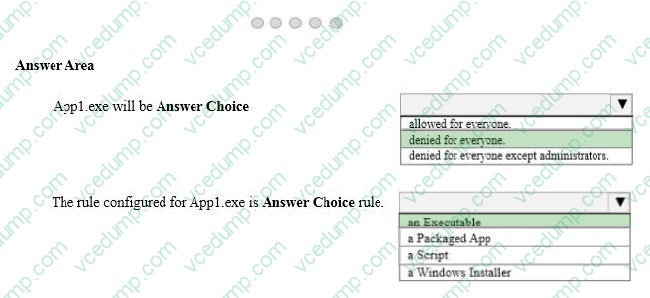
The Default Domain Policy contains the AppLocker settings configured as shown in the AppLocker Settings exhibit. (Click the Exhibit button.)
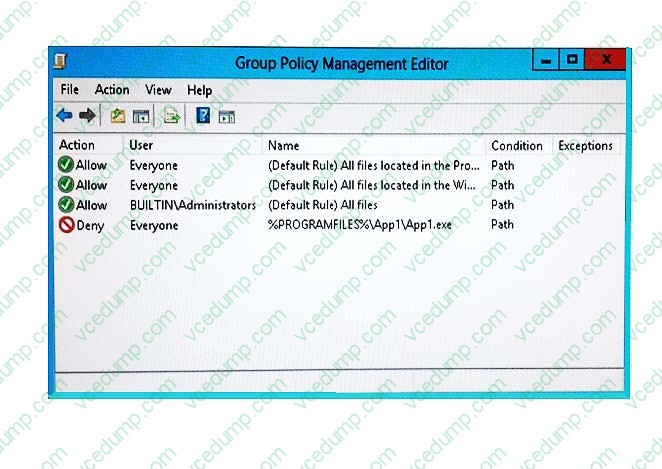
The Default Domain Policy contains the AppLocker properties configured as shown in the AppLocker properties exhibit. (Click the Exhibit button.)
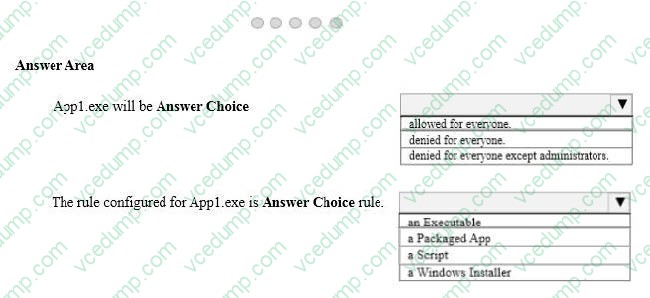
Use the drop-down menus to select the answer choice that completes each statement.
NOTE: Each correct selection is worth one point.
Hot Area:
-
Question 72:
Note: This question is part of a series of questions that present the same scenario. Each question in the series contains a unique solution that might meet the stated goals. Some question sets might have more than one correct solution, while
others might not have a correct solution.
After you answer a question in this section, you will NOT be able to return to it. As a result, these questions will not appear in the review screen.
Your company uses Microsoft Office 365.
You need to ensure that users are prompted to label and classify documents while they edit documents.
Solution: You import the data from on-premises to Office 365.
Does the solution meet the goal?
A. Yes
B. No -
Question 73:
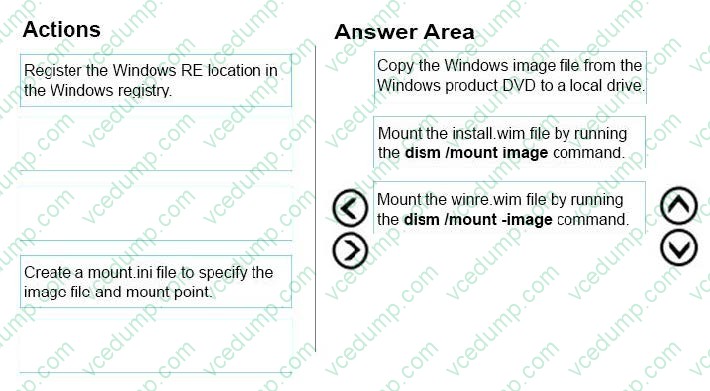
DRAG DROP
You are a desktop support technician for your company. You support more than 100 Windows 8 and Windows 10 Enterprise desktop computers.
You are preparing an installation image of a Windows 10 Enterprise computer by using the Deployment and Imaging Tools Environment command prompt on your own computer. The image includes a customized instance of the Windows
Recovery Environment (Windows RE).
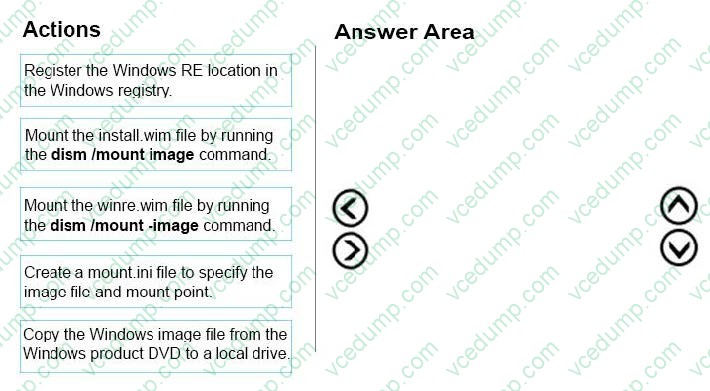
You need to extract and mount the Windows RE image.
Which three actions should you perform in sequence? To answer, move the appropriate three actions from the list of actions to the answer area and arrange them in the correct order.
Select and Place:
-
Question 74:
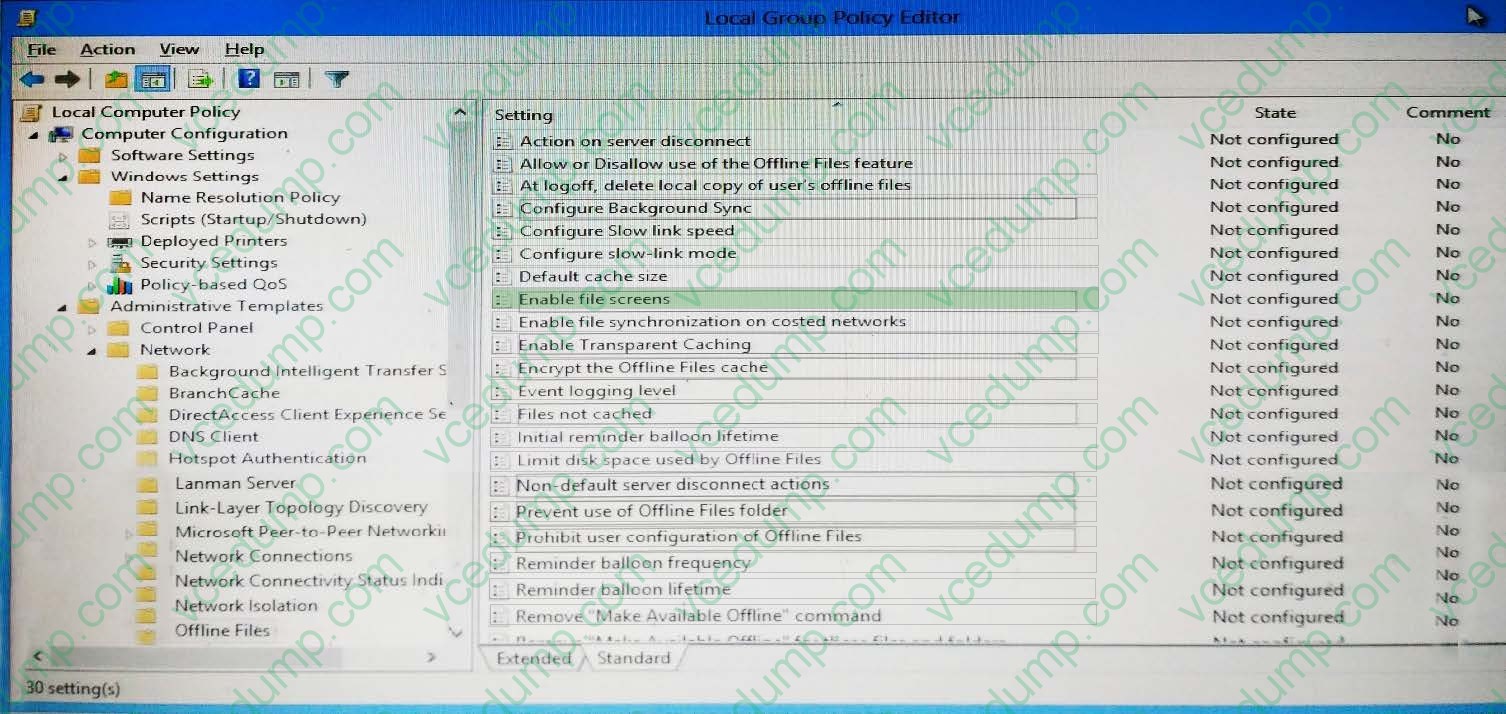
HOTSPOT
You install Windows 10 Enterprise on a new laptop that will be shipped to a remote user.
You logon to the laptop with the user credentials, map network drivers, and configure the network drivers to be always available offline.
Company policy requires that files with a .db1 extension should be excluded from offline file synchronization.
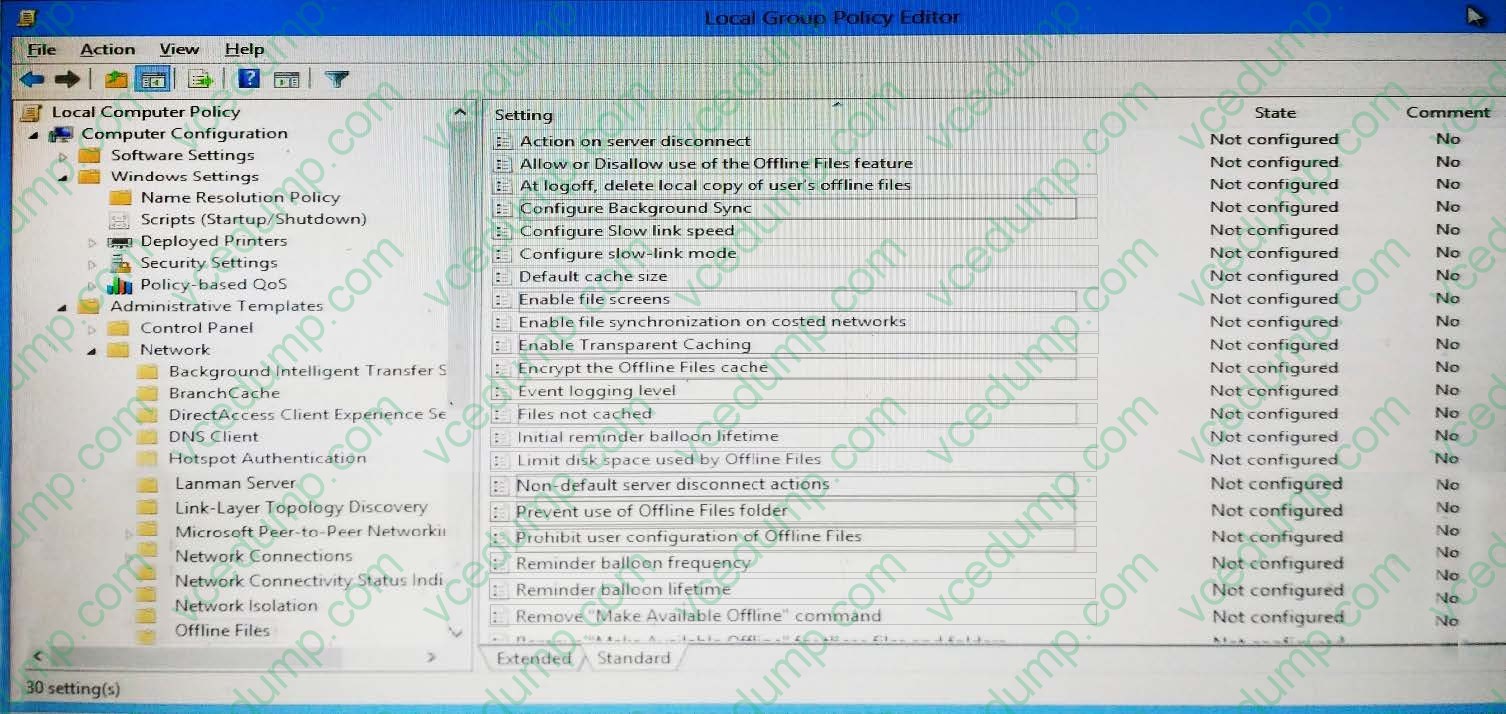
You need to prevent the user from creating files with a .db1 extension on the mapped drives.
In the Local Group Policy Editor, which setting should you configure?
To answer, select the appropriate setting in the answer area.
Hot Area:
-
Question 75:
A company has Windows 10 Enterprise client computers. Client computers are connected to a corporate private network. You deploy a Remote Desktop Gateway, DirectAccess, and a VPN server at the corporate main office.
Users are currently unable to connect from their home computers to their work computers by using Remote Desktop.
You need to ensure that users can remotely connect to their office computers by using Remote Desktop. Users must not be able to access any other corporate network resource by using the local Windows installation from their home computers.
Which setting should you configure on the home computers?
A. Remote Desktop Gateway IP address
B. Remote Desktop local resources
C. Virtual Private Network connection
D. DirectAccess connection -
Question 76:
Your Windows 10 Enterprise work computer is a member of an Active Directory domain. You use your domain account to log on to the computer. You use your Microsoft account to log on to a home laptop.
You want to access Windows 10 Enterprise apps from your work computer by using your Microsoft account.
You need to ensure that you are able to access the Windows 10 Enterprise apps on your work computer by logging on only once.
What should you do?
A. Add the Microsoft account as a user on your work computer.
B. Enable Remote Assistance on your home laptop.
C. Connect your Microsoft account to your domain account on your work computer.
D. Install OneDrive for Windows on both your home laptop and your work computer. -
Question 77:
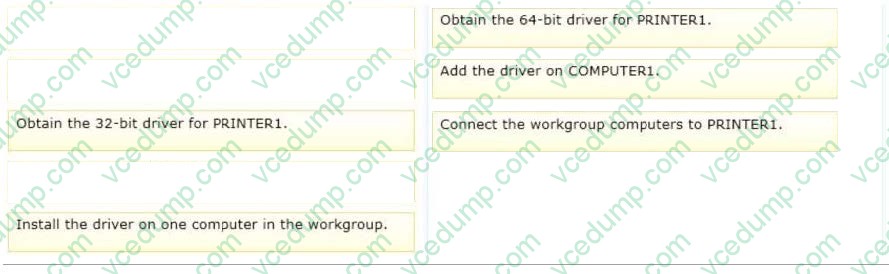
DRAG DROP
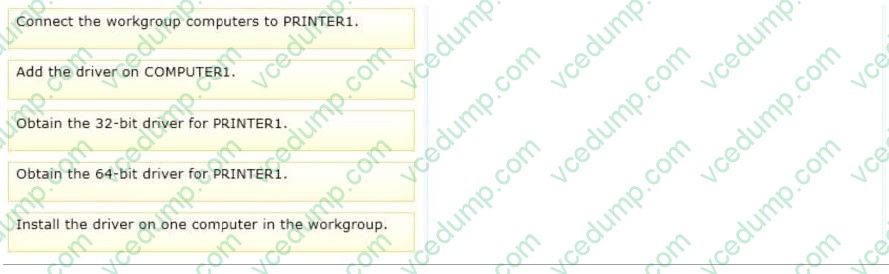
A local printer named PRINTER1 is shared from a client computer named COMPUTER1 that run a 32-bit version of Windows 10. A workgroup contains client computers that run a 64-bit version of Windows 10.
Computers in the workgroup can't currently print to PRINTER1.
You need to ensure that the workgroup computers can print to PRINTER1.
Which three actions should you perform in sequence? To answer, move the appropriate actions to the answer area and arrange them in the correct order.
Select and Place:
-
Question 78:
You support Windows 10 Enterprise computers. Your company protects all laptops by using the BitLocker Network Unlock feature.
Some employees work from home.
You need to ensure that employees can log on to their laptops when they work from home.
What should you do?
A. Have users run the Manage-bde.exe -unlock command before they disconnect from the company network.
B. Ensure that the Trusted Platform Module (TPM) chips in the laptops are version 1.2 or greater.
C. Enable BitLocker to Go.
D. Provide employees with their BitLocker PINs. -
Question 79:
A company has Windows 10 Enterprise client computers. A client computer named COMPUTER1 has a shared folder named Folder1 located in the user's Downloads folder. Folder1 is shared only with employees in the Marketing
department.
All Marketing employees can connect to Folder1 from their client computers.
A Marketing employee is unable to connect to Folder1 from a legacy device that is not compatible with the Windows 10 Enterprise default sharing settings. The device is able to connect to resources on other client computers.
You need to configure COMPUTER1 to allow the device to connect to Folder1.
Which setting should you enable?
A. Enable file sharing for devices that use 40- or 56-bit encryption
B. Turn off password protected sharing
C. Use 128-bit encryption to help protect file sharing connections
D. Turn off network discovery
E. Turn on sharing so anyone with network access can read and write files in the Public folders. -
Question 80:
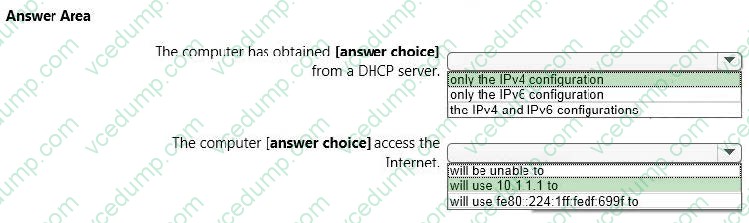
HOTSPOT
You have a network that contains Window 10 Enterprise computers.
The network configuration of one of the computers is shown in the following output.
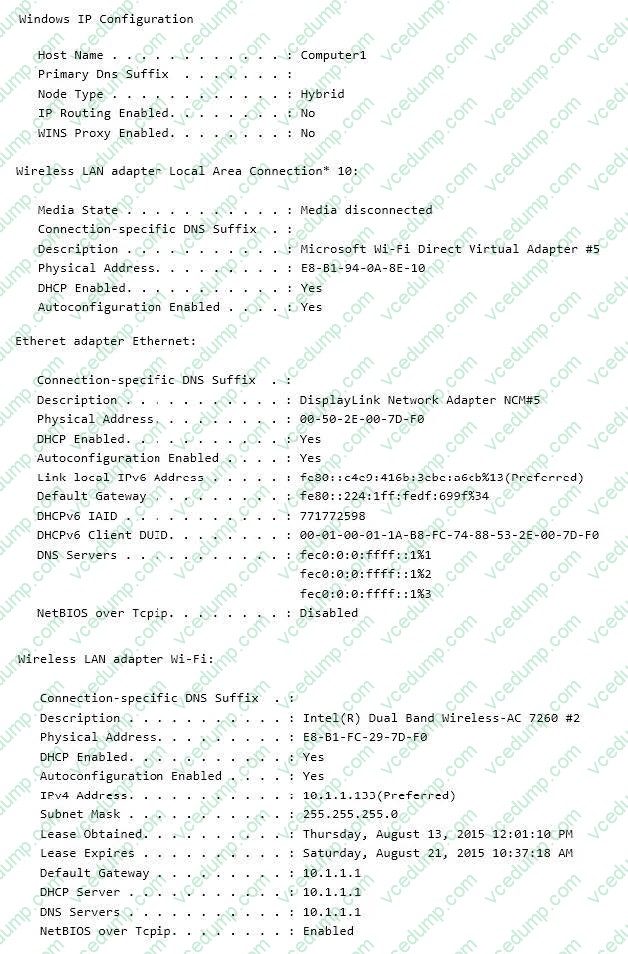
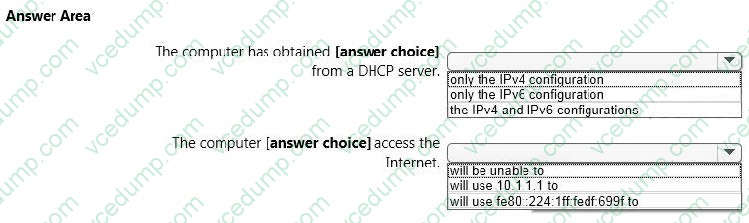
Use the drop-down menus to select the answer choice that completes each statement based on the information presented in the output. NOTE: Each correct selection is worth one point.
Hot Area:
Related Exams:
-
62-193
Technology Literacy for Educators -
70-243
Administering and Deploying System Center 2012 Configuration Manager -
70-355
Universal Windows Platform – App Data, Services, and Coding Patterns -
77-420
Excel 2013 -
77-427
Excel 2013 Expert Part One -
77-725
Word 2016 Core Document Creation, Collaboration and Communication -
77-726
Word 2016 Expert Creating Documents for Effective Communication -
77-727
Excel 2016 Core Data Analysis, Manipulation, and Presentation -
77-728
Excel 2016 Expert: Interpreting Data for Insights -
77-731
Outlook 2016 Core Communication, Collaboration and Email Skills
Tips on How to Prepare for the Exams
Nowadays, the certification exams become more and more important and required by more and more enterprises when applying for a job. But how to prepare for the exam effectively? How to prepare for the exam in a short time with less efforts? How to get a ideal result and how to find the most reliable resources? Here on Vcedump.com, you will find all the answers. Vcedump.com provide not only Microsoft exam questions, answers and explanations but also complete assistance on your exam preparation and certification application. If you are confused on your 70-697 exam preparations and Microsoft certification application, do not hesitate to visit our Vcedump.com to find your solutions here.