70-697 Exam Details
-
Exam Code
:70-697 -
Exam Name
:Configuring Windows Devices -
Certification
:Microsoft Certifications -
Vendor
:Microsoft -
Total Questions
:330 Q&As -
Last Updated
:Apr 18, 2020
Microsoft 70-697 Online Questions & Answers
-
Question 1:
A company has Windows 10 Enterprise client computers. The company uses Windows BitLocker Drive Encryption and BitLocker Network Unlock on all client computers.
You need to collect information about BitLocker Network Unlock status.
Which command should you run?
A. Run the BitLockerWizard command.
B. Run the manage-bde command.
C. Run the BdeHdCfg command.
D. Run the bitsadmin command. -
Question 2:
A company has an Active Directory Domain Services (AD DS) domain. All client computers run Windows 10 Enterprise and are joined to the domain.
You have the following requirements:
Ensure that files in shared network folders are available offline.
Maximize efficiency for users who connect to shared network folders from a mobile device.
You need to configure Group Policy settings to meet the requirements.
What should you do first?
A. Enable the Enable file synchronization on costed networks policy setting.
B. Enable the Synchronize all offline files when logging on policy settings.
C. Enable and configure the Configure slow-link mode policy setting.
D. Enable and configure the Specify administratively assigned Offline Files policy setting. -
Question 3:
Your network contains an Azure AD domain. You have a subscription to Microsoft Office 365.
Users discover that they must change their Azure AD password more frequently than their Office 365 password.
You need to ensure that the password policies for Office 365 and for Active Directory are the same.
What should you do?
A. From the Microsoft Azure Active Directory Module for Windows PowerShell, run Set-MsolDomainAuthentication.
B. From the Office 365 Admin center, in Settings, click Security and privacy.
C. From the Office 365 portal, under Billing, click Subscriptions.
D. From the Microsoft Azure Active Directory Module for Windows PowerShell, run Set-MsolCompanySettings. -
Question 4:
You administer computers that run Windows XP Professional. These computers have a wide range of line of business (LOB) applications installed.
You want to migrate from Windows XP Professional to Windows 10 Enterprise.
You need to identify which application will prompt users for elevated privileges.
What should you do first?
A. Install the Microsoft Application Compatibility Toolkit (ACT).
B. Install User Experience Virtualization (UE-V) on the Windows 10 Enterprise computers before you install the LOB applications.
C. Configure the advanced audit setting on the Windows 10 Enterprise computers before you install the LOB applications.
D. Install the Microsoft Assessment and Planning (MAP) Toolkit. -
Question 5:
Your network contains an Active Directory domain named contoso.com. All client computers run Windows 10 Enterprise and Microsoft Office 2013. All of the computers are joined to the domain.
Your company purchases a subscription to Office 365. An administrator creates an Office 365 account for each user and deploys a federated solution for Office 365.
You need to prevent the users from being prompted for a user account and a password each time they access services from Office 365.
Which account should you instruct the users to use when they sign in to their computer?
A. a Microsoft account
B. a local user account
C. an Office 365 account
D. a contoso.com account -
Question 6:
You use a Windows 8.1 tablet. The tablet receives Windows Update updates automatically from the Internet.
The tablet has Wi-Fi and is connected to a 3G mobile broadband Wi-Fi hot spot.
You need to minimize data usage while connected to this hot spot.
What should you do?
A. Turn on Airplane Mode.
B. Disable File and Print Sharing for mobile broadband connections.
C. Configure the interface metric of IP settings for Wi-Fi connection as1.
D. Edit the Inbound Rule of Windows Firewall, and then disable Internet Control Message Protocol (ICMP) traffic.
E. Configure the broadband connection as a metered network. -
Question 7:
You administer a Windows 10 Enterprise computer. The computer has File History turned on, and system protection turned on for drive C.
You accidentally delete a folder named Libraries\Customers by using the Shift+Delete keyboard shortcut.
You need to restore the most recent version of the folder to its original location.
Which approach should you use to restore the folder?
A. Recycle Bin
B. the latest restore point
C. File History
D. a manually selected restore point -
Question 8:
Note: This question is part of a series of questions that present the same scenario. Each question in the series contains a unique solution that might meet the stated goals. Some question sets might have more than one correct solution, while
others might not have a correct solution.
After you answer a question in this section, you will NOT be able to return to it. As a result, these questions will not appear in the review screen.
Your company uses Microsoft Office 365.
You need to ensure that users are prompted to label and classify documents while they edit documents.
Solution: You configure an Office 365 data loss prevention (DLP) policy.
Does the solution meet the goal?
A. Yes
B. No -
Question 9:
You are the system administrator for a company. You are deploying a new Microsoft Office 365 environment. You have an existing on-premises Microsoft environment.
You must deploy Microsoft Intune in a hybrid environment.
You need to configure the service connection point role.
Which tool should you use?
A. Microsoft System Center Configuration Manager (SCCM) console
B. Microsoft Office 365 Admin Center portal
C. Microsoft Office AD Admin Center portal
D. Microsoft System Center Operations Manager (SCOM) console -
Question 10:
HOTSPOT
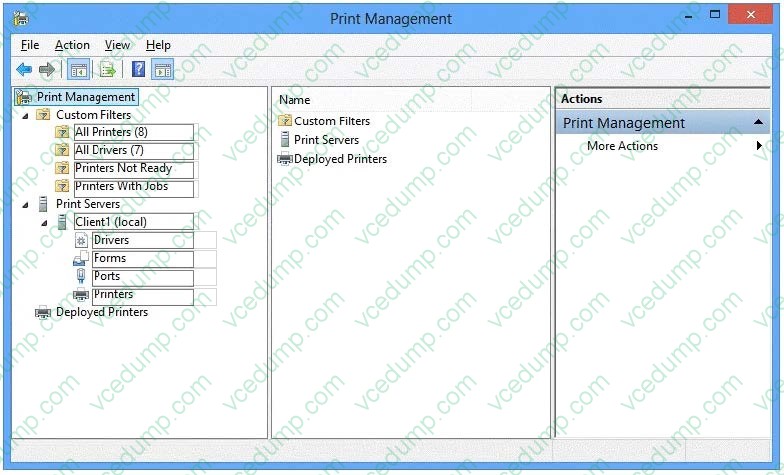
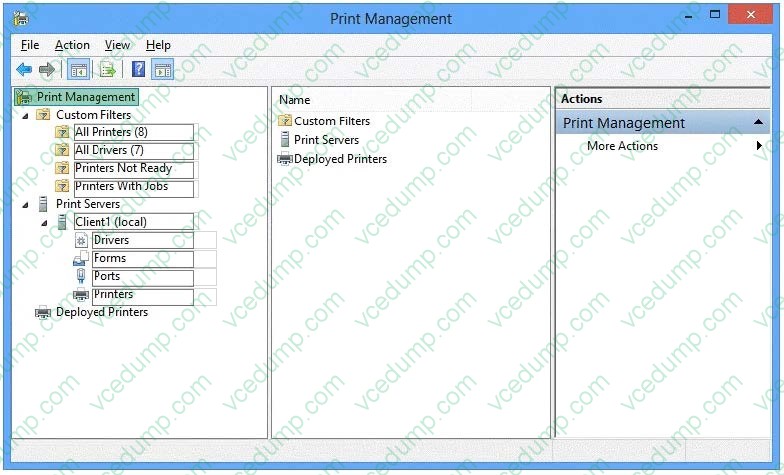
You administer Windows 10 Enterprise computers in your company network, including a computer named Wst1. Wst1 is configured with multiple shared printer queues.
Wst1 indicates hardware errors. You decide to migrate the printer queues from Wst1 to a new computer named Client1.
You export the printers on Wst1 to a file. You need to import printers from the file to Client1.
From the Print Management console, which Print Management node should you select? To answer, select the appropriate node in the answer area.
Hot Area:
Related Exams:
-
62-193
Technology Literacy for Educators -
70-243
Administering and Deploying System Center 2012 Configuration Manager -
70-355
Universal Windows Platform – App Data, Services, and Coding Patterns -
77-420
Excel 2013 -
77-427
Excel 2013 Expert Part One -
77-725
Word 2016 Core Document Creation, Collaboration and Communication -
77-726
Word 2016 Expert Creating Documents for Effective Communication -
77-727
Excel 2016 Core Data Analysis, Manipulation, and Presentation -
77-728
Excel 2016 Expert: Interpreting Data for Insights -
77-731
Outlook 2016 Core Communication, Collaboration and Email Skills
Tips on How to Prepare for the Exams
Nowadays, the certification exams become more and more important and required by more and more enterprises when applying for a job. But how to prepare for the exam effectively? How to prepare for the exam in a short time with less efforts? How to get a ideal result and how to find the most reliable resources? Here on Vcedump.com, you will find all the answers. Vcedump.com provide not only Microsoft exam questions, answers and explanations but also complete assistance on your exam preparation and certification application. If you are confused on your 70-697 exam preparations and Microsoft certification application, do not hesitate to visit our Vcedump.com to find your solutions here.