70-680 Exam Details
-
Exam Code
:70-680 -
Exam Name
:Windows 7 Configuring -
Certification
:Microsoft Certifications -
Vendor
:Microsoft -
Total Questions
:565 Q&As -
Last Updated
:Dec 13, 2021
Microsoft 70-680 Online Questions & Answers
-
Question 551:
You have a custom image of Windows 7. You plan to deploy the image to computers that are not connected to the corporate network. You need to ensure that a custom application is automatically installed after the image is deployed. What should you do?
A. From Microsoft Deployment Toolkit (MDT), create a custom task sequence and run the New Media Wizard.
B. From Windows System Image Manager (Windows SIM), open the image and add the applications to Pass 1 windowsPE.
C. Create a Group Policy object (GPO) and add a new software installation package.
D. Run Dism.exe and specify the /mount-WIM parameter. Add the application installation files to the image. Modify the winrm.cmd file. -
Question 552:
Your company has a server named Server1 that runs Windows Server 2008. Server1 is a Windows Server Update Services (WSUS) server. You have a computer named Computer1 that runs Windows 7.
Computer1 is configured to obtain updates from Server1.
You open the WSUS snap-in on Server1 and discover that Computer1 does not appear.
You need to ensure that Computer1 appears in the WSUS snap-in.
What should you do?
A. On Server1, open Windows Update then select Check for updates.
B. On Server1, run Wsusutil.exe and specify the /import parameter.
C. On Computer1, open Windows Update and then select Change settings.
D. On Computer1, run Wuauclt.exe and specify the /detectnow parameter. -
Question 553:
You have a computer that runs Windows 7.
You discover that an application named App1 runs during the startup process.
You need to prevent only App1 from running during startup. Users must be allowed to run App1 manually.
What should you do?
A. From the local Group Policy, modify the application control policy.
B. From the local Group Policy, modify the software restriction policy.
C. From the System Configuration tool, select Diagnostic Startup.
D. From the System Configuration tool, modify the Startup applications. -
Question 554:
You have a computer that runs Windows 7. The computer connects to the corporate network by using a VPN connection.
You need to ensure that you can access the Internet when the VPN connection is active. The solution must prevent Internet traffic from being routed through the VPN connection.
What should you do?
A. Configure a static DNS server address.
B. Configure a static IP address and default gateway.
C. Configure the security settings of the VPN connection.
D. Configure the advanced TCP/IP settings of the VPN connection. -
Question 555:
You have two computers named Computer1 and Computer2.
You migrate user state data from Computer1 to Computer2. The migrated data contains several Microsoft Office Excel files.
You need to ensure that you can open the Excel files by using Excel on Computer2.
What should you do?
A. Install Office.
B. Disable User Account Control (UAC).
C. Modify the default program settings.
D. Run Loadstate.exe /i:migapp.xml. -
Question 556:
You work as the desktop support technician at Abc.com. The Abc.com network consists of a single Active Directory domain named Abc.com. All client computers on the Abc.com network run Windows Vista Business. You have been instructed to upgrade a client computer named CERTKILLER-WS620 to Microsoft Windows 7 Professional. CERTKILLER-WS620 has the following specifications:

Drive C (system drive) has 12 gigabytes (GB) of free space.
Drive D (data drive) has 40 GB of free space.
Four memory slots with two occupied by 512 megabyte (MB) memory sticks.
One 2.0 gigahertz (GHz) 32-bit processor.
You need to ensure that Windows 7 Professional can be installed on CERTKILLER-WS620.
What should you do?
A. You should consider installing Windows 7 on Drive D.
B. You should consider creating more free space on Drive C.
C. You should consider upgrading the memory.
D. You should consider upgrading the processor. -
Question 557:
You have a computer that has the following hardware configuration:
1.6-gigahertz (GHz) processor (64-bit).
Graphics card that has 128-MB RAM.
You need to select an edition of Window 7 to meet the following requirements:
Support DirectAccess
Support joining an Active Directory domain.
Which edition should you choose?
A. Windows 7 Enterprise (64-bit)
B. Windows 7 Enterprise (x86)
C. Windows 7 Professional (64-bit)
D. Windows 7 Ultimate (x86) -
Question 558:
You plan to deploy a custom Windows 7 image to computers that are not connected to a corporate network.
You need to ensure that a custom application installs automatically after the image is deployed.
What should you do?
A. Use the Microsoft Deployment Toolkit (MDT) to create a custom task sequence and run the New Media Wizard.
B. Run Dism.exe and specify the /mount-WIM parameter. Add the application installation files to the image and then modify the winrm.cmd file.
C. Create a Group Policy object (GPO) that includes a software installation package.
D. Use the Windows System Image Manager (Windows SIM) to open the image and add the applications to the windowsPE configuration pass. -
Question 559:
You have a computer that runs Windows 7.
You run Ipconfig as shown in the exhibit. (Click the Exhibit button.)
You need to ensure that you can establish a DirectAccess connection to the network.
What should you do first?
A. Create a new VPN connection.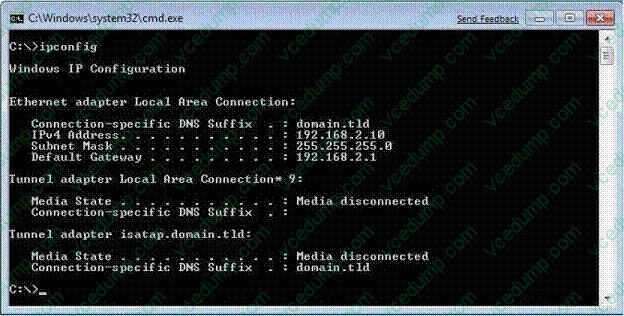
B. Configure a static IPv4 address.
C. Enable IPv6 on the network adapter.
D. Add an additional default gateway address. -
Question 560:
You have a Windows 7 Professional computer that is a member of an Active Directory domain. The domain group policy redirects documents to save to the network-attached storage device mapped to the F: drive.
You want to implement a disaster recovery solution that restores only the local drives to a previous state. You attach an external drive to the computer locally and assign it to the X: drive.
You need to configure the solution to perform the backup on a weekly basis.
What should you do?
A. Configure a Windows Backup to include a system image file to back up to the X: drive. Run the X: drive weekly.
B. Create a batch file that runs the command "ntbackup backup systemstate /J "SystemStateBackup" /F "X: \Backup. bkf". Configure a Scheduled Task to run the command weekly.
C. Create a batch file that runs the command "wbadmin start backup -backuptarget:x: -included: -quiet". Configure a Scheduled Task to run the command weekly.
D. Configure a Windows Backup to include a system image file and select the F: drive to back up to the X: drive. Run the F: drive weekly.
Related Exams:
-
62-193
Technology Literacy for Educators -
70-243
Administering and Deploying System Center 2012 Configuration Manager -
70-355
Universal Windows Platform – App Data, Services, and Coding Patterns -
77-420
Excel 2013 -
77-427
Excel 2013 Expert Part One -
77-725
Word 2016 Core Document Creation, Collaboration and Communication -
77-726
Word 2016 Expert Creating Documents for Effective Communication -
77-727
Excel 2016 Core Data Analysis, Manipulation, and Presentation -
77-728
Excel 2016 Expert: Interpreting Data for Insights -
77-731
Outlook 2016 Core Communication, Collaboration and Email Skills
Tips on How to Prepare for the Exams
Nowadays, the certification exams become more and more important and required by more and more enterprises when applying for a job. But how to prepare for the exam effectively? How to prepare for the exam in a short time with less efforts? How to get a ideal result and how to find the most reliable resources? Here on Vcedump.com, you will find all the answers. Vcedump.com provide not only Microsoft exam questions, answers and explanations but also complete assistance on your exam preparation and certification application. If you are confused on your 70-680 exam preparations and Microsoft certification application, do not hesitate to visit our Vcedump.com to find your solutions here.