70-680 Exam Details
-
Exam Code
:70-680 -
Exam Name
:Windows 7 Configuring -
Certification
:Microsoft Certifications -
Vendor
:Microsoft -
Total Questions
:565 Q&As -
Last Updated
:Dec 13, 2021
Microsoft 70-680 Online Questions & Answers
-
Question 11:
You have a computer that runs Windows 7. Your company has a corporate intranet Web site. You open Windows Internet Explorer as shown in the exhibit. (Click the Exhibit button.)
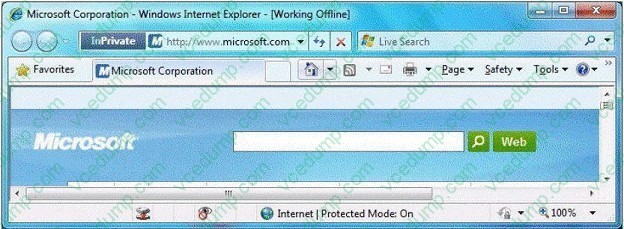
You need to ensure that you can access Web pages on both the Internet and the intranet.
What should you do?
A. From the Files menu, click Work Offline.
B. From the Safety menu, click InPrivate Filtering.
C. From the Security tab, add the intranet Web site to the Trusted sites zone.
D. From the Safety menu, click InPrivate Browsing. -
Question 12:
You plan to deploy Windows 7 images.
You need to ensure that you can deploy images by using the Windows Preinstallation Environment (Windows PE).
What should you add to the Windows PE image?
A. Imagex.exe
B. Mighost.exe
C. Usmtutils.exe
D. Loadstate.exe -
Question 13:
You are troubleshooting instability problems on a computer running Windows 7 Ultimate and suspect that they might be related to hardware faults in RAM.
You access the System Recovery options.
Which option is most likely to help you diagnose the problem?
A. Windows Memory Diagnostic
B. Startup Repair
C. System Restore
D. System Image Recovery -
Question 14:
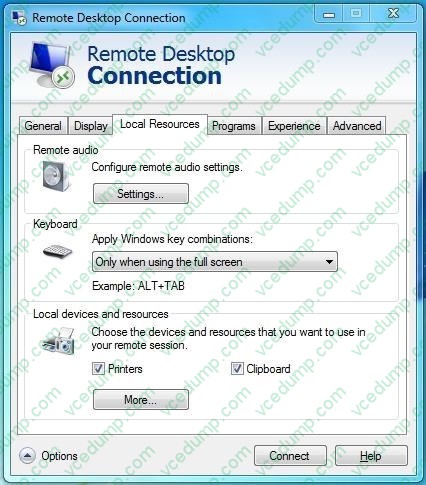
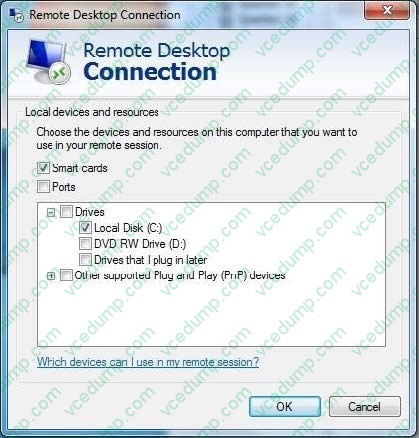
You have two computers named Computer1 and Computer2 that run Windows 7. You connect from Computer1 to Computer2 by using Remote Desktop. You discover that you cannot copy any files between the computers during the Remote Desktop session.
You need to ensure that you can copy files between the computers during the Remote Desktop session.
What should you do?
A. On Computer1, open Windows Firewall and allow file and printer sharing.
B. On Computer2, open Windows Firewall and allow file and printer sharing.
C. On Computer1, open Remote Desktop Connection and configure the Local devices and resources setting.
D. On Computer2, open Remote Desktop Connection and configure the Local devices and resources setting. -
Question 15:
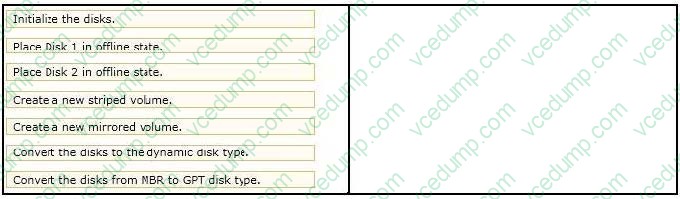
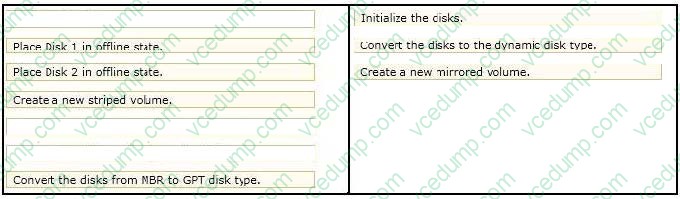
You use a computer that has Windows 7 Enterprise installed. The computer has a single 500GB hard disk.
You install two new 1 terabyte hard disks.
You need to configure the new disks in a fault-tolerant configuration.
What should you do? (To answer, move the appropriate actions from the list of actions from the list the answer area and arrange them in the correct order).
Select and Place:
-
Question 16:
You are preparing to migrate from Windows Vista to Windows 7.
You need to use the User System Migration Tool (USMT) XML files.
Which two of these are migrated by using only the default USMT XML files? (Each correct answer presents part of the solution. Choose two. )
A. Application settings for Office 2010 and Windows Mail
B. ACLs for folders outside the user profile
C. Data from the %PROGRAMDATA% folder
D. Installed network printers -
Question 17:
You administer a desktop computer that has the following hardware specifications:

Dual-core 2.5GHz processor
1GB RAM
25GB unpartitioned disk space Onboard graphics that has WDDM 1.0
You install a customized Windows 7 Enterprise 64-bit image on the computer by using unpartitioned disk space. The computer operates unacceptably slow.
You need to improve the performance of the computer.
What should you do?
A. Upgrade the RAM to 1 GB.
B. OpenTaks Manager. Set the priority of all SYSTEM processes to High.
C. Open Performance Monitor. Run the System Performance Data Collector Set.
D. Perform the initial Windows Experience Index Run. -
Question 18:
Your company office network includes a file server that has Windows Server 2008 R2 installed and client computers that have Windows 7 Enterprise installed. The computers are members of an Active Directory domain. The file server has
the BranchCache feature installed.
The client computers have a third-party firewall application installed.
You configure BranchCache on all computers to run in Distributed Cache mode.
You need to ensure that the client computers can access all cached files.
What should you do?
A. Configure firewall exception rules for multicast traffic, inbound and outbound traffic for local UDP port 3702, and inbound and outbound traffic for local TCP port 80.
B. Check permissions.
C. Configure firewall exception rules for inbound and outbound traffic for local TCP port 80 and for inbound and outbound traffic for local TCP port 8443
D. Create a Group Policy object and enable the Set BranchCache Hosted Cache mode policy.
E. Run the Netsh branchcache set service mode=HOSTEDSERVER clientauthentication=NONE command.
F. Run the netsh branchcache set service mode=HOSTEDCLIENT command.
G. Run the netsh branchcache set service mode=DISTRIBUTED command
H. Create a Group policy object and configure the Set percetage of disk space used for client computer cache option.
I. Create a Group policy that sets Hash Publication for Branchcache as disabled. -
Question 19:
A user wants to install the games included with Windows 7 on his PC. They were not installed by default. Windows components can be added or removed using which of the following in Windows 7.
A. Click the Start Bar, Control Panel, Add/Remove Programs, and click Windows Components.
B. Click the Start Bar, Control Panel, Programs, then click Turn Windows features on or off.
C. Click the Start Bar, Settings, Windows Control Center.
D. Right click the "My Computer" icon, Choose Properties, Choose Computer Management, on the left pane choose Add Remove Windows Components. -
Question 20:
You manage Windows 7 computers in your company.
The company uses a file share to store files. A group currently has permissions to access the share, but not the files in it They need permissions to update and delete files in the share but not to modify the permissions on the files.
You need to grant NTFS permissions to the group by using the standard permissions dialog. Which permission(s) should you grant the group on the folder?
A. Read and Execute
B. Modify
C. Full Control
D. Write
Related Exams:
-
62-193
Technology Literacy for Educators -
70-243
Administering and Deploying System Center 2012 Configuration Manager -
70-355
Universal Windows Platform – App Data, Services, and Coding Patterns -
77-420
Excel 2013 -
77-427
Excel 2013 Expert Part One -
77-725
Word 2016 Core Document Creation, Collaboration and Communication -
77-726
Word 2016 Expert Creating Documents for Effective Communication -
77-727
Excel 2016 Core Data Analysis, Manipulation, and Presentation -
77-728
Excel 2016 Expert: Interpreting Data for Insights -
77-731
Outlook 2016 Core Communication, Collaboration and Email Skills
Tips on How to Prepare for the Exams
Nowadays, the certification exams become more and more important and required by more and more enterprises when applying for a job. But how to prepare for the exam effectively? How to prepare for the exam in a short time with less efforts? How to get a ideal result and how to find the most reliable resources? Here on Vcedump.com, you will find all the answers. Vcedump.com provide not only Microsoft exam questions, answers and explanations but also complete assistance on your exam preparation and certification application. If you are confused on your 70-680 exam preparations and Microsoft certification application, do not hesitate to visit our Vcedump.com to find your solutions here.