70-680 Exam Details
-
Exam Code
:70-680 -
Exam Name
:Windows 7 Configuring -
Certification
:Microsoft Certifications -
Vendor
:Microsoft -
Total Questions
:565 Q&As -
Last Updated
:Dec 13, 2021
Microsoft 70-680 Online Questions & Answers
-
Question 521:
You have a computer that runs Windows 7. The computer's disk is configured as shown in the exhibit. (Click the Exhibit button.)
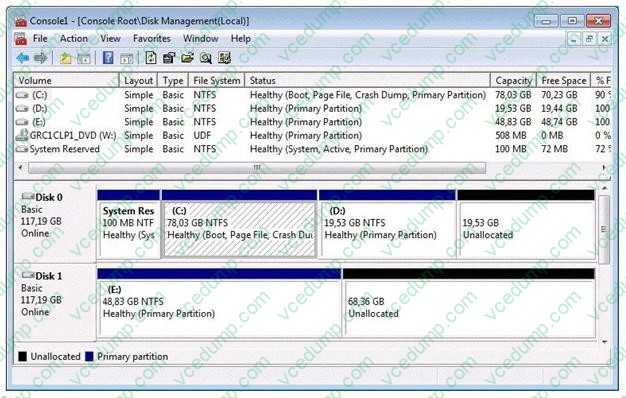
You need to extend volume C. What should you do first?
A. Back up and delete volume D.
B. Convert disk 0 to a dynamic disk.
C. Remove the crash dump from volume C.
D. Move the paging file from volume C to volume E. -
Question 522:
You have a computer that runs Windows 7.
You need to provide standard users the ability to update the drivers for display adapters.
What should you modify from the Local Group Policy?
A. driver installation settings for the user
B. device installation settings for the computer
C. driver installation settings for the computer
D. display settings for the user -
Question 523:
You have a computer that runs Windows 7.
A printer is installed on the computer.
You remove the Everyone group from the access control list (ACL) for the printer, and then you share the printer.
You need to ensure that members of the Sales group can modify all the print jobs that they submit.
You must prevent Sales group members from modifying the print jobs of other users.
What should you do?
A. From the printer's properties, assign the Print permission to the Sales group.
B. From the printer's properties, assign the Manage Documents permission to the Sales group.
C. From the local Group Policy, assign the Increase scheduling priority user right to the Sales group.
D. From the local Group Policy, assign the Take ownership of files or other objects user right to the Sales group. -
Question 524:
Your network contains 100 computers that run Windows XP.
You need to identify which applications installed on all of the computers can run on Windows 7.
You must achieve this goal by using the minimum amount of administrative effort.
What should you install?
A. Microsoft Application Compatibility Toolkit (ACT)
B. Microsoft Assessment and Planning (MAP) Toolkit
C. Microsoft Deployment Toolkit (MDT)
D. Windows Automated Installation Kit (AIK) -
Question 525:
You have a virtual hard disk (VHD) and a computer that runs Windows 7.
The VHD has Windows 7 installed.
You need to start the computer from the VHD.
What should you do?
A. Run the System Configuration Utility and modify the Boot section.
B. Run the System Configuration Utility and modify the Startup section.
C. Run Bootcfg.exe and specify the /Copy parameter.
D. Run Bcdedit.exe and modify the Windows Boot Manager settings. -
Question 526:
You are installing Windows 7 on from the desktop of a Windows XP Professional PC. Which of the following can be performed from the Windows 7 DVD? Choose three.
A. Run setup.exe from the DVD to start the Windows 7 installation.
B. Use the autorun feature on the DVD to start the installation.
C. Perform a full installation of Windows 7.
D. Perform and upgrade of Windows 7 keeping all the Windows XP settings. -
Question 527:
You want to prohibit read, write, and execute access to all types of external storage devices.
What computer policy setting do you enable?
A. All Removable Storage: Allow Direct Access In Remote Sessions
B. All Removable Storage Classes: Deny All Access
C. Removable Disks: Deny Read Access
D. Removable Disks: Deny Write Access -
Question 528:
Your company has an Active Directory domain and several branch locations. All sales employees use portable computers that have Windows 7 Enterprise installed.
Employees report that when they travel to different branch locations, documents that must be printed are sent to printers in their home office.
You need to ensure that documents that must be printed are automatically sent to printers at their current locations.
What should you do first?
A. Publish all printers to Active Directory.
B. From Devices and Printers, select Change my default printer when I change networks.
C. From Devices and Printers, select the branch office printer, and then select set as default.
D. Configure alternate IP settings. -
Question 529:
Which of the following is not a minimum requirement to install Windows 7?
A. 1 GHz or faster 32-bit (x86) or a 64-bit (x64) processor
B. 4GB RAM (32-bit)/2 GB RAM (64-bit)
C. 16 GB available disk space (32-bit)/20 GB (64-bit)
D. DirectX 9 graphics processor with WDDM 1.0 or higher driver. -
Question 530:
A company has a deployment of Windows Deployment Services (WDS), the Microsoft Deployment Toolkit (MDT), and the Windows Automated Installation Kit (WAIK) on a Windows 7 client computer.
You capture an image of the client computer.
A new driver is released for the network card that is installed in the client computer. You need to update the image with the new driver for the network card.
What should you do first?
A. Add a boot image in WDS.
B. Create a capture image in WDS.
C. Run the BCDEdit command.
D. Run the PEImg /Prepcommand.
E. Run the Start /w ocsetup command.
F. Run the Dism command with the/Add-Driver option,
G. Run the Dism command with the /Mount-Wim option.
H. Run the Dism command with the /Add-Package option.
I. Run the ImageX command with the /Mountparameter.
J. Run the DiskPart command and the Attach command option.
Related Exams:
-
62-193
Technology Literacy for Educators -
70-243
Administering and Deploying System Center 2012 Configuration Manager -
70-355
Universal Windows Platform – App Data, Services, and Coding Patterns -
77-420
Excel 2013 -
77-427
Excel 2013 Expert Part One -
77-725
Word 2016 Core Document Creation, Collaboration and Communication -
77-726
Word 2016 Expert Creating Documents for Effective Communication -
77-727
Excel 2016 Core Data Analysis, Manipulation, and Presentation -
77-728
Excel 2016 Expert: Interpreting Data for Insights -
77-731
Outlook 2016 Core Communication, Collaboration and Email Skills
Tips on How to Prepare for the Exams
Nowadays, the certification exams become more and more important and required by more and more enterprises when applying for a job. But how to prepare for the exam effectively? How to prepare for the exam in a short time with less efforts? How to get a ideal result and how to find the most reliable resources? Here on Vcedump.com, you will find all the answers. Vcedump.com provide not only Microsoft exam questions, answers and explanations but also complete assistance on your exam preparation and certification application. If you are confused on your 70-680 exam preparations and Microsoft certification application, do not hesitate to visit our Vcedump.com to find your solutions here.