70-680 Exam Details
-
Exam Code
:70-680 -
Exam Name
:Windows 7 Configuring -
Certification
:Microsoft Certifications -
Vendor
:Microsoft -
Total Questions
:565 Q&As -
Last Updated
:Dec 13, 2021
Microsoft 70-680 Online Questions & Answers
-
Question 511:
You use a computer that has Windows 7 SP1 installed and has a folder named C:\Data. The active network connection of the computer is configured as Public.
You use Advanced Sharing to share a folder as shown in the exhibit. (Click the Exhibit button.)
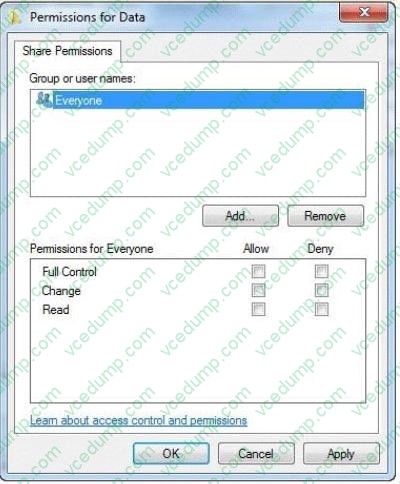
A user attempts to access the shared folder across the network and receives the following error message: "Access is Denied."
You need to ensure that the user can download files from the shared folder.
What should you do?
A. Allow file and printer sharing through Windows Firewall. From the Security settings of the folder, assign the Full Control NTFS permission to the user.
B. From the Advanced Sharing settings of the folder, assign the Read share permission to the user.
C. From the Security settings of the folder, assign the Read NTFS permission to the user.
D. Change the network location of the computer from a Public network to a Home or Work network. -
Question 512:
A company has a server running Windows Server 2008 R2, with Windows Deployment Services (WDS), the Microsoft Deployment Toolkit (MDT), and the indows Automated Installation Kit (WAIK) set up. The company also has client computers running Windows 7 Enterprise.
You need to capture an image of a client computer.
What should you do on the server before performing actions on the client computer?
A. Use Sysprep with an answer file and set the UpdatelnstalledDrivers option in the answer file to Mo.
B. Run the DiskPart command and the Attach command option.
C. Use Sysprep with an answer file and set the PersistAHDevicelnstalls option in the answer file to False.
D. Use Sysprep with an answer file and set the UpdatelnstalledDrivers option in the answer file to Yes.
E. Add a boot image and create a capture image in WDS.
F. Run the BCDEdit /delete command.
G. Run the Dism command with the /Add-Driver option.
H. Run the ImageX command with the /Mount parameter.
I. Run the Dism command with the /Add-Package option.
J. Use Sysprep with an answer file and set the PersistAHDevicelnstalls option in the answer file to True. -
Question 513:
You need to increase the size of a paging file.
What should you do?
A. From Disk Management, shrink the boot partition.
B. From Disk Management, shrink the system partition.
C. From System, modify the Advanced system settings.
D. From System, modify the System protection settings. -
Question 514:
You use a desktop computer that has Windows 7 Ultimate SP1. The relevant portions of the computer configuration are shown in the following exhibits: The Disk Management console (Click the Exhibit button.)
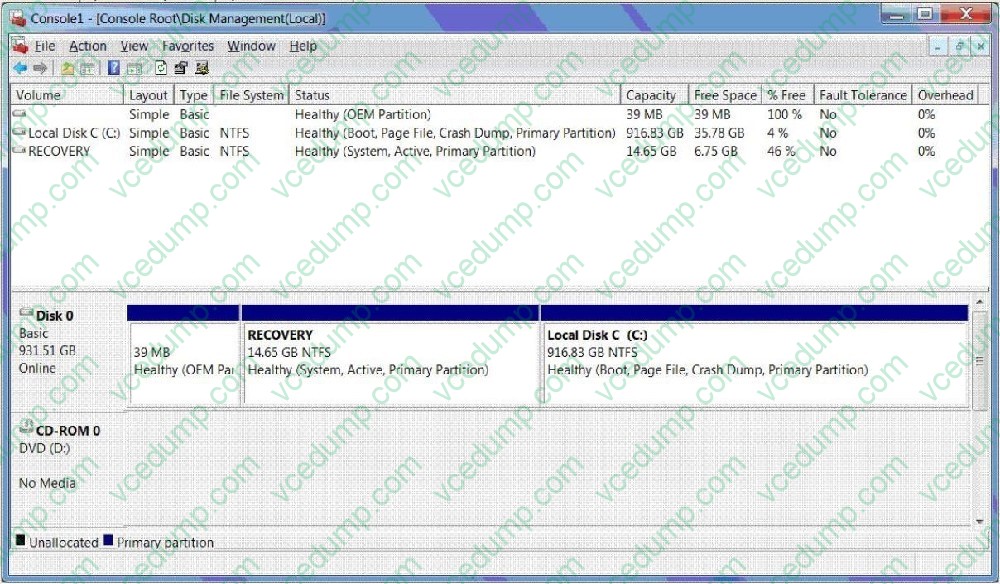
?The System Properties window (Click the Exhibit button.)
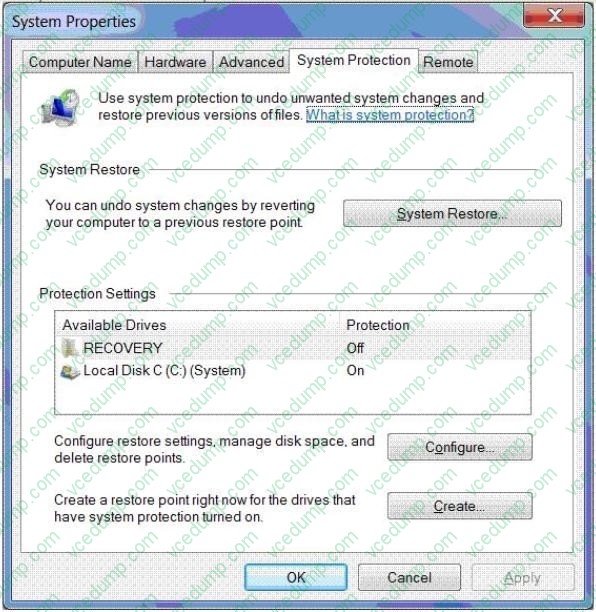
?The System protection for Local Disk C window (Click the Exhibit button.)
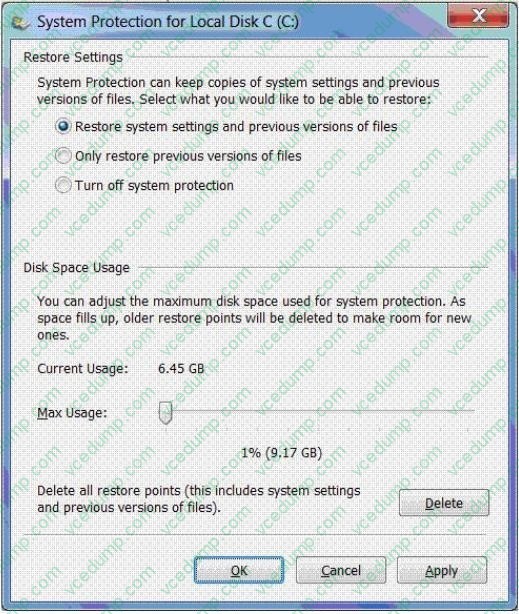
You share your Documents library over a network.
You discover that one of the files was deleted from the library by a network user.
You need to restore the most recent version of the deleted file.
What should you do?
A. Delete restore points.
B. Create a restore point.
C. Perform a system restore.
D. Search for the file in the Recycle Bin.
E. Increase disk space used for system protection.
F. Copy the file from a previous version of a folder.
G. Set restore settings to only restore previous versions of files.
H. Run the cipher /x command from the elevated command prompt,
I. Run the vssadmin list volumes command from the elevated command prompt.
J. Run the vssadmin list shadows command from the elevated command prompt, -
Question 515:
You work in an international company which is named Wiikigo. Before entering this company, you have two years of experience in the IT field, as well as experience implementing and administering any Windows client operating system in a networked environment. You are professional in installing, upgrading and migrating to Windows 7, deploying Windows 7, and configuring Hardware and Applications and son on. You use a computer that runs Windows 7. Now your company assigns a task to you. You are asked to prevent users from copying unencrypted files to removable drives.
What action should you perform?
A. The Trusted Platform Module (TPM) settings should be modified from a local Group Policy.
B. TPM should be initialized from the Trusted Platform Module (TPM) snap-in.
C. The BitLocker Drive Encryption settings should be modified from Control Panel.
D. The BitLocker Drive Encryption settings should be modified from a local Group Policy. -
Question 516:
You use a client computer named Marketing that has Windows 7 SP1 installed. The computer allows connections from other computers that have any version of Remote Desktop installed. The computer has a locally attached printer shared
as Printer1.
A MarketingUsers group is a member of the local Remote Desktop Users group on the computer. Only the MarketingUsers group has access to Printer1. A user named User1 is a member of MarketingUsers.
You need to configure the computer to meet the following requirements:

Prevent User1 from establishing Remote Desktop sessions to the Marketing computer. ?Allow other members of MarketingUsers to connect to the Marketing computer by using Remote Desktop.
Ensure that User1 can access Printer1. What should you do?
A. Assign the Deny access to this computer from the network user right to User1.
B. Remove the MarketingUsers group from the Remote Desktop Users group.
C. Assign the Deny log on through Remote Desktop Services user right to User1.
D. Remove User1 from the MarketingUsers group. -
Question 517:
You are investigating instability and boot problems on a computer running Windows 7 Enterprise. You boot using the Last Known Good Configuration (Advanced) option and perform a system restore. This does not solve your problems, and you want to undo the system restore. Can you do this, and what is the reason for your answer?
A. No. You can undo a system restore only if you initiate it from the System Recovery tools.
B. No. You can undo a system restore only if you carry it out after booting normally.
C. Yes. You can always undo a system restore, no matter how you booted the computer or how you initiated the restore.
D. Yes. You can undo a system restore that you perform after either booting normally or booting using Last Known Good Configuration (Advanced). -
Question 518:
You have a computer that runs Windows 7.
You need to copy files to a virtual hard disk (VHD) file.
What should you do first?
A. Run Dism.exe and specify the /image and /online parameters.
B. Open Windows Explorer, right-click the VHD file and select Open.
C. Run Diskpart.exe and then run the Select and Attach commands.
D. Run Imagex.exe and specify the /mountrw and /append parameters. -
Question 519:
You administer a computer that has Windows 7 and Internet Explorer 8 installed. A user has installed a third-party toolbar in Internet Explorer 8.
You need to permanently remove the toolbar.
What should you do?
A. From Programs and Features in the Control Panel, uninstall the toolbar.
B. From an elevated command prompt, run ?osystemdrive?o\Program Files\Internet Explorer\iecleanup.exe.
C. From Internet Explorer, launch Manage Add-ons and disable the toolbar.
D. Start Internet Explorer in an InPrivate Browsing session. -
Question 520:
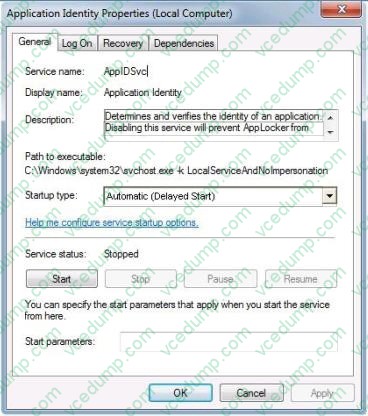
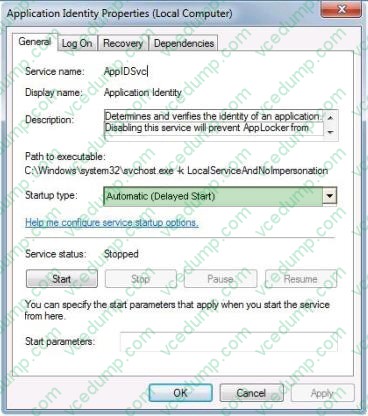
A company has client computers that run Windows 7. You create an AppLocker policy for the client computers.
You need to ensure that the AppLocker policy is enforced after the computers restart.
Which service startup type should you use? (To answer, select the appropriate setting or settings in the work area.)
Hot Area:
Related Exams:
-
62-193
Technology Literacy for Educators -
70-243
Administering and Deploying System Center 2012 Configuration Manager -
70-355
Universal Windows Platform – App Data, Services, and Coding Patterns -
77-420
Excel 2013 -
77-427
Excel 2013 Expert Part One -
77-725
Word 2016 Core Document Creation, Collaboration and Communication -
77-726
Word 2016 Expert Creating Documents for Effective Communication -
77-727
Excel 2016 Core Data Analysis, Manipulation, and Presentation -
77-728
Excel 2016 Expert: Interpreting Data for Insights -
77-731
Outlook 2016 Core Communication, Collaboration and Email Skills
Tips on How to Prepare for the Exams
Nowadays, the certification exams become more and more important and required by more and more enterprises when applying for a job. But how to prepare for the exam effectively? How to prepare for the exam in a short time with less efforts? How to get a ideal result and how to find the most reliable resources? Here on Vcedump.com, you will find all the answers. Vcedump.com provide not only Microsoft exam questions, answers and explanations but also complete assistance on your exam preparation and certification application. If you are confused on your 70-680 exam preparations and Microsoft certification application, do not hesitate to visit our Vcedump.com to find your solutions here.