70-680 Exam Details
-
Exam Code
:70-680 -
Exam Name
:Windows 7 Configuring -
Certification
:Microsoft Certifications -
Vendor
:Microsoft -
Total Questions
:565 Q&As -
Last Updated
:Dec 13, 2021
Microsoft 70-680 Online Questions & Answers
-
Question 531:
In which of the following scenarios must you perform a migration rather than an upgrade? Choose three.
A. Windows XP Professional (x64) to Windows 7 Professional (x64)
B. Windows Vista Business (x86) to Windows 7 Professional (x64)
C. Windows Vista Enterprise (x64) to Windows 7 Enterprise (x64)
D. Windows Vista Home Premium (x64) to Windows 7 Home Premium (x86) -
Question 532:
A remote user has a computer that runs Windows 7. The user reports that he receives several error messages while using an application. You do not have remote access to the user's computer.
You need to tell the user how to create screenshots of the actions he performs on the computer.
The solution must track the mouse actions that the user performs. What should you instruct the user to do?
A. Press ALT+PrintScreen
B. Run Psr.exe and then click Start Record
C. From Mouse Properties, select Display pointer trails
D. Run Snippingtool.exe, click New, and then click Window Snip -
Question 533:
Your company office network includes a file server that has Windows Server 2008 R2 installed and client computers that have Windows 7 Enterprise installed. The computers are members of an Active Directory domain. The file server has
the BrachCache features installed.
All sales user in the office must download a daily updated 5-GB file that is stored on a file server located in a remote office.
You configure the client computers to run BranchCache in Distributed Host mode. You discover that all users still access the file directly from the file server. You need to reduce the utilization of a WAN link between the offices because of
downloading the file to the client computers.
What should you do?
A. Run the Netsh branchcache set service mode=HOSTEDSERVER client authentication=NONE command
B. Configure firewall exception rules for multicast traffic, inbound and outbound traffic for local UDP port 3702, and inbound and outbound traffic for local TCP port 80.
C. Create a Group Policy that sets Hash Publication for BranchCache as disabled.
D. Run the netsh branchcache set service mode=DISTRIBUTED command.
E. Create a Group Policy object and configure the Set percentage of disk space used for client computer cache option.
F. Check permisions.
G. Run the netsh branchcache set service mode=HOSTEDCLIENT command.
H. Create a Group Policy object and enable the Set BranchCache Hosted Cache mode policy.
I. Configure firewall exception rules for inbound and outbound traffic for local TCP port 80 and for inbound and outbound traffic for local TCP port 8443. -
Question 534:
A company is in the process of upgrading its client computers from Windows XP to Windows 7.
You add an application to the Windows 7 base image.
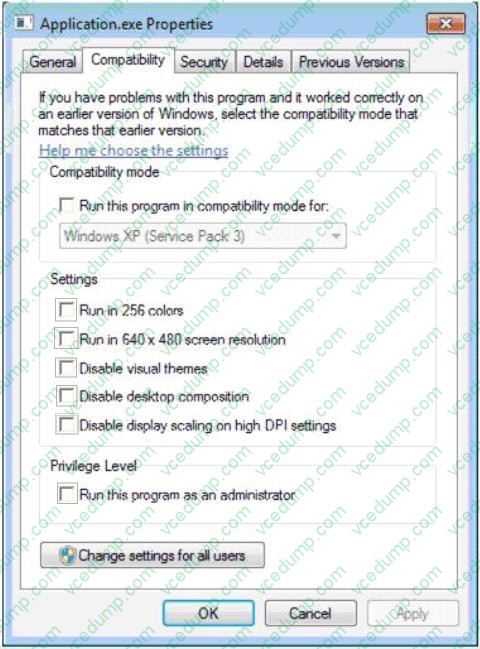
When users move the application window, the application is displayed improperly.
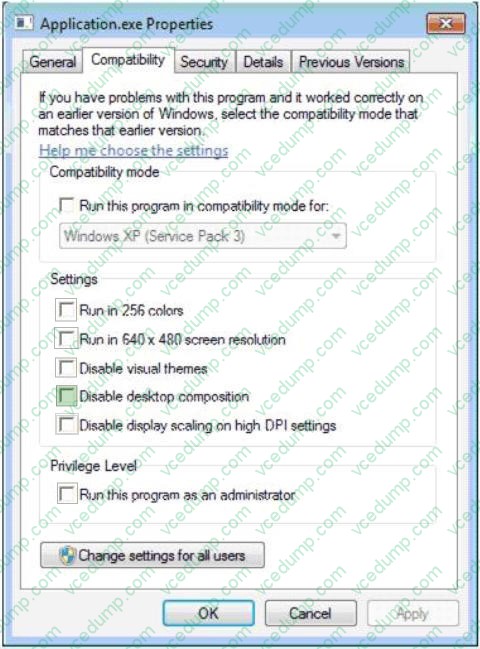
You need to ensure that the application is displayed properly by disabling the Aero theme.
Which setting should you choose? (To answer, select the appropriate check box in the dialog box.)
Hot Area:
-
Question 535:
You have a computer that runs Windows 7.
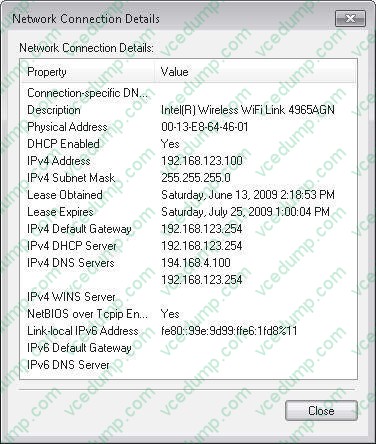
The IPv6 address of the computer is configured automatically. You need to identify the IPV6 address of the computer.
What should you do?
A. At the command prompt, run Netstat.
B. At the command prompt run Net config.
C. From the network connection status, click Details.
D. From network connection properties, select Internet Protocol Version 6 (TCP/IPv6) and click Properties. -
Question 536:
You have a computer named Computer1 that runs Windows 7. You have a server named Server1 that runs Windows Server 2008.
Computer1 and Server1 have IPv4 and IPv6 installed.
You need to identify whether you can connect to Server1 by using IPv6.
What should you do?
A. Run Ping Server1 -6.
B. Run Ping Server1- n 6.
C. Run Net view \\Server1.
D. Open \\server1 from the Run dialog box. -
Question 537:
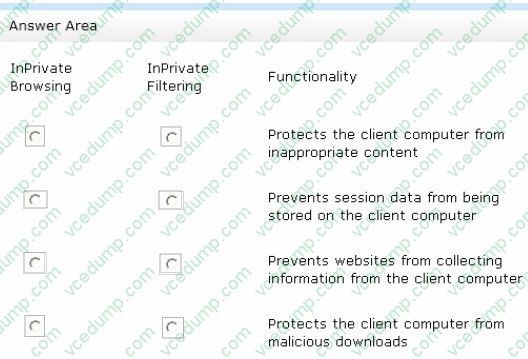
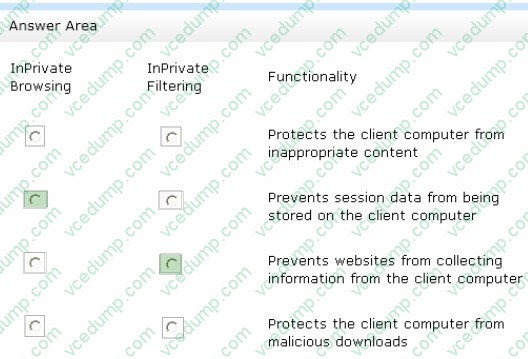
A company has Windows 7 computers that that use Internet Explorer 10 with InPrivate Browsing and InPrivate Filtering.
In the table below, identify the functionality of each InPrivate mode. (Make only one selection in each column. This question is worth two points. )
Hot Area:
-
Question 538:
You maintain Windows 7 virtual hard disks (VHDs) at Contoso, Ltd. You are applying a series of updates to one of the company's VHDs by using the Windows Deployment Image Servicing and Management (DISM) system. The VHD contains a Windows 7 64-bit operating system. The image is stored in N:\Images \Win7img. vhd.Additionally, there are three updates required, which are stored in subfolders of N:\updates.
You need to mount and apply Windows updates to the offline VHD.
Which two actions should you perform? (Each correct answer presents part of the solution. Choose two. )
A. Use diskpart to mount the VHD.
B. Use Dism with /Add-Driver and /recurse options.
C. Use Dism to mount the VHD.
D. Use Dism with /Add-Package /recurse. -
Question 539:
You administer a computer that has Windows 7 Enterprise installed. The computer reboots unexpectedly. You suspect that an unsigned driver causes the reboots.
You need to view a list of all installed device drivers that contain information about the digital signature of the device driver.
Which should you do?
A. Run the driverquery.exe /SI command.
B. Open the System Protection configuration for drive C.
C. Open Device Manager, show hidden devices, and sort all devices by type.
D. Run sigverif.exe and start the verification process of the device drivers. Then, review the generated log file. -
Question 540:
You install an application named app1.exe on a computer After the installation the computer becomes unresponsive. You restart the computer and attempt to uninstall App1.exe. The uninstallation of App1.exe fails. You need to restore the computer to its previous functional state. You must achieve the goal by using the minimum amount of administration.
What should you do?
A. From Recovery, restore a system restore point.
B. From the Previous Versions tab of App1.exe, click Restore button.
C. Start the computer, press F8 and then use the Last Known Good Configuration.
D. Create a system repair disc and then start the computer from the system repair disc.
Related Exams:
-
62-193
Technology Literacy for Educators -
70-243
Administering and Deploying System Center 2012 Configuration Manager -
70-355
Universal Windows Platform – App Data, Services, and Coding Patterns -
77-420
Excel 2013 -
77-427
Excel 2013 Expert Part One -
77-725
Word 2016 Core Document Creation, Collaboration and Communication -
77-726
Word 2016 Expert Creating Documents for Effective Communication -
77-727
Excel 2016 Core Data Analysis, Manipulation, and Presentation -
77-728
Excel 2016 Expert: Interpreting Data for Insights -
77-731
Outlook 2016 Core Communication, Collaboration and Email Skills
Tips on How to Prepare for the Exams
Nowadays, the certification exams become more and more important and required by more and more enterprises when applying for a job. But how to prepare for the exam effectively? How to prepare for the exam in a short time with less efforts? How to get a ideal result and how to find the most reliable resources? Here on Vcedump.com, you will find all the answers. Vcedump.com provide not only Microsoft exam questions, answers and explanations but also complete assistance on your exam preparation and certification application. If you are confused on your 70-680 exam preparations and Microsoft certification application, do not hesitate to visit our Vcedump.com to find your solutions here.