70-680 Exam Details
-
Exam Code
:70-680 -
Exam Name
:Windows 7 Configuring -
Certification
:Microsoft Certifications -
Vendor
:Microsoft -
Total Questions
:565 Q&As -
Last Updated
:Dec 13, 2021
Microsoft 70-680 Online Questions & Answers
-
Question 1:
Which of the following is not a Windows PE tool?
A. Diskpart
B. Oscdimg
C. Winpeshl
D. None of the above. -
Question 2:
You use a client computer that has Windows 7 Enterprise installed. The computer is located in a branch office.
The office is connected by a wide area network (WAN) link to a company's main office.
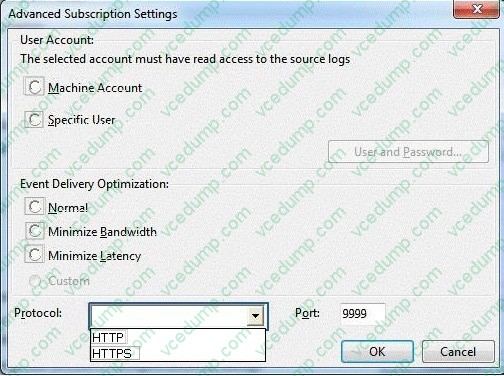
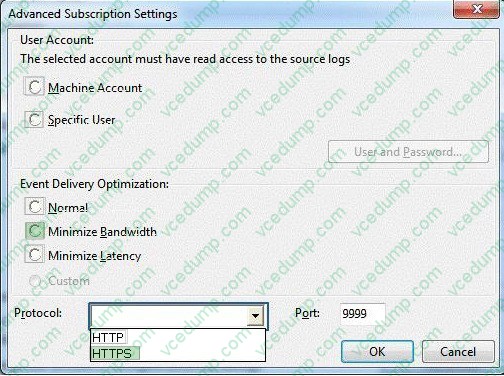
You need to configure an event subscription that meets the following requirements:
1. Forwards events across the WAN on port 3243.
2. Forwards events every 6 hours.
3. Protects forwarded events while transmission over the WAN network.
What should you do? (To answer, configure the appropriate option or options in the dialog box in the answer area.)
Hot Area:
-
Question 3:
Your company has a server that runs Windows Server 2008 R2. The server is configured as a remote access server.
The external firewall has TCP port 80 and TCP port 443 open for remote access connections.
You have a home computer that runs Windows 7.
You need to establish secure remote access connection from the home computer to the remote access server.
Which type of connection should you configure?
A. IPSEC
B. L2TP
C. PPTP
D. SSTP -
Question 4:
You administer desktops that have 32-bit and 64-bit versions of Windows 7 Enterprise SP1 installed. All desktops have a single CD-RW drive. The local hard disk drives on all computers are partitioned with a recovery partition and a single logical drive C. You need to be able to restore Windows boot files on any of the desktops if the boot files become corrupted.
Which two actions should you perform? (Each correct answer presents part of the solution. Choose two.)
A. Create a system image of a Windows 7 Enterprise 64-bit desktop
B. Create a system repair disk on a Windows 7 Enterprise 64-bit desktop.
C. Restart Windows 7 Enterprise 64-bit desktops. Select the Disable Drive Signature Enforcement option from the Advanced Boot options menu.
D. Enable system protection on the recovery partition on 64-bit desktops.
E. Create system repair disk on a Windows 7 Enterprise 32-bit desktop.
F. Create a system image of a Windows 7 Enterprise 32-bit desktop.
G. Enable system protection on the recovery partition on 32-bit desktops. -
Question 5:
You have a computer that runs Windows 7. The computer is joined to a domain. You need to ensure that only approved USB drives can be used on the computer.
Which two policy settings should you configure? (Each correct answer presents part of the solution. Choose two.)
A. Enable Prevent installation of removable devices.
B. Enable Prevent installation of devices not described by other policy settings.
C. Enable Prevent installation of devices that match any of these device IDs and enter the device ID for the approved USB drives.
D. Enable Allow installation of devices that match any of these device IDs and enter the device ID for the approved USB drives. -
Question 6:
You have a computer that runs Windows 7.
You mark a folder as Always available offline.
You need to verify that an offline copy of the folder has been created on the computer.
What should you do?
A. Open Sync Center and review the status.
B. Open Action Center and review any messages or issues.
C. Open Windows Mobile Device Center and review the status.
D. Open Network and Sharing Center and review the status for the local area connection. -
Question 7:
You have a computer that runs Windows 7.
Multiple users log on to the computer.
You need to deny one user access to removable devices on the computer. All other users must have access to the removable drives.
What should you do?
A. From the local Group Policy, modify an application control policy.
B. From Control Panel, modify the BitLocker Drive Encryption settings.
C. From Device Manager, modify the settings of all removable devices.
D. From the local Group Policy, modify a removable storage access policy. -
Question 8:
You have a computer that runs Windows 7.
You need to confirm that all device drivers installed on the computer are digitally signed.
What should you do?
A. At a command prompt, run Verify.
B. At a command prompt, run Sigverif.exe.
C. From Device Manager, click Scan for hardware changes.
D. From Device Manager, select the Devices by connection view. -
Question 9:
You have a portable computer that runs Windows 7. The computer is configured to keep an offline version of files located in a network share.
You need to identify whether you are working on an offline version of a file.
What should you do?
A. From Sync Center, click View sync partnerships.
B. From Action Center, click View archived messages.
C. From Windows Explorer, select the file and then view the toolbar.
D. From Windows Mobile Device Center, click the Connection settings. -
Question 10:
A computer that runs Windows 7 becomes infected with malware.
You scan the computer, remove all detected malware components, and restart the computer. When you attempt to connect to a financial institution's Web site, Internet Explorer redirects to another Web site and displays an alert that the Web
site may be a phishing site.
You need to prevent the computer from being redirected to the potential phishing site.
What should you do?
A. Configure the SmartScreen Filter.
B. Run Ipconfig /flushdns.
C. Configure InPrivate Browsing.
D. Modify the hosts file.
Related Exams:
-
62-193
Technology Literacy for Educators -
70-243
Administering and Deploying System Center 2012 Configuration Manager -
70-355
Universal Windows Platform – App Data, Services, and Coding Patterns -
77-420
Excel 2013 -
77-427
Excel 2013 Expert Part One -
77-725
Word 2016 Core Document Creation, Collaboration and Communication -
77-726
Word 2016 Expert Creating Documents for Effective Communication -
77-727
Excel 2016 Core Data Analysis, Manipulation, and Presentation -
77-728
Excel 2016 Expert: Interpreting Data for Insights -
77-731
Outlook 2016 Core Communication, Collaboration and Email Skills
Tips on How to Prepare for the Exams
Nowadays, the certification exams become more and more important and required by more and more enterprises when applying for a job. But how to prepare for the exam effectively? How to prepare for the exam in a short time with less efforts? How to get a ideal result and how to find the most reliable resources? Here on Vcedump.com, you will find all the answers. Vcedump.com provide not only Microsoft exam questions, answers and explanations but also complete assistance on your exam preparation and certification application. If you are confused on your 70-680 exam preparations and Microsoft certification application, do not hesitate to visit our Vcedump.com to find your solutions here.