70-680 Exam Details
-
Exam Code
:70-680 -
Exam Name
:Windows 7 Configuring -
Certification
:Microsoft Certifications -
Vendor
:Microsoft -
Total Questions
:565 Q&As -
Last Updated
:Dec 13, 2021
Microsoft 70-680 Online Questions & Answers
-
Question 291:
You have a virtual hard disk (VHD) file.
You need to view the files in the VHD. The solution must prevent users that log on to What should you do?
A. From Disk Management, Attach VHD as read only.
B. From Disk Management, Convert the VHD to GPT disk.
C. From Windows Explorer, modify the permissions of the VHD file.
D. From Windows Explorer, modify the read-only attribute of the VHD file. -
Question 292:
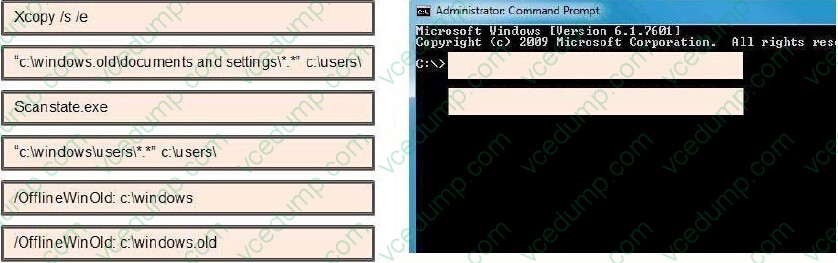
You have a computer that runs WindowsXP. The computer has one partition.
You install Windows 7 on the computer.
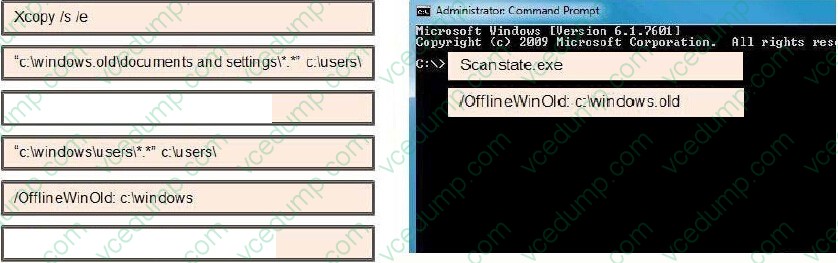
You need to migrate a user profile from the Windows XP installation to Windows 7 installation.
What should you do first? (To answer, drag the appropriate command from the list of command to the correct location or locations in the work area.)
Select and Place:
-
Question 293:
You have a computer that runs Windows 7. The network connection details are shown in the exhibit. (Click the Exhibit button.)
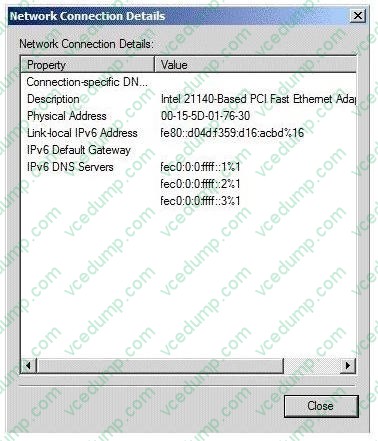
You need to manually assign an IP address of 192.168.1.50 to the computer. What should you do first?
A. Enable TCP/IPv4.
B. Disable TCP/IPv6.
C. Run Ipconfig and specify the /renew parameter.
D. Run Netsh and specify the Interface ipv4 add address command. -
Question 294:
You are testing unsigned device drivers on a computer on an isolated test network.
You install a display driver and find that the computer boots to a blank screen.
You restart the computer and press F8.
What Advanced Boot Options could you choose to help remedy the situation? (Choose all that apply.)
A. Safe Mode
B. Enable Boot Logging
C. Enable Low Resolution Video
D. Last Known Good Configuration (Advanced)
E. Disable Driver Signal Enforcement -
Question 295:
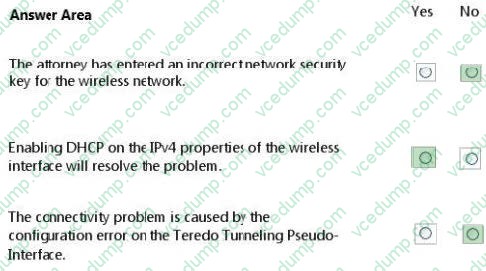
A law firm's wireless network does not use IPv6 and provides IP addresses automatically to connected clients.
A visiting attorney arrives to perform a deposition. The attorney's computer has never connected to the firm's wireless network. The attorney needs general access to several websites but is unable to connect to the Internet.
You collect information from the computer's Device Manager, Network Connections, and Wireless Network Connections.
Device information is shown in the Device Manager exhibit. (Click the Exhibit button.)
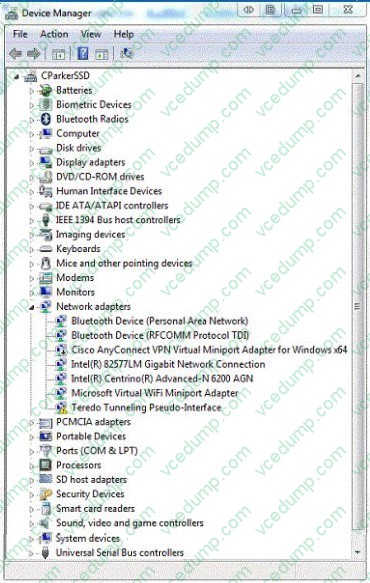
Network information is shown in the Network Connections exhibit. (Click the Exhibit button.)
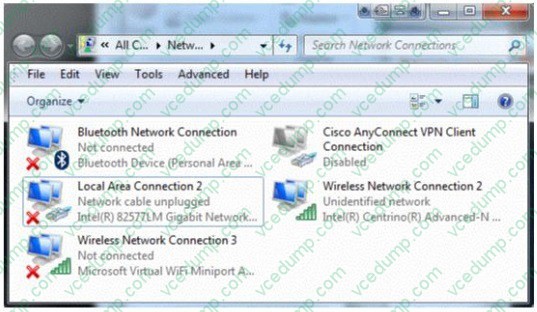
Wireless network information is shown in the Wireless Network Connections exhibit. (Click the Exhibit button.)
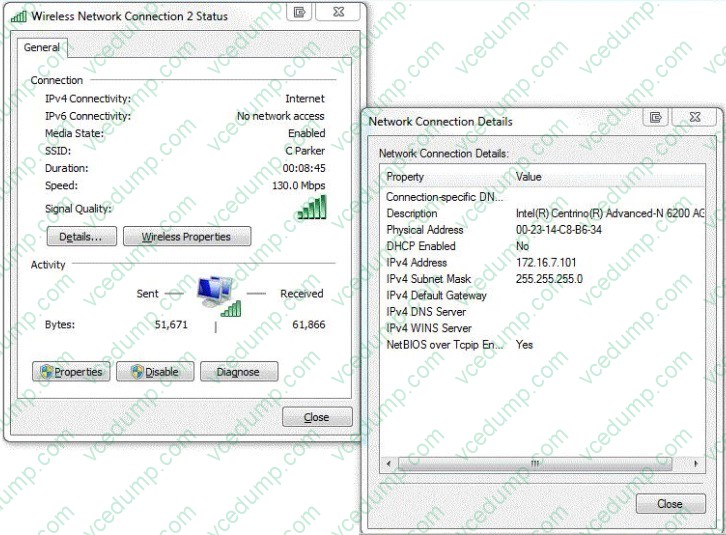
You need to configure this attorney's laptop so it can access the Internet through the firm's wireless network.
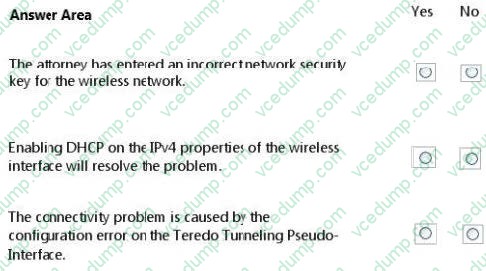
Consider each of the following statements. Does the information in the three screenshots support the inference as stated? (This question is worth three points.)
Hot Area:
-
Question 296:
You use a computer that has Windows 7 SP1 installed and has a folder named C:\Data. The active network connection for the computer is configured as Public.
You assign User1 to a local group called DataUsers. The group has been granted Read NTFS permissions for the folder.
User1 browses to the shared folder across the network and receives the following error message:
"Access is Denied."
You need to ensure that the user can download files from the shared folder.
What should you do?
A. Allow file and printer sharing through Windows Firewall.
B. Change the network location of the computer from a Public network to a Home or Work network.
C. From the Security settings of the C:\Data folder, assign the Full Control NTFS permissions to User1.
D. From the Advanced Sharing settings of the folder, assign the Read share permission to User1.
E. From the Advanced Sharing permissions, enable caching. -
Question 297:
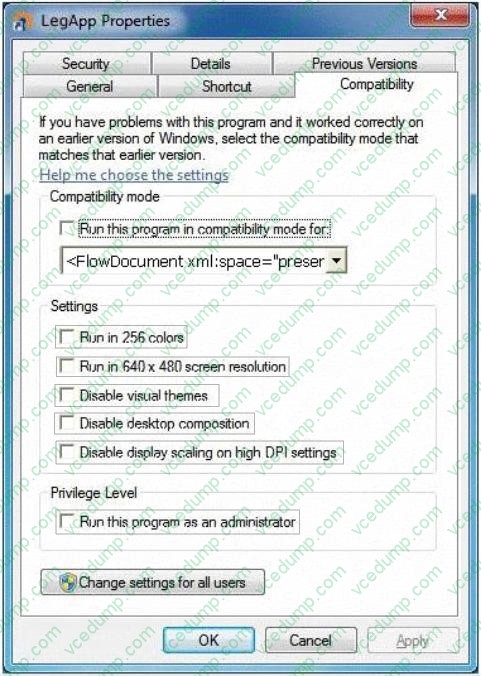
You use a computer that has Windows 7 installed. You install a legacy application named LegApp.
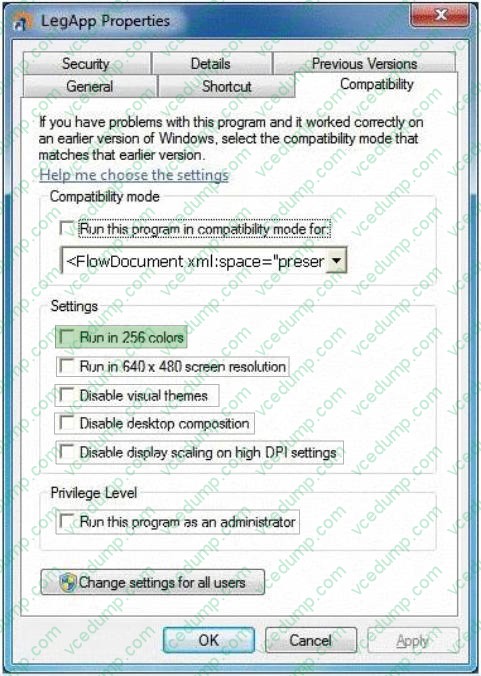
LegApp is designed for Windows 98 and does not support the 16-bit or 32-bit color quality setting.
You need to configure application compatibility settings for LegApp to meet the following requirements:
1. Compatible with Windows 98
2. The 8-bit color quality setting must be used
What should you do?(To answer, configure the appropriate option or options in the dialog box in the answer area.)
Hot Area:
-
Question 298:
You need to prevent a custom application from connecting to the Internet.
What should you do?
A. From Windows Firewall, add a program.
B. From Windows Defender, modify the Allowed items list.
C. From Windows Firewall with Advanced Security, create an inbound rule.
D. From Windows Firewall with Advanced Security, create an outbound rule. -
Question 299:
You administer a computer that has Windows 7 Enterprise installed.
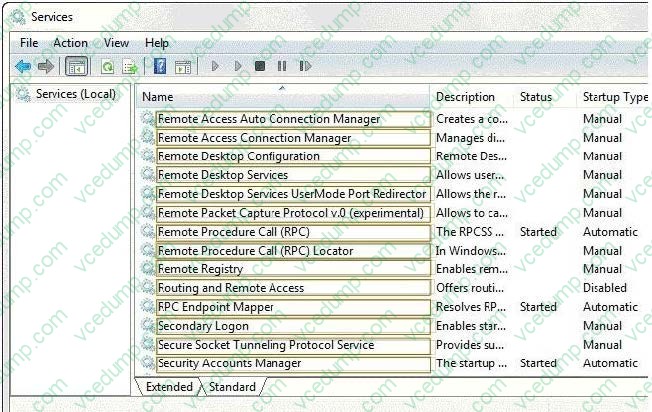
The computer has an application that must run by using administrative permission.
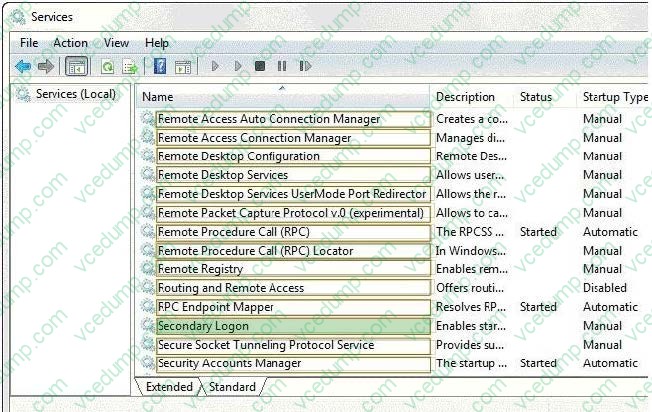
A user who has a standard user account connects to the computer by using a Remote Desktop connection. The user right-clicks the application shortcut, but the run as administrator option is unavailable.
You need to ensure that the user is able to run the application by using administrative permissions.
Which services should you configure? (To answer, select the appropriate option or options in the answer area).
Hot Area:
-
Question 300:
A company has a server running Windows Server2008 R2 with Windows Deployment Services (WDS), the Microsoft Deployment Toolkit (MDT), and the Windows Automated Installation Kit (WAIK) set up. The company also has client computers running Windows 7 Enterprise.
A new driver is released for the network cards that are installed in the client computers.
You need to update the image with the new driver for the network cards.
What should you do to add the driver to the mounted Windows image file?
A. Run the Start /w ocsetup command.
B. Run the DiskPart command and the Attach command option.
C. Use Sysprep with an answer file and set the PersistAHDeviceInstalls option in the answer file to True.
D. Use Sysprep with an answer file and set the PersistAHDeviceInstalls option in the answer file to False.
E. Use Sysprep with an answer file and set the UpdateInstalledDrivers option in the answer file to Yes.
F. Run the Dism command with the /Mount-Wim option.
G. Use Sysprep with an answer file and set the UpdateInstalledDrivers option in the answer file to No.
H. Run the PEImg /Prepcommand.
I. Run the ImageX command with the /Mountparameter.
J. Add a boot image and create a capture image in WDS.
Related Exams:
-
62-193
Technology Literacy for Educators -
70-243
Administering and Deploying System Center 2012 Configuration Manager -
70-355
Universal Windows Platform – App Data, Services, and Coding Patterns -
77-420
Excel 2013 -
77-427
Excel 2013 Expert Part One -
77-725
Word 2016 Core Document Creation, Collaboration and Communication -
77-726
Word 2016 Expert Creating Documents for Effective Communication -
77-727
Excel 2016 Core Data Analysis, Manipulation, and Presentation -
77-728
Excel 2016 Expert: Interpreting Data for Insights -
77-731
Outlook 2016 Core Communication, Collaboration and Email Skills
Tips on How to Prepare for the Exams
Nowadays, the certification exams become more and more important and required by more and more enterprises when applying for a job. But how to prepare for the exam effectively? How to prepare for the exam in a short time with less efforts? How to get a ideal result and how to find the most reliable resources? Here on Vcedump.com, you will find all the answers. Vcedump.com provide not only Microsoft exam questions, answers and explanations but also complete assistance on your exam preparation and certification application. If you are confused on your 70-680 exam preparations and Microsoft certification application, do not hesitate to visit our Vcedump.com to find your solutions here.