70-680 Exam Details
-
Exam Code
:70-680 -
Exam Name
:Windows 7 Configuring -
Certification
:Microsoft Certifications -
Vendor
:Microsoft -
Total Questions
:565 Q&As -
Last Updated
:Dec 13, 2021
Microsoft 70-680 Online Questions & Answers
-
Question 281:
You have a computer that runs Windows Vista.
You need to identify whether the computer can be upgraded to Windows 7.
Which tool should you use?
A. Windows Anytime Upgrade for Windows 7
B. Windows Anytime Upgrade for Windows Vista
C. Windows 7 Upgrade Advisor
D. Windows Vista Upgrade Advisor -
Question 282:
You have 15 computers that run Windows 7.
You need to implement a monitoring solution that meets the following requirements:

Sends an e-mail notification when an application error is logged in the event log
Runs a script to restart the computer if an application error occurs between 17:00 and
07:00
Minimizes the administrative effort required to monitor applications
What should you do?
A. On all the computers, configure a custom view. Configure a custom task for the application error events.
B. On a computer, configure a custom view to display the application errors. Configure a custom task for the application error events.
C. On a central computer, configure an event subscription. On all of the computers, configure a custom task in the Forwarded Events log.
D. On all the computers, configure an event subscription to a central computer. On the central computer, configure a custom task in the Forwarded Events log. -
Question 283:
You have a computer named Computer1 that runs Windows 7. Computer1 is a member of an Active Directory domain. Remote Desktop is enabled on the computer.
You share a folder on Computer1.
You need to configure Computer1 to meet the following requirements:
Allow computers in the local subnet to access the shared folder
Prevent computers in remote subnets from accessing the shared folder
Allow all computers to connect to Computer1 by using
Remote Desktop
What should you do?
A. Modify the subnet mask.
B. Modify the Public folder sharing settings.
C. Disable network discovery on all computers located in remote subnets.
D. Modify the properties of the File and Printer Sharing firewall exceptions. -
Question 284:
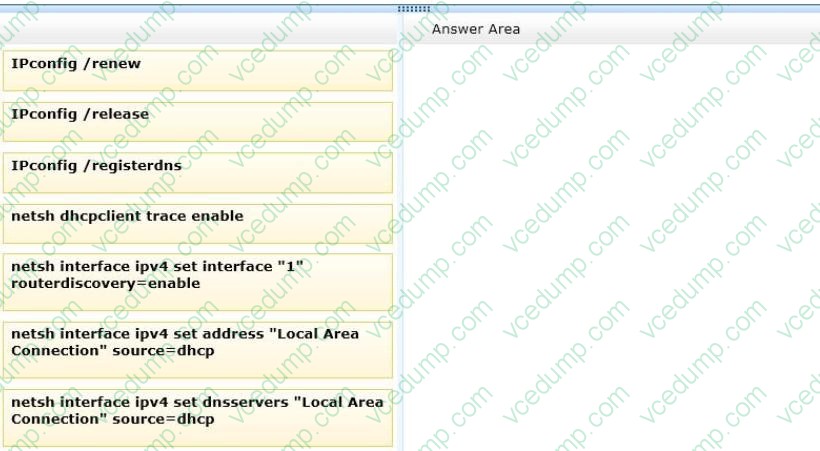
Windows 7 client computers in your company network are assigned IP addresses manually or by using DHCP.
Recent changes have been made to a DHCP Server scope. Desktops that have manually assigned IP addresses are reporting that they can no longer connect to the Internet.
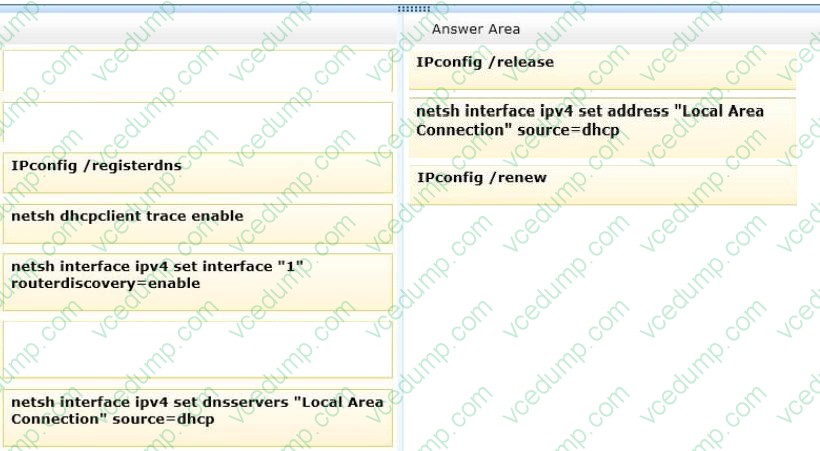
You need to ensure that all client computers receive IP address and DNS servers' addresses from the DHCP server.
Which commands should you run? (To answer, move the appropriate commands from the list of commands to the answer area and arrange them in the correct order.)
Select and Place:
-
Question 285:
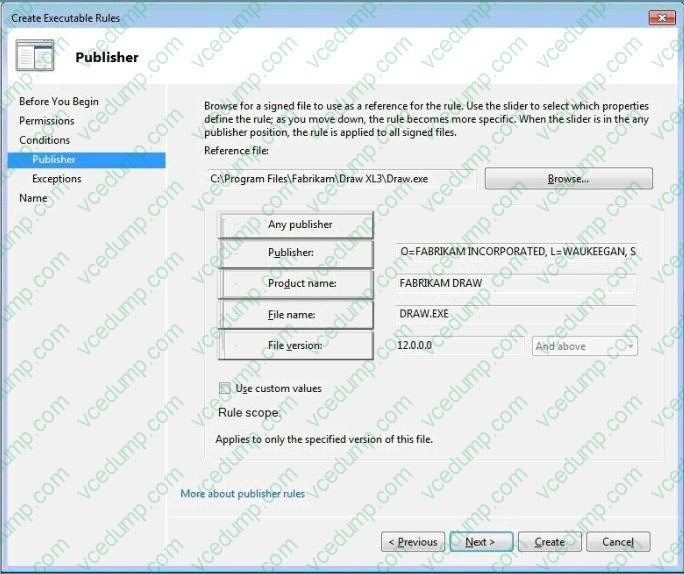
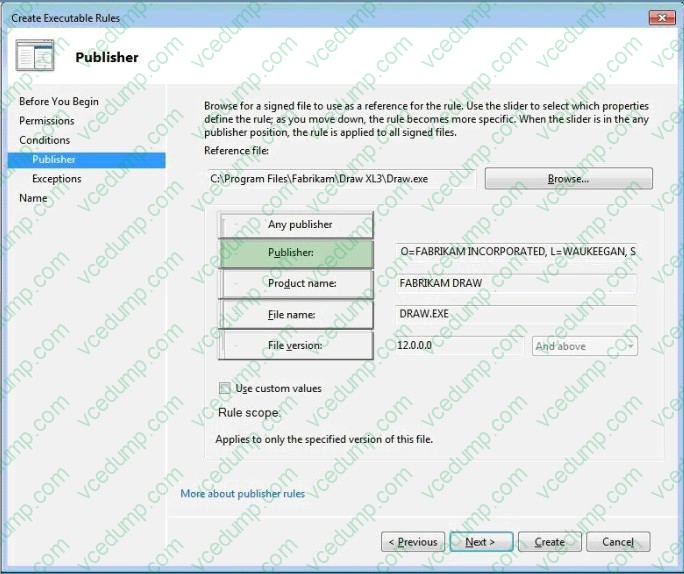
A company's security policy prohibits employees from running any software from Fabrikam on computers running Windows 7 Enterprise. The applications are digitally signed by the publisher.
You need to configure a single deny rule in AppLocker by applying a condition to restrict all of the applications from running, without affecting other programs.
You have selected one of Fabrikam's applications as a reference.
Which property should you choose? (To answer, select the appropriate setting or settings in the work area.)
Hot Area:
-
Question 286:
You have a computer that runs Windows 7. You attempt to add files to %programfiles%\app1 and receive a prompt to elevate your privileges. You need to ensure that you can add files to % rogramfiles%\app1 without receiving a prompt for elevated privileges. The solution must prevent harmful applications from making unwanted changed to the system. What should you do?
A. Enable the built-in administrator account.
B. Modify the User Account Control (UAC) settings.
C. Add your user account to the local Power Users group.
D. Modify the permissions of the %programfiles%\app1 folder. -
Question 287:
You have a computer that runs Windows 7 and Windows Internet Explorer 8.
You open Internet Explorer and access a Web site. The Web site displays a page that has misaligned text and graphic image. You verify that the Web page displays correctly in previous versions of Internet Explorer. You need to view the Web page correctly.
What should you do?
A. Modify the text size.
B. Enable Caret Browsing.
C. Enable Compatibility View.
D. Disable the SmartScreen Filter. -
Question 288:
You start a computer by using Windows Preinstallation Environment (Windows PE). You need to dynamically load a network adapter device driver in Windows PE. What should you do?
A. Run Peimg.exe and specify the device driver path.
B. Run Drvload.exe and specify the device driver path.
C. Run Winpeshl.exe and specify a custom Winpeshl.ini file.
D. Run Wpeutil.exe and specify the InitializeNetwork command. -
Question 289:
You have a computer that runs Windows 7. IPv6 is disabled on the computer.
The computer has the following IPv4 settings:
IP address: 10.1.1.193
Subnet mask: 25S.255.0.0
Default gateway: 10.1.1.194
Preferred DNS server: 10.1.1.195
You need to ensure that the computer can only communicate with computers on the local subnet.
What should you do?
A. Delete the default gateway address.
B. Delete the preferred DNS server IP address
C. Configure the subnet mask to use 255.255.255.0
D. Configure the subnet mask to use 255.255.255.192 -
Question 290:
You install the Windows Automated Installation Kit (WAIK) for Windows 7 on a computer that runs Windows 7.
You want to deploy a Windows image (WIM) file to other computers in the domain. You need to capture the operating system, computer configuration, and applications installed on the computer to a WIM file.
What should you do before you capture the image?
A. Run Oscdimg.exe.
B. Run Sysprep.exe.
C. Open a command prompt that has elevated privileges.
D. Run Defrag.exe.
Related Exams:
-
62-193
Technology Literacy for Educators -
70-243
Administering and Deploying System Center 2012 Configuration Manager -
70-355
Universal Windows Platform – App Data, Services, and Coding Patterns -
77-420
Excel 2013 -
77-427
Excel 2013 Expert Part One -
77-725
Word 2016 Core Document Creation, Collaboration and Communication -
77-726
Word 2016 Expert Creating Documents for Effective Communication -
77-727
Excel 2016 Core Data Analysis, Manipulation, and Presentation -
77-728
Excel 2016 Expert: Interpreting Data for Insights -
77-731
Outlook 2016 Core Communication, Collaboration and Email Skills
Tips on How to Prepare for the Exams
Nowadays, the certification exams become more and more important and required by more and more enterprises when applying for a job. But how to prepare for the exam effectively? How to prepare for the exam in a short time with less efforts? How to get a ideal result and how to find the most reliable resources? Here on Vcedump.com, you will find all the answers. Vcedump.com provide not only Microsoft exam questions, answers and explanations but also complete assistance on your exam preparation and certification application. If you are confused on your 70-680 exam preparations and Microsoft certification application, do not hesitate to visit our Vcedump.com to find your solutions here.