70-680 Exam Details
-
Exam Code
:70-680 -
Exam Name
:Windows 7 Configuring -
Certification
:Microsoft Certifications -
Vendor
:Microsoft -
Total Questions
:565 Q&As -
Last Updated
:Dec 13, 2021
Microsoft 70-680 Online Questions & Answers
-
Question 301:
You have 100 computers that run Windows XP. Each computer has the following features:

Contains a single hard disk drive.
Contains a single partition.
Supports USB devices during startup.
You are planning a clean installation of Windows 7 Ultimate.
You need to ensure that the installation of Windows 7 Ultimate will support BitLocker Drive Encryption on the system partition.
What should you do?
A. Verify that the computers have a Trusted Platform Module (TPM) version 1.2 security devices.
B. Perform a clean installation of Windows 7 Ultimate by using the existing partition. Use bcdedit.exe to create a new empty boot configuration data store.
C. Perform a clean installation of Windows 7 Ultimate by using the existing partition. Verify the status of the partition by using manage bde.exe.
D. Start the computer from Windows 7 media. Delete the existing partition and install Windows 7 Ultimate on the unpartitioned space. -
Question 302:
You plan to deploy Windows 7 to 100 computers on your corporate network. You install Windows 7 on a computer.
You and need to prepare the computer to be imaged.
What should you do before you create the image of the computer?
A. At the command prompt, run the Dism command.
B. At the command prompt, run the Sysprep command.
C. Start the computer from the Windows Preinstallation Environment (Windows PE) and then run the Imagex command.
D. Start the computer from the Windows Preinstallation Environment (Windows PE) and then run the Wpeutil command. -
Question 303:
Which of the following steps will keep a Microsoft Word shortcut icon on the Taskbar after the next reboot?
A. Copy and paste a Microsoft Word icon to the Taskbar.
B. Right click on the Microsoft Word icon and choose, "Staple to Superbar".
C. Right click on the Microsoft Word icon and choose, "Pin this programm to taskbar".
D. Open Microsoft Word. While the Icon is on the Taskbar, right click the icon and choose, "Pin this program to taskbar". -
Question 304:
You manage several computers that run Windows 7. A user wants to roll back a driver.
The user opens the device properties in Device Manager and discovers that the Roll Back Driver option is unavailable.
You connect to the computer by using Windows Remote Assistance.
You need to roll back the driver to its previous version.
What should you do first?
A. Add the user to the Power Users group.
B. Right-click Device Manager and select Run as administrator.
C. From System Properties, modify Device Installation Settings.
D. From the Local Group Policy, modify Device Installation Restrictions. -
Question 305:
A user on your company network creates a new file and works on it during the day. He saves the file but decides he no longer needs it and deletes it just before the office closes. Overnight, a file and folder backup takes place. The next morning, the user decides he needs the file after all. He calls you for help.
What action can you take?
A. Restore the file from the previous night's backup.
B. Restore the Recycle Bin from the previous night's backup. The file will be in the restored Recycle Bin.
C. Restore the file from an older backup.
D. Ask the user to open his Recycle Bin. -
Question 306:
Your network consists of an Active Directory domain named contoso.com. You have a computer named computer1.contoso.com.
Your network is configured to use only IPv6.
You need to request that a DNS record be created to enable users to connect to your computer by using the name dev.contoso.com.
Which type of record should you request?
A. A
B. AAAA
C. HINFO
D. NAPTR -
Question 307:
You have a Windows XP computer.
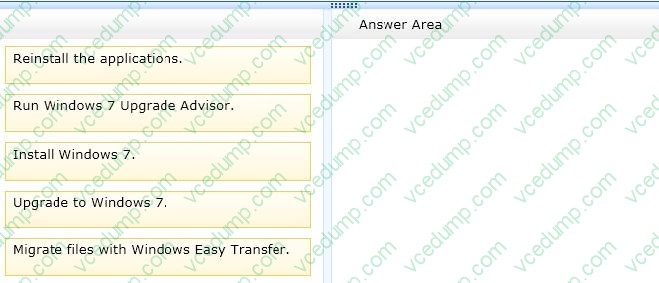
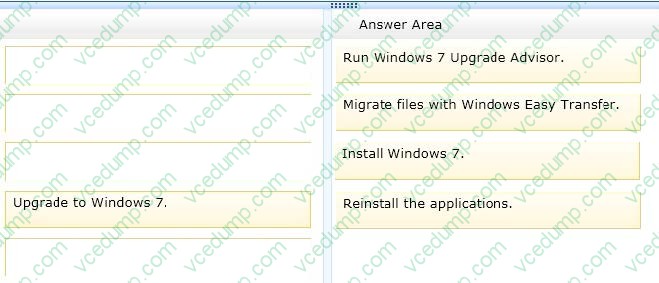
You need to migrate to Windows 7 and determine that all third-party applications installed on the computer continue to operate with the new operating system.
Which four actions should you perform in sequence? (To answer, move the appropriate four actions from the list of actions to the answer area and arrange them in the correct order. )
Select and Place:
-
Question 308:
You are creating an unattend answer file for automatic Windows 7 installation. What can you use to do this? Choose two.
A. The Windows SIM tool in Windows AIK
B. Microsoft Notepad
C. The Deployment Workbench MDT tool
D. Sysprep.exe -
Question 309:
A virtual hard disk (VHD) contains a Windows 7 Enterprise installation.
You need to mount the VHD on a client computer.
What should you do?
A. Run the Dism command with the /Mount-Wimoption.
B. Use Sysprep with an answer file and set the UpdatelnstalledDrivers option in the answer file to Yes.
C. Run the Dism command with the /Add-Package option.
D. Run the PEImg/Prepcommand.
E. Add a boot image in WDS.
F. Run the Dism command with the /Add-Driver option.
G. Use Sysprep with an answer file and set the PersistAllDevicelnstalls option in the answer file to True.
H. Use Sysprep with an answer file and set the UpdatelnstalledDrivers option in the answer file to No.
I. Run the BCDEdit command.
J. Use Sysprep with an answer file and set the PersistAllDevicelnstalls option in the answer file to False. -
Question 310:
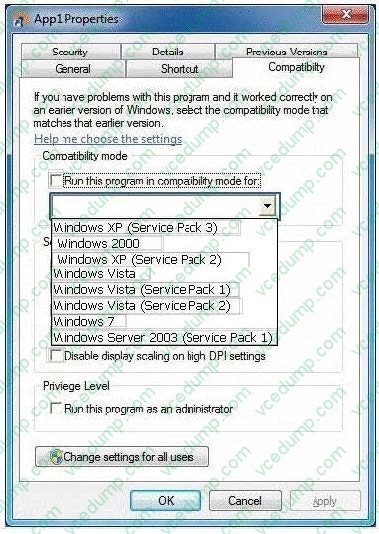
You use a computer that has Windows 7 and a legacy application named App1 installed.
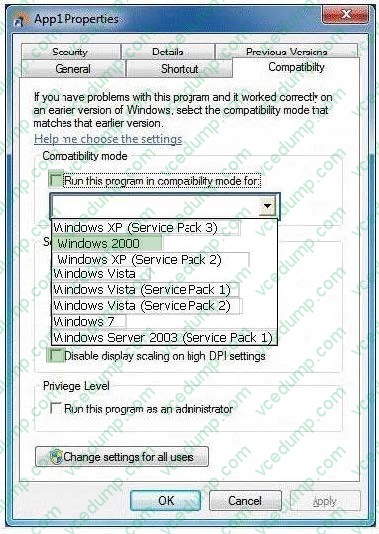
App1 is designed for Windows 2000 and implements large-scale font sizes.
You need to configure application compatibility settings for App1 according to the following requirements:
Compatible with Windows 2000
Large-scale fonts must not be resized
What should you do? (To answer, select the appropriate check boxes in the Application "App1" Compatibility Properties tab in the answer area.)
Hot Area:
Related Exams:
-
62-193
Technology Literacy for Educators -
70-243
Administering and Deploying System Center 2012 Configuration Manager -
70-355
Universal Windows Platform – App Data, Services, and Coding Patterns -
77-420
Excel 2013 -
77-427
Excel 2013 Expert Part One -
77-725
Word 2016 Core Document Creation, Collaboration and Communication -
77-726
Word 2016 Expert Creating Documents for Effective Communication -
77-727
Excel 2016 Core Data Analysis, Manipulation, and Presentation -
77-728
Excel 2016 Expert: Interpreting Data for Insights -
77-731
Outlook 2016 Core Communication, Collaboration and Email Skills
Tips on How to Prepare for the Exams
Nowadays, the certification exams become more and more important and required by more and more enterprises when applying for a job. But how to prepare for the exam effectively? How to prepare for the exam in a short time with less efforts? How to get a ideal result and how to find the most reliable resources? Here on Vcedump.com, you will find all the answers. Vcedump.com provide not only Microsoft exam questions, answers and explanations but also complete assistance on your exam preparation and certification application. If you are confused on your 70-680 exam preparations and Microsoft certification application, do not hesitate to visit our Vcedump.com to find your solutions here.