70-680 Exam Details
-
Exam Code
:70-680 -
Exam Name
:Windows 7 Configuring -
Certification
:Microsoft Certifications -
Vendor
:Microsoft -
Total Questions
:565 Q&As -
Last Updated
:Dec 13, 2021
Microsoft 70-680 Online Questions & Answers
-
Question 311:
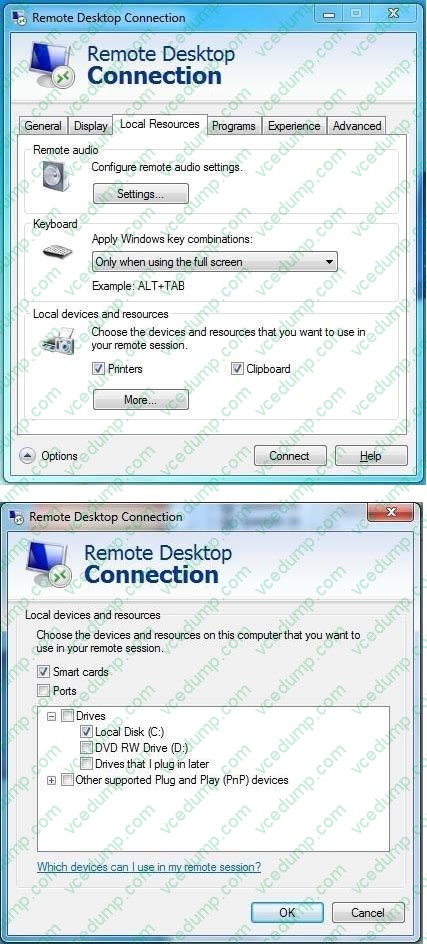
You have two computers named Workstation! and Workstation2 that have Windows 7 SP1 installed.
You connect to Workstation2 from Workstation1 by using Remote Desktop. You need to be able to copy files between the computers during the Remote Desktop session.
What should you do?
A. On Workstation2, open Remote Desktop Connection and configure the Local devices and resources settings.
B. On Workstation1, open Remote Desktop Connection and configure the Local devices and resources settings.
C. On Workstation2, type MSTSC /v:Computer1 /f /console.
D. On Workstation1, open Remote Desktop Connection and configure the Connect from Anywhere settings. -
Question 312:
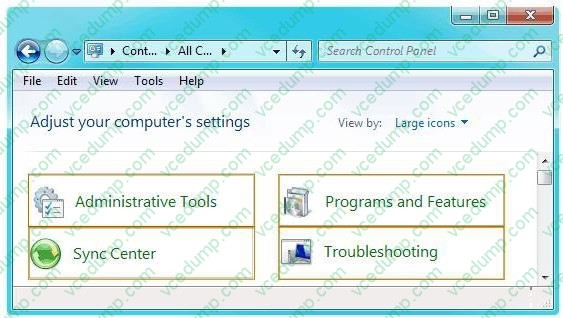
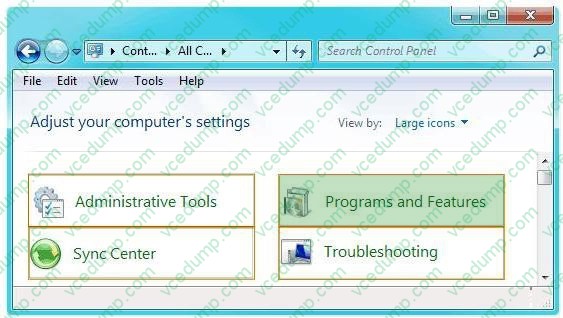
You need to uninstall a Windows update from a computer that runs Windows 7.
Which Control Panel item should you use? (To answer, select the appropriate item in the Control Panel in the answer area.)
Hot Area:
-
Question 313:
You work as the desktop support technician. The network consists of a single Active Directory domain named CK.com.
You need to perform a clean installation of Microsoft Windows 7 Professional on the workstations in the Research department.
All workstations in the Research department have identical hardware as listed below:

1.2 GHz Dual-Core processor.
1024 MB of RAM.
20 GB hard drive.
DirectX 10 video display card.
Integrated sound card.
10/100 integrated network adapter.
You need to ensure that the workstations able to support Windows 7 and are able to support Windows XP mode.
What should you do? (Each correct answer presents part of the solution. Choose two.)
A. You should upgrade the processor.
B. You should upgrade the RAM.
C. You should upgrade the video card.
D. You should upgrade the hard drive.
E. You should upgrade the network adapter. -
Question 314:
You have a computer that runs Windows 7.
You need to configure the computer to meet the following requirements:
Generate a new security ID (SID) when the computer starts.
Ensure that the Welcome screen appears when the computer starts. What should you do?
A. Run Sysprep.exe /oobe /generalize.
B. Run Sysprep.exe /audit /generalize.
C. Run Msconfig.exe and select Selective startup.
D. Run Msconfig.exe and select Diagnostic startup. -
Question 315:
Your company network includes computers that have Windows 7 Enterprise installed. The computers use IP addresses of DNS and WINS servers assigned statically.
The DNS and WINS servers on the company network have been taken offline for upgrades. Users report that they can no longer access the Internet.
You need to provide access to the Internet for the computers during the maintenance.
What should you do?
A. Change the IP address of the primary WINS to a public name server.
B. Change the IP address of the default gateway.
C. Change the IP address of the primary DNS to a public DNS.
D. Change the client IP address and subnet mask. -
Question 316:
You work in an international company which is named Wiikigo. Before entering this company, you have two years of experience in the IT field, as well as experience implementing and administering any Windows client operating system in a networked environment. You are professional in installing, upgrading and migrating to Windows 7, deploying Windows 7, and configuring Hardware and Applications and son on. You are in charge of a computer that runs Windows Vista. You have Windows 7 installed on a new partition on the computer. You have to make sure that the computer always starts Windows Vista by default. So what action should you perform to make sure of this?
A. In order to make sure that the computer always starts Windows Vista by default, a boot.ini file should be created in the root of the Windows 7 partition.
B. In order to make sure that the computer always starts Windows Vista by default, a boot.ini file should be created in the root of the Windows Vista partition.
C. In order to make sure that the computer always starts Windows Vista by default, Bcdedit.exe should be run and the /default parameter should be specified.
D. In order to make sure that the computer always starts Windows Vista by default, Bcdedit.exe should be run and the /bootems parameter should be specified. -
Question 317:
Your company network includes desktop computers that have Windows XP Professional SP1 64- bit installed.
The company has purchased new portable computers that have Windows 7 Professional 32-bit installed.
You need to be able to migrate user profiles from the desktop computers to the portable computers.
What should you do?
A. Run scanstate /nocompress on the desktop computers.
B. Stop the User Profile Service on the desktop computers.
C. Add each desktop user to the local Administrators on the desktop computers.
D. Replace all versions of Windows 7 with 64-bit. -
Question 318:
You have a reference computer that runs Windows 7.
You plan to deploy an image of the computer.
You create an answer file named answer.xml.
You need to ensure that the installation applies the answer file after you deploy the image.
Which command should you run before you capture the image?
A. Imagex.exe /append answer.xml /check
B. Imagex.exe /mount answer.xml /verify
C. Sysprep.exe /reboot /audit /unattend:answer.xml
D. Sysprep.exe /generalize /oobe /unattend:answer.xml -
Question 319:
A stand-alone computer that runs Windows 7 has only one partition. Two users named User1 and User2 share this computer.
User1 encrypts a file by using Encrypting File System (EFS). User1 attempts to grant User2 access to the file as shown in the exhibit.
You need to ensure that User1 can grant User2 access to the file.
What should you do?
Exhibit: A. Instruct User2 to log on to the computer and take ownership of the file.
B. Instruct User1 to move the file to a shared folder on the computer.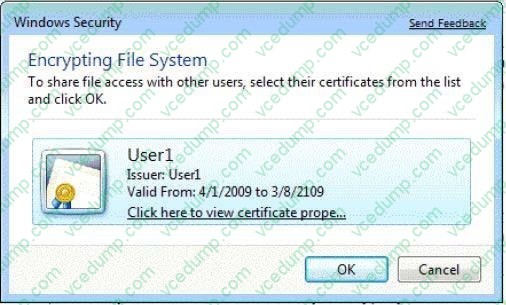
C. Instruct User2 to export the EFS certificate to a certificate file.
D. Instruct User1 to export the EFS certificate to a certificate file. -
Question 320:
You have a computer that runs windows 7.
The computer is configured as shown in the following table.

You plan to install a new application that requires 40 GB of space. The application will be installed to C:\app1.
You need to provide 40 GB of free space for the application.
What should you do?
A. Create a shortcut.
B. Create hard link.
C. Create a mount point.
D. Change the quota settings.
Related Exams:
-
62-193
Technology Literacy for Educators -
70-243
Administering and Deploying System Center 2012 Configuration Manager -
70-355
Universal Windows Platform – App Data, Services, and Coding Patterns -
77-420
Excel 2013 -
77-427
Excel 2013 Expert Part One -
77-725
Word 2016 Core Document Creation, Collaboration and Communication -
77-726
Word 2016 Expert Creating Documents for Effective Communication -
77-727
Excel 2016 Core Data Analysis, Manipulation, and Presentation -
77-728
Excel 2016 Expert: Interpreting Data for Insights -
77-731
Outlook 2016 Core Communication, Collaboration and Email Skills
Tips on How to Prepare for the Exams
Nowadays, the certification exams become more and more important and required by more and more enterprises when applying for a job. But how to prepare for the exam effectively? How to prepare for the exam in a short time with less efforts? How to get a ideal result and how to find the most reliable resources? Here on Vcedump.com, you will find all the answers. Vcedump.com provide not only Microsoft exam questions, answers and explanations but also complete assistance on your exam preparation and certification application. If you are confused on your 70-680 exam preparations and Microsoft certification application, do not hesitate to visit our Vcedump.com to find your solutions here.