70-680 Exam Details
-
Exam Code
:70-680 -
Exam Name
:Windows 7 Configuring -
Certification
:Microsoft Certifications -
Vendor
:Microsoft -
Total Questions
:565 Q&As -
Last Updated
:Dec 13, 2021
Microsoft 70-680 Online Questions & Answers
-
Question 211:
You administer client computers that have Windows 7 Enterprise installed for the marketing department of your company. The client computers are members of a single Active Directory domain. All regular client computer user accounts are
members of the domain security group named Marketing.
You install a new printer on one of the client computers. You remove the Everyone group from the access control list (ACL) for the printer, and then share the printer.
You need to achieve the following goals:

Prevent members of the Marketing group from modifying the print jobs of other users.
Ensure that members of the Marketing group can modify the print jobs that they submit. What should you do?
A. Modify local Group Policy on the desktops and disable the Point and Print Restrictions user right to the Marketing group.
B. From the printer's properties, assign the Print permission to the Marketing group.
C. From the printer's properties, assign the Manage Documents permission to the Marketing group.
D. Modify local Group Policy on the desktops and assign the Take ownership of files or other objects user right to the Marketing group. -
Question 212:
To which of the following versions and editions of Windows 7 can you directly upgrade a computer running Windows Vista Enterprise (x86)?
A. Windows 7 Home Professional (x86).
B. Windows 7 Ultimate (x86)
C. Windows 7 Ultimate (x64)
D. Windows 7 Enterprise (x64) -
Question 213:
You use a computer that has Windows 7 Enterprise installed.
You install Windows Vista Enterprise to a different partition. You discover that the computer boots to Windows Vista by default.
You need to ensure that the computer boots to Windows 7 Enterprise by default.
What should you do?
A. On the General tab in the msconfig tool, select the Selective startup option button, and then select the Use original boot configuration check box.
B. On the Boot tab in the msconfig tool, highlight the Windows 7 boot entry and select the Make all boot settings permanent check box. Then, click Apply.
C. From an elevated command prompt in Windows Vista, run the bcdedit /default (default) comma
D. From an elevated command prompt in Windows 7 run the bcdedit /default (current) command -
Question 214:
You install Windows 7 on a new computer.
Every time you start the computer, you receive a "STOP" error message.
You suspect that the RAM on the computer has a problem.
You need verify the RAM on the computer.
What should you do first?
A. Start the computer, press F8, and select Repair Your Computer.
B. Start the computer, press F8, and then select Debugging Mode.
C. Start the computer by using Windows PE and then run the bootsect.exe /all command
D. Start the computer by using Windows PE and then run the bcdedit /bootsequence command -
Question 215:
You use a desktop computer that has Windows 7 Ultimate SP1. The relevant portions of the computer configuration are shown in the following exhibits: The Disk Management console (Click the Exhibit button.)
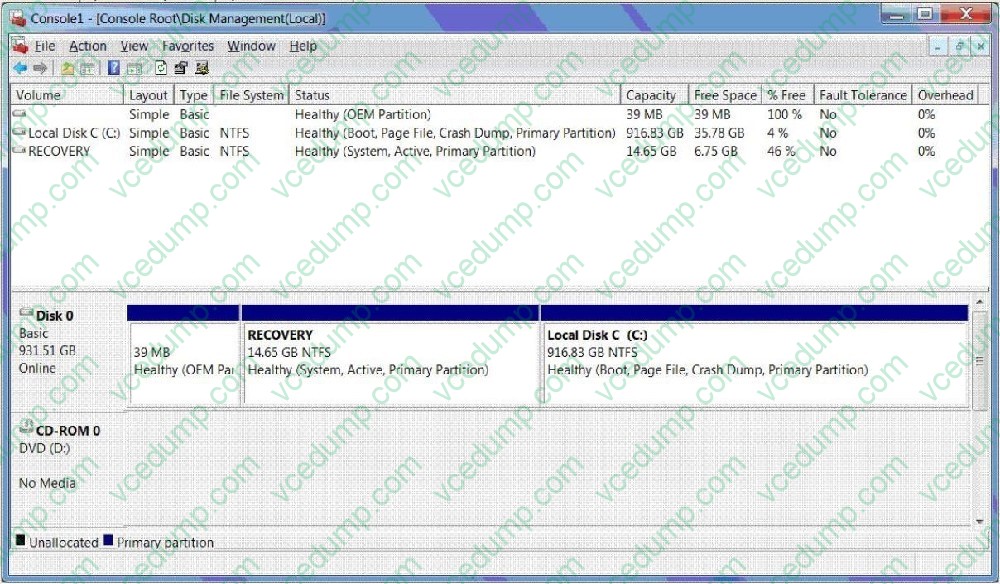
?The System Properties window (Click the Exhibit button.)
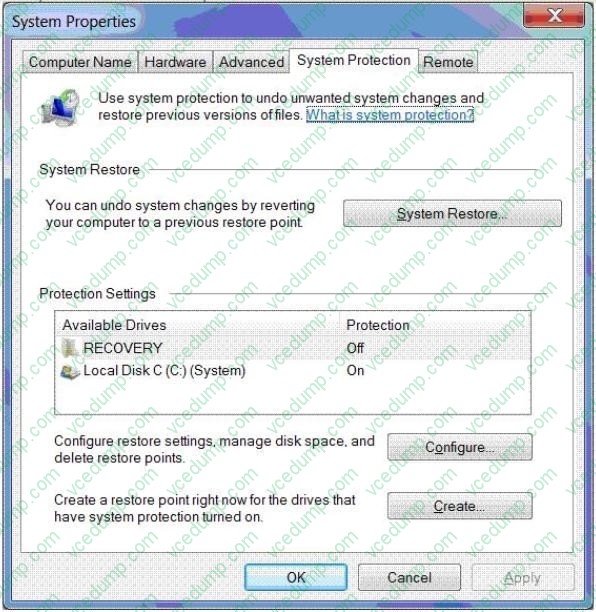
?The System protection for Local Disk C window (Click the Exhibit button.)
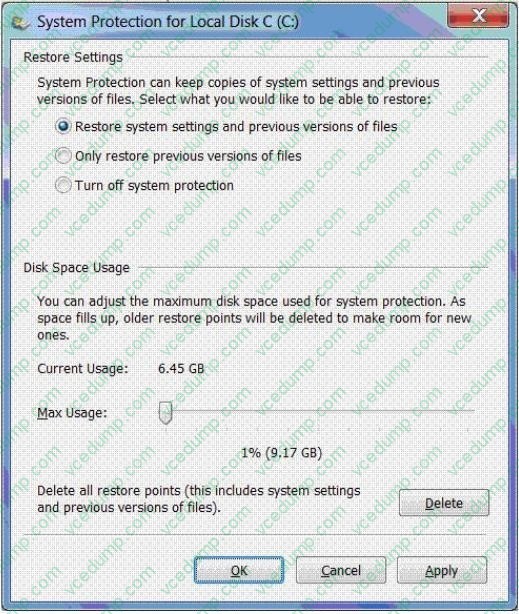
You share your Documents library over a network.
You discover that one of the files in the library was replaced with a previous version and then renamed.
You need to restore the most recent version of the original file.
What should you do?
A. Delete restore points.
B. Create a restore point.
C. Perform a system restore.
D. Search for the file in the Recycle Bin.
E. Increase disk space used for system protection.
F. Copy the file from a previous version of a folder.
G. Set restore settings to only restore previous versions of files.
H. Run the cipher /x command from the elevated command prompt,
I. Run the vssadmin list volumes command from the elevated command prompt.
J. Run the vssadmin list shadows command from the elevated command prompt, -
Question 216:
You need to create a VPN connection. What should you do?
A. From Windows Explorer, right-click Computer and then click Map network drive.
B. From Windows Explorer, right-click Computer and then click Add a network location.
C. From Network and Sharing Center, click Set up a new connection or network and then click Set up a new network.
D. From Network and Sharing Center, click Set up a new connection or network and then click Connect to a workplace. -
Question 217:
You have a computer that runs Windows 7.
You need to modify the file extensions that are associated to Internet Explorer.
What should you do?
A. From Internet Explorer, click Tools and then click Manage Add-ons.
B. From Control Panel, open Default Programs and then click Set Associations.
C. From the local Group Policy, expand Computer Configuration and then click Software Settings.
D. From Window Explorer, right-click %programfiles%\Internet Explorer\iexplore.exe and then click Properties. -
Question 218:
You have a computer that runs Windows 7. You need to ensure that all users are required to enter a username and password when uninstalling applications from the computer. What should you do from Local Group Policy Editor?
A. Configure a software restriction policy.
B. Modify the Add or Remove Programs settings.
C. Configure an AppLocker Windows Installer rule.
D. Modify the User Account Control: Behavior of the elevation prompt for administrators in Admin Approval Mode setting. -
Question 219:
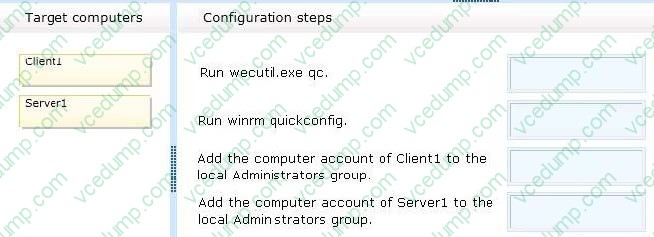
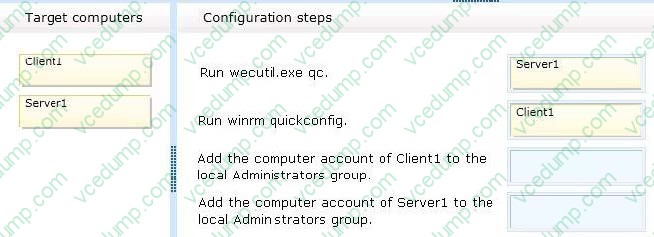
Your company network includes a Windows Server 2008 R2 server named Server1. You use a client computer named Client1 that has Windows 7 Enterprise installed. Both Computers are members of an Active Directory domain.
You want to automatically forward events from Client1 to Server1.
You need to configure the required source-initiated subscription.
What should you do? (To answer, drop the appropriate configuration step or configurations steps to the correct target or target computers in the answer area. An answer choice can be used once,
more than once, or not at all.)
Select and Place:
-
Question 220:
You administer desktop computers that have Windows XP professional SP3 64-bit installed. The computers have the Volume Shadow Copy Service (VSS) enabled on all drives.
You want to migrate existing user profiles to Windows 7 by using the User State Migration Tool (USMT) 4.0.
You also plan to migrate files from the user profiles even if the files are locked by applications.
You need to capture user profiles and all locked files.
What should you do on the Windows XP computers?
A. Stop the VSS before running ScanState.exe
B. Stop the VSS before running LoadState.exe
C. Run ScanState /vsc/
D. Run ScanState /hardlink
Related Exams:
-
62-193
Technology Literacy for Educators -
70-243
Administering and Deploying System Center 2012 Configuration Manager -
70-355
Universal Windows Platform – App Data, Services, and Coding Patterns -
77-420
Excel 2013 -
77-427
Excel 2013 Expert Part One -
77-725
Word 2016 Core Document Creation, Collaboration and Communication -
77-726
Word 2016 Expert Creating Documents for Effective Communication -
77-727
Excel 2016 Core Data Analysis, Manipulation, and Presentation -
77-728
Excel 2016 Expert: Interpreting Data for Insights -
77-731
Outlook 2016 Core Communication, Collaboration and Email Skills
Tips on How to Prepare for the Exams
Nowadays, the certification exams become more and more important and required by more and more enterprises when applying for a job. But how to prepare for the exam effectively? How to prepare for the exam in a short time with less efforts? How to get a ideal result and how to find the most reliable resources? Here on Vcedump.com, you will find all the answers. Vcedump.com provide not only Microsoft exam questions, answers and explanations but also complete assistance on your exam preparation and certification application. If you are confused on your 70-680 exam preparations and Microsoft certification application, do not hesitate to visit our Vcedump.com to find your solutions here.