70-680 Exam Details
-
Exam Code
:70-680 -
Exam Name
:Windows 7 Configuring -
Certification
:Microsoft Certifications -
Vendor
:Microsoft -
Total Questions
:565 Q&As -
Last Updated
:Dec 13, 2021
Microsoft 70-680 Online Questions & Answers
-
Question 201:
You use a computer that has Windows 7 SP1 installed. The computer has a shared folder named C:\Software.
User1 is a local user account on the computer. The account is a member of several groups that have access to the C:\Software folder.
You need to verify whether User1 can save files to C:\Software.
What should you do?
A. Run the Net View command.
B. view the Share permissions on C:\Software.
C. in the Advanced Security Settings for the Documents folder, select the Effective Permissions tab.
D. Run the Wfs C:\Software command. -
Question 202:
You use a desktop computer that has Windows 7 Ultimate SP1. The relevant portions of the computer configuration are shown in the following exhibits: The Disk Management console (Click the Exhibit button.)
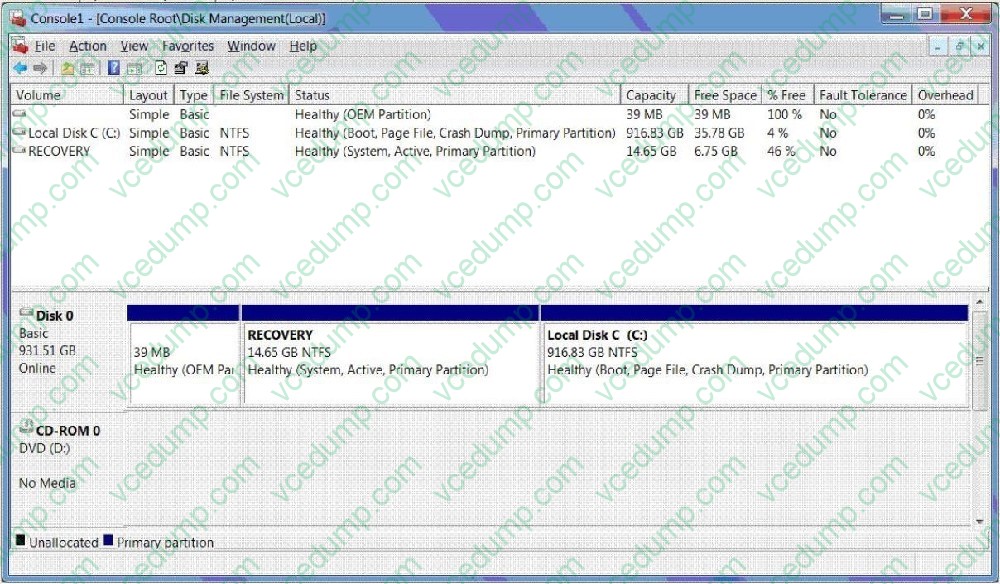
?The System Properties window (Click the Exhibit button.)
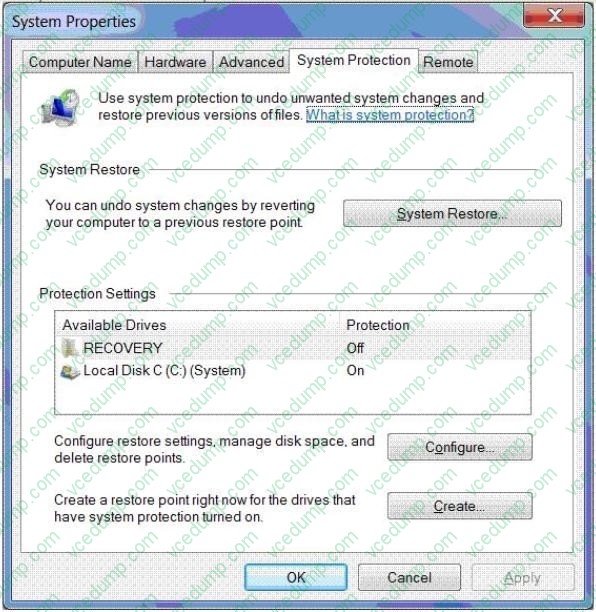
?The System protection for Local Disk C window (Click the Exhibit button.)
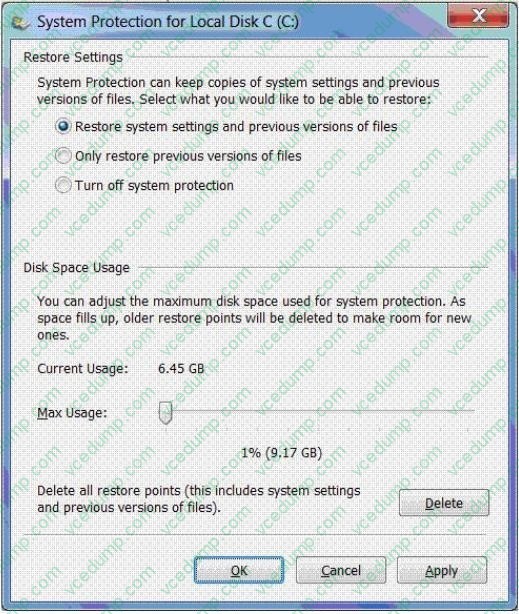
You encrypt several files on an external USB hard disk drive by using the Encrypting File System (EFS).
You need to ensure that you can access the files from another computer.
What should you do?
A. Delete restore points.
B. Create a restore point.
C. Perform a system restore.
D. Search for the file in the Recycle Bin.
E. Increase disk space used for system protection.
F. Copy the file from a previous version of a folder.
G. Set restore settings to Only restore previous versions of files.
H. Run the cipher /x command from the elevated command prompt,
I. Run the vssadmin list volumes command from the elevated command prompt.
J. Run the vssadmin list shadows command from the elevated command prompt, -
Question 203:
You use a computer that has Windows 7 and Internet Explorer 8 installed. You need to block all web content providers on the Internet from collecting and sharing your information with other websites. What should you do?
A. From Manage Add-ons, disable all ActiveX and Java extensions.
B. From Internet Options, configure Privacy Settings for third-party cookies.
C. Enable InPrivate Filtering and select Automatically Block.
D. From Internet Options, add the web content provider to Restricted Sites.
E. Start an InPrivate Browsing session. -
Question 204:
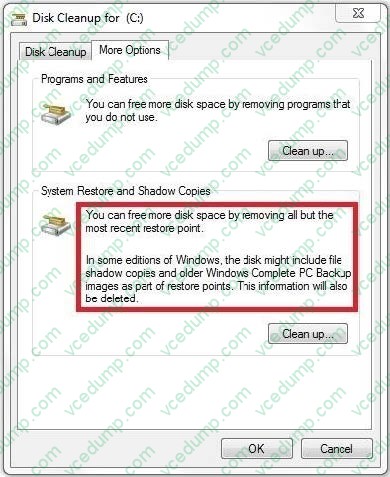
You have a computer that runs Windows 7. The computer has System Protection enabled.
You need to retain only the last System Protection snapshot of the computer. All other snapshots must be deleted.
What should you do?
A. Run Disk Cleanup for Programs and features.
B. Run Disk Cleanup for System Restore and Shadow Copies.
C. From the System Protection Restore settings, select Turn off System Restore.
D. From the System Protection Restore settings, select Only restore previous versions of files. -
Question 205:
You use a desktop computer that has Windows 7 SP1 Ultimate installed.
You update the driver for the computer's sound card and the computer becomes unresponsive.
You need to be able to roll back the sound card driver.
What should you do?
A. Boot from the computer from a Windows Recovery Environment (Windows RE) disk, and then restore the system image.
B. Start the computer, press F8, and then select Repair Your Computer.
C. Start the computer, press F8, and then select Debugging Mode.
D. Restart the computer in safe mode. -
Question 206:
You have a computer that runs Windows 7. The computer is a member of a workgroup. You use Encrypting File System (EFS) to protect your local files. You need to ensure that you can decrypt EFS files on the computer if you forget your password.
What should you do?
A. From Authorization Manager, modify the Authorization Manager options.
B. Run the cipher.exe /adduser /user:administrator command.
C. From User Accounts, select Manage your file encryption certificates.
D. From Credential Manager, select Back up vault. -
Question 207:
You have a computer that runs Windows 7.
Your network has a SSTP VPN server that uses a self-signed certificate.
When you connect to the VPN server, you receive the following error message: "Your computer does not trust the issuing certification authority (CA) of the SSTP VPN servers certificate".
You need to prevent the error message from appearing when you connect to the VPN server.
What should you do?
A. From the properties of the VPN connection, modify the dialing options.
B. From the properties of the VPN connection, modify the data encryption settings.
C. From Certificate Manager, import the servers certificate into the Personal store.
D. From Certificate Manager, import the server's certificate into the Trusted Root Certification Authorities store. -
Question 208:
You have a computer that runs windows 7.
The network contains a monitoring server named server1 Computer runs a monitoring service named service1.
Service 1 uses remote procedure. You need to ensure that service1 can receive requests from server1.
What should you do?
A. From windows Firewall with Advanced Security, create a predefined rule.
B. From windows Firewall with Advanced Security, create custom rule.
C. From the Network and Sharing Center, modify the network location settings.
D. From the Network and Sharing Center, modify the advanced sharing settings. -
Question 209:
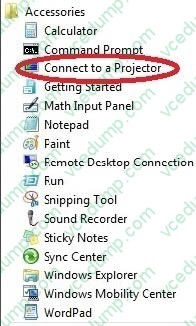
You use a portable computer that has Windows 7 Enterprise SP1 installed. A conference room at your company has a network projector installed on a server within the company network.
You need to connect to the projector from your computer.
What should you do?
A. From Screen Resolution, click Connect to a projector.
B. From Accessories, click Connect to a Network Projector.
C. From Network and Sharing Center, create a temporary network and run Displayswitch.exe.
D. From Device Manager, click Add legacy hardware. -
Question 210:
Your network contains computers that run either Windows Vista (x86) or Windows 7 (x86). All computers are joined to a domain. You install a computer named Computer1 that runs Windows 7 (64-bit). You share a printer named Printer1 on Computer1.
You need to ensure that any user can automatically download and install the drivers for Printer1.
What should you do from Printer Properties?
A. Install a new driver.
B. Enable bidirectional support.
C. Modify the Additional Drivers settings.
D. Assign the Manage this printer permission to the Domain Users group.
Related Exams:
-
62-193
Technology Literacy for Educators -
70-243
Administering and Deploying System Center 2012 Configuration Manager -
70-355
Universal Windows Platform – App Data, Services, and Coding Patterns -
77-420
Excel 2013 -
77-427
Excel 2013 Expert Part One -
77-725
Word 2016 Core Document Creation, Collaboration and Communication -
77-726
Word 2016 Expert Creating Documents for Effective Communication -
77-727
Excel 2016 Core Data Analysis, Manipulation, and Presentation -
77-728
Excel 2016 Expert: Interpreting Data for Insights -
77-731
Outlook 2016 Core Communication, Collaboration and Email Skills
Tips on How to Prepare for the Exams
Nowadays, the certification exams become more and more important and required by more and more enterprises when applying for a job. But how to prepare for the exam effectively? How to prepare for the exam in a short time with less efforts? How to get a ideal result and how to find the most reliable resources? Here on Vcedump.com, you will find all the answers. Vcedump.com provide not only Microsoft exam questions, answers and explanations but also complete assistance on your exam preparation and certification application. If you are confused on your 70-680 exam preparations and Microsoft certification application, do not hesitate to visit our Vcedump.com to find your solutions here.