70-680 Exam Details
-
Exam Code
:70-680 -
Exam Name
:Windows 7 Configuring -
Certification
:Microsoft Certifications -
Vendor
:Microsoft -
Total Questions
:565 Q&As -
Last Updated
:Dec 13, 2021
Microsoft 70-680 Online Questions & Answers
-
Question 231:
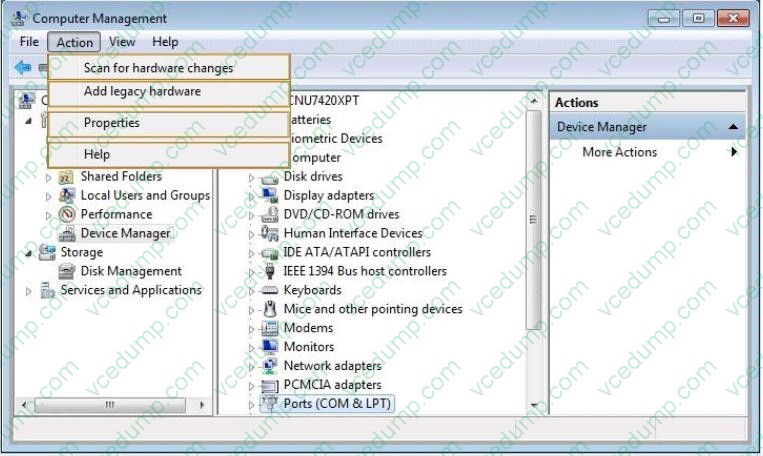
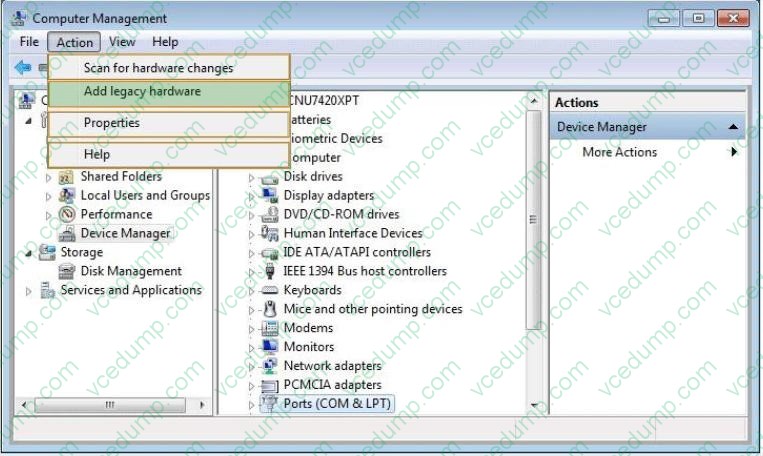
A device driver for a laser printer connected through the LPT port in a computer running Windows 7 does not function correctly. You uninstall the driver without issue and this process does not prompt a restart.
The device does not appear in Device Manager.
You need to ensure that Device Manager can detect the device, and then reinstall the device driver.
Which Action option should you choose? (To answer, select the appropriate setting in the work area.)
Hot Area:
-
Question 232:
You have three computers that run Windows 7.
You use Windows PowerShell to perform remote administration tasks on all three computers.
You need to remotely administer all three computers by using PowerShell.
Which PowerShell cmdlet should you use?
A. Enable-PSRemoting
B. Enable-PSSessionConfiguration
C. New-PSDrive
D. New-PSSession -
Question 233:
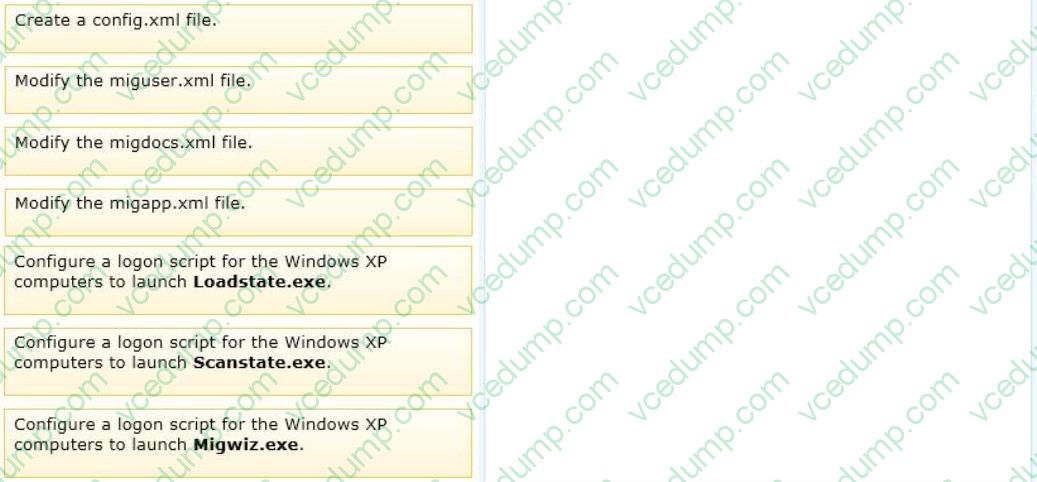
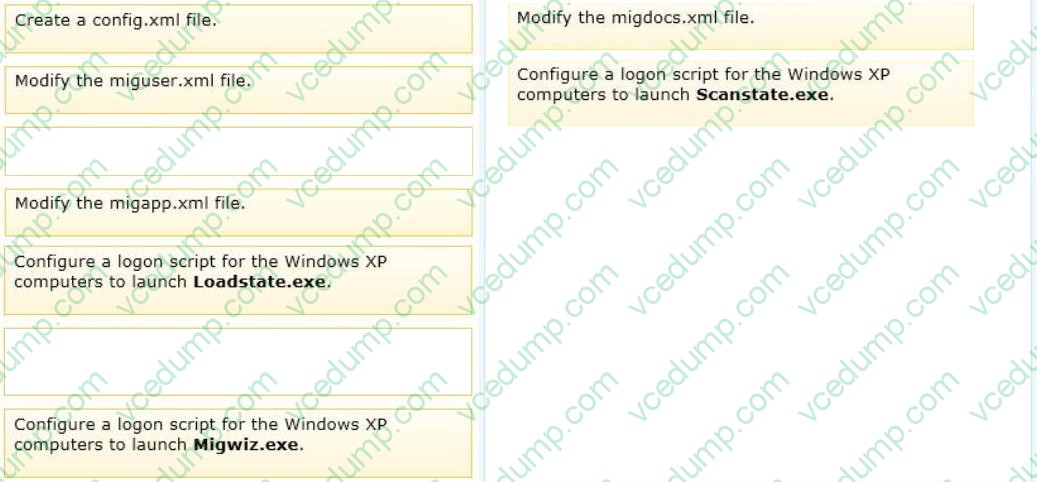
Twenty client computers run Windows XP. The computers are joined to a domain. You plan to perform a clean installation of Windows 7 on all the computers.
You need to transfer all users' documents and settings. You must exclude music and video files.
You must achieve this goal by using the minimum amount of administrative effort.
Which two actions should you perform in sequence? (To answer, move the appropriate actions from the list of actions to the answer area and arrange them in the correct order.)
Select and Place:
-
Question 234:
You are preparing a custom Windows 7 image for deployment.
You need to install a third-party network interface card (NIC) driver in the image.
What should you do?
A. Run Pkgmgr.exe and specify the /ip parameter.
B. Run Dism.exe and specify the /add-driver parameter.
C. Create a new answer file by using Windows System Image Manager (Windows SIM). Run Pkgmgr.exe and specify the /n parameter.
D. Create a new answer file by using Windows System Image Manager (Windows SIM). Run Dism.exe and specify the /apply-unattend parameter. -
Question 235:
A user telephones your help desk. She has just accidentally deleted a file she was working on earlier that day.
You have configured her computer to carry out backups every evening, and you installed a new graphics driver two days ago.
How should you advise the user to retrieve her file?
A. Open the Backup And Restore console and restore the file from backup.
B. Use the Restore Previous Versions feature to restore the file.
C. Open her Recycle Bin, right-click the file, and choose Restore.
D. Perform a system restore. -
Question 236:
A company has a server running Windows Server2008 R2 with Windows Deployment Services(WDS), the Microsoft Deployment Toolkit(MDT), and the Windows Automated Installation Kit(WAIK) set up. The company also has client computers running windows 7 Enterpire. You are preparing to a capture an image of a windows 7 client computer. You need to ensure that the capture iamge does not contian the device drivers from the client computer.
What should you do?
A. Run the Dism command with the /Add-Driver options
B. Run the PEImg/Prep command
C. Run the ImageX command with the /Mount parameter
D. Run the Start/w ocsetup command
E. Run the DiskPart command and the Attach command option
F. Use Sysprep with an answer file and set the PersistAllDeviceInstalls option the answer file to False
G. Run the Dism command with the /Mount-Wim options
H. Use Sysprep with an answer file and set the UpdateInstalledDrivers option the answer file to Yes
I. Run the BCDEdit /delete command
J. Use Sysprep with an answer file and set the UpdateInstalledDrivers option the answer file to No -
Question 237:
You have a computer named Computer1 that runs Windows 7. Computer1 has Remote Desktop enabled. Computer1 has a shared printer named Printer1.
A group named HRUsers is a member of the Remote Desktop Users group. Only HRUsers has access to Printer1. A user named User1 is a member of HRUsers. You need to configure the computer to meet the following requirements:
Allow User1 to print to Printer1

Prevent User1 from establishing Remote Desktop sessions to Computer1
Allow other members of HRUsers to connect to Computer1 by using Remote Desktop What should you do?
A. Remove User1 from the HRUsers group.
B. Remove HRUsers from the Remote Desktop Users group.
C. Assign User1 the Deny log on through Remote Desktop Services user right.
D. Assign User1 the Deny access to this computer from the network user right. Assign HRUsers the Allow log on locally user right. -
Question 238:
You have a computer that runs Windows 7. The computer is a member of a workgroup.
You use Encrypting File System (EFS) to protect your local files.
You need to ensure that you can decrypt EFS files on the computer if you forget your password.
What should you do?
A. From Authorization Manager, modify the Authorization Manager options.
B. From Credential Manager, select Back up vault.
C. Create an EFS Data Recovery Agent by using Group Policy.
D. From User Accounts, select Manage your file encryption certificates. -
Question 239:
You want to centralize backups by backing up all client computers in your company's production network to a network share on a file server running Windows Server 2008 R2. All your client computers run Windows 7, but because your company has grown through a series of mergers, some run Windows 7 Professional, some run Windows 7 Enterprise, and some run Windows 7 Ultimate.
Which computers can you back up to a network share?
A. Only the computers running Windows 7 Ultimate
B. Only the computers running Windows 7 Enterprise
C. Only the computers running either Windows 7 Ultimate or Windows 7 Enterprise
D. All your company's client computers -
Question 240:
You have a computer joined to a domain that runs Windows 7. Your company network contains a Windows Server 2008 R2 remote access server. The server is configured as a Network Access Protection (NAP) enforcement point. You set
the startup type of the NAP Agent service to Automatic on the computer.
You need to complete the configuration of the computer as a NAP client.
What should you do?
A. From the NAP Client Configuration console, configure the user interface settings.
B. From the command line of the computer, enable the DHCP Quarantine Enforcement Client by using the netsh command.
C. From the NAP Client Configuration console, enable the DHCP Quarantine Enforcement Client.
D. From the NAP Client Configuration console, configure the Health Registration settings.
Related Exams:
-
62-193
Technology Literacy for Educators -
70-243
Administering and Deploying System Center 2012 Configuration Manager -
70-355
Universal Windows Platform – App Data, Services, and Coding Patterns -
77-420
Excel 2013 -
77-427
Excel 2013 Expert Part One -
77-725
Word 2016 Core Document Creation, Collaboration and Communication -
77-726
Word 2016 Expert Creating Documents for Effective Communication -
77-727
Excel 2016 Core Data Analysis, Manipulation, and Presentation -
77-728
Excel 2016 Expert: Interpreting Data for Insights -
77-731
Outlook 2016 Core Communication, Collaboration and Email Skills
Tips on How to Prepare for the Exams
Nowadays, the certification exams become more and more important and required by more and more enterprises when applying for a job. But how to prepare for the exam effectively? How to prepare for the exam in a short time with less efforts? How to get a ideal result and how to find the most reliable resources? Here on Vcedump.com, you will find all the answers. Vcedump.com provide not only Microsoft exam questions, answers and explanations but also complete assistance on your exam preparation and certification application. If you are confused on your 70-680 exam preparations and Microsoft certification application, do not hesitate to visit our Vcedump.com to find your solutions here.