70-643 Exam Details
-
Exam Code
:70-643 -
Exam Name
:Windows Server 2008 Applications Infrastructure, Configuring -
Certification
:Microsoft Certifications -
Vendor
:Microsoft -
Total Questions
:419 Q&As -
Last Updated
:Dec 14, 2021
Microsoft 70-643 Online Questions & Answers
-
Question 331:
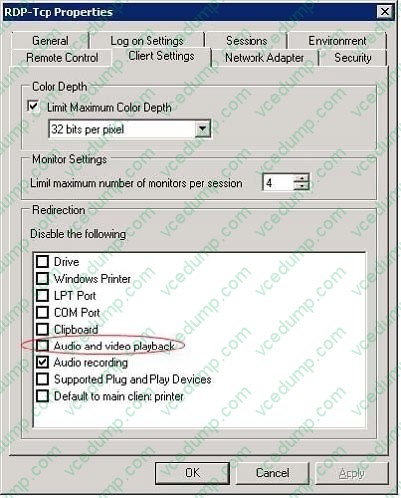
Your network contains two servers named Server1 and Server2 that run windows Server 2008 R2 Service Pack 1 (SP1). Server1 has the Remote Desktop Gateway (RD Gateway) role service installed. Server2 has the Remote Desktop
Session Host role service installed.
Internal users establish Remote Desktop connections directly to Server2. Remote users access Server2 by using the RD Gateway on Server1.
You need to configure the Remote Desktop environment to meet the following requirements:
Only allow the remote users to establish a Remote Desktop connection to Server2 if they use Remote Desktop Connection 7.0 or later. The internal users must be allowed to use Remote Desktop Connection 5.0.
Prevent all of the users from using audio redirection.
Which two actions should you perform? (Each correct answer presents part of the solution. Choose two.)
A. On Server2, configure the Client Settings of the RDP-Tcp Properties.
B. On Server1, configure the Client Settings of the RDP-Tcp Properties.
C. On Server2, configure Remote Desktop IP Virtualization to use per session mode.
D. On Server1, modify the Remote Desktop resource authorization policies (RD RAPs).
E. On Server1, modify the Remote Desktop connection authorization policies (RD CAPs). -
Question 332:
Your network contains a server named Server1 that runs Windows Server 2008 R2 Service Pack 1 (SP1).
You need to ensure that when you connect a drive that contains volumes to Server1, the volumes are NOT assigned a drive letter automatically.
Which Diskpart command should you run?
A. Active
B. Add
C. Assign
D. Attach vdisk
E. Attributes
F. automount
G. Break
H. Repair
I. Compact vdisk
J. Retain -
Question 333:
Your network contains a server named Server1 that runs Windows Server 2008 R2. Server 1 has the Remote Desktop Session Host (RD Session Host) role service installed. On server1, you install and configure the Windows System Resource Manager (WSRM) feature as shown in the exhibit. (Click the Exhibit button.)
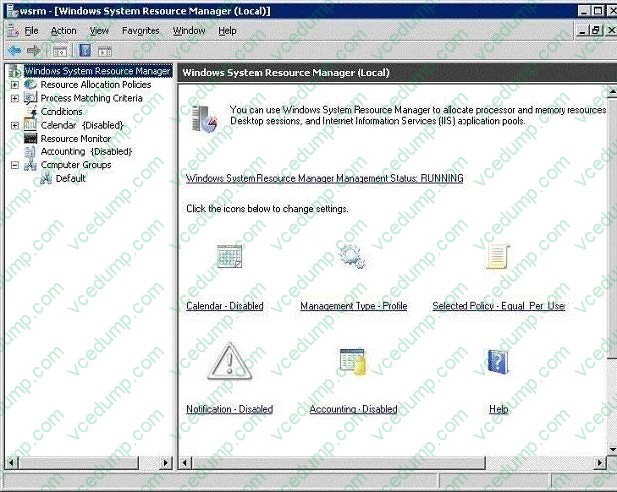
You need to ensure that WSRM enforces the allocation of CPU capacity between users. What should you do?
A. Enable Accounting.
B. Change the Management type to Manage.
C. Add Server1 to the Default computer group.
D. Change the resource allocation policy to Equal_per_process. -
Question 334:
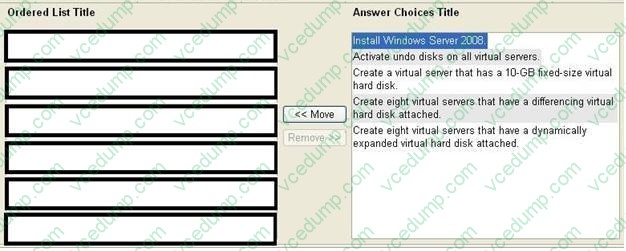
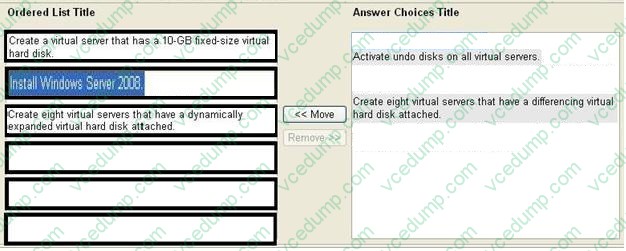
Your company has a server named VS1 that runs Windows Server 2008 and Microsoft Hyper-V.
You want to create eight virtual servers that run Windows Server 2008 and configure the virtual servers as an Active Directory forest for testing purposes.
You discover that VS1 has only 30 GB of free hard disk space.
You need to install the eight new virtual servers on VS1.
What should you do? (To answer, move the appropriate actions from the list of actions to the answer area and arrange them in the correct order.)
Select and Place:
-
Question 335:
You have a Terminal Server that runs Windows Server 2008.
You create a Windows Installer package for Microsoft Office Word 2007 by using Terminal Services RemoteApp (TS RemoteApp). You install the package on a client computer.
You double-click on a Word document and receive the following error. Windows cannot open this file. You need to ensure that you can open the Word document by double-clicking on the file.
What should you do?
A. Recreate the Windows Installer package.
B. Modify the file association on the client computer.
C. Modify the file association on the TS RemoteApp server.
D. Install the Windows Installer package by using msiexec.exe. -
Question 336:
Your network contains an Active Directory domain named adatum.com. The domain contains a server named Servers that runs windows Server 2008 R2 Service Pack 1 (SP1).
Server5 contains a mirrored volume named Volume1.
You need to replace one of the disks in Volume1.
Which Diskpart command should you run first?
A. Active
B. Add
C. Assign
D. Attach vdisk
E. Attributes
F. automount
G. Break
H. Repair
I. Compact vdisk
J. Retain -
Question 337:
Your network contains an Active Directory domain. The domain contains a server named Server1 that runs Windows Server 2008 R2. Server1 has the Streaming Media Services role installed. You need to ensure that all streaming media is encrypted when the media is sent over the network.
What should you do?
A. Configure a connection security rule.
B. Configure the WMS Digest Authentication plug-in.
C. Configure the WMS Publishing Points ACL Authorization plug-in.
D. Install an SSL certificate and bind the certificate to port 443. -
Question 338:
You have a server that runs Windows Server 2008. The server has the Windows Server virtualization role service installed and has one virtual machine. The virtual machine runs Windows Server 2008.
You plan to install a new application on the virtual machine.
You need to ensure that you can restore the virtual machine to its original state in the event the application installation fails.
What should you do?
A. Log on to the virtual host and enable the Remote Differential Compression Features.
B. Log on to the virtual host and enable the Windows Recovery Disk feature.
C. From Virtualization Management Console, create a snapshot.
D. From Virtualization Management Console, save the state of the virtual machine. -
Question 339:
Your network contains an Active Directory domain. The domain contains 20 member servers. The domain contains have two servers named Server1 and Server2 that run Windows Server 2008 R2.
You connect Server1 and Server2 to a logical unit number (LUN) on a Storage Area Network (SAN). You create a failover cluster named Cluster1. You add Server1 and Server2 as nodes to Cluster1.
You discover that there are no cluster disks available for a new clustered file server service on Cluster1.
You need to ensure that you can add a clustered file server service to Cluster1.
What should you do?
A. Enable cluster shared volumes.
B. Run the Provision Storage Wizard.
C. Configure Cluster1 to use a No Majority: Disk Only quorum configuration.
D. Configure Cluster1 to use a Node and File Share Majority quorum configuration. -
Question 340:
Your network contains a server named Server1 that runs Windows Server 2008 R2.
You install three new hard disk drives on Server1. The drives are identical in size.
You need to create a volume by using the three new disk drives.
The volume must meet the following requirements: Provide the maximum amount of usable storage. Provide the fastest read/write performance available.
Which type of volume should you create?
A. mirrored
B. RAID-5
C. spanned
D. striped
Related Exams:
-
62-193
Technology Literacy for Educators -
70-243
Administering and Deploying System Center 2012 Configuration Manager -
70-355
Universal Windows Platform – App Data, Services, and Coding Patterns -
77-420
Excel 2013 -
77-427
Excel 2013 Expert Part One -
77-725
Word 2016 Core Document Creation, Collaboration and Communication -
77-726
Word 2016 Expert Creating Documents for Effective Communication -
77-727
Excel 2016 Core Data Analysis, Manipulation, and Presentation -
77-728
Excel 2016 Expert: Interpreting Data for Insights -
77-731
Outlook 2016 Core Communication, Collaboration and Email Skills
Tips on How to Prepare for the Exams
Nowadays, the certification exams become more and more important and required by more and more enterprises when applying for a job. But how to prepare for the exam effectively? How to prepare for the exam in a short time with less efforts? How to get a ideal result and how to find the most reliable resources? Here on Vcedump.com, you will find all the answers. Vcedump.com provide not only Microsoft exam questions, answers and explanations but also complete assistance on your exam preparation and certification application. If you are confused on your 70-643 exam preparations and Microsoft certification application, do not hesitate to visit our Vcedump.com to find your solutions here.