70-643 Exam Details
-
Exam Code
:70-643 -
Exam Name
:Windows Server 2008 Applications Infrastructure, Configuring -
Certification
:Microsoft Certifications -
Vendor
:Microsoft -
Total Questions
:419 Q&As -
Last Updated
:Dec 14, 2021
Microsoft 70-643 Online Questions & Answers
-
Question 321:
You implement a member server that runs Windows Server 2008 R2. The member server has the Web Server (IIS) role installed. The member server also hosts intranet Web sites.
Your company policy has the following requirements:
Use encryption for all authentication traffic to the intranet Web site. Authenticate users by using their Active Directory credentials. Avoid the use of SSL on the Web server for performance reasons.
You need to configure all the Web sites on the server to meet the company policy.
Which three actions should you perform? (Each correct answer presents part of the solution. Choose three.)
A. Configure the Basic Authentication setting on the server to Enabled.
B. Configure the Digest Authentication setting on the server to Enabled.
C. Configure the Windows Authentication setting on the server to Enabled.
D. Configure the Anonymous Authentication setting on the server to Disabled.
E. Configure the Active Directory Client Certificate Authentication setting on the server to Enabled. -
Question 322:
Your network contains a Web server that runs Windows Server 2008 R2. The Web server has a Web site named Web1. Web1 hosts several HTML Web pages located in the C:\inetpub\wwwroot folder.
Windows authentication is enabled for Web1.
You need to prevent some users from accessing one of the HTML Web pages.
What should you do?
A. From Windows Explorer, modify the NTFS permissions.
B. From Windows Explorer, modify the share permissions.
C. From Internet Information Services (IIS) Manager, modify the Authentication settings.
D. From Internet Information Services (IIS) Manager, modify the Request Filtering settings. -
Question 323:
You manage a new server that runs Windows Server 2008 R2. You plan to install the Streaming Media Services server role on the server.
Users will access content on the new server by using Windows Media Player for Windows 7 and Windows Media Player for Mac.
You need to install the Streaming Media Services server role on the server to support both media players.
What should you do?
A. Install Session Initiation Protocol (SIP).
B. Install Simple Object Access Protocol (SOAP).
C. Install Stream Control Transmission Protocol (SCTP).
D. Install RPC over HTTPS. -
Question 324:
Your network contains an Active Directory domain. The domain contains two servers named Server1 and Server2.
You connect Server1 and Server2 to a logical unit number (LUN) on a Storage Area Network (SAN).
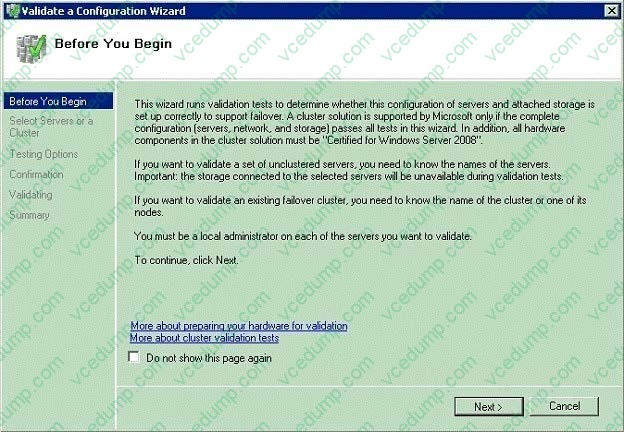
You need to ensure that you can use the LUN in a failover cluster.
What should you do?
A. From Server Manager, run the Best Practices Analyzer.
B. From File Server Resource Manager, generate a storage report.
C. From Failover Cluster Manager, run the Validate a Configuration Wizard.
D. From Share and Storage Management, verify the advanced settings of the LUN. -
Question 325:
Your network contains an Active Directory domain named adatum.com.
The domain contains a server named Server5 that runs Windows Server 2008 R2 Service Pack 1 (SP1).
You install the Remote Desktop Services (RDS) server role and all of the RDS role services on Server5.
You create universal security group named Support.yYou add 10 user accounts to the Support group.
You need to ensure that Remote Desktop sessions established by members of the Support group receive the highest possible CPU allocation on Server5.
Which tool should you use?
A. Regedit
B. Remote Desktop Gateway Manager
C. Dism
D. Rdpsign
E. Netsh
F. Remote Desktop Services Manager
G. Windows System Resource Manager (WSRM)
H. Rdpinit
I. Mstsc
J. Remote Desktop Connection Manager -
Question 326:
Your network contains a server named Server1 that has Microsoft SharePoint Foundation 2010 installed. You install the SMTP Server feature on Server1.
You configure the incoming email settings from Central Administration.
You mail-enable a document library.
From an external email account, you attempt to send an email message to the document library and you receive a non-delivery report (NDR).
You need to ensure that you can send email messages to the document library.
What should you do?
A. Create a Mailbox (MB) record in DNS.
B. Create a Mail Exchanger (MX) record in DNS.
C. Configure the outgoing email settings in Central Administration.
D. Configure the connection control settings of the SMTP virtual server. -
Question 327:
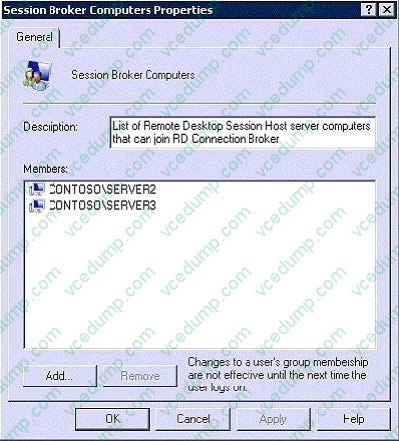
Your network contains a server named Server1 that has the Remote Desktop Connection Broker (RD Connection Broker) role service installed. You deploy two ew servers named Server2 and Server3. On Server2 and Server3, you install the Remote Desktop Session Host (RD Session Host) role service. From the emote Desktop Session Host Configuration snap-in, you configure Server2 and Server3 as server farm members.
You need to ensure that all Remote Desktop sessions are distributed between Server2 and Server3.
What should you do?
A. On Server2 and Server3, add the Server1 computer account to the Remote Desktop Users group.
B. On Server1, add the Server2 computer account and the Server3 computer account to the Session Broker Computers group.
C. On Server1, install the Remote Desktop Gateway (RD Gateway) role service. Add Server1 as an RD Gateway server farm member.
D. On Server1, install the Remote Desktop Gateway (RD Gateway) role service. Add Server2 and Server3 as RD Gateway server farm members. -
Question 328:
Your network contains two Hyper-V hosts named Server1 and Server2.
Server1 and Server2 belong to a failover cluster. Server1 and Server2 are connected to the same 2- terabyte logical unit number (LUN).
The cluster will host 20 highly available virtual machines (VMs).
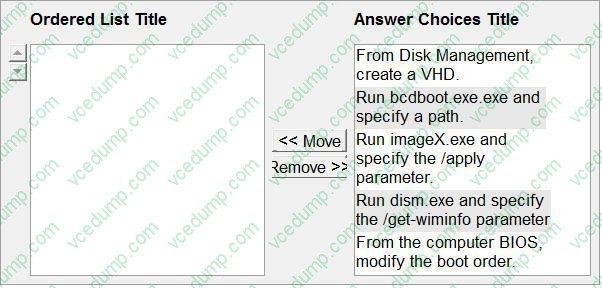
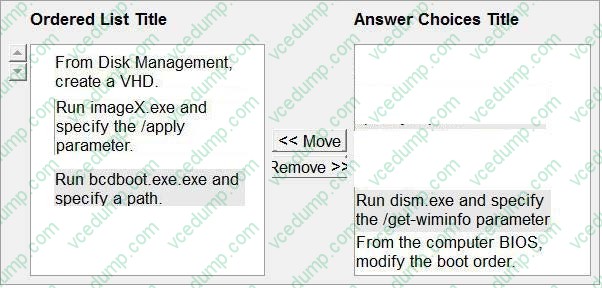
You need to ensure that the VMs can fail over independently. Which action should you select from Failover Cluster Manager?
To answer, select the appropriate action in the answer area.
Select and Place:
-
Question 329:
Your network contains three servers that run Windows Server 2008 R2. The servers are configured as shown in the following table.
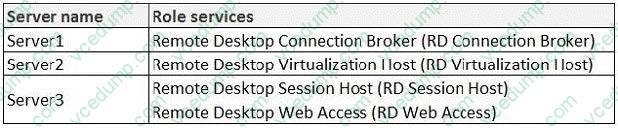
On Server1, you configure a virtual desktop pool named Pool1. Pool1 contains a Windows 7 virtual machine (VM) named Computer1. You need to ensure that when a user logs off of Computer1, all of the changes made to Computer1 are discarded.
What should you do?
A. On Server2, enable shadow copies.
B. On Server2, take a snapshot of Computer1 and rename the snapshot RDV_Rollback.
C. From the properties of Pool1 on Server1, modify the Automatically save virtual machines setting.
D. From the Remote Desktop Session Host Configuration console on Server1, modify the Delete temporary folders on exit setting. -
Question 330:
Your network contains two servers. The servers are configured as shown in the following table.

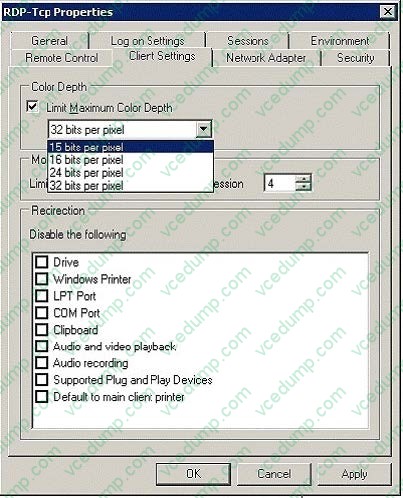
You need to limit the display quality of Remote Desktop connections. What should you do?
A. Create a Remote Desktop resource allocation policy (RD RAP) on Server2.
B. Create a Windows System Resource Manager (WSRM) resource allocation policy on Server1.
C. Edit the properties of the RDP-Tcp connection on Server1.
D. Edit the properties of the Remote Desktop connection authorization policy (RD CAP) on Server2.
Related Exams:
-
62-193
Technology Literacy for Educators -
70-243
Administering and Deploying System Center 2012 Configuration Manager -
70-355
Universal Windows Platform – App Data, Services, and Coding Patterns -
77-420
Excel 2013 -
77-427
Excel 2013 Expert Part One -
77-725
Word 2016 Core Document Creation, Collaboration and Communication -
77-726
Word 2016 Expert Creating Documents for Effective Communication -
77-727
Excel 2016 Core Data Analysis, Manipulation, and Presentation -
77-728
Excel 2016 Expert: Interpreting Data for Insights -
77-731
Outlook 2016 Core Communication, Collaboration and Email Skills
Tips on How to Prepare for the Exams
Nowadays, the certification exams become more and more important and required by more and more enterprises when applying for a job. But how to prepare for the exam effectively? How to prepare for the exam in a short time with less efforts? How to get a ideal result and how to find the most reliable resources? Here on Vcedump.com, you will find all the answers. Vcedump.com provide not only Microsoft exam questions, answers and explanations but also complete assistance on your exam preparation and certification application. If you are confused on your 70-643 exam preparations and Microsoft certification application, do not hesitate to visit our Vcedump.com to find your solutions here.