70-643 Exam Details
-
Exam Code
:70-643 -
Exam Name
:Windows Server 2008 Applications Infrastructure, Configuring -
Certification
:Microsoft Certifications -
Vendor
:Microsoft -
Total Questions
:419 Q&As -
Last Updated
:Dec 14, 2021
Microsoft 70-643 Online Questions & Answers
-
Question 1:
You are evaluating whether to purchase Windows Server 2008 R2 Service Pack 1 (SP1).
Several weeks ago, you installed Windows Server 2008 R2 SP1 on a server. During the installation, you did not enter a product key.
You need to identify how many days remain until the license status of the server will change to Unlicensed.
Which tool should you use?
A. Wevutil.exe
B. Windows Activation
C. Computer Management
D. Action Center -
Question 2:
Your network contains an Active Directory domain named fabnkam.com. The domain contains a Web Server named Web1 that runs Windows Server 2008 R2.
You create a new site named Site1.
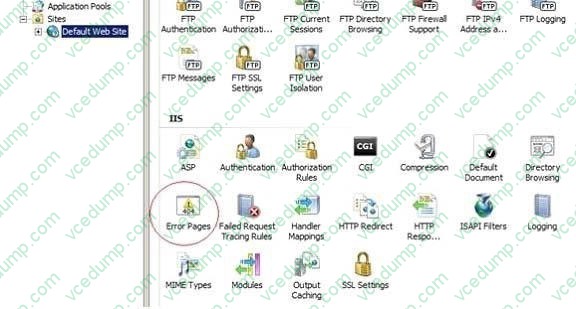
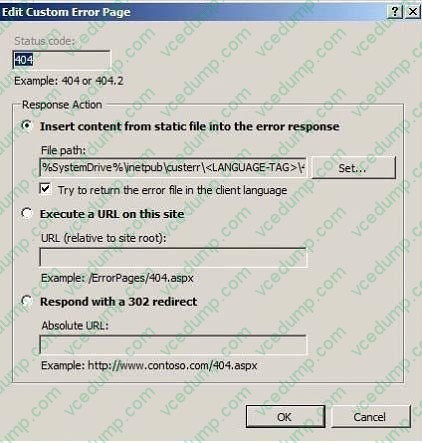
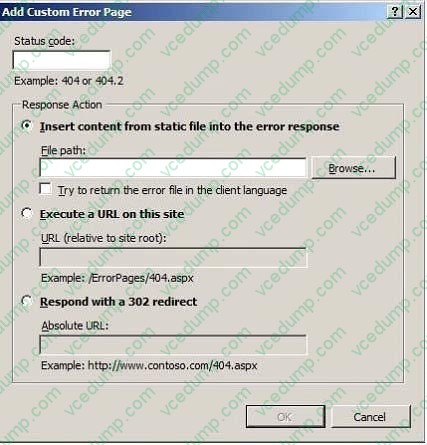
You need to ensure that when a user enters a URL on site1 for a resource that does not exist, a custom web page displays.
Which feature should you configure?
A. Default Document
B. Error Pages
C. HTTP Redirect
D. Authorization Rules -
Question 3:
Your network contains an FTP server that runs Windows Server 2008 R2.
The server has two FTP sites.
The sites are configured as shown in the following table.
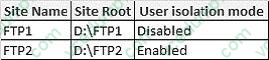
You need to prevent users from storing more than 500 MB of data on FTP2.
The users must be able to store at least 900 MB of data on FTP1.
What should you do?
A. Modify the properties of the FTP1 site.
B. Modify the properties of the FTP2 site
C. Create a disk quota from Windows Explorer.
D. Install File Server Resource Manager (FSRM) and create a quota. -
Question 4:
Your network contains three servers named Server1, Server2, and Server3. Server1 is located on a perimeter network. Server2 and Server3 are accessible from the internal network only.
Users connect to Server2 and Server3 to run RemoteApp programs.
You need to ensure that remote users can run the RemoteApp programs on Server2 and Server3. The solution must minimize the number of ports that must be opened on the internal firewall.
Which role service should you install on Server3?
A. Remote Desktop Connection Broker (RD Connection Broker)
B. Remote Desktop Web Access (RD Web Access)
C. Remote Desktop Gateway (RD Gateway)
D. Remote Desktop Session Host (RD Session Host) -
Question 5:
Your network contains a single Active Directory domain. The domain contains two servers. The servers are configured as shown in the following table.

Server2 is configured to use Server1 as a licensing server. You install 100 Remote Desktop Services Per User client access licenses (RDS Per User CALs) on Server1.
You discover that when users connect to Remote Desktop Services (RDS) on Server2, they receive temporary licenses.
You need to ensure that users receive permanent licenses when they connect to Server2.
What should you do?
A. On Server2, install the RD Licensing role service.
B. On Server2, change the Remote Desktop licensing mode to Per User.
C. On Server1, remove the RD Session Host role service.
D. On Server1, change the discovery scope of the license server to Domain. -
Question 6:
You have a server that runs Windows Server 2008 R2. The server has the Web Server (IIS) server role installed.
The server contains a Web site that is configured to use only Windows Authentication. You have a security group named Group1 that contains several user accounts.
You need to prevent the members of Group1 from accessing a Web site. You must not prevent other users from accessing the Web site.
Which Web site feature should you configure?
A. Authentication
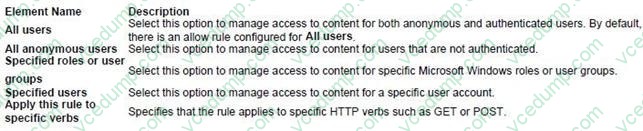
B. Authorization Rules
C. IIS Manager Permissions
D. SSL Settings -
Question 7:
Your network contains a server named Server1 that runs Windows Server 2008 R2. Server1 has the Windows Deployment Services (WDS) server role installed.
You need to copy a default Windows 7 image to Server1.
Which type of image should you add?
A. boot
B. capture
C. discover
D. install -
Question 8:
Your network contains an Active Directory domain named contoso.com. You publish a RemoteApp named Appl. The Remote Desktop Connection (.rdp) file for App1 is unsigned.
When a user named User1 runs App1 from the Remote Desktop Web Access (RD Web Access) website, User1 is prompted for credentials. You need to prevent users from being prompted for credentials when they run Appl.
What should you do?
A. Enable the Allow Delegating Default Credentials Group Policy setting.
B. Enable the Assign a default domain for logon Group Policy setting.
C. Configure the SSL Settings for the RDWeb virtual directory.
D. Modify the Authentication Settings for the RDWeb virtual directory. -
Question 9:
Your network contains a Remote Desktop Session Host (RD Session Host) server named Server1.
You need to prevent users from running a application named App1 in Remote Desktop sessions.
The solution must ensure that the users can run other applications from Remote Desktop sessions on Server1.
What should you do? (Each correct answer presents part of the solution. Choose three.)
A. Start the Application Management service, and then set up the startup to Automatic.
B. From th Local Group Policy console, set the security level of the software restriction policy to Basic user.
C. From the Local group Policy Editor, create the default AppLocker executable rules and a deny AppLocker executable rule.
D. Start the Application Identity service, and then set the startup type to Automatic.
E. From the Local group Policy Editor, modify the AppLocker Enforcement settings. -
Question 10:
You are configuring a two-node failover cluster. The failover cluster will connect to a storage server that runs Windows Storage Server 2008. The storage server contains a raw disk. The raw disk appears in the Disk Management console for both nodes. From one of the nodes, you bring the disk online, and then you initialize the disk. You run the Validate a Configuration Wizard as shown in the exhibit. (Click the Exhibit button.)
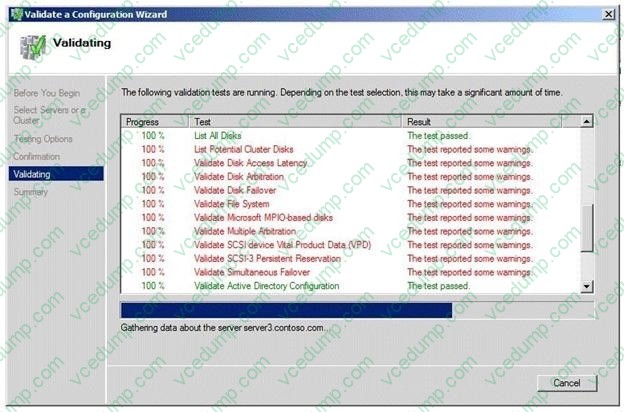
You need to ensure that all of the tests pass when you run the Validate a Configuration Wizard. What should you do?
A. Convert the disk to a GPT disk, and then create a simple volume.
B. Convert the disk to a dynamic disk, and then take the disk offline.
C. Create a simple volume on the disk, and then take the disk offline.
D. Create a simple volume, and then convert the disk to a dynamic disk.
Related Exams:
-
62-193
Technology Literacy for Educators -
70-243
Administering and Deploying System Center 2012 Configuration Manager -
70-355
Universal Windows Platform – App Data, Services, and Coding Patterns -
77-420
Excel 2013 -
77-427
Excel 2013 Expert Part One -
77-725
Word 2016 Core Document Creation, Collaboration and Communication -
77-726
Word 2016 Expert Creating Documents for Effective Communication -
77-727
Excel 2016 Core Data Analysis, Manipulation, and Presentation -
77-728
Excel 2016 Expert: Interpreting Data for Insights -
77-731
Outlook 2016 Core Communication, Collaboration and Email Skills
Tips on How to Prepare for the Exams
Nowadays, the certification exams become more and more important and required by more and more enterprises when applying for a job. But how to prepare for the exam effectively? How to prepare for the exam in a short time with less efforts? How to get a ideal result and how to find the most reliable resources? Here on Vcedump.com, you will find all the answers. Vcedump.com provide not only Microsoft exam questions, answers and explanations but also complete assistance on your exam preparation and certification application. If you are confused on your 70-643 exam preparations and Microsoft certification application, do not hesitate to visit our Vcedump.com to find your solutions here.