70-643 Exam Details
-
Exam Code
:70-643 -
Exam Name
:Windows Server 2008 Applications Infrastructure, Configuring -
Certification
:Microsoft Certifications -
Vendor
:Microsoft -
Total Questions
:419 Q&As -
Last Updated
:Dec 14, 2021
Microsoft 70-643 Online Questions & Answers
-
Question 401:
Your network contains an Active Directory domain named contoso.com. The domain contains five Remote Desktop Session Host (RD Session Host) servers and one Remote Desktop license server.
You need to ensure that all of the RD Session Host servers use Per User licensing mode.
What should you do? (Each correct answer presents a complete solution. Choose two.)
A. On the Remote Desktop license server, modify the discovery scope.
B. On each RD Session Host, modify the license settings.
C. On the Remote Desktop license server, modify the connection method.
D. On each RD Session Host, modify the user logon mode setting.
E. From a Group Policy object (GPO), enable the Set the Remote Desktop licensing mode setting. -
Question 402:
Your network contains a server named Server1 that has Microsoft SharePoint Foundation 2010 installed.
You discover that users who access the SharePoint sites on Server1 by using a Windows Phone device are redirected to the desktop version of the sites rather than the mobile version.
You need to ensure that the Windows Phone users are redirected automatically to the mobile version of the sites.
What should you modify from Server1?
A. the site collection settings
B. the Web.config file
C. the site settings
D. the Compat.browsers file -
Question 403:
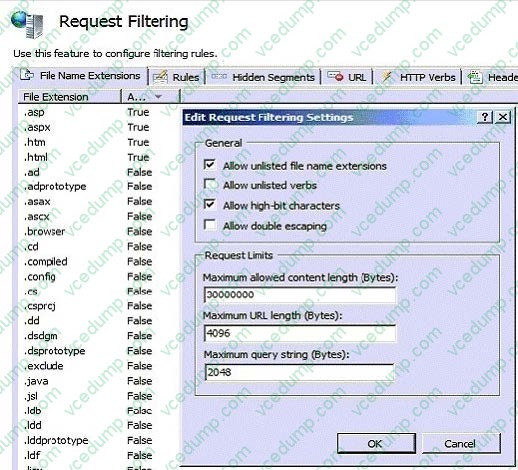
Your network contains a Web server.
You need to ensure that users can only access files that have the .htm, .html, .asp, and .aspx file extensions.
What should you do?
A. Add an authorization rule.
B. Modify the handler mappings.
C. Update the default documents list.
D. Configure the request filtering settings. -
Question 404:
Your network contains a server named Server1 that has the Web Server (IIS) server role installed.
You need to ensure that the IIS configuration of Server1 backed up daily. The solution must minimize the size of the backup.
What should you do?
A. From Windows Server Backup, create a custom backup configuration that backs up the system state.
B. Create a scheduled task that runs Get-WebConfiguration.
C. Create a scheduled task that runs iisbback.vbs.
D. From Windows Server Backup, create a custom backup configuration that backs up the %Windows%\system32\Inetsrv\config folder. -
Question 405:
Your network contains an Active Directory domain named contoso.com. All servers run Windows Server 2008 R2. Routers on the network support multicast
transmissions.
A server named Server1 has the Windows Deployment Services (WDS) server role installed. A custom Windows 7 image is available for download from Server1.
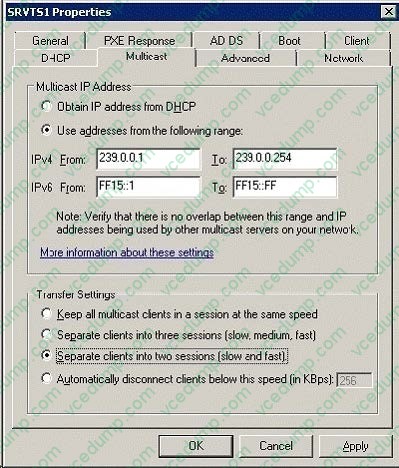
You need to deploy the image to 100 new computers by using multicast. The solution must prevent computers that use low-bandwidth connections from slowing the deployment to computers that use high bandwidth connections.
What should you do?
A. Enable Auto-Cast.
B. Enable Scheduled-Cast.
C. From the WDS server properties, adjust the Transfer Settings.
D. From the WDS server properties, modify the Multicast IP Address settings. -
Question 406:
Your network contains an Active directory domain named fabrikam.com. The domain contains a Web server named Web1 that runs Windows Server 2008 R2.
You install the SMTP Server feature on Web1.
You need to create an SMTP virtual server on Web1.
Which tool should you use?
A. Internet Information Services (IIS) Manager
B. System Configuration
C. Services
D. Internet Information Services (IIS) 6.0 Manager -
Question 407:
Your network contains a Web server that runs Windows Server 2008 R2. Remote management is configured for Internet Information Services (IIS). From IIS Manager Permissions, you add a user to a Web site.
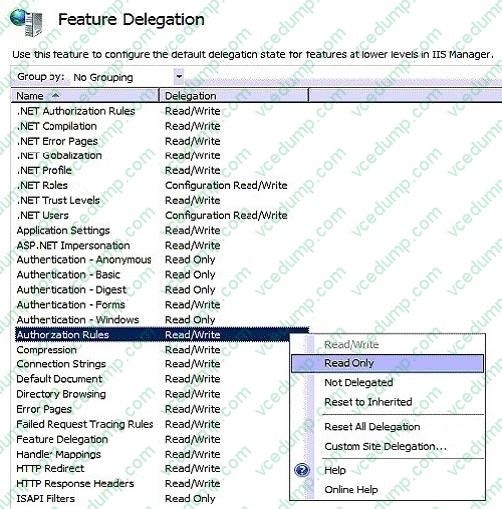
You need to prevent the user from using Internet Information Services (IIS) Manager to modify the authorization rules of the Web site.
Which settings should you configure?
A. Authorization Rules
B. Feature Delegation
C. IIS Manager Permissions
D. IIS Manager Users -
Question 408:
Your company uses Public folders and Web Distributed Authoring and Versioning. The company asks you to install Microsoft Windows SharePoint Services (WSS) as a server in a new server farm. You plan to install WSS on a server that runs Windows Server 2008 R2.
You start the Configuration Wizard to begin the installation. You receive an error message as shown in the exhibit.
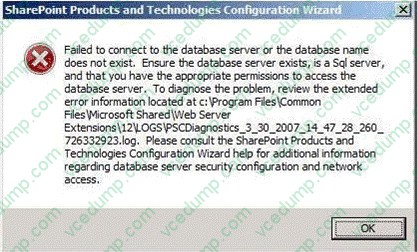
You need to configure WSS to start SharePoint Services 3.0 SP 2 Central Administration. What should you do?
A. Install the Windows Internal Database.
B. Install a Microsoft SQL Server 2005 server.
C. Install the Active Directory Rights Management Services role.
D. Install the Active Directory Lightweight Directory Services role. -
Question 409:
Your network contains an Active Directory forest. Microsoft Exchange Server 2010 is deployed in the forest. You have a server named Server1 that has Microsoft SharePoint Foundation installed.
You need to ensure that users can receive email notifications when the SharePoint content is modified.
What should you do?
A. Install the SMTP Server feature.
B. Configure the Send To Connections.
C. Configure the incoming email settings.
D. Configure the outgoing email settings. -
Question 410:
Your company has an Active Directory domain. The company runs Terminal Services. All client computers run Windows Vista Service Pack 1. You need to ensure that users are able to run Windows Media Player 11 during a Terminal Services session. What should you do?
A. Install the Desktop Experience feature on the Terminal Server.
B. Install the Quality Windows Audio Video Experience feature on the Terminal Server.
C. Create a new Group Policy object (GPO) by using the Desktop Window Manager template. Configure the Do not allow desktop composition option to True. Apply the GPO to all client computers in the domain.
D. Create a new Group Policy object (GPO) that configures the Policy-based QoS option and set the Differential Services Code Point value to 10 for the Windows Media Player 11 executable. Apply the GPO to the Terminal Server.
Related Exams:
-
62-193
Technology Literacy for Educators -
70-243
Administering and Deploying System Center 2012 Configuration Manager -
70-355
Universal Windows Platform – App Data, Services, and Coding Patterns -
77-420
Excel 2013 -
77-427
Excel 2013 Expert Part One -
77-725
Word 2016 Core Document Creation, Collaboration and Communication -
77-726
Word 2016 Expert Creating Documents for Effective Communication -
77-727
Excel 2016 Core Data Analysis, Manipulation, and Presentation -
77-728
Excel 2016 Expert: Interpreting Data for Insights -
77-731
Outlook 2016 Core Communication, Collaboration and Email Skills
Tips on How to Prepare for the Exams
Nowadays, the certification exams become more and more important and required by more and more enterprises when applying for a job. But how to prepare for the exam effectively? How to prepare for the exam in a short time with less efforts? How to get a ideal result and how to find the most reliable resources? Here on Vcedump.com, you will find all the answers. Vcedump.com provide not only Microsoft exam questions, answers and explanations but also complete assistance on your exam preparation and certification application. If you are confused on your 70-643 exam preparations and Microsoft certification application, do not hesitate to visit our Vcedump.com to find your solutions here.