70-643 Exam Details
-
Exam Code
:70-643 -
Exam Name
:Windows Server 2008 Applications Infrastructure, Configuring -
Certification
:Microsoft Certifications -
Vendor
:Microsoft -
Total Questions
:419 Q&As -
Last Updated
:Dec 14, 2021
Microsoft 70-643 Online Questions & Answers
-
Question 11:
Failover Cluster with Clustered Shared Volumes enabled.
2 Virtual machines and 5 networks.
Network metrics 1,000 - 10,1000 (you see the table)
You need to ensure that all the failover traffic goes through Network 3.
A. On Failover Cluster Manager modify the properties of VM1 and VM2
B. On Hyper V Manager modify the properties of VM1 and VM2
C. set the metrics to 500
D. set the metrics to 10,200 -
Question 12:
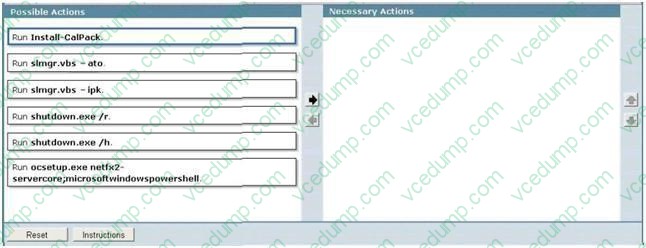
Your network uses Multiple Activation Key (MAX) licenses.
A network technician performs a Server Core installation of Windows Server 2008 R2. Dunng the installation, the technician does not enter the license key.
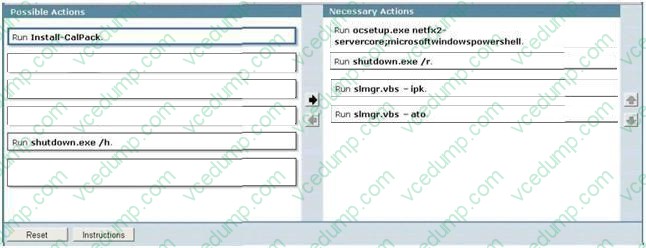
You need to activate Windows Server 2008 R2 on the server.
What should you do?
To answer, move the appropriate actions from the Possible Actions list to the Necessary Actions area and arrange them in the correct order.
Select and Place:
-
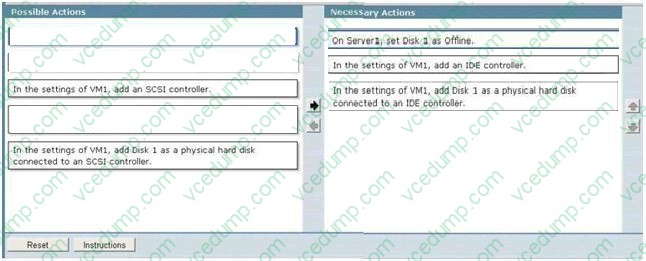
Question 13:
Your network contains a Hyper-V host named Server1 that runs Windows Server 2008 R2. The disks on Server1 are configured as shown in the exhibit. (Click the Exhibit button.)
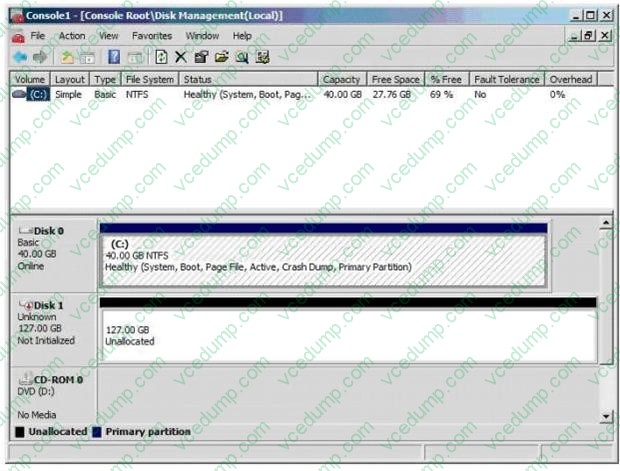
You create a virtual machine (VM) named VM1. You deploy Windows Server 2008 R2 to VM1.
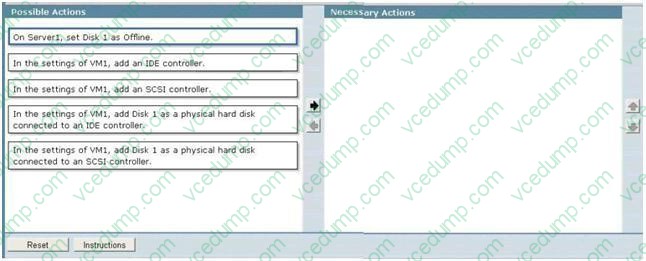
You need to configure VM1 to use Disk l as a pass-through disk.
The solution must minimize downtime on VM1. What should you do?
To answer, move the appropriate actions from the Possible Actions list to the Necessary Actions area and arrange them in the correct order.
Select and Place:
-
Question 14:
Your network contains a Web server that runs Windows Server 2008 R2. The server has a single IP address.
You plan to create several Web sites.
You need to ensure that each Web site is accessible over TCP port 80.
What should you configure?
A. the ISAPI Filters for each site
B. the Request Filtering settings for the server
C. the host headers for each site
D. the bindings for each site -
Question 15:
Your network contains a server named Server1. Server1 has the Volume Activation Management Tool (VAMT) installed.
You need to activate Windows on a server named Server2 by using VAMT.
Which firewall rule should you enable on Server2?
A. COM+ Network Access (DCOM-In)
B. COM+ Remote Administration (DCOM-In)
C. Remote Service Management (RPC)
D. Windows Management Instrumentation (WMI-In) -
Question 16:
Your company has an Active Directory domain. The company runs Remote Desktop Services. You configure the main office printer as the default printer on the Remote Desktop Session Host Server.
The company policy states that all remote client computers must meet the following requirements:
-The main office printer must be the default printer of the client computers. ?Users must be able to access their local printers during a terminal session.
You need to create a Group Policy Object by using the Remote Desktop Session Host Services Printer Redirection template to meet the company policy.
What should you do?
A. Set the Easy Print driver first option to Disabled. Apply the GPO to the Terminal Server.
B. Set the Use Terminal Services Easy Print driver first option to Disabled. Apply the GPO to all the client computers.
C. Set the Do not set default client printer to be default printer in a session option to Enabled. Apply the GPO to the Terminal Server.
D. Set the Do not set default client printer to be default printer in a session option to Enabled. Apply the GPO to all the client computers. -
Question 17:
You manage a server that runs Windows Server 2008 R2. The Remote Desktop Services server role is installed on the server.
A Remote Desktop Services application runs on the server. Users report that the application stops responding.
You monitor the memory usage on the server for a week. You discover that the application has a memory leak.
A patch is not currently available. You create a new resource-allocation policy in Windows System Resource Manager (WSRM). You configure a Process Matching Criteria named TrackShip and select the application. You need to terminate
the application when the application consumes more than half of the available memory on the server.
What should you do?
A. Configure the resource-allocation policy and set the maximum working set limit option to half the available memory on the server. Set the new policy as a Profiling Policy.
B. Configure the resource-allocation policy and set the maximum working set limit option to half the available memory on the server. Set the new policy as a Managing Policy.
C. Configure the resource-allocation policy and set the maximum committed memory option to half the available memory on the server. Set the new policy as a Profiling Policy.
D. Configure the resource-allocation policy and set the maximum committed memory option to half the available memory on the server. Set the new policy as a Managing Policy. -
Question 18:
You have a test lab that contains 20 client computers and a server named Server1. The client computers run Windows 7. Server1 runs Windows Server 2008 Service Pack 2 (SP2).
You install the Key Management Service (KMS) on Server1. You need to ensure that the client computers can successfully activate by using Server1.
What should you do?
A. Upgrade Server 1 to Windows Server 2008 R2.
B. Deploy five additional client computers that run Windows 7.
C. On each client computer, run slmgr.vbs /rearm.
D. On Server1, restart the Windows Activation Technologies service. -
Question 19:
Your company has a single Active Directory domain named contoso.com. All servers in the domain run Windows Server 2008.
The DNS service is installed on two domain controllers named DC1 and DC2. Both DNS servers host Active Directory integrated zones that are configured to allow the most secure updates only.
DC1 has Key Management Service (KMS) installed and activated.
You discover that the service locator records from the contoso.com zone hosted on DC1 and DC2 are missing.
You need to force registration of the KMS service locator records in the contoso.com zone.
What should you do?
A. Configure the contoso.com zone to accept non-secure updates.
B. On DC1 at the command prompt, run the slmgr.vbs Crearm script.
C. On DC1 at the command prompt, run the net stop sppsvc command, and then run the net start sppsvc command.
D. On DC2 at the command prompt, run the net stop netlogon command, and then run the net start netlogon command. -
Question 20:
Your network contains an Active Directory domain named adatum.com. The domain contains a server named Server5 that has the Remote Desktop Services (RDS) server role installed and all of the RDS role services installed. Server5 is configured as a file server and a Remote Desktop Services client access licences (RDS CALS) on Server5.
Which tool should you use?
A. Regedit
B. Remote Desktop Gateway Manager
C. Dism
D. Rdpsign
E. Netsh
F. Remote Desktop Services Manager
G. Windows System Resource Manager (WSRM)
H. Rdpinit
I. Mstsc
J. Remote Desktop Connection Manager
Related Exams:
-
62-193
Technology Literacy for Educators -
70-243
Administering and Deploying System Center 2012 Configuration Manager -
70-355
Universal Windows Platform – App Data, Services, and Coding Patterns -
77-420
Excel 2013 -
77-427
Excel 2013 Expert Part One -
77-725
Word 2016 Core Document Creation, Collaboration and Communication -
77-726
Word 2016 Expert Creating Documents for Effective Communication -
77-727
Excel 2016 Core Data Analysis, Manipulation, and Presentation -
77-728
Excel 2016 Expert: Interpreting Data for Insights -
77-731
Outlook 2016 Core Communication, Collaboration and Email Skills
Tips on How to Prepare for the Exams
Nowadays, the certification exams become more and more important and required by more and more enterprises when applying for a job. But how to prepare for the exam effectively? How to prepare for the exam in a short time with less efforts? How to get a ideal result and how to find the most reliable resources? Here on Vcedump.com, you will find all the answers. Vcedump.com provide not only Microsoft exam questions, answers and explanations but also complete assistance on your exam preparation and certification application. If you are confused on your 70-643 exam preparations and Microsoft certification application, do not hesitate to visit our Vcedump.com to find your solutions here.