PL-200 Exam Details
-
Exam Code
:PL-200 -
Exam Name
:Microsoft Power Platform Functional Consultant -
Certification
:Microsoft Certifications -
Vendor
:Microsoft -
Total Questions
:371 Q&As -
Last Updated
:Jul 11, 2026
Microsoft PL-200 Online Questions & Answers
-
Question 291:
DRAG DROP
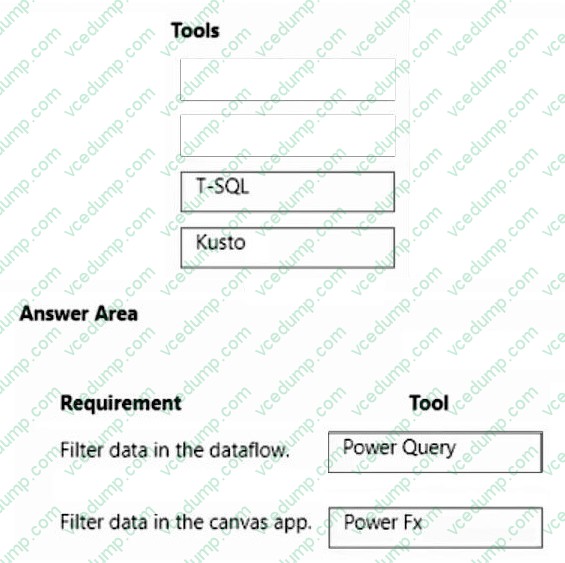
You create a canvas app that uses data from a Microsoft SQL Server database.
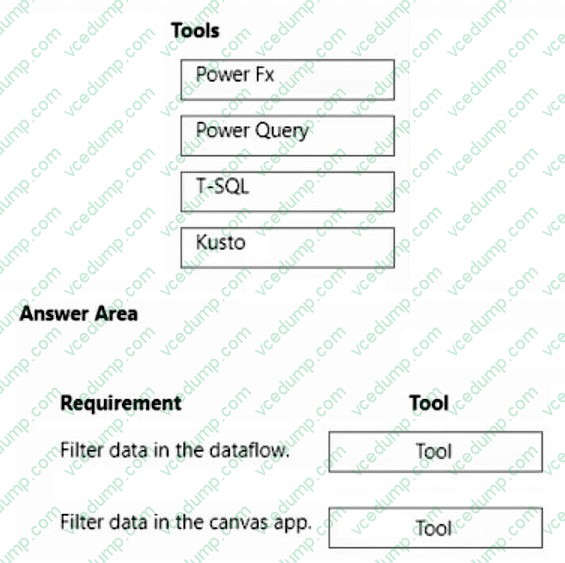
You use a dataflow to move some of the data from the database to Microsoft Dataverse. Users will filter the data by using the app.
You need to filter data in the dataflow and in the canvas app.
Which tools should you use? To answer, drag the appropriate tools to the correct requirements. Each tool may be used once, more than once, or not at all. You may need to drag the split bar between panes or scroll to view content.
NOTE: Each correct selection is worth one point.
Select and Place:
-
Question 292:
Note: This question is part of a series of questions that present the same scenario. Each question in the series contains a unique solution that might meet the stated goals. Some question sets might have more than one correct solution, while others might not have a correct solution.
After you answer a question in this section, you will NOT be able to return to it. As a result, these questions will not appear in the review screen.
You administer the Microsoft 365 and Power Platform environments for Contoso, Ltd. The company has a model-driven app that is used to track customer interactions with employees. The app uses standard table types for customers. A user named Elisabeth Rice signs in to the app by using the following sign in name: [email protected].
After marriage, Elisabeth changes her legal name to Elisabeth Mueller.
You need to update the sign in name for the user without losing any application history.
Solution: Ask the Microsoft 365 administrator to sign in to the admin portal and change the username.
Does the solution meet the goal?
A. Yes
B. No -
Question 293:
You have a canvas app with an embedded Power Bl tile.
You share the canvas app. Users report that they are unable to access the Power Bl content.
You need to determine why users are unable to access the content
What is the cause of the user s problems?
A. The Power Bl dashboard is not shared.
B. The Power Bl interactions property on the Power Bl tiles is set to Off.
C. The Power Bl connection is not shared.
D. The Power Bl Display mode property on the Power Bl tiles is set to Disabled -
Question 294:
HOTSPOT
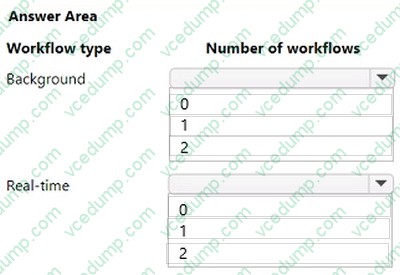
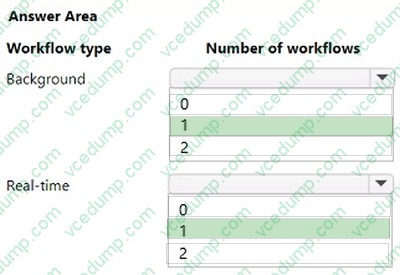
You plan to create classic workflows for process automation on the Account table.
The process automation has the following requirements:
1. If the Account Name column changes, a custom column named Previous Name must be updated with the original value.
2. If the Credit Limit column changes, an email must be sent to the record owner with the new value.
3. Asynchronous processes must be used whenever possible.
You need to implement the process automation.
What is the minimum number of workflows you should use? To answer, select the appropriate options in the answer area.
NOTE: Each correct selection is worth one point.
-
Question 295:
You create a canvas app for a sales team. The app has an embedded Power BI tile that shows year-to-date sales. Sales users do not have access to the data source that the tile uses.
Sales team users must be able to see data in the Power BI tile. You must minimize the level of permissions that you grant and minimize administrative overhead.
You need to share another Power BI component to make the data visible.
What should you share?
A. The Power BI dataset the tile uses as a data source.
B. The Power BI dataset the tile uses as a data source.
C. The Power BI dashboard that includes the tile. -
Question 296:
HOTSPOT
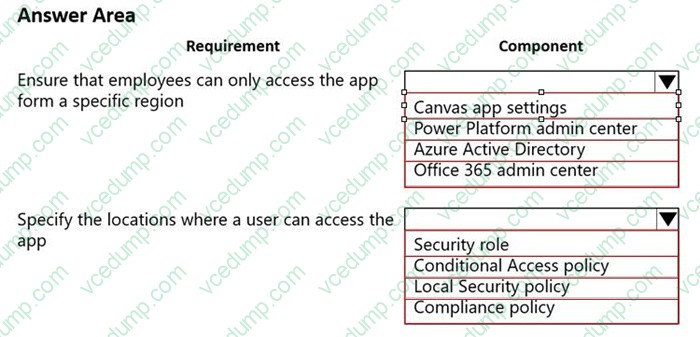
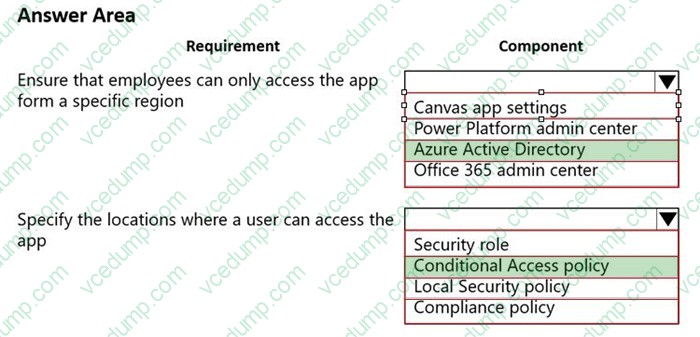
A company uses a canvas app to manage production resources in a specific region. Employees must be at company locations to use the app.
Due to a sudden requirement for employees to work remotely, employees no longer commute to a specific location to conduct their work and cannot access the canvas app.
You must reconfigure the app to ensure that employees only access the app from a limited number of locations.
You need to restrict access to the app.
Which components should you configure? To answer, select the appropriate options in the answer area.
NOTE: Each correct selection is worth one point.
-
Question 297:
You use Power Bl Desktop to configure Power Bl reports and dashboards.
You need to create a canvas app that displays account information and include the app in a Power Bl report.
Which three actions should you perform? Each correct answer presents part of the solution.
NOTE Each correct selection is worth one point.
A. Publish the report to the Power Bl service.
B. Connect to Common Data Service from Power Bl Desktop.
C. Connect Common Data Service from Power Bl Desktop. Selected required fields from the Accounts table.
D. From the Power Apps Insert menu, add a Power Bl
E. From the Power Bl Desktop menu, insert a Power Apps visual and include the required fields in the Power Apps data. -
Question 298:
You are creating a business rule to implement new business logic.
You must apply the business logic to a canvas app that has a single screen named Screen1.
You need to configure the scope for the business rule.
Which scope should you use?
A. Screen1
B. Entity
C. All Forms
D. Global -
Question 299:
DRAG DROP
A company that manufactures medical devices uses Power Apps to manage their sales and device maintenance.
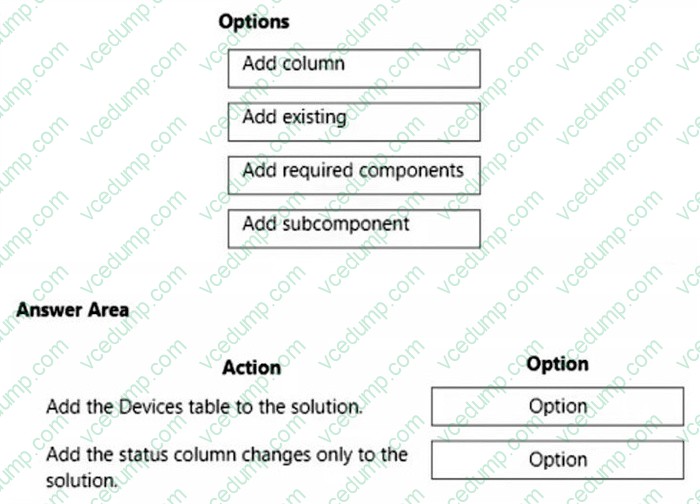
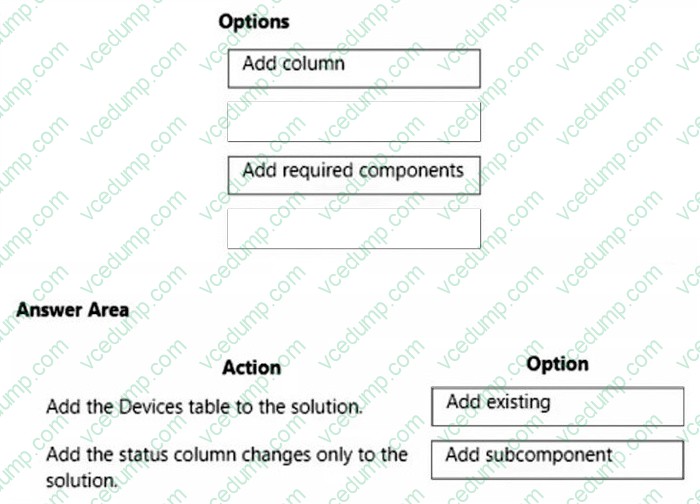
A table named Devices in Microsoft Dataverse has a column named Status. The Status column must have a new status value of Review added to the existing Choice values of Active and Inactive.
The table must be added to a solution to be promoted once the change is made.
Only this change must be promoted to the test environment. The changes must not be able to be changed once promoted.
You need to add the change to a solution for promotion.
Select and Place:
-
Question 300:
A company uses Power BI dashboards.
A manager wants to understand the raw data in one of the charts.
You need to present the data.
What should you do?
A. Export the dashboard to Microsoft PowerPoint.
B. Export the dashboard to Microsoft Excel.
C. Change to focus mode.
D. Drill down in the dashboard controls.
Related Exams:
-
62-193
Technology Literacy for Educators -
70-243
Administering and Deploying System Center 2012 Configuration Manager -
70-355
Universal Windows Platform – App Data, Services, and Coding Patterns -
77-420
Excel 2013 -
77-427
Excel 2013 Expert Part One -
77-725
Word 2016 Core Document Creation, Collaboration and Communication -
77-726
Word 2016 Expert Creating Documents for Effective Communication -
77-727
Excel 2016 Core Data Analysis, Manipulation, and Presentation -
77-728
Excel 2016 Expert: Interpreting Data for Insights -
77-731
Outlook 2016 Core Communication, Collaboration and Email Skills
Tips on How to Prepare for the Exams
Nowadays, the certification exams become more and more important and required by more and more enterprises when applying for a job. But how to prepare for the exam effectively? How to prepare for the exam in a short time with less efforts? How to get a ideal result and how to find the most reliable resources? Here on Vcedump.com, you will find all the answers. Vcedump.com provide not only Microsoft exam questions, answers and explanations but also complete assistance on your exam preparation and certification application. If you are confused on your PL-200 exam preparations and Microsoft certification application, do not hesitate to visit our Vcedump.com to find your solutions here.