Which object type can a developer import using the Merchant Tools > Import $ Export module in Business Manager?
A. Images and other static assets B. Content slots C. Products
C. Products In Salesforce B2C Commerce, using the Merchant Tools > Import and Export module, developers and site administrators can import various types of objects. Among the options listed, "Products" is the type of object that can be imported using this module. This feature allows for the bulk management of product data, including details like pricing, descriptions, and categorization. Importing products is a common task in e-commerce platforms, especially for managing large inventories or updating product information en masse. The Import and Export module provides a streamlined way to handle these operations directly within Business Manager.
Question 102:
When looking at Custom Object instances for a site, a merchant notices that the creation date is not showing up on the instances in Business Manager. Where should the developer add this attribute to the Custom Object so itis visible for the merchant to see in Business Manager?
A. Assign the current date/time to a new custom attribute, creationDate, via code. B. Add the creation date to the attributes of the Custom Object. C. Mark the existing creation date attribute as visible. D. Add the creation date to the attribute group for the Custom Object.
D. Add the creation date to the attribute group for the Custom Object. In Salesforce B2C Commerce, custom attributes for Custom Objects can be organized into attribute groups in the Business Manager. These attribute groups help in managing how attributes are displayed. To make the creation date visible for Custom Object instances within the Business Manager, the developer should add a creation date attribute to an appropriate attribute group for the Custom Object. This allows the attribute to be properly displayed and managed within the user interface of Business Manager, providing merchants clear visibility of the data.
Question 103:
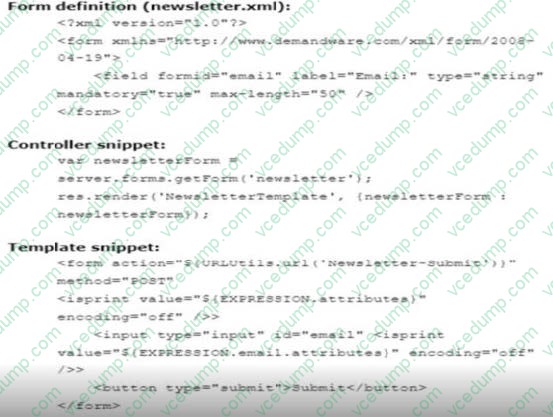
Reference the following code snippets that allow a form to function correctly.
Which code should a developer insert at the EXPRESSION placeholder m the ISML template snippet above to have the form work as expected?
A. pdict.newslettersFrom B. Pdict, newsletter C. sowslettersform
B. Pdict, newsletter The correct code to insert at the EXPRESSION placeholder in the ISML template snippet to ensure the form functions correctly is pdict.newsletter (Option B). This variable likely contains the form data being passed to the template via the controller, which aligns with typical naming conventions and practices in SFRA where the pdict (Page Dictionary) object holds all data relevant to the current page context. This ensures that form inputs and actions are properly linked to their corresponding data handled in the server-side script.
Question 104:
A developerhas a B2C site and a merchant requirement to add a new locale to it.
What are the steps to enable the locale in the Storefront?
A. Create and configure the locale under Global Preferences section and activate it in Site Preferences. B. Create, configure,and activate the locale under Global Preferences section. C. Add an alias for the new locale and then create and configure the locale itself under Global Preferences section.
C. Add an alias for the new locale and then create and configure the locale itself under Global Preferences section. When adding a new locale to a B2C Commerce site, it is important to first add an alias for the new locale. This step is critical as it helps in defining a unique identifier that can be used in URLs and for other localization purposes. After adding the alias, the developer must then create and configure the locale under the Global Preferences section of the Business Manager. This configuration involves setting specific parameters such as language, currency, and country code, which are essential for the correct functioning of the locale on the storefront. Activating the locale in the site preferences is also crucial to ensure that the new locale is available for use on the site.
Question 105:
Business Manager has the configuration:
Active Log category is "root"
Log level of WARN
The code below is executing:
var log = Logger.getLogger("products");
Using this information, which two logs will be written? Choose 2 answers
A. log.warn("This is a warn message"); B. log.error("This is an error message"); C. log.info("This is an info message"); D. log.debugfThis is a debug message");
A. log.warn("This is a warn message"); B. log.error("This is an error message"); In the Salesforce B2C Commerce logging system, logs are categorized by severity levels, which include DEBUG, INFO, WARN, and ERROR. With the log level set to WARN in the Business Manager, any log entries with a severity of WARN or higher (which includes ERROR) will be recorded. Therefore, the messages from log.warn("This is a warn message") and log.error("This is an error message") will be written to the log. The INFO and DEBUG messages will not be recorded since their severity is lower than the WARN level set in the configuration.
Question 106:
Given the requirement to add caching toan existing page while adhering to SFRA best practices, which code snippet should be used?
A. server.get('Show', cache.applyDefaultCache, function (req, res, next) { // code }); C. server.get('Show', function (req, res, next) { // code }).applyDefaultCache();
A. server.get('Show', cache.applyDefaultCache, function (req, res, next) { // code }); In Salesforce B2C Commerce, caching plays a vital role in enhancing performance by storing content that can be reused for multiple requests without the need to regenerate it. The Storefront Reference Architecture (SFRA) provides specific mechanisms to manage caching effectively through its server-side JavaScript controllers. Here, we are considering different ways to implement caching for a route in an SFRA controller: Option A: server.get('Show', cache.applyDefaultCache, function (req, res, next) { // code }); This snippet correctly demonstrates the best practice for applying caching in SFRA. The cache.applyDefaultCache method is used as middleware in the route setup. This middleware approach is clean and in line with SFRA practices, allowing the caching behavior to be clearly defined and consistently applied before the controller logic executes. Option B: html While this tag is used to define caching within ISML templates and specifies that the content should be cached for 24 hours, it does not affect the caching of controller responses directly. This snippet is not suitable for implementing caching in server-side routes but rather in the presentation layer for specific segments of a page. Option C: javascript This snippet attempts to chain the caching method as an application after defining the route. This approach, however, is incorrect and does not conform to SFRA's practices or JavaScript's syntax. Middleware functions like cache.applyDefaultCache should be included as part of the route definition, not chained afterward. Given the context and adherence to SFRA best practices, Option A is the correct and recommended way to add caching to an existing page. This method integrates caching as middleware, ensuring that it is processed appropriately within the request lifecycle and aligns with SFRA's structured approach to route management and caching.
Question 107:
A Digital Developer is asked to optimize controller performance by lazy loading scripts as needed instead of loading all scripts at the start of the code execution. Which statement should the Developer use to lazy loadscripts?
A. importPackage () method B. $.ajax () jQuery method C. local include D. require () method
D. require () method Explanation Explanation/Reference:To optimize controller performance by lazy loading scripts as needed, the best approach in a Salesforce Commerce Cloud environment is to use the require() method. This method allows scripts to be loaded dynamically at the time they are needed rather than at the start of the code execution, which can significantly improve performance by reducing the initial load time and resource consumption. The require() method is part of the CommonJS module specification implemented in the Rhino JavaScript engine used by Salesforce B2C Commerce. This method provides a standard way to include modular JavaScript files as needed during runtime, as detailed in the "Managing Scripts with require()" section of the Salesforce Commerce Cloud documentation.
Question 108:
A developer has a requirement to display a banner in two different category pages.
Which snippet of code should the developeradd to a template to allow the merchant to configure each independently?
C Explanation Explanation/Reference:For displaying a banner on two different category pages with independent configurations by the merchant, Option C is the best approach. This code snippet uses the tag with a global context and specifies the object directly using pdict.ProductSearchResult.category. This approach ensures that the content is dynamically associated with the category being viewed, allowing for specific content configuration for each category page through the Business Manager. It provides flexibility and precise control over the content displayed on each category page, aligning with best practices for dynamic content display in Salesforce B2C Commerce.
Question 109:
A developer wants to use an external application to manage their stores information (such as opening hours, and so on), and see their changes in their B2C Commerce Staging instance aas son as they are saved. What is the appropriatetechnique the developer should perform to allow the merchant to create a new store in this scenario?
A. A POST request to the Stores Data OCAPI. B. A PUT request to the Stores Data OCAPI. C. A PATCH request to the Stores Data OCAPI. D. An UPDATE request tothe Stores Data OCAPI.Siempre que sea un objeto standard ser?put en vez de post
A. A POST request to the Stores Data OCAPI. Explanation Explanation/Reference:For a developer to integrate an external application for managing store information with the B2C Commerce Staging instance, the appropriate technique is to use a POST request to the Stores Data OCAPI. This approach is used to create new store entries in the system. POST requests are standard for creating new resources in RESTful APIs, including the OCAPI used by Salesforce Commerce Cloud, which aligns with the method's definition and intended use for adding new data to a collection of resources.
Question 110:
A Digital Developer has been given a specification to integrate with aREST API for retrieving weather conditions. The service expects parameters to be form encoded.
Which service type should the Developer register?
A. FTP B. SOAP C. HTTP Form D. WebDAV
C. HTTP Form In Salesforce Commerce Cloud, when a Digital Developer needs to integrate with a REST API that expects parameters to be form encoded, the correct service type to register is HTTP Form. This service type is specifically designed for handling form-encoded data being sent to and from REST APIs. The HTTP Form service type ensures that the parameters are encoded correctly according to the application/x-www-form-urlencoded standard, which is typically used in HTML forms and can be consumed by many REST APIs expecting this format.
Nowadays, the certification exams become more and more important and required by more and more
enterprises when applying for a job. But how to prepare for the exam effectively? How to prepare
for the exam in a short time with less efforts? How to get a ideal result and how to find the
most reliable resources? Here on Vcedump.com, you will find all the answers.
Vcedump.com provide not only Salesforce exam questions,
answers and explanations but also complete assistance on your exam preparation and certification
application. If you are confused on your B2C-COMMERCE-DEVELOPER exam preparations
and Salesforce certification application, do not hesitate to visit our
Vcedump.com to find your solutions here.