In order to build the SFRA code to adeveloper sandbox for the first time, which build steps should the developer perform for the site to appear and function as designed?
A. npm run compile:js, npm run compile:html, npm run clean B. npm run compile:scss, npm run compile:html, npm run clean C. npm run compile:js, npm run compile: scss, npm run compile:html D. npm run compile:js, npm run compile:scss, npm run compile:fonts
C. npm run compile:js, npm run compile: scss, npm run compile:html To successfully deploy SFRA code to a developer sandbox ensuring that the site appears and functions as designed, the developer should execute the following build steps: npm run compile:js, npm run compile:scss, and npm run compile:html. These commands compile JavaScript files, SCSS (Sass) files, and HTML templates respectively, which are essential components of the storefront application. This sequence ensures that all the necessary frontend assets are properly compiled and ready for deployment, aligning with SFRA's architecture and build requirements as outlined in the Salesforce B2C Commerce documentation.
Question 92:
A Digital Developer is tasked with setting up a new Digital Server Connection using UX Studio in their sandbox.
Which three items are required to accomplish this task? (Choose three.)
A. Instance Version B. Instance Hostname C. Business Manager Username D. Keystore Password E. Business Manager Password
B. Instance Hostname C. Business Manager Username E. Business Manager Password When setting up a new Digital Server Connection using UX Studio in a Salesforce B2C Commerce sandbox, the developer needs to provide certain key pieces of information to establish the connection properly: Instance Hostname (B): This is the URL of the sandbox instance to which UX Studio will connect. It is crucial for UX Studio to know where to send API calls and how to access the server. Business Manager Username (C): This username is required for authentication and to ensure that the developer has the necessary permissions to carry out operations on the server. Business Manager Password (E): This password, paired with the username, authenticates the connection to the Commerce Cloud instance. These items are necessary for setting up the server connection correctly and securely, allowing the developer to perform tasks and deploy code directly through UX Studio. Other options such as Instance Version (A) and Keystore Password (D) are not directly required for setting up a typical Digital Server Connection in UX Studio.
Question 93:
Given a file in a plug-in cartridge with the following code:
A. A controller B. A middleware script C. A decorator D. A model
B. A middleware script Explanation Explanation/Reference:The provided code snippet demonstrates the extension of a middleware script in Salesforce B2C Commerce. Middleware scripts are used to modify or enhance the functionality of existing server-side logic, often by intercepting requests and responses to add additional processing steps or modify the response properties. In this snippet, the script adjusts caching properties (CachePeriod and cachePeriodUnit) and then calls next() to pass control to the next middleware function. The pattern of exporting module.exports alongside a custom function (applyCustomCache) adheres to the typical structure of middleware in SFCC, which extends the functionality of an existing module (in this case, indicated by module.superModule). This is characteristic of middleware extensions rather than controllers, decorators, or models.
Question 94:
A client has a requirement to allow users on the Storefornt to filter by a newly created attribute.
Which is necessary to achieve this?
A. Add a new Search Refinment Definition. B. Set the attributeas Searchable. C. Change the productseachrefinerbar.iml template
A. Add a new Search Refinment Definition. To allow users to filter by a newly created attribute on the storefront, it is necessary to add a new Search Refinement Definition. This configuration is done in the Business Manager under the search indexing settings, where you can define which attributes should be available for filtering in the storefront's search and navigation. Adding a new search refinement ensures that the attribute is included in the facets used by customers to refine their search results, thus enhancing the shopping experience and allowing for more precise navigation based on the newly created attribute. This approach is consistent with Salesforce B2C Commerce's capabilities for dynamically managing search attributes and user-facing filters.
Question 95:
Given the SFRA Controller below:
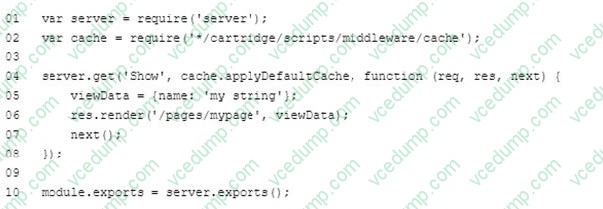
Why would a JavaScript debugger, that is stopped at line 06, fall to show the viewdata variable in the inspection tool?
A. cache. applyDefauItCache is not a valid middleware. B. viewdata is declared but not assigned. C. viewdata is assigned but not declared. D. viewdata is a B2C Script reserved name.
C. viewdata is assigned but not declared. In the given SFRA controller code, viewData is indeed assigned a value within the function but it is not explicitly declared using JavaScript's declaration keywords like var, let, or const. This can lead to situations where a JavaScript debugger might not show viewData as expected because it is not recognized as a defined variable within the local scope of the function. This kind of issue is common in environments where strict mode is enabled or when debugging tools strictly enforce variable declarations.
Question 96:
A developer needs to render a Page Designer page in JSON format. What is the correct syntax?
A. PageMgr.serializePage(pageID), {parameter1:value1}}; B. JSON.stringgify(PageMgrrenderpage(pageID), {paramter1:value1}}: C. PageMgr,renderPage{pageID, {parameter1: value1}}
C. PageMgr,renderPage{pageID, {parameter1: value1}} The correct syntax to render a Page Designer page in JSON format in Salesforce B2C Commerce is Option C: PageMgr.renderPage(pageID, {parameter1: value1}). This syntax correctly invokes the renderPage method from the PageMgr class, which is used to render pages constructed with the Page Designer tool. The method accepts the page ID and an object representing additional parameters, allowing the developer to specify how the page should be rendered, including format specifications like JSON.
Question 97:
Which code sample is required to use a custom tag provided in SiteGenesis in an ISML template?
D. dw.util.CustomTagMgr.createCustomTag("mytag");
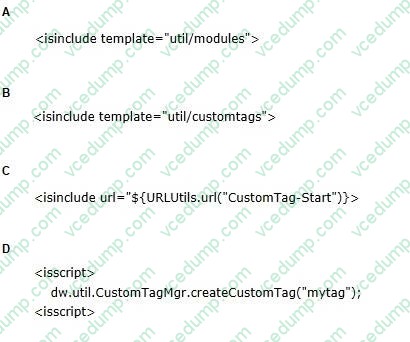
B To use a custom tag defined in SiteGenesis within an ISML template, the correct code snippet is Option B: This ISML tag includes the custom tag definitions from the specified template into the current template, making the custom tags available for use within the template. This method follows the best practice in ISML template development for reusing common functionality defined in separate templates, as outlined in the Salesforce B2C Commerce ISML template documentation and guidelines.
Question 98:
A client has a requirement to render different content on the homepage based on if the customer is logged in or guest user.
What should a developer implement to achieve this requirement?
A. Write specific custom code in the Content Asset for a customer that is a registered, versus unregistered, user. B. Set the Content Slot configuration so it is based on the system customer group registered, versus unregistered. C. Set the Content Asset configuration for a customer that is a registered, versus unregistered, user. D. Add specific custom messages in Page Designer for a customer that is a registered, versus unregistered, user.
B. Set the Content Slot configuration so it is based on the system customer group registered, versus unregistered. To display different content on the homepage based on whether the customer is logged in (registered) or is a guest (unregistered), the recommended approach is to use Content Slots configured for different customer groups. Salesforce B2C Commerce Cloud allows the configuration of Content Slots to display specific content based on various criteria, including customer groups. By setting up these slots to differentiate between registered and unregistered users, the site can dynamically display tailored content to users based on their logged-in status. This method leverages the platform's built-in capabilities for personalizing user experience without the need for extensive custom coding.
Question 99:
A business user wants to add a link to a content page from within the body of another content asset. The target content asset ID is: terms-and-conditions. Which link function generates the correct link?
A. $include(`Page-Include', `cid',`terms-and-conditions')$ B. $http(`Content-Page', `cid', `terms-and-conditions')$ C. $httpUrl(`Content-Show', `cid', `terms-and-conditions')$ D. $url(`Page-Show', `cid', `terms-and-conditions')$
C. $httpUrl(`Content-Show', `cid', `terms-and-conditions')$ In Salesforce B2C Commerce, the $httpUrl method is used to generate a fully qualified URL to a specified route. For creating a link within a content asset to another content asset, you should use the $httpUrl function with the appropriate pipeline and parameters. In this case, 'Content-Show' is the correct pipeline to use for fetching content assets based on their ID, and the 'cid' parameter specifies the content asset ID. Thus, $httpUrl('Content- Show', 'cid', 'terms-andconditions')$ correctly generates the URL needed to link to the content asset with the ID "terms-and-conditions".
Question 100:
Once the Cache Information tool of the storefront toolkit isenabled, how can a Digital Developer view caching information for a particular component of the page?
A. Hover over the caching icons now present on the storefront. B. Open the Request Logs to view the caching information. C. Start a pipeline debugging session and view the caching information provided. D. Right-click on the component in UX Studio and view the caching properties of the file.
A. Hover over the caching icons now present on the storefront. Once the Cache Information tool in the storefront toolkit is enabled, a Digital Developer can view caching information for page components by simply hovering over the caching icons that appear on the storefront. This method, option A, provides an immediate and visual means of inspecting cache statuses and properties directly within the context of the storefront page. It allows developers to quickly assess which components are cached and understand their caching characteristics without the need to delve into backend logs or debugging sessions. More information on this tool and its usage can be found in the "Storefront Toolkit" and "Cache Management" sections of the Salesforce Commerce Cloud documentation.
Nowadays, the certification exams become more and more important and required by more and more
enterprises when applying for a job. But how to prepare for the exam effectively? How to prepare
for the exam in a short time with less efforts? How to get a ideal result and how to find the
most reliable resources? Here on Vcedump.com, you will find all the answers.
Vcedump.com provide not only Salesforce exam questions,
answers and explanations but also complete assistance on your exam preparation and certification
application. If you are confused on your B2C-COMMERCE-DEVELOPER exam preparations
and Salesforce certification application, do not hesitate to visit our
Vcedump.com to find your solutions here.