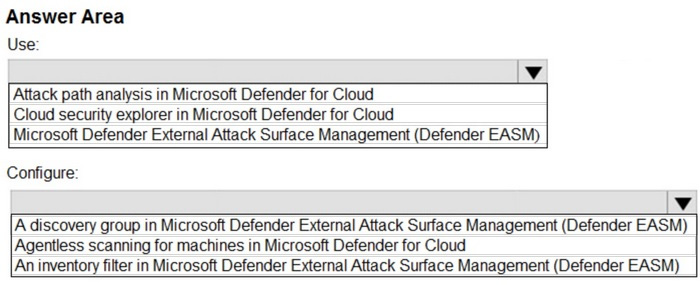
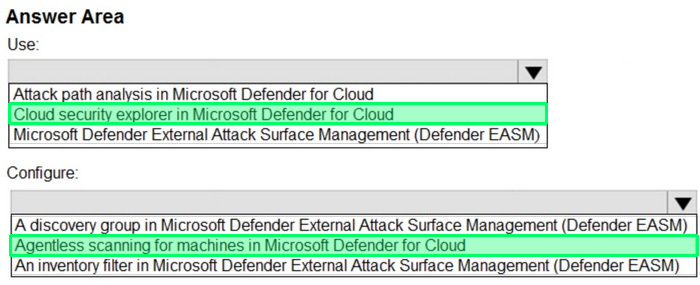
Box 1: Cloud Security Explorer in Microsoft Defender for Cloud Use
Microsoft Defender for Cloud, Build queries with cloud security explorer With the cloud security explorer, you can query all of your security issues and environment context such as assets inventory, exposure to internet, permissions, and lateral movement between resources and across multiple clouds (Azure AWS, and GCP).
Box 2: Agentless scanning for machines in Microsoft Defender for Cloud Configure Microsoft Defender for Cloud improves compute posture for Azure, AWS and GCP environments with machine scanning. For requirements and support, see the compute support matrix in Defender for Cloud.
Agentless scanning for virtual machines (VM) provides:
*-> Broad, frictionless visibility into your software inventory using Microsoft Defender Vulnerability Management. Deep analysis of operating system configuration and other machine meta data. Vulnerability assessment using Defender Vulnerability Management. Secret scanning to locate plain text secrets in your compute environment. Threat detection with agentless malware scanning, using Microsoft Defender Antivirus.
Incorrect:
* A discovery group in Microsoft Defender External Attack Surface Management (Defender EASM) Discovered assets are indexed and classified in your Defender EASM Inventory, providing a dynamic record of all web infrastructure under the organization's management. Assets are categorized as recent (currently active) or historic, and can include web applications, third party dependencies, and other asset connections.
Discovery groups Custom discoveries are organized into discovery groups. They're independent seed clusters that comprise a single discovery run and operate on their own recurrence schedules. You organize your discovery groups to delineate assets in whatever way best benefits your company and workflows. Common options include organizing by the responsible team or business unit, brands, or subsidiaries.
* An inventory filter in Microsoft Defender External Attack Surface Management (Defender EASM) Defender EASM inventory filters Filtering helps you find specific subsets of inventory assets based on selected parameters. This article outlines each filter and operator and provides guidance on input options that yield the best results. It also explains how to save queries for easy accessibility to the filtered results.
References:
https://learn.microsoft.com/en-us/azure/defender-for-cloud/how-to-manage-cloud-security-explorer
https://learn.microsoft.com/en-us/azure/defender-for-cloud/concept-agentless-data-collection
https://learn.microsoft.com/en-us/azure/external-attack-surface-management/inventory-filters