AZ-700 Exam Details
-
Exam Code
:AZ-700 -
Exam Name
:Designing and Implementing Microsoft Azure Networking Solutions -
Certification
:Microsoft Certifications -
Vendor
:Microsoft -
Total Questions
:452 Q&As -
Last Updated
:Jul 08, 2026
Microsoft AZ-700 Online Questions & Answers
-
Question 81:
You have an Azure environment.
You need to create a private connection between Azure PaaS and hosted services.
Which Azure Service should you deploy?
A. Azure Private Link
B. Azure Service Endpoint
C. Azure NaaS (network as a service) -
Question 82:
HOTSPOT
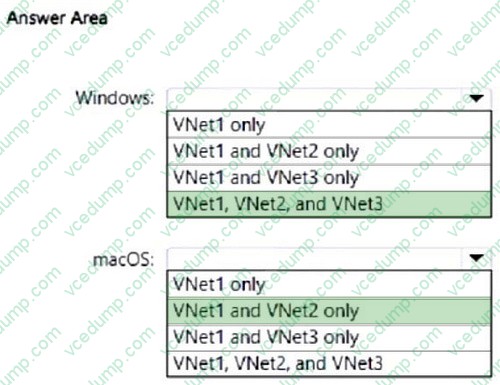
You have an Azure subscription that contains the virtual networks shown in the following table.
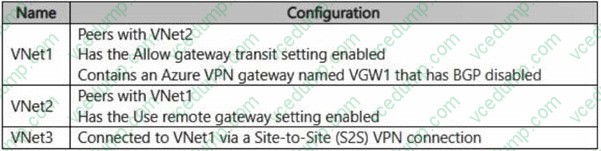
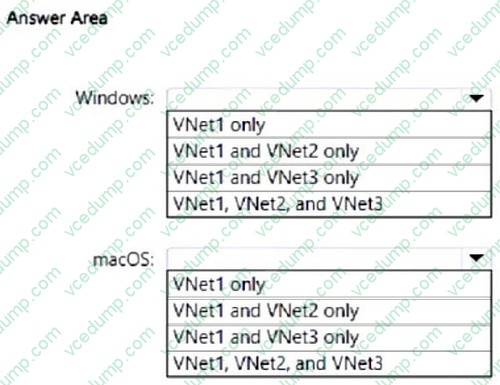
You have devices that run either Windows or macOS. The devices connect to VGW1 by using the OpenVPN protocol.
Which virtual networks can each device access? To answer, select the appropriate options in the answer area.
NOTE: Each correct answer is worth one point.
-
Question 83:
You have an on-premises network named Site1.
You have an Azure subscription that contains a virtual network named VNet1 and a storage account named storage1.
Site1 and VNet1 are connected by using a Site-to-Site (S2S) VPN.
You need to ensure that the servers in Site1 can connect to storage1 by using the S2S VPN. The solution must minimize administrative effort.
What should you create on VNet1?
A. an Azure application gateway
B. an Azure Private Link service
C. a service endpoint
D. a private endpoint -
Question 84:
HOTSPOT
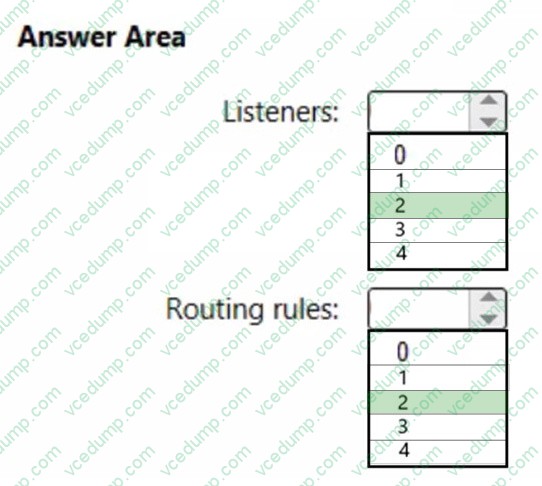
You have two Azure App Service instances that host the web apps shown the following table.
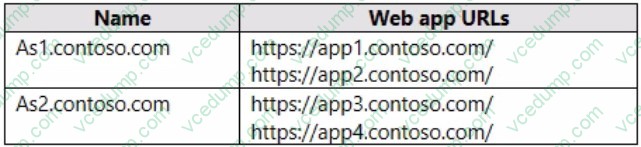
You deploy an Azure 2 that has one public frontend IP address and two backend pools.
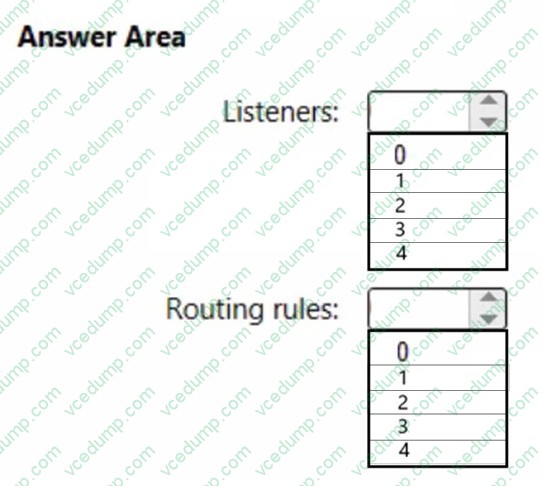
You need to publish all the web apps to the application gateway. Requests must be routed based on the HTTP host headers.
What is the minimum number of listeners and routing rules you should configure? To answer, select the appropriate options in the answer area.
NOTE: Each correct selection is worth one point.
-
Question 85:
You plan to configure BGP for a Site-to-Site VPN connection between a datacenter and Azure.
Which two Azure resources should you configure? Each correct answer presents a part of the solution. (Choose two.)
NOTE: Each correct selection is worth one point.
A. a virtual network gateway
B. Azure Application Gateway
C. Azure Firewall
D. a local network gateway
E. Azure Front Door -
Question 86:
SIMULATION
Username and password
Use the following login credentials as needed:
To enter your username, place your cursor in the Sign in box and click on the username below.
To enter your password, place your cursor in the Enter password box and click on the password below.
Azure Username: [email protected] Azure Password: xxxxxxxxxx
If the Azure portal does not load successfully in the browser, press CTRL-K to reload the portal in a new browser tab.
The following information is for technical support purposes only:
Lab Instance: 12345678
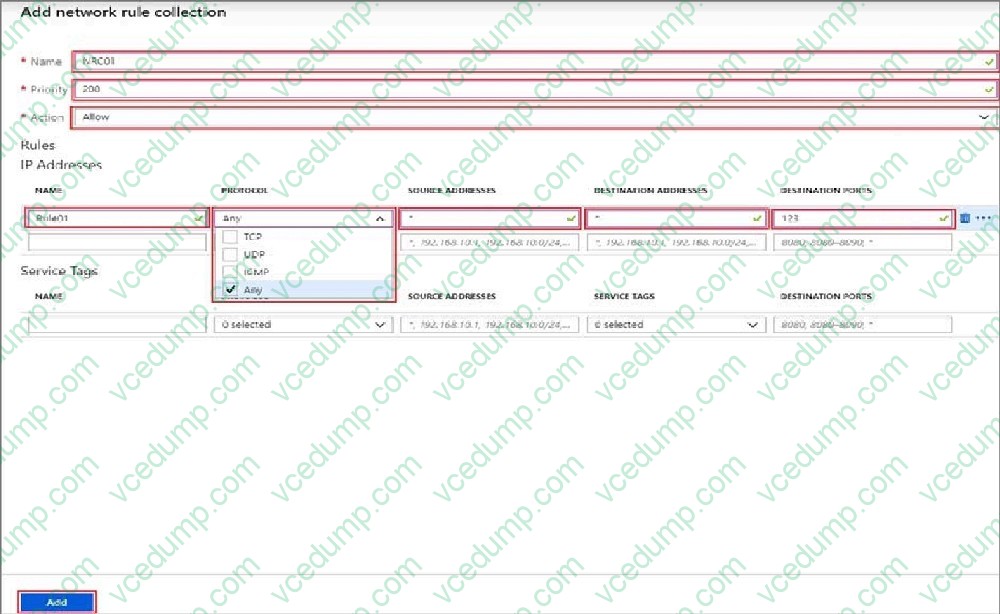
You need to block all outbound internet traffic for HTTP and HTTPS that originates from subnet1-1. All other traffic must be allowed.
To complete this task, sign in to the Azure portal.
A. See explanation below.
B. PlaceHolder
C. PlaceHolder
D. PlaceHolder -
Question 87:
You have deployed a virtual named VM1 that connects over port number 4444 to an application named App1.
App1 is hosted in your on-premises environment.
You discover that VM1 is not able to connect to App1.
You need to verify whether the issue relates to the network security groups.
What should you use?
A. Diagnostic settings in Azure Monitor
B. Diagnose and solve problems in Traffic Manager Profiles
C. The security recommendations in Azure Advisor
D. IP flow verify in Azure Network Watcher -
Question 88:
HOTSPOT
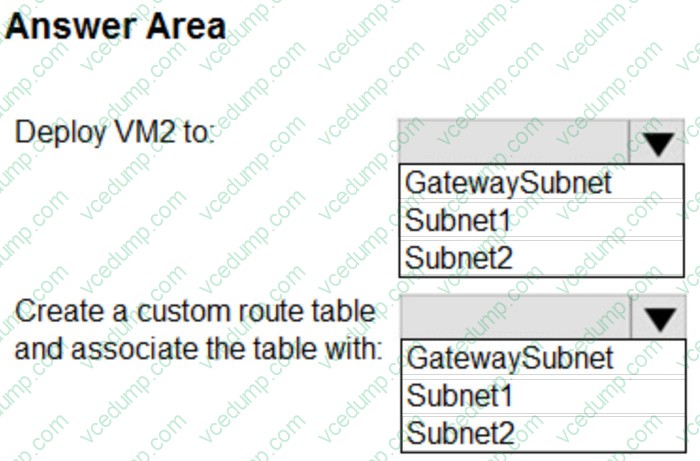
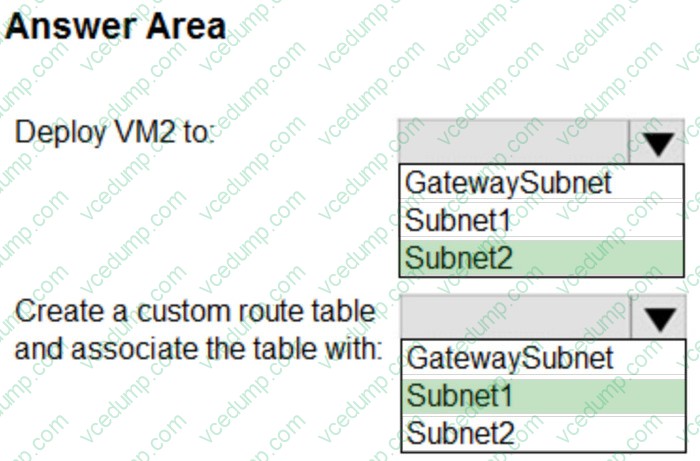
You have an Azure subscription that contains a virtual machine named VM1 and a virtual network named Vnet1. Vnet1 contains three subnets named Subnet1, Subnet2 and GatewaySubnet. VM1 is connected to Subnet 1.
You plan to deploy a new virtual machine named VM2 that will perform network traffic routing and inspection.
You need to ensure that all the traffic from VM1 to the internet will be routed through VM2.
What should you do? To answer, select the appropriate options in the answer area.
NOTE: Each correct selection is worth one point.
-
Question 89:
You have an Azure subscription that contains a virtual network named Vnet1. Vnet1 contains 20 subnets and 500 virtual machines. Each subnet contains a virtual machine that runs network monitoring software.
You have a network security group (NSG) named NSG1 associated to each subnet.
When a new subnet is created in Vnet1 an automated process creates an additional network monitoring virtual machine in the subnet and links the subnet to NSG1.
You need to create an inbound security rule in NSG1 that will allow connections to the network monitoring virtual machines from an IP address of 131.107.1.15. The solution must meet the following requirements:
1. Ensure that only the monitoring virtual machines receive a connection from 131.1071.15.
2. Minimize changes to NSG1 when a new subnet is created.
What should you use as the destination in the inbound security rule?
A. an application security group
B. a service tag
C. a virtual network
D. an IP address -
Question 90:
HOTSPOT
You have the network security groups (NSGs) shown in the following table.
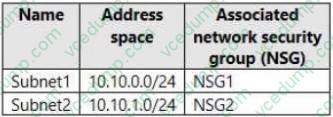
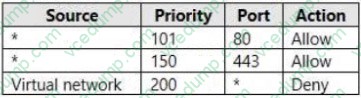
In NSG1, you create inbound rules as shown in the following table.
You have the Azure virtual machines shown in the following table.
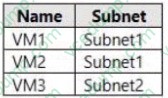
NSG2 has only the default rules configured.
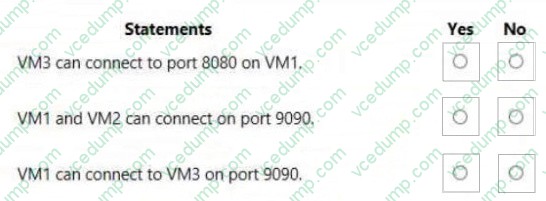
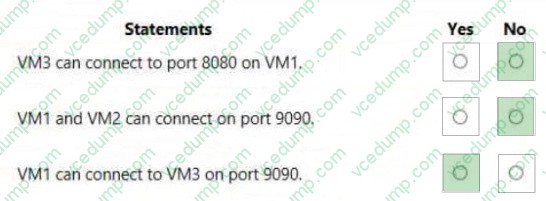
For each of the following statements, select Yes if the statement is true. Otherwise, select No.
NOTE: Each correct selection is worth one point.
You have an Azure virtual network that contains the subnets shown in the following table.
Related Exams:
-
62-193
Technology Literacy for Educators -
70-243
Administering and Deploying System Center 2012 Configuration Manager -
70-355
Universal Windows Platform – App Data, Services, and Coding Patterns -
77-420
Excel 2013 -
77-427
Excel 2013 Expert Part One -
77-725
Word 2016 Core Document Creation, Collaboration and Communication -
77-726
Word 2016 Expert Creating Documents for Effective Communication -
77-727
Excel 2016 Core Data Analysis, Manipulation, and Presentation -
77-728
Excel 2016 Expert: Interpreting Data for Insights -
77-731
Outlook 2016 Core Communication, Collaboration and Email Skills
Tips on How to Prepare for the Exams
Nowadays, the certification exams become more and more important and required by more and more enterprises when applying for a job. But how to prepare for the exam effectively? How to prepare for the exam in a short time with less efforts? How to get a ideal result and how to find the most reliable resources? Here on Vcedump.com, you will find all the answers. Vcedump.com provide not only Microsoft exam questions, answers and explanations but also complete assistance on your exam preparation and certification application. If you are confused on your AZ-700 exam preparations and Microsoft certification application, do not hesitate to visit our Vcedump.com to find your solutions here.