APPLE-DEVICE-SUPPORT Exam Details
-
Exam Code
:APPLE-DEVICE-SUPPORT -
Exam Name
:Apple Device Support -
Certification
:Apple Certifications -
Vendor
:Apple -
Total Questions
:214 Q&As -
Last Updated
:Jul 14, 2026
Apple APPLE-DEVICE-SUPPORT Online Questions & Answers
-
Question 181:
DRAG DROP
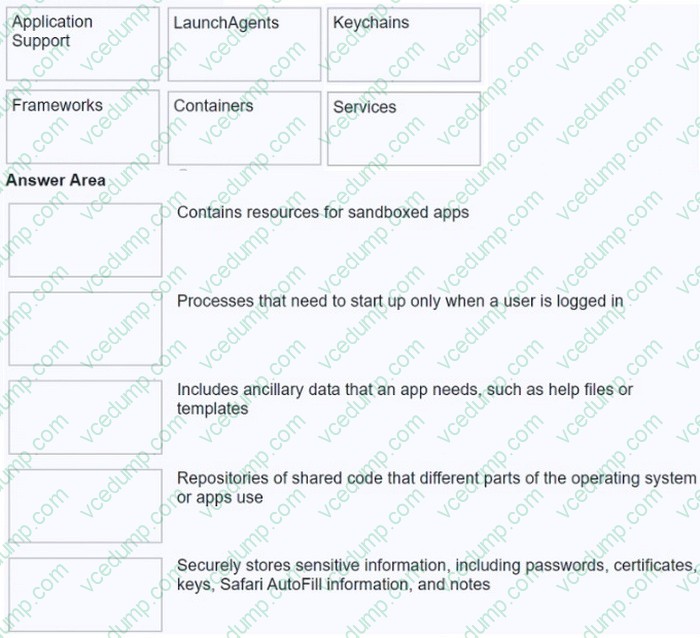
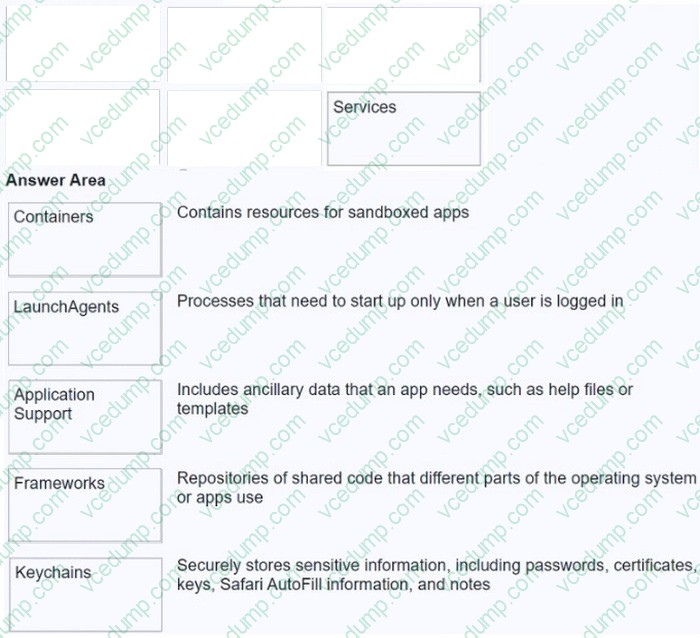
Match the macOS library resources listed on the left to the descriptions on the right by dragging responses to the correct target areas. Responses may be used once, more than once, or not at all.
Select and Place:
-
Question 182:
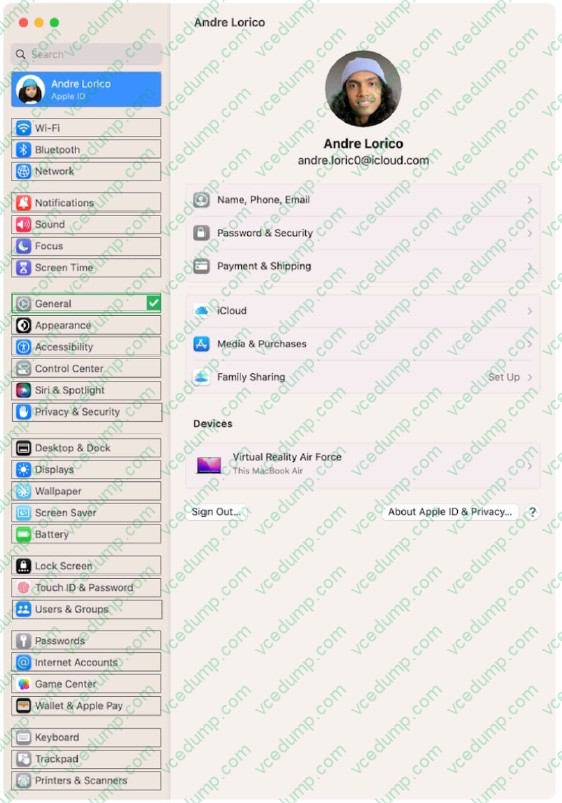
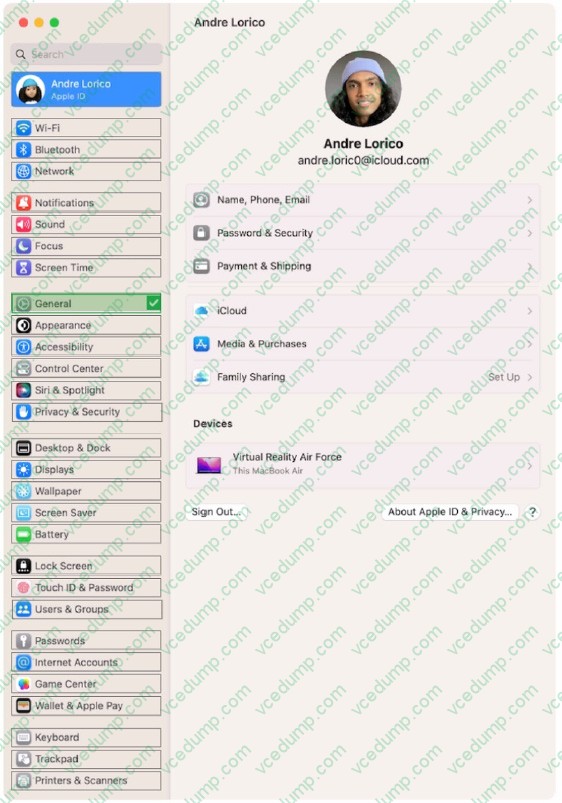
HOTSPOT
Select the setting in the sidebar that you should use to automatically keep your Mac up to date.
Hot Area:
-
Question 183:
Where can you view the amount of memory that apps are using?
A. Console
B. Apple Diagnostics
C. System Information
D. Activity Monitor -
Question 184:
Which Wi-Fi authentication settings does Apple recommend for better security for Wi-Fi routers and access points?
A. WPA3 Personal or WPA Personal
B. WPA3 Personal or WPA/WPA2
C. WPA3 Personal or WPA2/WPA3 Transitional
D. WPA2/WPA3 Transitional or WEP Transitional Security Network -
Question 185:
A user can't open an app on their iPhone. Which two methods help them open the app? (Select two.)
A. Force the app to close and reopen.
B. Correct errors in Settings > Apps > [app name].
C. Tap and hold the app, then choose Relaunch from the shortcut menu.
D. Delete the app, then redownload it.
E. Edit Location Access settings for the app. -
Question 186:
Use this image to answer the question.
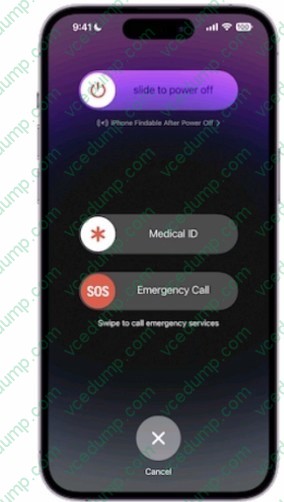
How do you get to this screen on iPhone?
A. Press and hold the side button and one of the volume buttons until the Emergency SOS slider appears.
B. Press the side button then one of the volume buttons. The Emergency Call slider appears.
C. Rapidly press the volume up button five times. The Emergency Call slider appears.
D. Press and hold the side button, then drag the Emergency Call slider to call emergency services. -
Question 187:
Which IP address might indicate a DHCP issue?
A. 10.0.1.17
B. 169.254.47.72
C. 192.168.17.12
D. 172.27.13.47 -
Question 188:
Which feature limits what a root user can do to macOS?
A. XProtect
B. Full Disk Access
C. System Integrity Protection
D. Secure Enclave -
Question 189:
Where in Recovery app > Recovery Log can you set the view to display only error messages?
A. Message Type
B. Detail Level
C. Log Type
D. Filter Level -
Question 190:
What's the first action you should try when an app is unresponsive?
A. Contact the developer
B. Force the app to quit and reopen it
C. Update iOS or iPadOS
Related Exams:
-
9L0-004
Apple Desktop Service Exam -
9L0-005
Apple Desktop Service Certification Exam -
9L0-006
Apple Macintosh Service Exam -
9L0-007
Macintosh Service Certification Exam -
9L0-009
Macintosh Service Certification Exam -
9L0-011
Mac Service Certification Exam -
9L0-012
Mac Service Certification -
9L0-060
Mac OS X 10.4 Service and Support Exam -
9L0-061
MAC OS X 10.5 Troubleshooting Exam -
9L0-062
Mac OS X v10.6 Troubleshooting Exam
Tips on How to Prepare for the Exams
Nowadays, the certification exams become more and more important and required by more and more enterprises when applying for a job. But how to prepare for the exam effectively? How to prepare for the exam in a short time with less efforts? How to get a ideal result and how to find the most reliable resources? Here on Vcedump.com, you will find all the answers. Vcedump.com provide not only Apple exam questions, answers and explanations but also complete assistance on your exam preparation and certification application. If you are confused on your APPLE-DEVICE-SUPPORT exam preparations and Apple certification application, do not hesitate to visit our Vcedump.com to find your solutions here.