Apple APPLE-DEVICE-SUPPORT Online Practice
Questions and Exam Preparation
APPLE-DEVICE-SUPPORT Exam Details
Exam Code
:APPLE-DEVICE-SUPPORT
Exam Name
:Apple Device Support
Certification
:Apple Certifications
Vendor
:Apple
Total Questions
:214 Q&As
Last Updated
:Jul 14, 2026
Apple APPLE-DEVICE-SUPPORT Online Questions &
Answers
Question 151:
Which feature is available for Managed Apple Accounts but not for personal Apple Accounts?
A. Access to the Appleseed for IT beta program B. Security Key Rotation C. Managed iCloud Keychain D. Managed and verified two-factor authentication
A. Access to the Appleseed for IT beta program
Question 152:
How do you limit access to your location in "Precise Location Access" for certain apps on your iPad?
A. Go to Settings > General > Location Services, then edit the settings for each app. B. Open each app and edit the Location Access settings. C. Delete and reinstall the app. D. Go to Settings > Privacy and Security > Location Services, then edit settings for each app.
D. Go to Settings > Privacy and Security > Location Services, then edit settings for each app.
Question 153:
How many days do you have to recover deleted files from iCIoud Drive?
A. 15 B. 45 C. 60 D. 30
D. 30 You can recover files you deleted from iCloud Drive within the last 30 days, whether you deleted them on iCloud.com or another device that has iCloud Drive turned on. However, you can't recover or restore files you permanently remove. To recover files from iCloud Drive, you can use the Recently Deleted folder in iCloud Drive or the Restore Files option in Account Settings on iCloud.com. For instructions, see the references below. References: Recover deleted files on iCloud.com, Recover recently deleted iCloud Drive files in iCloud for Windows, How to Recover Deleted Files from iCloud Drive
Question 154:
HOTSPOT
Scenario
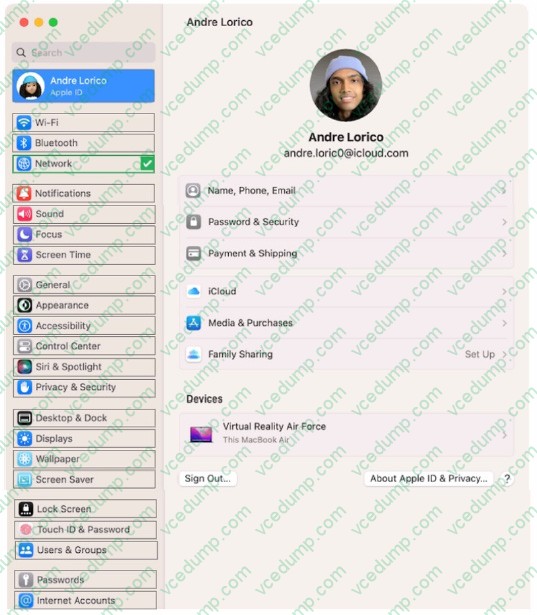
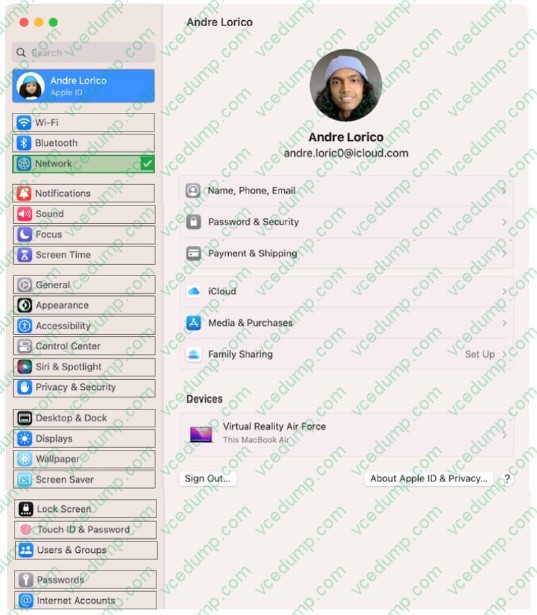
Andre created a Keynote presentation on his iPad that he wants to access on the desktop of his MacBook Air.
Select the setting in the sidebar that Andre should turn on to access iCIoud Drive on his Mac.
Hot Area:
Explanation/Reference:
Question 155:
Select Four.
Which iPads is the Apple Pencil 1st gen compatible with?
A. iPad Air (3rd gen) B. iPad Air (4th gen) C. iPad (6th gen and newer) D. iPad Pro 12.9 inch (1st and 2nd gen) E. iPad Mini (5th gen) F. iPad Pro 12.9 inch (2nd and 3rd gen)
A. iPad Air (3rd gen) C. iPad (6th gen and newer) D. iPad Pro 12.9 inch (1st and 2nd gen) E. iPad Mini (5th gen) The Apple Pencil (1st gen) is a stylus that allows you to draw, write, and interact with your iPad in a natural and precise way. The Apple Pencil (1st gen) has a Lightning connector that you can use to pair and charge it with your iPad. It also supports pressure and tilt sensitivity, palm rejection, and low latency. The Apple Pencil (1st gen) is compatible with any iPad that has a Lightning port and supports Apple Pencil. According to the Apple Device Support Reference Materials1, these iPad models are: iPad Air (3rd gen) iPad (6th, 7th, 8th, and 9th gen) iPad Pro 12.9-inch (1st and 2nd gen) iPad Pro 10.5-inch iPad Pro 9.7-inch iPad mini (5th gen) Therefore, the correct answer is A, C, D, and E. References: Apple Pencil compatibility - Apple Support.
Question 156:
How do you quit out of a man page in Terminal Mac?
A. less B. clear C. q D. esc
C. q To quit out of a man page in Terminal Mac, you need to press the q key on your keyboard. A man page is a manual page that shows the usage and syntax of a command or a program. The man command uses a pager program to display the man page on the screen. A pager program is a program that lets you view a text file one page at a time, or scroll up and down. The default pager program for the man command is less, which is a more advanced version of the more program. The q key is the command to quit the less program and return to the shell prompt. The other options, less, clear, and esc, are not valid ways to quit out of a man page in Terminal Mac. Less is the name of the pager program, not a command. Clear is a command to clear the screen, not to quit the pager program. Esc is a key to escape from certain modes or commands, not to quit the pager program. References: 1. How to Exit the MAN Command and Quit Man Pages Properly - OS X Daily 2. How to escape out of the MAN screen or page in UNIX? - Stack Overflow 3. How to use the command manual in Terminal | Macworld 4 How to Quit the MAN Command and Exit Man Pages Properly - Bollyinside
Question 157:
You've forgotten your login password or it's locked from too many failed attempts to log in.
What's the alternative method to unlock FileVault and reset your password?
A. Create a new local recovery key. B. Use iCIoud Account Recovery. C. Call AppleCare to create a new account recovery key.
B. Use iCIoud Account Recovery. iCloud Account Recovery is an alternative method to unlock FileVault and reset your password if you've forgotten your login password or it's locked from too many failed attempts to log in. iCloud Account Recovery allows you to use your Apple ID and password to unlock your Mac and reset your user account password, if you stored your FileVault recovery key in iCloud when you turned on FileVault. To use iCloud Account Recovery, you need to restart your Mac and enter the Password Reset Assistant from the FileVault login screen or from Recovery Mode. Then, you need to select "I forgot my password" and sign in with your Apple ID and password. Follow the onscreen instructions to unlock your Mac and reset your password. References: = Apple - Support - Manuals, Find My User Guide, iCloud Account Recovery; Apple Device Support Exam Prep Guide, page 6.
Question 158:
Several managed apps used for work collaboration disappeared from a user-owned iPhone. Which user action would cause this?
A. Resetting network settings B. Unenrolling from the organization's MDM solution C. Releasing the device from Apple Business Manager D. Signing out of their personal Apple Account
B. Unenrolling from the organization's MDM solution
Question 159:
You install software that contains a system extension on a Mac. An alert appears. What should you do?
A. Restart the Mac in Safe Mode, and use Control Center to reinstall the extension. B. Use System Information to inspect and notarize the extension, then restart the Mac. C. Open Migration Assistant, and update the extension to be compatible with the current version of macOS. D. Open Privacy and Security settings, allow the extension, and restart the Mac.
D. Open Privacy and Security settings, allow the extension, and restart the Mac.
Question 160:
Which two types of Activation Lock are available to organizations?
A. Individual-linked B. Device-linked C. User-linked D. Personal E. Organization
B. Device-linked C. User-linked Activation Lock is a feature that prevents unauthorized use of an Apple device after it has been erased. It is enabled automatically when a user turns on Find My on their device. However, for devices that are owned or managed by an organization, there are two types of Activation Lock available: device-linked and user-linked. Device-linked Activation Lock requires Apple School Manager, Apple Business Manager, or Apple Business Essentials and an MDM solution. It allows the MDM solution to control turning Activation Lock on and off through server-side interactions, without depending on the user's Apple ID or Find My settings. The MDM solution creates and sends a bypass code to Apple servers when it needs to lock or unlock the device. User-linked Activation Lock requires the user to have a personal Apple ID (not a Managed Apple ID) and to turn on Find My on their device. This method allows the user to lock an organization-linked device to their personal Apple ID if the MDM solution has allowed Activation Lock. The MDM solution should request and store a bypass code from the device before allowing the user to turn on Activation Lock. This bypass code can be used to turn off Activation Lock remotely with MDM, or directly on the device, if the user is unable to authenticate with their Apple ID. References: Activation Lock on Apple devices - Apple Support Activation Lock: How Apple Admins Can Manage It - Kandji Disable Activation Lock on Apple devices with Intune
Nowadays, the certification exams become more and more important and required by more and more
enterprises when applying for a job. But how to prepare for the exam effectively? How to prepare
for the exam in a short time with less efforts? How to get a ideal result and how to find the
most reliable resources? Here on Vcedump.com, you will find all the answers.
Vcedump.com provide not only Apple exam questions,
answers and explanations but also complete assistance on your exam preparation and certification
application. If you are confused on your APPLE-DEVICE-SUPPORT exam preparations
and Apple certification application, do not hesitate to visit our
Vcedump.com to find your solutions here.