Atlassian ACP-520 Online Practice
Questions and Exam Preparation
ACP-520 Exam Details
Exam Code
:ACP-520
Exam Name
:Atlassian Cloud Organization Admin
Certification
:Atlassian Certifications
Vendor
:Atlassian
Total Questions
:65 Q&As
Last Updated
:Jul 10, 2026
Atlassian ACP-520 Online Questions &
Answers
Question 11:
You are looking at the Jira Service Management product page on the "beta" site.
On this page, product access to Jira Service Management is granted to three groups, as shown.
Which action can the org admin perform on this page?
A. Update "jira-servicemanagement-users-beta" so it is not a default group. B. Remove "hr-managers" from the product. C. Remove "jira-servicemanagement-users-beta" from the product. D. Make "site-admins" a default group. E. Delete "hr-managers" group.
C. Remove "jira-servicemanagement-users-beta" from the product.
Explanation/Reference:
The org admin can remove a group from a product, but they cannot update or delete a group, or make a group a default group.
References:
How to prepare for ACP-520 Atlassian Cloud Organization Admin Learn about Atlassian organizations
Question 12:
The following tasks need to be performed:
1.
Verify an email domain
2.
Configure an email handler in Jira Software
3.
Add a custom email address.
4.
Customize a notification scheme for a Jira Software project
5.
Manage personal notification settings
How many of these tasks can be performed only by an org admin?
A. none B. one C. two D. all E. three
C. two
Explanation/Reference:
Out of the five tasks, only verifying an email domain and adding a custom email address require org admin permissions. Configuring an email handler, customizing a notification scheme, and managing personal notification settings can be done by project admins or site admins. References: Verify a domain to manage accounts, Add custom email addresses for product notifications, Create issues and comments from email, Configure notification schemes, Manage your Jira personal settings
Question 13:
In your organization, you navigate to Directory > Managed accounts, and you see the following:
What can you definitely conclude?
A. You have 8 verified domains. B. You have 8 verified email addresses. C. You have 8 entries on that page. D. You have 8 billable users.
D. You have 8 billable users.
Explanation/Reference:
The table is showing the total number of managed accounts in the organization and the number of deactivated accounts. The total number of managed accounts is the number ofbillable users in the organization, regardless of whether they have verified their email addresses or not. The deactivated accounts are the accounts that have been suspended by the organization admin and do not consume a license. Therefore, you can definitely conclude that you have 8 billable users in your organization12 References = View and manage your bill, Remove or suspend a user
Question 14:
Alpha Corp. recently acquired one of its competitors, Beta Corp.
Each company had its own Atlassian Cloud organization.
You would like to manage users and groups from both corporations in a single location.
Identify the correct feature to use.
A. Organization insights B. Release tracks C. Verify domains D. Transfer products E. Identity providers
D. Transfer products
Explanation/Reference:
If you want to manage users and groups from both corporations in a single location, you need to consolidate your Atlassian Cloud organizations. This can be done by transferring all product instances in one organization to another. After the transfer, the unwanted organization is deleted1. This feature is called Transfer products and it is available from the organization settings2. The other options are not features that can help you merge your organizations. Organization insights is a feature that provides analytics and reports on your organization's users, products, and security3. Release tracks is a feature that allows you to choose when your cloud products receive new features and improvements4. Verify domains is a feature that allows you to manage the Atlassian accounts of your users and apply security policies to them5. Identity providers is a feature that allows you to integrate your organization with external identity services, such as SAML or SCIM6. References : Should I merge my Atlassian organizations? Transfer all products to another organization View organization insights Choose a release track for your cloud products Verify a domain to manage accounts Manage users from your identity provider
Question 15:
Your company has a single Atlassian Cloud organization.
Atlassian Access discovered "shadow IT".
Which statement explains how this occurred?
A. One of your managed accounts created a product in another Cloud organization. B. One of your users has multiple Atlassian IDs under different email addresses. C. The same domain was verified under both Settings > Domains and Settings > Emails. D. One of your groups provides default group access for multiple products. E. A domain was verified both by your organization and another Cloud organization.
A. One of your managed accounts created a product in another Cloud organization.
Explanation/Reference:
Shadow IT refers to the product creation and usage administered outside of an organization's IT department, which can lead to unexpected costs, security and compliance concerns, and operational complexity1. Atlassian Access is a service that provides enhanced security and governance features for Atlassian Cloud products, such as SAML SSO, user provisioning, enforced two-step verification, and audit logs2. Atlassian Access also offers a feature called automatic product discovery, which helps admins discover and manage the shadow IT products created by their managed users1. A managed user is a user whose account is on a domain that is verified by an organization3. A verified domain is a domain that an organization has proven ownership of by adding a DNS or HTTPS record4. For example, if an organization verifies the domain acme.com, then any user with an email address ending with @acme.com is a managed user of that organization. A product is an instance of an Atlassian Cloud product, such as Jira Software, Confluence, Bitbucket, or Trello5. A product belongs to a site, which is a collection of products that share a URL and administration settings6. A site belongs to an organization, which is a way to group and manage multiple sites and products under one central admin console7. A managed user can create a product in another Cloud organization by using their work email address to sign up for a new site or join an existing site that is not owned by their organization1. This creates a shadow IT product that is not visible or controlled by their organization's admins. Atlassian Access can discover these shadow IT products by scanning the domains of all Atlassian Cloud products and matching them with the domains of the organizations that have Atlassian Access enabled1. Atlassian will proactively send an email to the organization admins with the number of shadow IT products created by their managed users and what the exact shadow IT product is. Within admin.atlassian.com, organization admins can also view additional information, such as the owner of these products, how many users are in that product, and the date it was created1. Therefore, the statement that explains how Atlassian Access discovered shadow IT is that one of your managed accounts created a product in another Cloud organization. References : Automatic product discovery in Atlassian Access Atlassian Access: Enhanced Cloud Data Security and Governance What is a managed account? Verify a domain to manage accounts What is a product? Understand Atlassian sites and organizations What is an Atlassian organization?
Question 16:
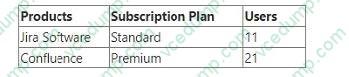
Your billing preview appears as shown.
In order to keep your license count in control, you just removed a user who had access to both products. What will happen to your subscriptions immediately afterward?
A. The subscriptions will remain the same. B. Confluence will be downgraded to a Standard plan. C. Confluence will begin a Standard plan trial period. D. Jira Software will be downgraded to a Free plan. E. Jira Software will begin a Free plan trial period.
A. The subscriptions will remain the same.
Explanation/Reference:
Removing a user from an Atlassian Cloud Organization does not affect the subscription plan for the products. The subscription plan remains the same until you change it manually or it expires. The billing preview shows the estimated cost for the next billing cycle based on the current number of users and the subscription plan. If you remove a user, the billing preview will reflect the reduced cost, but the subscription plan will not change12 References = Manage product access, Manage your bill for Standard and Premium plans
Question 17:
Foogie performed the following task.
He navigated to the Project Role Browser and set a default group in the Developers project role.
What admin privileges does Foogie definitely have?
A. Product admin role for Jira Administration B. project admin role C. site admin role D. Product admin role for Confluence E. org admin role
C. site admin role
Explanation/Reference:
To access the Project Role Browser and set a default group for a project role, Foogie must have the Administer Jira global permission, which is granted by the site admin role1. The product admin role for Jira Administration does not have this permission2. The project admin role can only manage project role members for specific projects, not the default members3. The product admin role for Confluence and the org admin role are irrelevant for this task. References: Manage project roles, Jira Cloud site and product administration, Project permissions
Question 18:
Your organization has multiple products. You need a count of billable users only for Jira Software, which is on a monthly subscription of the Standard plan on your
site "acme.atlassian.net".
Where can you find this information?
A. Directory > Users > Total users B. Directory > Managed accounts > Total C. Directory > Users > Active users D. Groups > "jira-software-users-acme" > Members E. Billing > Jira Software "acme.atlassian.net" > Users
E. Billing > Jira Software "acme.atlassian.net" > Users
Explanation/Reference:
The Billing page shows you the number of billable users for each product on your site, as well as the user tier and the monthly cost. You can filter by product and site to see the specific details for Jira Software on "acme.atlassian.net".
References:
How to prepare for ACP-520: Atlassian Cloud Organization Admin Certification, section "Manage product subscriptions and billing" Manage your bill for Standard and Premium plans, subsection "View your bill"
Question 19:
You are viewing a list of names under Directory > Users.
The status for Rolf shows as "Active".
Which statement is definitely true?
A. Rolf belongs to at least one group. B. Rolf's access has not been suspended. C. Rolf has a managed account. D. Rolf accessed your site within the past 24 hours. E. Rolf has access to at least one product.
B. Rolf's access has not been suspended.
Explanation/Reference:
The status "Active" means that the user has an active account and can access the products they have been granted access to1. It does not imply anything about the user's group membership, account type, last login time, or product access.
References:
Manage users in your organization
Question 20:
A new access request was just made by Beth.
She requested that Drew be granted access to Jira Software.
Which statement is definitely true?
A. Beth has the Product admin role for Jira Software. B. Beth has the User role for Jira Software. C. Drew is an existing user on the site. D. Drew is a new user on the site. E. Drew's email address is verified.
E. Drew's email address is verified.
Explanation/Reference:
The only statement that is definitely true is that Drew's email address is verified. This is because product access requests must be made by a user with a verified email address and Atlassian account1 The other statements are not necessarily true, as they depend on other factors, such as the roles and permissions of Beth and Drew, the existing users on the site, and the self-signup settings2 References = Approve or deny product access requests, Manage product access
Nowadays, the certification exams become more and more important and required by more and more
enterprises when applying for a job. But how to prepare for the exam effectively? How to prepare
for the exam in a short time with less efforts? How to get a ideal result and how to find the
most reliable resources? Here on Vcedump.com, you will find all the answers.
Vcedump.com provide not only Atlassian exam questions,
answers and explanations but also complete assistance on your exam preparation and certification
application. If you are confused on your ACP-520 exam preparations
and Atlassian certification application, do not hesitate to visit our
Vcedump.com to find your solutions here.