74-409 Exam Details
-
Exam Code
:74-409 -
Exam Name
:Server Virtualization with Windows Server Hyper-V and System Center -
Certification
:Microsoft Certifications -
Vendor
:Microsoft -
Total Questions
:99 Q&As -
Last Updated
:Dec 10, 2021
Microsoft 74-409 Online Questions & Answers
-
Question 51:
A company has Windows Server 2012 R2 servers that have the Hyper-V role installed. The guest virtual machines are configured as follows:

You need to ensure that the environment supports online virtual hard disk resizing. What should you do?
A. Convert the virtual machines to Generation 2 virtual machines.
B. Deploy clustered storage spaces.
C. Convert the drive format of the virtual machines to the VHDX file format.
D. Deploy Serial Attached SCSI (SAS). -
Question 52:
An organization has a private cloud infrastructure. The organization uses Windows Server 2012 R2 servers that have the Hyper-V role installed. The organization uses all components of System Center 2012 R2.
You use Virtual Machine Manager to configure four clouds and self-service groups. In addition, you configure price sheets for chargeback reporting in Service Manager. You must implement chargeback for private cloud customers.
You need to ensure that chargeback reports in Service Manager will return data. Which three actions should you perform? Each correct answer presents part of the solution.
A. In Service Manager, configure the Virtual Machine Manager Connector.
B. Configure integration between Virtual Machine Manager and Operations Manager.
C. Import a list of Hyper-V host servers into Service Manager by using the Import Instances from the CSV File tool.
D. In Service Manager, configure the Operations Manager configuration item connector.
E. In Service Manager, configure the Configuration Manager Connector.
F. In Service Manager, configure the Orchestrator connector. -
Question 53:
A Windows Server 2012 R2 Hyper-V host server has four network adapters that are connected to two different network switches. The server contains a virtual machine named NYC-WEB.
You have the following requirements:
1.
increase the available bandwidth for NYC-WEB
2.
implement network fault tolerance for NYC-WEB without modifying network switch configurations
3.
use the least amount of administrative effort
You need to configure the Hyper-V environment. What should you do first?
A. Enable NIC teaming. Configure the team to use Static Teaming mode.
B. Enable NIC teaming. Configure the team to use Switch Independent mode.
C. Enable Bandwidth Management on NYC-WEB.
D. Run the Windows PowerShell command Set-NetLbfoTeam -Name Team1 -TeamingMode Static. -
Question 54:
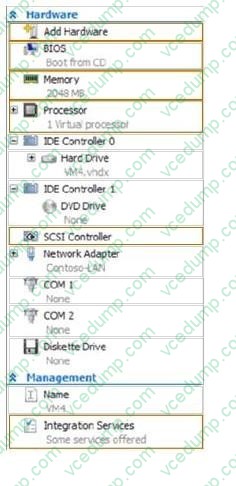
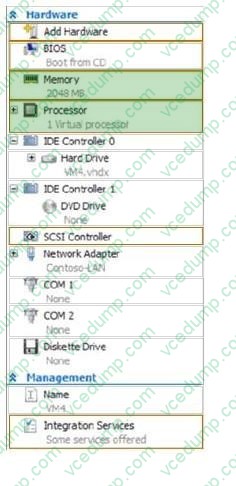
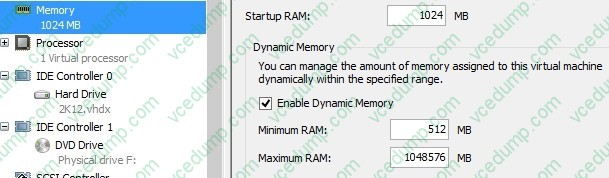
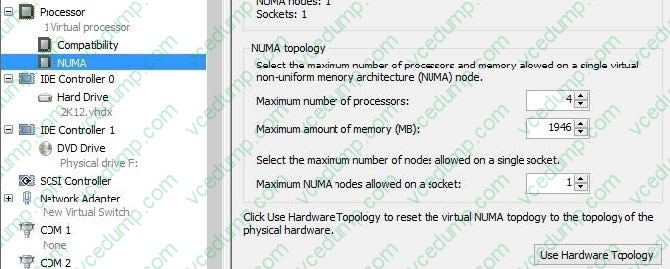
You administer the Hyper-V environment for a company. All virtual machines must use dynamic memory and virtual non-uniform memory access (NUMA) settings that are aligned to the underlying hardware.
One virtual machine is misconfigured.
You need to update the misconfigured virtual machine.
In the Settings dialog box for the virtual machine, which two options should you select?
Hot Area:
-
Question 55:
A company has a Hyper-V failover cluster that consists of sixteen host servers that run Windows Server 2012 R2. The company uses System Center 2012 R2 Virtual Machine Manager (VMM) to manage the Hyper-V environment.
Eight of the host servers are used only for engineering-related services. The other eight host servers are used for general corporate use.
You need to ensure that the corporate virtual machines (VMs) are never moved to the host servers that are used for engineering.
What should you do?
A. Create a new VMM availability set for the corporate VMs.
B. Create a custom property for the corporate VMs and host servers. Then, use a custom placement rule for the host group. Specify that the rule must match.
C. In the corporate VMs, set the value of the Preferred Owners setting to the names of the corporate host servers.
D. Create a new VMM availability set for the corporate host servers. -
Question 56:
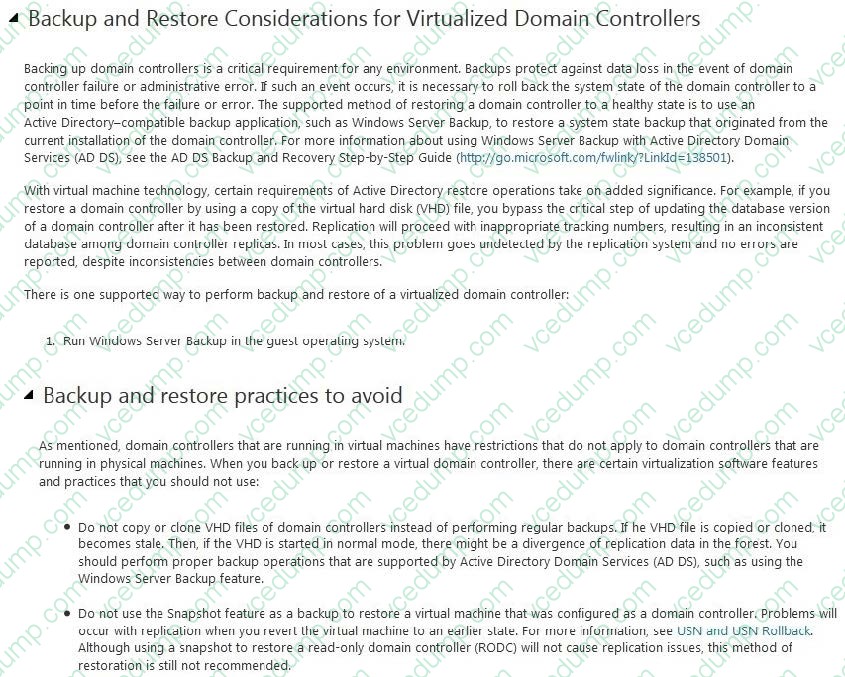
Your environment contains one Active Directory Domain Services (AD DS) domain. All domain controllers have Windows Server 2012 R2 installed. All domain controllers are virtualized domain controllers.
You design a disaster recovery strategy. You have the following requirements:
The domain controllers can be recovered in the event that a Hyper-V host server fails.
The AD DS domain must be restorable to a consistent state.
You must minimize the data loss.
You need to ensure that the domain controllers can be recovered in the event of a failure. What should you do?
A. Clone the domain controller that holds the PDC Emulator role to a different Hyper-V host server. Schedule a Windows PowerShell job to run the Checkpoint- VM cmdlet on each virtual domain controller.
B. Run Windows Azure Hyper-V Recovery Manager.
C. On each guest operating system, run Windows Server Backup.
D. On the host operating system, run Windows Server Backup.
E. Schedule a Windows PowerShell job to back up each domain controller's virtual hard disk (VHD) file. -
Question 57:
A company has a Windows Server 2012 R2 Hyper-V host server named NYC-HOST1 that hosts a virtual machine (VM) named NYC-VM1. A critical security update must be applied immediately to NYC-VM1. There is no time to test the
update before deployment. You must minimize the amount of time needed to restore the VM. You need to capture the state of NYC-VM1 before you install the critical security update.
What should you do?
A. From Hyper-V Manager, select NYC-VM1, and then create a checkpoint.
B. Run the Windows PowerShell command Save-VM NYC-VM1.
C. Run the Windows PowerShell command Get-VMSnapshot NYC-VM1.
D. Run the Windows PowerShell command Export-VMSnapshot NYC-VM1. -
Question 58:
You administer two servers that run Windows Server 2012 R2. Both servers are part of a Hyper- V cluster. The servers are configured as shown in the following diagram:
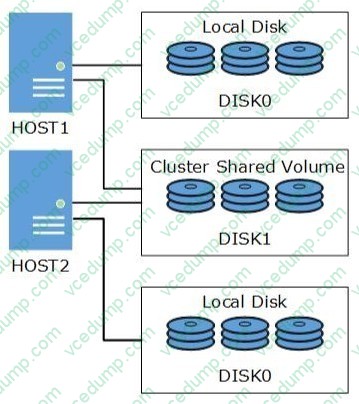
All of the .vhdx files are stored on DISK1.
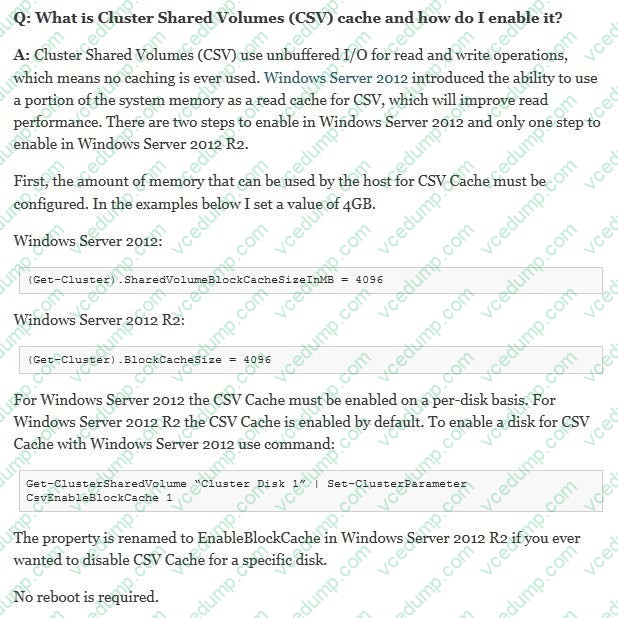
You observe that the physical input/output (I/O) performance degrades when .vhdx files are accessed.
You need to improve performance.
Which two actions should you perform? Each correct answer presents part of the solution.
A. Run the Windows PowerShell command Set-BCCache 10.
B. On each host server, enable write caching for DISK1.
C. Run the Windows PowerShell command Get-ClusterSharedVolumeBlockCacheSizeInMB = 0.
D. Run the Windows PowerShell command (Get- Cluster).SharedVolumeBlockCacheSizeInMB = 512.
E. Run the Windows PowerShell command Get-ClusterSharedVolume "Disk1" | Set- ClusterParameter CsvEnableBlockCache 1.
F. On each host server, disable write caching for DISK0. -
Question 59:
A company has Windows Server 2012 R2 servers that have the Hyper-V role installed. The guest virtual machines are configured as follows:
You need to configure the environment to support the creation of failover clusters. What should you do?
A. Convert the data drives to use the VHDX file format.
B. Convert the operating system drive to use the virtual hard disk (VHD) file format.
C. Convert the virtual machines to Generation 2 virtual machines.
D. Upgrade the operating system to Windows Server 2012 R2. -
Question 60:
You manage a virtualization environment that contains Windows Server 2012 R2 servers that have the Hyper-V role installed. You manage the host servers by using Virtual Machine Manager (VMM) in System Center 2012 R2.
You must monitor the virtualization environment, including all virtual machines and service instances.
You need to configure monitoring.
Which three actions should you perform? Each correct answer presents part of the solution.
A. Import the VMM Management Pack and then deploy agents to the Hyper-V host servers and the VMM server. On the Hyper-V host server, enable agent proxy for the Operations Manager agent.
B. In the VMM console, add the name of an Operations Manager server to the management group that will be used to monitor the virtualization infrastructure.
C. On the VMM server, install the Operations Manager console.
D. On the Operations Manager management server, enable Windows Remote Management (WinRM).
E. Import the VMM Management Pack and then deploy agents to Hyper-V host servers and the VMM Server. On the VMM server, enable agent proxy for the Operations Manager agent.
F. Configure the VMM server and the Active Directory computer accounts of the Hyper-V host servers to allow constrained delegation.
Related Exams:
-
62-193
Technology Literacy for Educators -
70-243
Administering and Deploying System Center 2012 Configuration Manager -
70-355
Universal Windows Platform – App Data, Services, and Coding Patterns -
77-420
Excel 2013 -
77-427
Excel 2013 Expert Part One -
77-725
Word 2016 Core Document Creation, Collaboration and Communication -
77-726
Word 2016 Expert Creating Documents for Effective Communication -
77-727
Excel 2016 Core Data Analysis, Manipulation, and Presentation -
77-728
Excel 2016 Expert: Interpreting Data for Insights -
77-731
Outlook 2016 Core Communication, Collaboration and Email Skills
Tips on How to Prepare for the Exams
Nowadays, the certification exams become more and more important and required by more and more enterprises when applying for a job. But how to prepare for the exam effectively? How to prepare for the exam in a short time with less efforts? How to get a ideal result and how to find the most reliable resources? Here on Vcedump.com, you will find all the answers. Vcedump.com provide not only Microsoft exam questions, answers and explanations but also complete assistance on your exam preparation and certification application. If you are confused on your 74-409 exam preparations and Microsoft certification application, do not hesitate to visit our Vcedump.com to find your solutions here.