74-409 Exam Details
-
Exam Code
:74-409 -
Exam Name
:Server Virtualization with Windows Server Hyper-V and System Center -
Certification
:Microsoft Certifications -
Vendor
:Microsoft -
Total Questions
:99 Q&As -
Last Updated
:Dec 10, 2021
Microsoft 74-409 Online Questions & Answers
-
Question 41:
A company has a Windows Server 2012 R2 server named NYC-HOST1 that has the Hyper-V role installed. The host server hosts two virtual machines named SALES1 and SALES2. NYC- HOST1 uses storage spaces with tiered storage. The storage spaces contain both solid state disks (SSDs) and 10,000 RPM Serial Attached SCSI (SAS) disks for .vhdx files. Each virtual machine runs on its own .vhdx file.
You plan to add new virtual machines each month. SALES1 and SALES2 must run at the highest possible performance at all times.
You need to configure the virtual machines.
What should you do?
A. Add additional SSDs to the storage space that is occupied by SALES1 and SALES2.
B. Replace the 10,000 RPM SAS disks with 15,000 RPM SAS disks.
C. Move the .vhdx files from the storage spaces to individual SAS hard disks.
D. Pin the .vhdx files for SALES1 and SALES2 to the fast tier. -
Question 42:
You have three Windows Server 2012 R2 servers that are set up as a Hyper-V cluster. You use System Center 2012 R2 Virtual Machine Manager to manage the Hyper-V environment. Users report that when a Hyper-V host server becomes
overloaded, the performance of the virtual machines is unacceptable. You need to analyze workloads and automatically migrate virtual machines from overloaded host servers to host clusters that have available capacity.
What should you configure?
A. Performance and Resource Optimization (PRO)
B. Placement Rules
C. shared .vhdx file
D. Dynamic Optimization -
Question 43:
An organization has private and public cloud resources. The organization has Windows Server 2012 R2 servers that have the Hyper-V role installed. You have one four-node cluster of Hyper- V host servers. You use System Center 2012 R2.
The virtual machines that run on the cluster must remain online when you install updates on the Hyper-V host servers.
You need to install updates on the Hyper-V host servers.
What should you do?
A. Configure Windows Server Update Services (WSUS) to provide updates to the Hyper-V host servers in the cluster.
B. Add all the virtual machines hosted on the cluster to a collection in System Center 2012 R2 Configuration Manager. Deploy updates to the collection.
C. Use the Cluster-Aware Updating (CAU) wizard.
D. Configure Windows Update on the Hyper-V host servers to download updates from Microsoft Update. -
Question 44:
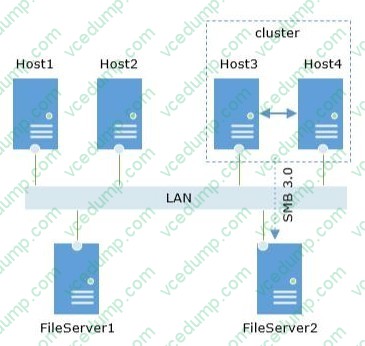
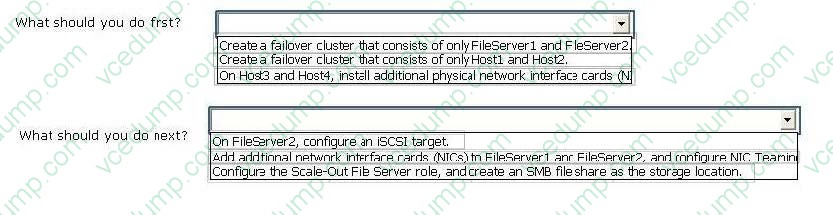
A company has six physical Windows Server 2012 R2 servers. The servers are configured as shown in the following diagram: Host 1 and Host2 run Windows Server 2012 R2 and have the Hyper-V role installed. You need to configure the environment to support shared files that use the VHDX file format. Use the drop-down menus to complete each statement based on the information presented in the screenshot. Each correct selection is worth one point.
Hot Area:
-
Question 45:
You administer an environment that contains a Windows Server 2012 R2 server that has the Hyper-V role installed and a server that has System Center 2012 R2 Virtual Machine Manager (VMM). You plan to deploy two virtual machines
(VMs).
You have the following requirements:
You must minimize the likelihood that the VMs will be offline at the same time.
You must minimize the likelihood that the VMs will reside on the same Hyper-V host server in the Hyper-V cluster.
You need to configure the two VMs. What should you do?
A. Configure the two VMs to include a value for the preferred owners setting.
B. Configure only one VM as highly available.
C. Configure the VMs to reside on different storage area networks (SANs).
D. Configure the VMs to use a custom property that contains the same value. Then, configure the VMs as members of the same availability set. -
Question 46:
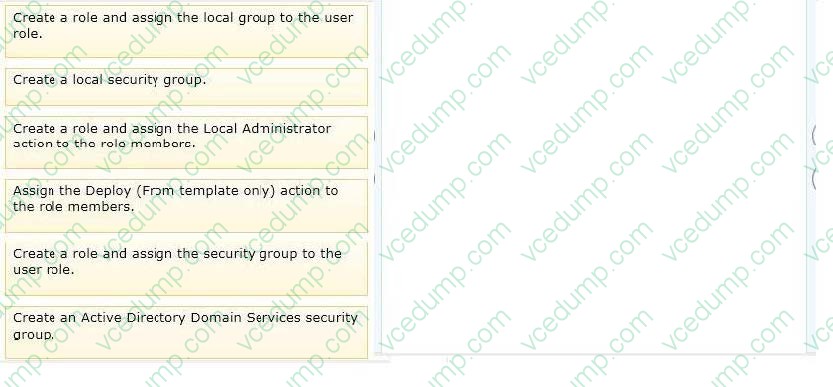
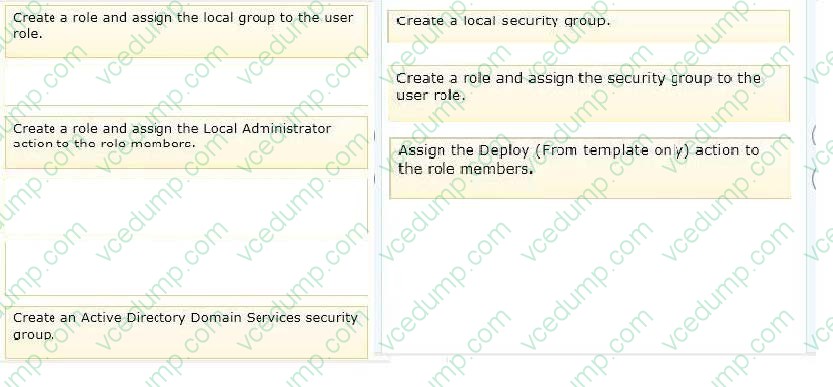
A company uses System Center 2012 R2 Virtual Machine Manager (VMM). You need to create and assign a self-service user role in VMM.
You have the following requirements:
All role members must share ownership of all virtual machines (VMs) that any role member creates.
Role members must be able to deploy VMs.
Role members must NOT have authoring rights.
Which three actions should you perform in sequence? To answer, move the appropriate actions from the list of actions to the answer area and arrange them in the correct order.
Select and Place:
-
Question 47:
You administer two Windows Server 2012 R2 servers that have the Hyper-V role installed. You use System Center 2012 Virtual Machine Manager (VMM) to manage the Hyper-V host servers. You need to create a server lab environment.
The lab servers have the following requirements:
All of the lab servers must be virtualized.
All of the lab servers must be on an isolated network.
All of the lab servers must be able to communicate with each other.
You need to configure networking for the lab environment.
What should you do?
A. Create a logical switch.
B. Create a media access control (MAC) pool.
C. Add a load balancer.
D. Create a private virtual LAN (PVLAN) logical network. -
Question 48:
An organization uses System Center 2012 R2 Data Protection Manager (DPM). Backups of virtual machines that are hosted on local volumes complete successfully. Backups of virtual machines that are hosted on storage area network (SAN) volumes fail. You receive the following error message in the Windows Event Log:
Backup failed with the following error An error occurred:
Writer 'Microsoft Hyper-V VSS Writer' reported an error: 'VSS_WS_FAILED_AT_FREEZE'. Check the application component to verify it is in a valid state for the operation.
You need to ensure that all backups can complete successfully. What should you do?
A. On the Cluster Shared Volume (CSV), grant administrator rights to the DPM server computer account.
B. On all Windows servers in the environment, enable the Volume Shadow Copy Service (VSS).
C. Install and configure the Volume Shadow Copy Service (VSS) hardware provider from the SAN vendor.
D. On virtual machine files hosted on the Cluster Shared Volume (CSV), grant administrator rights to the DPM server computer account. -
Question 49:
A company has Hyper-V host servers and virtual machines (VMs). All host servers and VMs run Windows Server 2012 R2. You need to ensure that new VMs can boot from a SCSI virtual hard disk. What should you create?
A. virtual disks that use the virtual hard disk (VHD) format
B. virtual disks that use the VHDX format
C. Generation 1 VMs
D. Generation 2 VMs -
Question 50:
You administer a Windows Server 2012 R2 server that has the Hyper-V role installed. The server hosts three virtual machines (VMs). One of the VMs is managed by a security engineer. The security engineer must capture traffic on another
VM that is running on the same server. You need to ensure that the security engineer can access the network traffic information from the target VM.
Which networking feature should you enable?
A. port mirroring
B. NIC teaming
C. Protected network
D. MAC address spoofing

Related Exams:
-
62-193
Technology Literacy for Educators -
70-243
Administering and Deploying System Center 2012 Configuration Manager -
70-355
Universal Windows Platform – App Data, Services, and Coding Patterns -
77-420
Excel 2013 -
77-427
Excel 2013 Expert Part One -
77-725
Word 2016 Core Document Creation, Collaboration and Communication -
77-726
Word 2016 Expert Creating Documents for Effective Communication -
77-727
Excel 2016 Core Data Analysis, Manipulation, and Presentation -
77-728
Excel 2016 Expert: Interpreting Data for Insights -
77-731
Outlook 2016 Core Communication, Collaboration and Email Skills
Tips on How to Prepare for the Exams
Nowadays, the certification exams become more and more important and required by more and more enterprises when applying for a job. But how to prepare for the exam effectively? How to prepare for the exam in a short time with less efforts? How to get a ideal result and how to find the most reliable resources? Here on Vcedump.com, you will find all the answers. Vcedump.com provide not only Microsoft exam questions, answers and explanations but also complete assistance on your exam preparation and certification application. If you are confused on your 74-409 exam preparations and Microsoft certification application, do not hesitate to visit our Vcedump.com to find your solutions here.