74-409 Exam Details
-
Exam Code
:74-409 -
Exam Name
:Server Virtualization with Windows Server Hyper-V and System Center -
Certification
:Microsoft Certifications -
Vendor
:Microsoft -
Total Questions
:99 Q&As -
Last Updated
:Dec 10, 2021
Microsoft 74-409 Online Questions & Answers
-
Question 31:
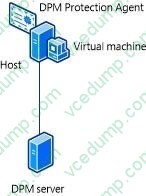
A company has a Windows Server 2012 R2 server that has the Hyper-V role installed. The server hosts 12 virtual machines (VMs) that run Windows Server 2012 R2. The company plans to deploy System Center 2012 R2 Data Protection Manager (DPM). The company has identified the following requirements for the DPM deployment:
1.
allow files and folders on VMs to be recovered
2.
allow recovery of data to a network share
3.
minimize the number of DPM protection agents that you must deploy
You need to implement the backup solution.
Which two actions should you perform? Each correct answer presents part of the solution.
A. Deploy a DPM server.
B. Deploy the DPM protection agent to VMs.
C. Add the Hyper-V role to the DPM server.
D. Configure DPM to perform guest-level backups of the VMs.
E. Configure DPM to perform host-level backups of the VMs. -
Question 32:
A company uses System Center 2012 R2 Virtual Machine Manager (VMM) to manage their Hyper-V environment. The VMM environment has two host groups named Dev and Prod. The Hyper-V environment has the following requirements:
Administrators of the Prod host group must be able to manage virtual machines (VMs) and perform all VMM administrative tasks only within the Prod host group.
Administrators of the Dev host group must be able to manage VMs and perform all VMM administrative tasks only within the Dev host group.
Administrators of the Dev host group must be able to provision new Hyper-V host servers from physical computers for the Dev host group.
The security administrators must be able to add user objects to the Administrator role in VMM.
All delegation must adhere to the principle of least privilege.
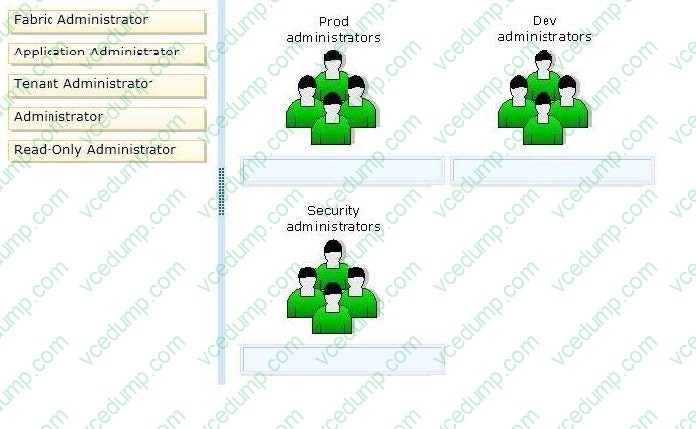
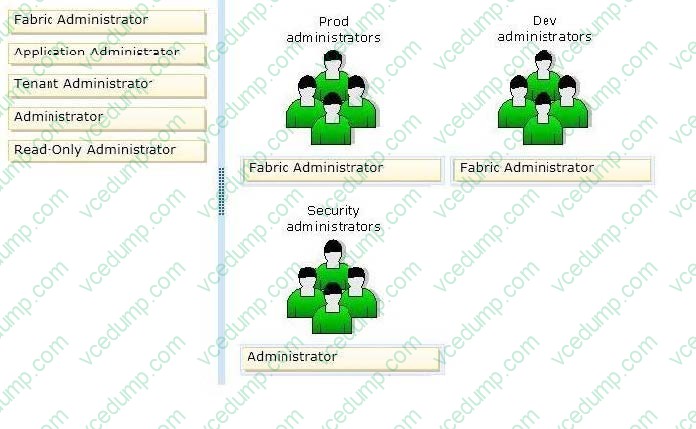
You need to configure the user role profiles for each host group. Which user role profiles should you assign? To answer, drag the appropriate user role profile to the correct user group.
Each user role profile may be used once, more than once, or not at all. You may need to drag the split bar between panes or scroll to view content.
Select and Place:
-
Question 33:
You administer the virtual machines and the Hyper-V host server for a large organization. All Hyper-V virtual machines must start even when the host server does not have enough physical memory available.
You need to ensure that all Hyper-V virtual machines start.
What should you do?
A. Configure the Hyper-V host server to use smart paging.
B. Configure the virtual machines to run at high priority.
C. Configure the Hyper-V host server to run at high priority.
D. Configure the virtual machines to use dynamic memory.
E. Configure the virtual machines as members of an availability set.
F. Configure the Hyper-V host server as a member of an availability set. -
Question 34:
You are the virtualization administrator for an organization. The organization uses all components of System Center 2012 R2 in its production environment.
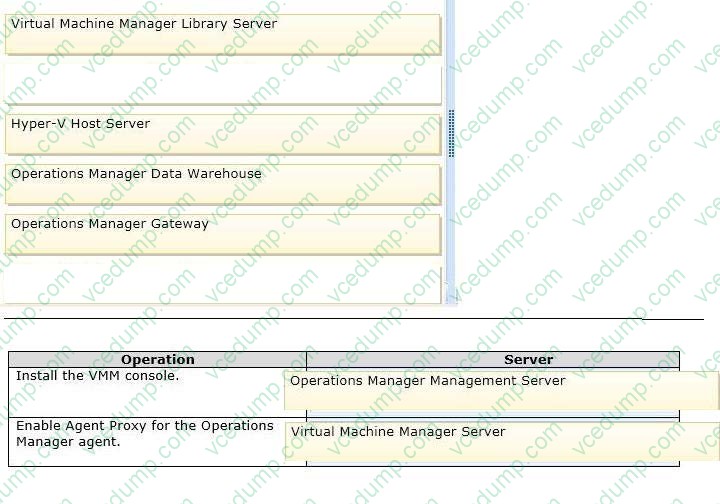
You need to configure the environment to support Performance and Resource Optimization (PRO).
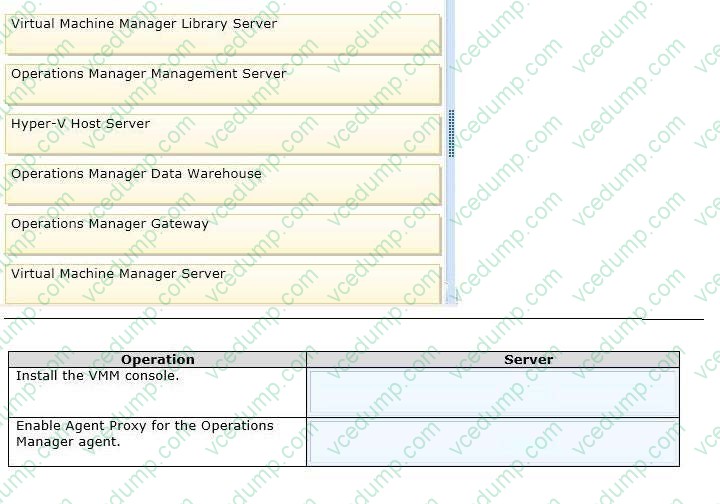
How should you configure the environment? To answer, drag the appropriate server role to the correct location or locations. Each server role may be used once, more than once, or not at all.
You may need to drag the split bar between panes or scroll to view content.
Select and Place:
-
Question 35:
You administer a Virtual Desktop Infrastructure (VDI). The environment runs on a Windows Server 2012 R2 server that has the Hyper-V role installed. You use Systems Center 2012 R2 Operations Manager to troubleshoot performance
issues. Some users of dedicated virtual desktops report slow response times within their sessions. Operations Manager reports indicate that a performance bottleneck exists at the storage layer. You need to manage the amount of input/
output operations per second (IOPS) that the dedicated desktop pool can generate.
What should you do?
A. Enable Resource Metering on the Hyper-V host server.
B. Configure Operations Manager to monitor virtual machine disk performance on the Hyper-V host server. Configure monitoring alerts for virtual machine use greater than the allowed IOPS.
C. For each virtual machine, enable Network Quality of Service (QoS). Set a minimum and max mum value for the Mbps property.
D. For each virtual machine, enable Storage Quality of Service (QoS). Set a minimum and maximum value for IOPS. -
Question 36:
You use System Center 2012 R2 Operations Manager to monitor the datacenter infrastructure and applications for an organization. You import the SQL Server Management Pack. You are unable to monitor long-running SQL Server Agent
jobs. You observe that the SQL Server Agent Jobs View displays zero instances.
Other SQL Server-related monitoring operations function as expected.
You need to monitor long-running SQL Server Agent jobs.
What should you do?
A. Enable the Job Duration unit monitor.
B. Enable agent proxy for SQL Servers.
C. Enable the object discovery for the SQL Server Agent Job class.
D. End maintenance mode for the SQL Server 2012 Computers group. -
Question 37:
You administer four servers that run Windows Server 2012 R2. The servers are part of a four- node Hyper-V cluster. You also have a file server cluster. All four Hyper-V nodes and the file server cluster have access to a storage area network (SAN) that is administered by a SAN administrator.
You have the following requirements:
1.
The SAN administrator must retain control over which servers have access to the SAN logical unit numbers (LUNs).
2.
The SAN administrator must be able to control the zoning for the SAN environment at the individual guest virtual machine level.
You need to create the virtualized storage environment. What should you do?
A. Implement virtual Fibre Channel adapters by using direct LUNs.
B. Create Cluster Shared Volumes (CSVs) by using shared .vhdx files.
C. Create Cluster Shared Volumes (CSVs) by using pass-through disks.
D. Scale out the file server by using Server Message Block (SMB) 3.0. -
Question 38:
A company has Active Directory Domain Services (AD DS) domain controllers that run Windows Server 2012 R2. You prepare a disaster recovery plan for Active Directory. You have the following requirements:
The domain controller restore process must complete as quickly as possible.
After the restore process completes, the Active Directory database on the domain controller must be brought up to date by using replication.
You need to implement the disaster recovery plan.
What should you do?
A. Authoritatively restore the domain controllers by using the ntdsutil.exe tool.
B. Restore the domain controllers by using the Active Directory Recycle Bin.
C. Back up and restore the domain controllers by using the wbadmin.exe tool.
D. Back up and restore the domain controllers by using the Idp.exe tool. -
Question 39:
A company uses System Center 2012 R2 Virtual Machine Manager (VMM).
You have the following requirements:
Self-service users must be able to store and share their resources.
Self-service users must be able to use the resources to create profiles and templates in VMM.
You need to configure VMM to support self-service users. Which three actions should you perform? Each correct response presents part of the solution.
A. In the VMM library share, create a user data path.
B. Grant the Read permission and the Write permission to all role members.
C. In the Public Documents share, create a user data path.
D. Assign the Deploy action to the role members.
E. Grant the Read and execute permission to all role members.
F. Assign the Author action to the role members. -
Question 40:
You administer a server that runs Windows Server 2012 R2 that has the Hyper-V role installed. You plan to apply an update to a virtual machine (VM). You have the following requirements:
1.
You must be able to quickly revert back to a pre-update state.
2.
The solution must minimize storage requirements on the server. You need to apply the update. What should you do?
A. Run the Windows PowerShell cmdlet New-VirtualDiskClone.
B. Create a checkpoint of the VM.
C. Run the Windows PowerShell cmdlet Export-VMSnapshot.
D. Export the VM.
Related Exams:
-
62-193
Technology Literacy for Educators -
70-243
Administering and Deploying System Center 2012 Configuration Manager -
70-355
Universal Windows Platform – App Data, Services, and Coding Patterns -
77-420
Excel 2013 -
77-427
Excel 2013 Expert Part One -
77-725
Word 2016 Core Document Creation, Collaboration and Communication -
77-726
Word 2016 Expert Creating Documents for Effective Communication -
77-727
Excel 2016 Core Data Analysis, Manipulation, and Presentation -
77-728
Excel 2016 Expert: Interpreting Data for Insights -
77-731
Outlook 2016 Core Communication, Collaboration and Email Skills
Tips on How to Prepare for the Exams
Nowadays, the certification exams become more and more important and required by more and more enterprises when applying for a job. But how to prepare for the exam effectively? How to prepare for the exam in a short time with less efforts? How to get a ideal result and how to find the most reliable resources? Here on Vcedump.com, you will find all the answers. Vcedump.com provide not only Microsoft exam questions, answers and explanations but also complete assistance on your exam preparation and certification application. If you are confused on your 74-409 exam preparations and Microsoft certification application, do not hesitate to visit our Vcedump.com to find your solutions here.