74-343 Exam Details
-
Exam Code
:74-343 -
Exam Name
:Managing Projects with Microsoft Project -
Certification
:Microsoft Certifications -
Vendor
:Microsoft -
Total Questions
:128 Q&As -
Last Updated
:Dec 02, 2021
Microsoft 74-343 Online Questions & Answers
-
Question 71:
You are using Microsoft Project.
Management wants to see an overview of your project that shows the overall start and finish dates, total duration, and the name of the project. They want to see this information in a simple layout that does not include task details.
You need to show one line item that displays all the requested information in the Gantt view.
What should you do?
A. Apply the Top Level Tasks filter.
B. Select the Project Summary Task checkbox.
C. Apply the Summary Tasks filter.
D. Select the Summary Tasks checkbox -
Question 72:
You are an independent project manager who uses Microsoft Project.
You work on multiple projects for different customers, and you use one project to manage all of their tasks. You invoice your customers on a monthly basis.
You use a custom field named Not Invoiced to identify all tasks that have not been invoiced, and you use a custom field named Customer Name to identify the customer.
You need to see all tasks that have not been invoiced, but only for one customer at a time.
What should you do?
A. Group by the Not Invoiced field and display the AutoFilter for the Customer name column.
B. Group by Customer name and display the AutoFilter for the Not Invoiced column.
C. Display the AutoFilter and apply it for the Customer Name and the Not Invoiced columns.
D. Create a custom highlight filter that asks fora Customer name value and identifies Not Invoiced tasks. -
Question 73:
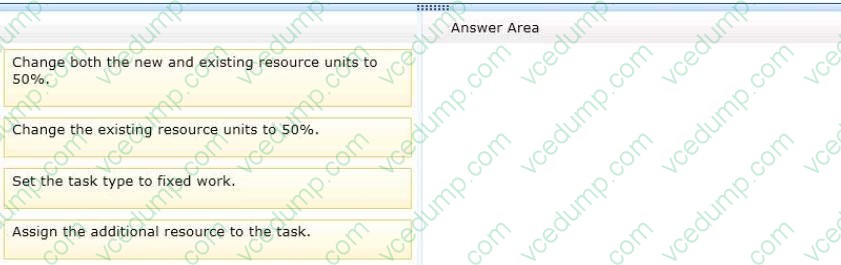
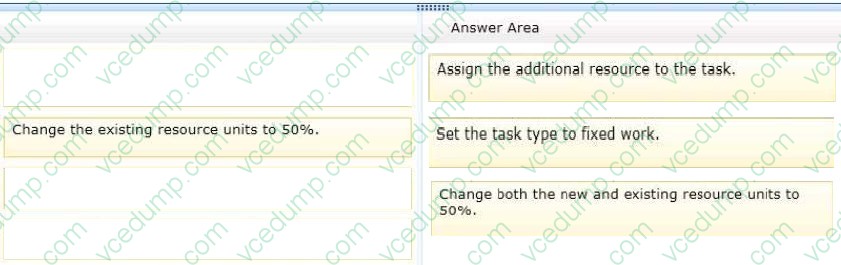
You are a project manager who uses Microsoft Project 2013. A resource manager notifies you that your assigned resource is now only available 50% to work on the communication plan task. The estimated amount of work for the task remains the same at 16 hours. The task must also be completed within the original two-day commitment even though the resource is only available 50% of the time. You need to bring on another resource to assist with the remaining 50% of the work while ensuring that the same amount of work gets done in the two days that were originally committed. Which three actions should you perform in sequence? (To answer, move the appropriate three actions from the list of actions to the answer area and arrange them in the correct order.)
Select and Place:
-
Question 74:
Your company uses Microsoft Project, and you are setting up an initial planning schedule.
You need to make sure that all new task durations are shown as estimated.
What should you do?
A. Enter the duration suffixed with -ed for estimated days.
B. Use a task custom field and set the Roll task down to assignment check box.
C. Use an assignment custom field and set the Roll assignment up to task check box.
D. Set the task to manually scheduled.
E. From Project Options| Schedule tab, select the New scheduled tasks have estimated durations check box.
F. From Project Options| Schedule tab, select the Show that scheduled tasks have estimated durations check box. -
Question 75:
You are managing a project by using Microsoft Project, and you notice a potential scheduling problem indicated by wavy red lines under some of the dates in the Finish column.
You need to resolve the issue.
What should you do?
A. Recalculate the project schedule.
B. Adjust the resource assignment on the task to when the resource is available.
C. Activate Task Inspector for the task to decide if adjustments are necessary.
D. Adjust the finish date on the task to a date in the future. -
Question 76:
You are a project manager who uses Microsoft Project.
You have created a project which involves three other colleagues who are also using Microsoft Project. You and your colleagues are over budget and cannot spend any more money on this project.
To ensure that the latest version of the project file is always the one being used, you need to save, share, and sync this project plan File among your colleagues without using email.
What should you do?
A. Save and sync your project by using SkyDrive.
B. Save and sync selected tasks in the project by using SkyDrive.
C. Save and sync your project to a shared Microsoft Excel file.
D. Save and sync selected tasks in your Microsoft SharePoint Tasks List. -
Question 77:
You are using Microsoft Project.
You want the ability to see only tasks that have finish dates past their deadline date
You need to achieve this goal using a custom field.
What should you do?
A. Create a Lookup containing the values Yes and No against the Task Text1 custom field. Write a formula that compares the deadline date to the finish date and displays the correct value from the Lookup table.
B. Use the Task Flagl5 custom field. Write a formula that compares the deadline date to the finish date, and set the result to Yes or No.
C. Use the Task Text30 custom field, also known as the Deadline Flag, since it automatically provides this capability.
D. Rename the Task Number1 custom field to Deadline passed. Write a formula that compares the deadline date to the finish date and displays Yes or No in the field. -
Question 78:
You are a project manager for an organization that uses Microsoft Project.
You manage a critical project across multiple regions. All information regarding the project must be shared through email directly to the stakeholders.
You have already added all of the tasks and milestones to Timeline, aiming to present the most important information of the project through graphs. You are not allowed to send the .mpp file to your stakeholders since they will not be able to
open it.
You need to share the Timeline view through email.
What should you do?
A. Select Visual Reports, select a Built-in template for Timeline views, and click Generate. When the report has been generated, copy and paste the output in the body of your email.
B. Activate the Timeline view. Click the View tab, select Other Views, and choose Save View. Name this view and save it, before going to the body of your email and attaching the view you just saved.
C. Activate the Timeline view. Then go to the Format tab and click Copy Timeline For Email. Paste where necessary in the body of your email.
D. Choose File, Share. In the Share page, select Email. Then select Send as Attachment. -
Question 79:
You are managing a project schedule by using Microsoft Project.
You need to implement stoplight indicators that represent the difference between the baseline finish date and the planned finish date for a task.
Which three actions should you perform? Each correct answer presents part of the solution.
A. Assign graphic indicator values based on the values contained in the custom field.
B. Create a custom task field with a look-up table that contains the stop light values.
C. Create a custom field named TaskStatus.
D. Create a custom task flag field, and then set the graphic indicator to show red, yellow, or green based on the value in the field.
E. Create a formula in the custom field. -
Question 80:
You are a senior project manager in a software development company. You manage your projects with Project Professional 2013. The development team is behind schedule due to a problem found in the architectural design of the database.
The lead architect estimates that redesigning the database will take approximately 30 hours.
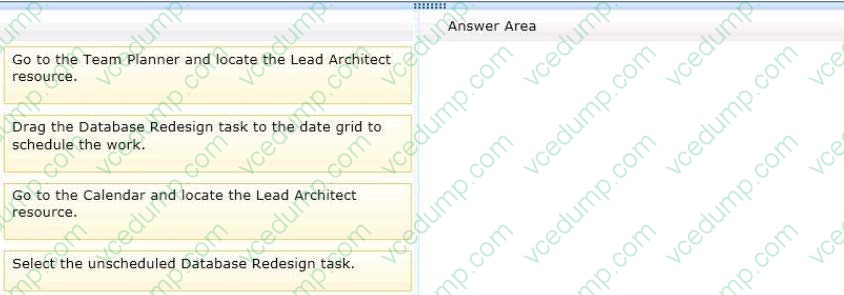
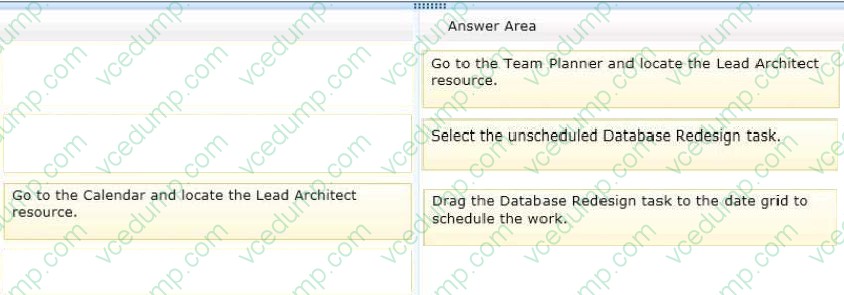
You create a new manual task and assign it to the lead architect. However, the task has not been scheduled. You need to easily see a time phased view of all tasks for the lead architect in order to schedule the task for completion. Which
three actions should you perform in sequence? (To answer, move the appropriate three actions from the list of actions to the answer area and arrange them in the correct order.)
Select and Place:
Related Exams:
-
62-193
Technology Literacy for Educators -
70-243
Administering and Deploying System Center 2012 Configuration Manager -
70-355
Universal Windows Platform – App Data, Services, and Coding Patterns -
77-420
Excel 2013 -
77-427
Excel 2013 Expert Part One -
77-725
Word 2016 Core Document Creation, Collaboration and Communication -
77-726
Word 2016 Expert Creating Documents for Effective Communication -
77-727
Excel 2016 Core Data Analysis, Manipulation, and Presentation -
77-728
Excel 2016 Expert: Interpreting Data for Insights -
77-731
Outlook 2016 Core Communication, Collaboration and Email Skills
Tips on How to Prepare for the Exams
Nowadays, the certification exams become more and more important and required by more and more enterprises when applying for a job. But how to prepare for the exam effectively? How to prepare for the exam in a short time with less efforts? How to get a ideal result and how to find the most reliable resources? Here on Vcedump.com, you will find all the answers. Vcedump.com provide not only Microsoft exam questions, answers and explanations but also complete assistance on your exam preparation and certification application. If you are confused on your 74-343 exam preparations and Microsoft certification application, do not hesitate to visit our Vcedump.com to find your solutions here.