74-343 Exam Details
-
Exam Code
:74-343 -
Exam Name
:Managing Projects with Microsoft Project -
Certification
:Microsoft Certifications -
Vendor
:Microsoft -
Total Questions
:128 Q&As -
Last Updated
:Dec 02, 2021
Microsoft 74-343 Online Questions & Answers
-
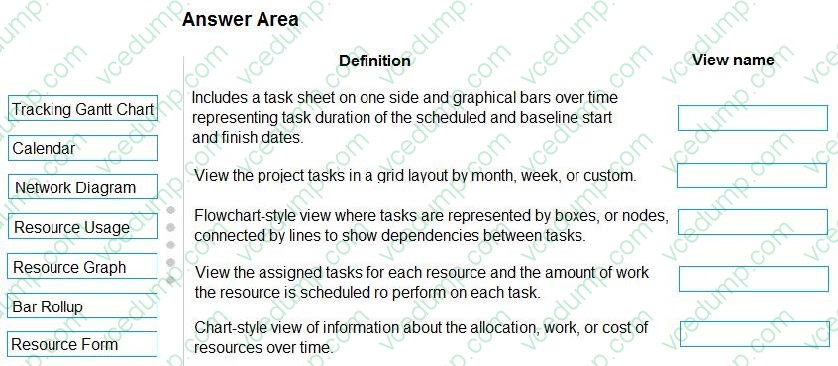
Question 111:
You are a project manager using Microsoft Project.
You need to be able to view your project plan in different ways to obtain information.
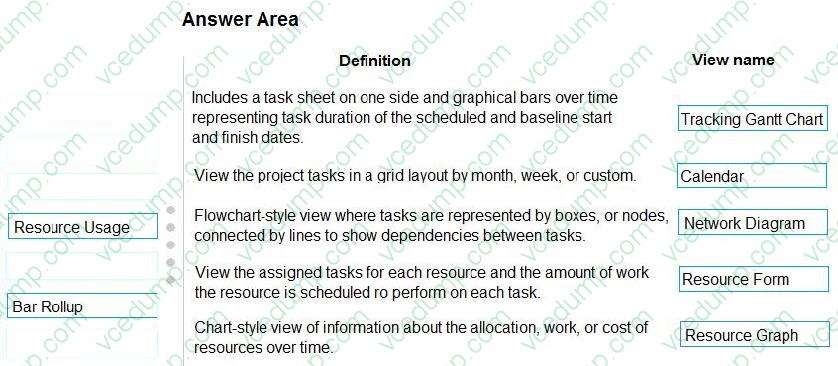
Match each view to its definition.
To answer, drag the appropriate view name from the column on the left to its definition on the right. Each view name may be used once, more than once, or not at all.
Select and Place:
-
Question 112:
You use Microsoft Project to manage a project schedule which includes all task relationships.
The resource who is assigned to the "Develop software delivery" task is no longer available to work on your project. You can find another resource to perform this task, but you are not sure when the resource will become available.
You need to know which future tasks could be affected as a result of the resource leaving your project.
What should you do?
A. Sort all tasks by start date and check start dates of tasks that are scheduled after the Develop Software Delivery task.
B. View the critical path for tasks that are successors to the Develop Software Delivery task.
C. View the Network diagram and filter for the predecessor tasks to Develop Software Delivery task.
D. Use the Task path function to check driven successors for the Develop Software Delivery task. -
Question 113:
You are managing a project by using Microsoft Project. The project has a baseline that was set after the schedule was approved. The project has a work budget. The project is currently 50 percent complete. You are using a standard report,
with no customization.
You need to create a report that graphically compares baseline with actual work completed.
Which two actions will achieve the goal? Each correct answer presents a complete solution?
A. From In Progress, select Slipping Tasks.
B. From Dashboards, display the Work Overview Report.
C. From In Progress, select Late Tasks
D. From Visual Reports, run Baseline Work Report.
E. From Visual Reports, run Task Status Report. -
Question 114:
You update a schedule that you are managing by using Microsoft Project.
After the update, you observe that many of the resources in the schedule are overallocated.
You need to resource level the schedule without changing the current projected finish data for the project.
Which three actions will achieve the goal? Each correct answer presents part of the solution.
A. Select respect Links.
B. Allow the leveling tool to create splits in remaining work.
C. Configure the leveling tool to level only within available slack.
D. Change the leveling calculation option from Manual to Automatic.
E. Allow the leveling tool to adjust individual assignments on tasks. -
Question 115:
You manage a project by using Microsoft Project.
You need to use the Baseline2 fields to calculate Variance at Completion (VAC). You have already set Baseline2.
What should you do?
A. Enter physical percent complete for the tasks that have actual values. Set the Baseline to the Baseline2, and reschedule uncompleted work based on the status date.
B. Change the Earned Value method to Baseline2 in the Task Information Form. Enter tracking data, and view the VAC on the Earned Value table.
C. Change the Baseline for Earned Value calculation option to Baseline2, and reschedule uncompleted work based on the status date.
D. Go to the Earned Value table and insert the Baseline2 column. Recalculate the project. -
Question 116:
You are a project manager who uses Microsoft project.
Your manager wants you to plan an office move. You have a project schedule from a prior office move named OfficeMove.mpp.
You need to create a new project schedule based on the old project schedule by performing the fewest steps possible.
What should you do?
A. Open the Old OfficeMove.mpp file and change the project start date and project title. Clear the baseline and save the file using the current project name.
B. Open the old OfficeMove.mpp file and save the file as Project template file. Create a new project using the template.
C. Open the old OfficeMove.mpp file and save the file using a new file name. Then, enter the project name in the Project Summary task. Set all tasks to zero percent complete.
D. Open the old OfficeMove.mpp file and save the file using a new file name. Clear the baseline and set all tasks to zero percent complete. -
Question 117:
You are an independent project manager who uses Microsoft Project.
You work on multiple projects for different customers and use only one project to manage their tasks. You invoice your customers on a monthly basis. To identify tasks that have not been invoiced, you create a custom field called Not Invoiced.
Without losing the original project tasks' sort order, and without hiding any information, you need to see all tasks which have not been invoiced.
You create a custom filter based on the Not Invoiced custom field.
What should you do next?
A. Apply the custom filter.
B. Export to Microsoft Excel using the custom filter.
C. Apply the custom filter and select the Highlight option
D. Use the filter in the Group By function. -
Question 118:
You are a project manager who uses Microsoft Project.
After updating a project schedule, you want to determine the amount of time that the schedule has slipped from the original scheduled dates.
You need a graphical view that shows the current schedule to baseline.
Which view should you use?
A. Detail Gantt view
B. Tracking Gantt view
C. Leveling Gantt view
D. Gantt Chart view -
Question 119:
You use Microsoft Project to manage a project for your organization.
You are tracking work in a project which contains a baseline and resource assignments. You want to view the work variance for a specific resource for a specific task.
You need to choose a view that will show this information.
What should you do?
A. View the Resource Sheet that shows the Work table.
B. View the Gantt chart in split view with Task form formatted to show Work Details.
C. View the Resource Sheet view and insert the Work Variance field.
D. View the Task Usage view and insert the Work Variance column on the left side of the view. -
Question 120:
You manage a project by using Microsoft Project.
The work variance for a task is 48 hours. The remaining work is 25 hours. The work for this task has been completed.
You need the work variance to be adjusted to reflect what has occurred during the performance of the task.
What should you do?
A. Adjust the value in the Baseline Work column.
B. Enter a 0 in the remaining Duration column.
C. Adjust the value in the Work Variance column.
D. Mark the task inactive.
Related Exams:
-
62-193
Technology Literacy for Educators -
70-243
Administering and Deploying System Center 2012 Configuration Manager -
70-355
Universal Windows Platform – App Data, Services, and Coding Patterns -
77-420
Excel 2013 -
77-427
Excel 2013 Expert Part One -
77-725
Word 2016 Core Document Creation, Collaboration and Communication -
77-726
Word 2016 Expert Creating Documents for Effective Communication -
77-727
Excel 2016 Core Data Analysis, Manipulation, and Presentation -
77-728
Excel 2016 Expert: Interpreting Data for Insights -
77-731
Outlook 2016 Core Communication, Collaboration and Email Skills
Tips on How to Prepare for the Exams
Nowadays, the certification exams become more and more important and required by more and more enterprises when applying for a job. But how to prepare for the exam effectively? How to prepare for the exam in a short time with less efforts? How to get a ideal result and how to find the most reliable resources? Here on Vcedump.com, you will find all the answers. Vcedump.com provide not only Microsoft exam questions, answers and explanations but also complete assistance on your exam preparation and certification application. If you are confused on your 74-343 exam preparations and Microsoft certification application, do not hesitate to visit our Vcedump.com to find your solutions here.