74-343 Exam Details
-
Exam Code
:74-343 -
Exam Name
:Managing Projects with Microsoft Project -
Certification
:Microsoft Certifications -
Vendor
:Microsoft -
Total Questions
:128 Q&As -
Last Updated
:Dec 02, 2021
Microsoft 74-343 Online Questions & Answers
-
Question 11:
You are a project manager who uses Microsoft Project. You have worked on a project for four years and have created a very detailed project plan in Microsoft Project. You use milestones as key deliverables, and you use summary tasks as
phases.
Your company requests a presentation of the key deliverables for each phase of your project plan in a simple and consolidated view that fits in one Microsoft PowerPoint slide.
You need to ensure that phases and key deliverables are clearly shown in the timeline and are not confusing to the audience.
What should you do?
A. Create a new Timeline view from existing tasks in your project plan. Drag the timeline into a blank PowerPoint slide.
B. Create a new Timeline view that automatically shows milestones for each stage of your project. Copy the full-size timeline and paste to your PowerPoint slide.
C. Add all summary tasks to your timeline. Microsoft Project will automatically recognize and add all milestones on each stage to your Timeline view. Copy the full-size timeline and paste to the PowerPoint slide.
D. Add all summary tasks to your timeline. Add all milestones to your timeline. Copy the full-size timeline and paste to your PowerPoint slide. -
Question 12:
You are a project manager who uses Microsoft Project.
A colleague sends you a Microsoft Excel file that contains a list of tasks that define a project you must complete.
You need to create a project file that contains this task list, ensuring that any fields are mapped correctly.
What should you do?
A. Add the Import Project Wizard to the Quick Access Toolbar. Initiate the wizard and select the Excel file to import.
B. Open the file in Excel, and copy and paste the tasks into a new project.
C. Rename the Excel file to tasks.mpp and open the plan in Microsoft Project.
D. Open the Excel file by using Microsoft Project and import the task list using the Project Import Wizard. -
Question 13:
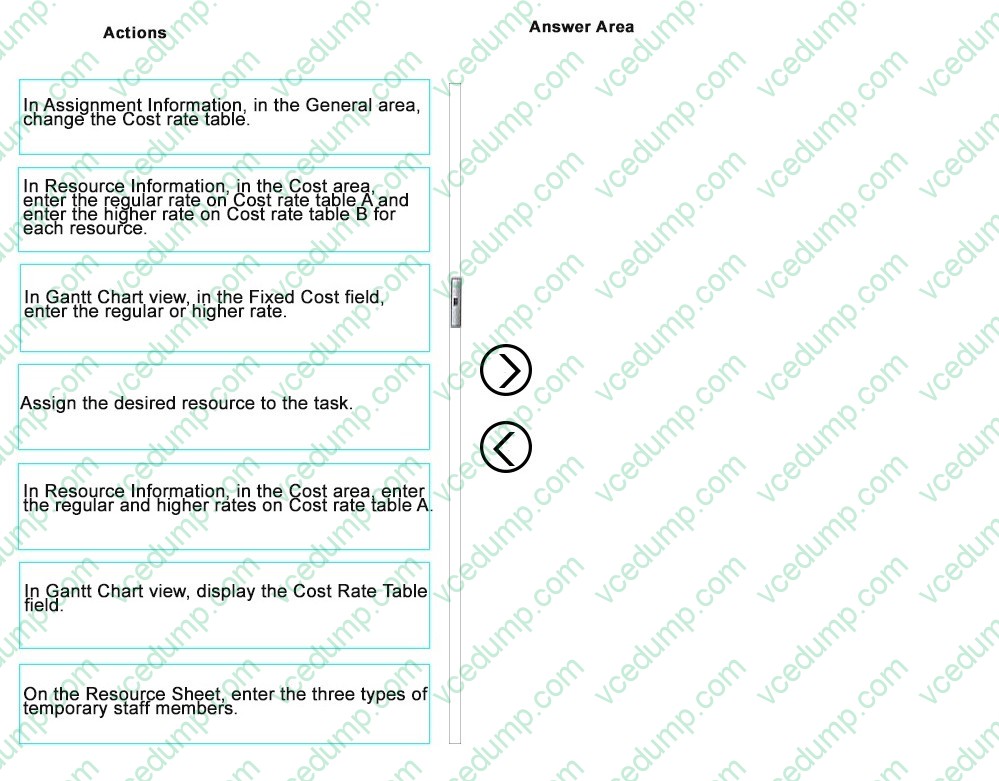
You are using Microsoft PPM.
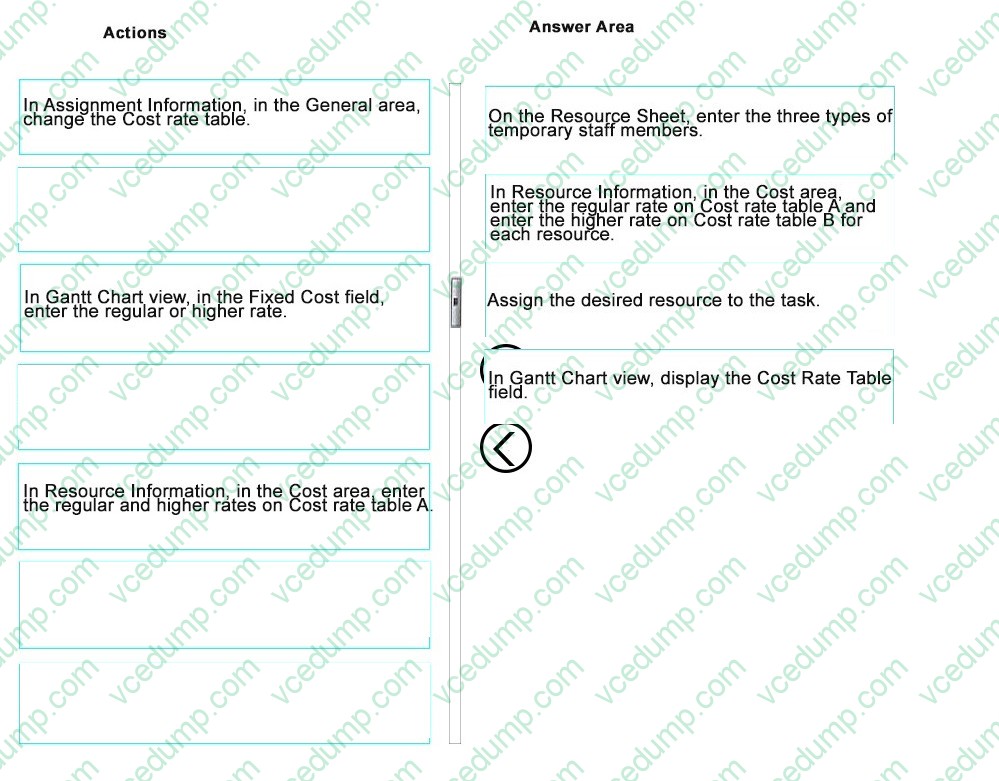
Your organization provides temporary staff to its customers. Temporary staff members are organized into junior level, standard level, and senior level. Each level is further categorized by two rates. The regular rate is for work within 100
kilometers and a higher rate is for work beyond that distance. You must include all temporary staff and all rates in your schedule.
You need to ensure that Project calculates total resource cost immediately when making a resource assignment. You want the ability to switch between the regular rate and the higher rate for each task.
Which four actions should you perform in sequence? To answer, move the appropriate actions from the list of actions to the answer area and arrange them in the correct order.
Select and Place:
-
Question 14:
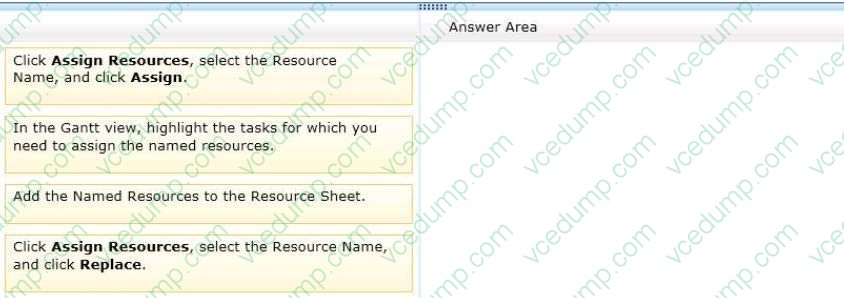
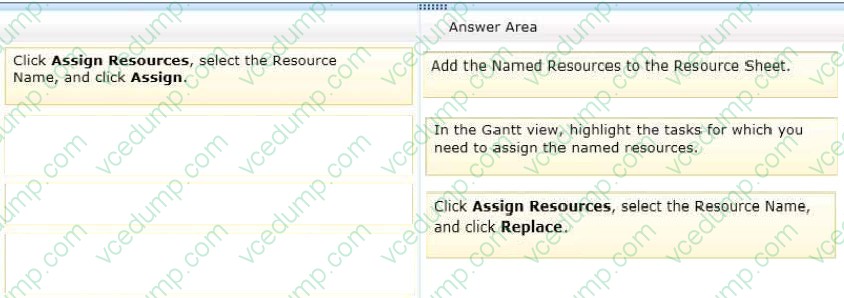
You are a project manager who uses Project Standard 2013. Your project is approved, and you identify named resources to replace the generic resources for your project tasks. You need to update the project schedule to assign the named resources to their appropriate tasks. Which three actions should you perform in sequence? (To answer, move the appropriate three actions from the list of actions to the answer area and arrange them in the correct order.)
Select and Place:
-
Question 15:
You are a project manager for a company that uses Microsoft Project.
You are responsible for communicating the progress of your projects every month. Your company provides you with a Gantt Chart view that uses the standard Entry table.
You need to communicate the progress of tasks that have a finish date of either October 2 or October 22.
What should you do?
A. Go to the Task tab, open the Find window, and set the parameters to find the required dates, setting the Look in Field to Finish. Then click Find Next.
B. Go to the View tab, open the More Views window, and create a new view.
C. Go to the View tab and use the Date Range filter.
D. Go to the View tab and select Display AutoFilter. Click on the arrow next to the Finish column and check only the required dates. -
Question 16:
You are a project manager who uses Microsoft Project.
When viewing the critical path, you notice that there are some inconsistencies. To investigate the status of the critical path, you insert the Total Slack column into a task table. You discover that many of the tasks have negative Total Slack values.
You need to resolve the negative Total Slack values. What should you do?
A. Remove lag time from task relationships.
B. Remove as many constraints as possible.
C. Re-assign resources that have more availability at the time of the negative slack.
D. Remove lead time from the task relationships. -
Question 17:
You use Microsoft Project to create a new project from a corporate template.
You observe that the information displayed for each task in a phase named Consumer Testing is shown with horizontal lines through the text, and the text is lighter as compared to other tasks in the schedule.
You need to ensure that the Consumer Testing phase is available for this schedule.
What should you do?
A. Select all of the tasks in the Consumer Testing phase and reformat them to remove Strikethrough. Make additional formatting adjustments until the tasks match the other tasks.
B. Select all the tasks in the Consumer Testing phase and then select Inactivate.
C. Select all of the tasks in the schedule and click Inactivate.
D. Delete all tasks in the Consumer Testing phase. -
Question 18:
You manage a project and use Microsoft Project to track your project schedule. One of several resources assigned to a fixed-unit, effort-driven, five-day task is assigned at 50% of their availability.
The resource asks to start the task three days later than planned because of a scheduling conflict. The schedule change is approved.
You need to make the adjustment to the resource assignment to accommodate this request without affecting the other resources assigned to the task.
What should you do?
A. Use the Resource Usage view and add duration to the assignment to extend the deadline three days.
B. Use the Gantt Chart view tracking table and add a Start no earlier than constraint to the task.
C. Use the Task Form formatted to show Work Details and add a three-day delay to the assignment for the resource.
D. Use the Task Form formatted to show Schedule Details and add a three-day delay to the assignment for the resource. -
Question 19:
You are a program manager. Your project managers use Microsoft Project to manage projects. The project managers want to utilize the same resources across their projects.
You need to combine the projects, as well as the project resources, to see allocations across the projects.
What should you do?
A. Copy and paste all resource assignments into a Master file.
B. Share resources from an external resource pool.
C. Create a Master project and insert subprojects by using Link to project.
D. Open all projects in a new window. -
Question 20:
You are a project manager and have built a project plan by using Microsoft Project.
Your project plan has both fixed duration and fixed work tasks.
You have been asked to denote key existing tasks as milestones in the Gantt view.
What should you do?
A. Format the bar styles in the Gantt view to denote the tasks as milestones.
B. Enter the word Milestone in the Task Duration column to set the task as a milestone.
C. Set the Duration column to 0 to set the task as a milestone.
D. Navigate to View, Text Styles, select Milestones, and then select the black diamond.
Related Exams:
-
62-193
Technology Literacy for Educators -
70-243
Administering and Deploying System Center 2012 Configuration Manager -
70-355
Universal Windows Platform – App Data, Services, and Coding Patterns -
77-420
Excel 2013 -
77-427
Excel 2013 Expert Part One -
77-725
Word 2016 Core Document Creation, Collaboration and Communication -
77-726
Word 2016 Expert Creating Documents for Effective Communication -
77-727
Excel 2016 Core Data Analysis, Manipulation, and Presentation -
77-728
Excel 2016 Expert: Interpreting Data for Insights -
77-731
Outlook 2016 Core Communication, Collaboration and Email Skills
Tips on How to Prepare for the Exams
Nowadays, the certification exams become more and more important and required by more and more enterprises when applying for a job. But how to prepare for the exam effectively? How to prepare for the exam in a short time with less efforts? How to get a ideal result and how to find the most reliable resources? Here on Vcedump.com, you will find all the answers. Vcedump.com provide not only Microsoft exam questions, answers and explanations but also complete assistance on your exam preparation and certification application. If you are confused on your 74-343 exam preparations and Microsoft certification application, do not hesitate to visit our Vcedump.com to find your solutions here.