70-697 Exam Details
-
Exam Code
:70-697 -
Exam Name
:Configuring Windows Devices -
Certification
:Microsoft Certifications -
Vendor
:Microsoft -
Total Questions
:330 Q&As -
Last Updated
:Apr 18, 2020
Microsoft 70-697 Online Questions & Answers
-
Question 81:
You have a Remote Desktop Session Host (RD Session Host) server. The server is accessible from the internal network.
To access the server remotely, you must connect to a Remote Desktop Gateway (RD Gateway) server.
On a laptop, you successfully configure a Remote Desktop connection that you use to access the RD Session Host server from the internal network.
From your home, you attempt to connect to the RD Session Host server by using the Remote Desktop connection, but the connection fails.
You need to connect to the RD Session Host server.
What should you configure on the laptop?
A. the Remote Assistance settings in System Properties.
B. the Connect from anywhere settings in Remote Desktop Connection.
C. the Performance settings in Remote Desktop Connection.
D. the Remote Desktop settings in System Properties. -
Question 82:
A company has 100 Windows 10 Enterprise client computers. The client computers are members of a workgroup.
A custom application requires a Windows Firewall exception on each client computer.
You need to configure the exception on the client computers without affecting existing firewall settings.
Which Windows PowerShell cmdlet should you run on each client computer?
A. Set-NetFirewallRule
B. New-NetFirewallRule
C. New-NetIPSecMainModeRule
D. Set-NetFirewallProfile
E. Set-NetFirewallSetting -
Question 83:
Note: This question is part of a series of questions that present the same scenario. Each question in the series contains a unique solution that might meet the stated goals. Some question sets might have more than one correct solution, while others might not have a correct solution.
After you answer a question in this section, you will NOT be able to return to it. As a result, these questions will not appear in the review screen.
You are the system administrator for a sales company. You manage the Microsoft Office 365 environment for your company. You are investigating the requirements for Office 365 data loss prevention (DLP). All users have an Enterprise E5
license.
You must ensure that all users are prevented from storing social security numbers in Office 365.
You need to implement a DLP policy that meets the requirement.
Solution: Create a DLP policy with Microsoft SharePoint Online as a content source location.
Does the solution meet the goal?
A. Yes
B. No -
Question 84:
HOTSPOT
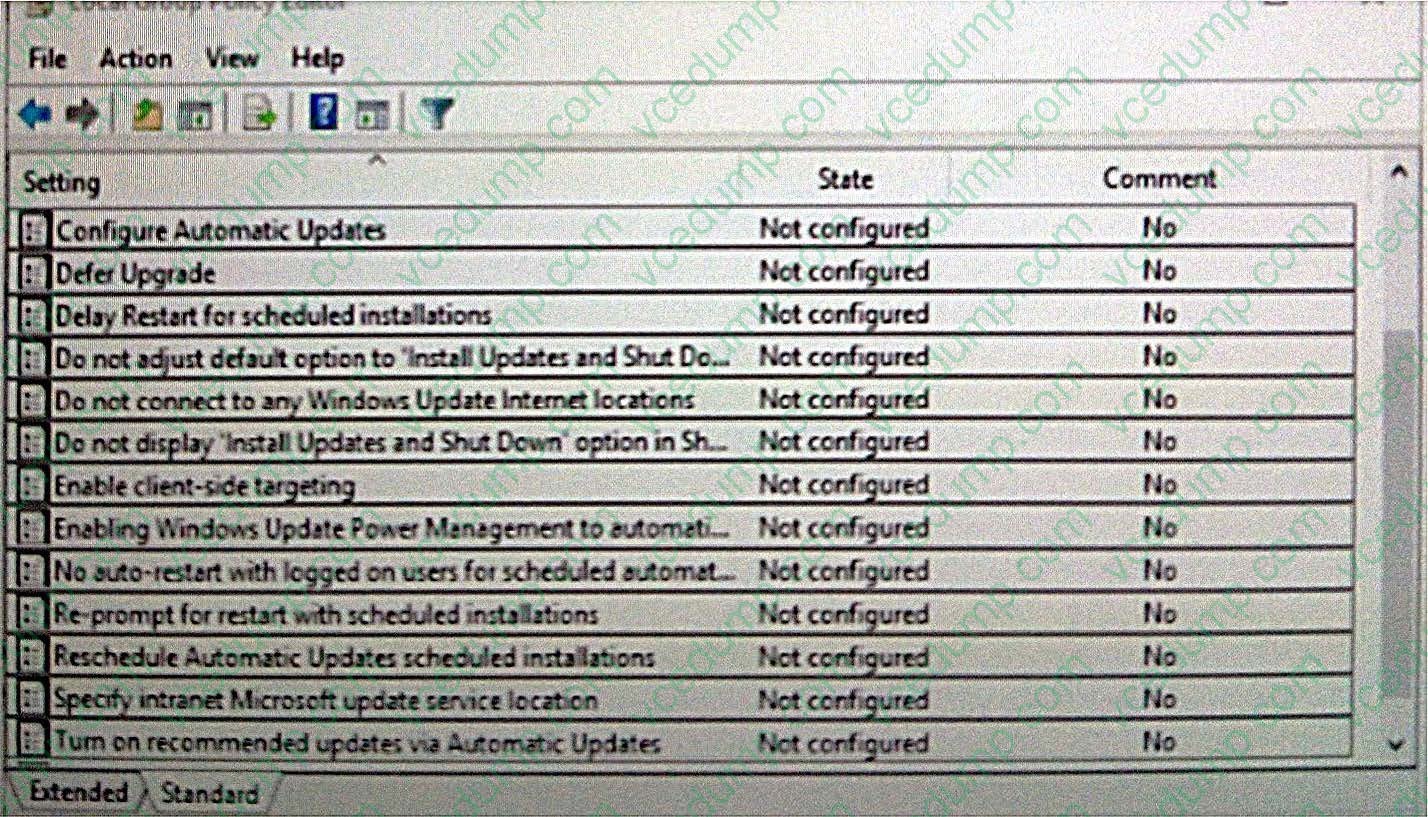
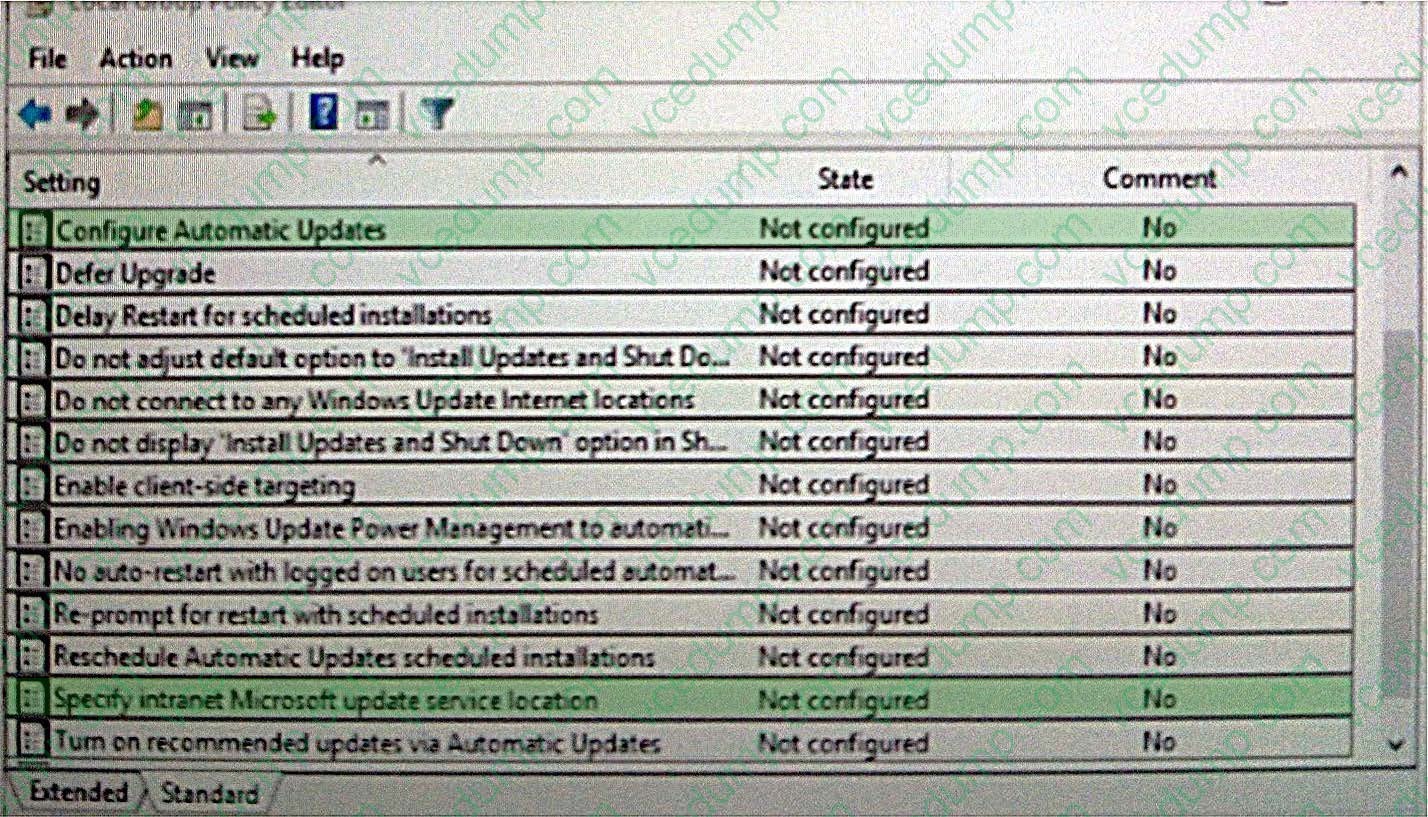
You have an Active Directory domain. All of the client computers in the domain run Windows 10 Enterprise.
You need to configure the client computers to download updates from a Windows Server Update Service server.
Which two settings should you configure? To answer, select the appropriate settings in the answer area.
Hot Area:
-
Question 85:
An organization has client computers that run Windows 8. You upgrade the client computers to Windows 10 Enterprise without migrating the local user profiles. You install the Windows Assessment and Deployment Kit (ADK) in the
environment.
You need to migrate the user profiles from the Windows 8 installation to the Windows 10 Enterprise installation.
What should you do first on each client computer?
A. Run the loadstate command.
B. Copy the Default Profile to a folder on drive C.
C. Run the ImageX command.
D. Run Windows Easy Transfer and select the user profile to migrate.
E. Run the scanstate command. -
Question 86:
A company implements Microsoft Office 365.
You must prevent credit card numbers and other sensitive information in documents from being sent externally.
You need to ensure that the data is protected on all devices.
What are two possible ways to achieve the goal? Each correct answer presents a complete solution.
NOTE: Each correct selection is worth one point.
A. Configure a Microsoft Intune mobile device management (MDM) policy
B. Implement Microsoft Azure Rights Management
C. Configure a data loss prevention (DLP) policy
D. Configure a threat management policy -
Question 87:
You have a computer that runs Windows 10. The computer is a member of an Active Directory domain.
You need to enable Network Discovery on the computer.
Which option should you select from the Network and Sharing Center?
A. Change adapter settings
B. Change advanced sharing settings
C. Internet Options
D. Set up a new connection or network -
Question 88:
You administer Windows 10 Enterprise computers for a software development company.
The marketing department is going to meet a potential customer to demonstrate the product. You want to configure a laptop that has a stand-alone virtual machine that runs Windows 10 Enterprise and the latest build of your software.
You need to enable BitLocker on the system drive of the virtual machine.
What should you do first?
A. Join the virtual machine to an Active Directory Domain Services (AD DS) domain.
B. Activate Windows.
C. Turn on the Require additional authentication at startup local policy.
D. Turn off the Require additional authentication at startup local policy. -
Question 89:
You have a computer named Computer1 that runs Windows 10 Enterprise.
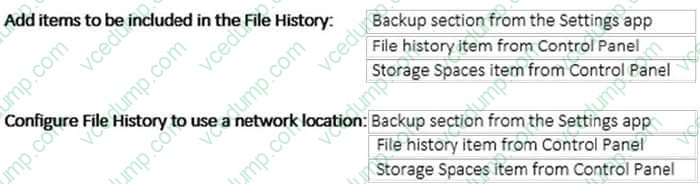
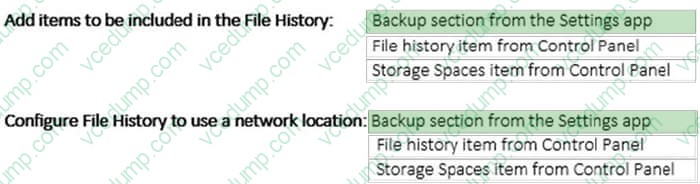
You plan to implement File History on Computer1.
You need to identify the interface that can be used to perform File History management actions.
Which interface should you identify for each action? To answer, select the appropriate options in the answer area.
Hot Area:
-
Question 90:
Note: This question is part of a series of questions that use the same or similar answer choices. An answer choice may be correct for more than one question in the series. Each question is independent of the other questions in this series.
Information and details in a question apply only to that question.
Your network contains a shared folder that is located at \\server1\data.
On a computer, you make the shared folder available for offline use.
You need to ensure that you have the most up-to-date version of the folder cached.
Which Control Panel application should you use?
A. Credential Manager
B. Phone and Modem
C. Work Folders
D. System
E. RemoteApp and Desktop Connections
F. Network and Sharing Center
G. Sync Center
H. Power Options
Related Exams:
-
62-193
Technology Literacy for Educators -
70-243
Administering and Deploying System Center 2012 Configuration Manager -
70-355
Universal Windows Platform – App Data, Services, and Coding Patterns -
77-420
Excel 2013 -
77-427
Excel 2013 Expert Part One -
77-725
Word 2016 Core Document Creation, Collaboration and Communication -
77-726
Word 2016 Expert Creating Documents for Effective Communication -
77-727
Excel 2016 Core Data Analysis, Manipulation, and Presentation -
77-728
Excel 2016 Expert: Interpreting Data for Insights -
77-731
Outlook 2016 Core Communication, Collaboration and Email Skills
Tips on How to Prepare for the Exams
Nowadays, the certification exams become more and more important and required by more and more enterprises when applying for a job. But how to prepare for the exam effectively? How to prepare for the exam in a short time with less efforts? How to get a ideal result and how to find the most reliable resources? Here on Vcedump.com, you will find all the answers. Vcedump.com provide not only Microsoft exam questions, answers and explanations but also complete assistance on your exam preparation and certification application. If you are confused on your 70-697 exam preparations and Microsoft certification application, do not hesitate to visit our Vcedump.com to find your solutions here.