70-688 Exam Details
-
Exam Code
:70-688 -
Exam Name
:Supporting Windows 8.1 -
Certification
:Microsoft Certifications -
Vendor
:Microsoft -
Total Questions
:224 Q&As -
Last Updated
:Apr 07, 2020
Microsoft 70-688 Online Questions & Answers
-
Question 171:
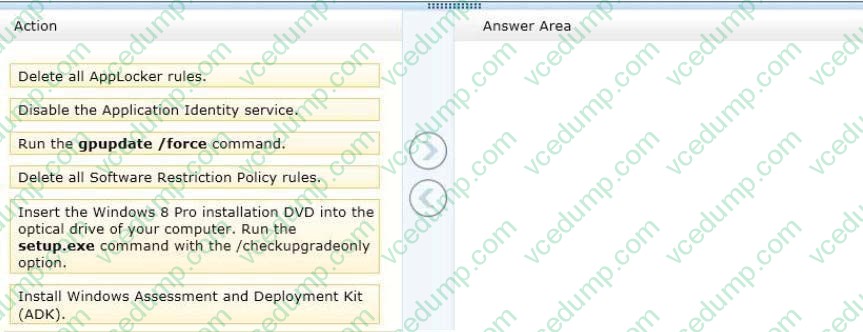
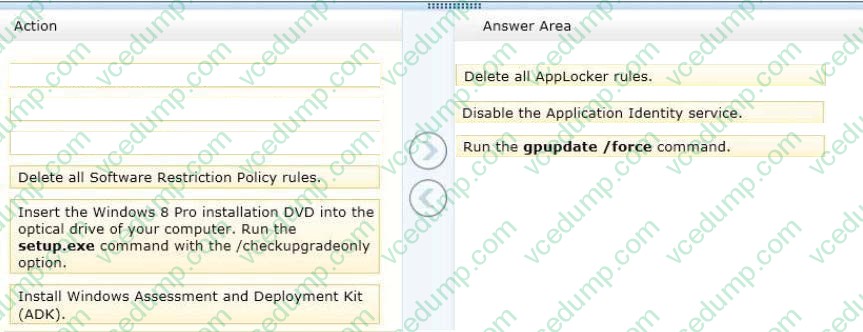
You support computers that run windows 8 Enterprise. AppLocker policies are deployed.
Company policy states that AppLocker must be disabled.
You need to disable AppLocker.
Which three actions should you perform in sequence? (To answer, move the appropriate actions from the list of actions to the answer area and arrange them in the correct order.)
Select and Place:
-
Question 172:
You support Windows 8.1 Enterprise computers. Your company protects all laptops by using the BitLocker Network Unlock feature.
Some employees work from home.
You need to ensure that employees can log on to their laptops when they work from home.
What should you do?
A. Provide employees their BitLocker PINs.
B. Have users run the Manage-bde.exe -unlock command before they disconnect from the company network.
C. Ensure that the Trusted Platform Module (TPM) chips in the laptops are version 1.2 or greater.
D. Enable BitLocker To Go. -
Question 173:
You administrator Windows 8.1 Enterprise 64-bit client computers. Your network includes printers that require custom drivers. When local administrators attempt to install the custom printer drivers, an error message appears. The error states
that an unsigned driver cannot be installed.
You need to configure the computers so that printer drivers can be installed. You also need to ensure that standard users are able to use the printers after installation.
What should you do?
A. Press F8 during startup log in as an administrator and connect the printer.
B. Disable User Account control Log in as an administrator and connect the printer.
C. Sign the printer drivers with a certificate issued by a trusted Certificate Authority (CA).
D. Submit the printer drives for certification in Windows Store Search Windows Store for the approved drivers. -
Question 174:
You administer Windows 8.1 Enterprise laptops. All of the computers are members of an Active Directory domain.
You are in a remote office. You connect to a variety of Microsoft clients in the main office, including Windows 8, Windows XP, and Server 2008. The VPN authentication traffic must be encrypted.
You need to establish a VPN connection that will allow you to connect to all Microsoft clients.
Which of the following should you use?
A. EAP-TLS
B. MS-CHAP v2
C. 802.1X
D. RADIUS
E. PPTP
F. L2TP/IPSEC
G. IPSEC/IKEv2
H. SSTP -
Question 175:
You support computers that run Windows 8. You are designing a remote access server (RAS).
The firewall accepts incoming TCP connections only to ports 80 and 443.
You want to connect to the RAS server from a laptop.
You need to create a virtual private network (VPN) connection to the RAS server.
Which VPN tunneling protocol should you use?
A. L2TP
B. SSTP
C. PPTP
D. IPSEC -
Question 176:
You administer Windows 8 Pro and Windows RT tablets for your company. Your company network includes a Windows Server 2012 domain and Microsoft Exchange 2010 with ActiveSync and Outlook Web Access.
Users will be using the tablets outside of the corporate network.
The Microsoft Exchange ActiveSync policy is configured to require an alphanumeric password.
You need to ensure an alphanumeric password is required on all Windows 8 tablets.
What should you do?
A. From the Mail app, add the user's Exchange account.
B. Set up New Partnership in Sync Center.
C. From Sync your Settings, set Password to Off.
D. Create a user profile by using a Microsoft account. -
Question 177:
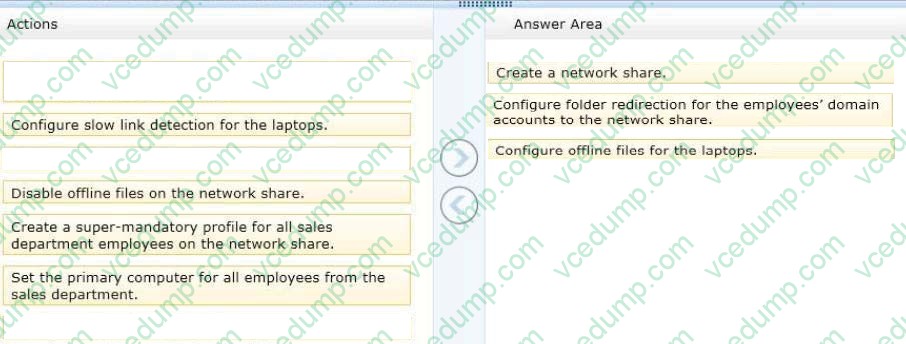
You administer laptops and virtual desktop computers that run Windows 8 and are joined to an Active Directory domain.
Your company provides virtual desktop computers to all users. Employees in the sales department also use laptops, sometimes connected to the company network and sometimes disconnected from the company network.
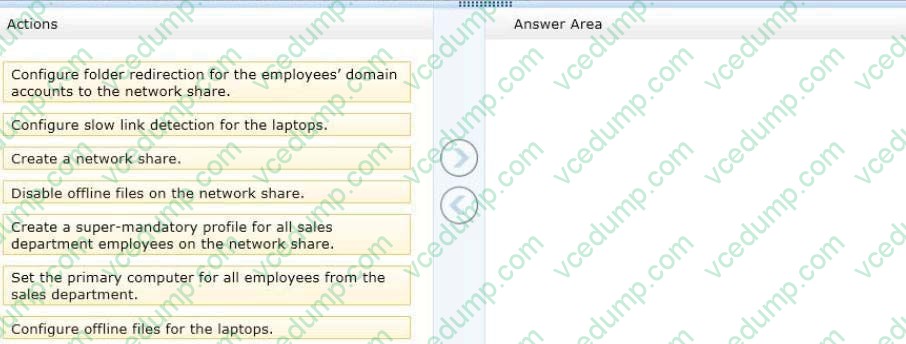
You want sales department employees to have the same personal data, whether they are using their virtual desktop computers or their laptops.
You need to configure the network environment to meet the requirements.
Which three actions should you perform in sequence? (To answer, move the appropriate actions from the list of actions to the answer area and arrange them in the correct order.)
Select and Place:
-
Question 178:
You support desktop computers and tablets that run Windows 8 Enterprise. All of the computers are able to connect to your company network from the Internet by using DirectAccess.
Your company wants to deploy a new application to the tablets.
The deployment solution must meet the following requirements:
The application is not accessible if a user is working offline. The application is isolated from other applications. The application uses the least amount of disk space. You need to deploy the new application to the tablets.
What should you do?
A. Deploy the application as an Application Virtualization (App-V) package. Install the App- V 4.6 client on the tablets.
B. Deploy the application as a published application on the Remote Desktop server. Create a Remote Desktop connection on the tablets.
C. Install the application on a local drive on the tablets.
D. Install the application in a Windows To Go workspace.
E. Install Hyper-V on tablets. Install the application on a virtual machine.
F. Publish the application to Windows Store.
G. Install the application within a separate Windows 8 installation in a virtual hard disk (VHD) file. Configure the tablets with dual boot.
H. Install the application within a separate Windows 8 installation in a VHDX file. Configure the tablets with dual boot. -
Question 179:
You are a systems administrator of a small branch office. Computers in the office are joined to a Windows 8 HomeGroup. The HomeGroup includes one shared printer and several shared folders.
You join a new computer to the HomeGroup and try to access the HomeGroup shared folders. You discover that the shared folders are unavailable, and you receive an error message that indicates the password is incorrect.
You need to reconfigure the new computer in order to access the HomeGroup resources.
What should you do?
A. Adjust the time settings on the new computer to match the time settings of the HomeGroup computers.
B. Reset your account password to match the HomeGroup password.
C. Disjoin all HomeGroup members and re-create the HomeGroup.
D. Change NTFS security permission on the shared folders. Grant Everyone account Read and Execute permission. -
Question 180:
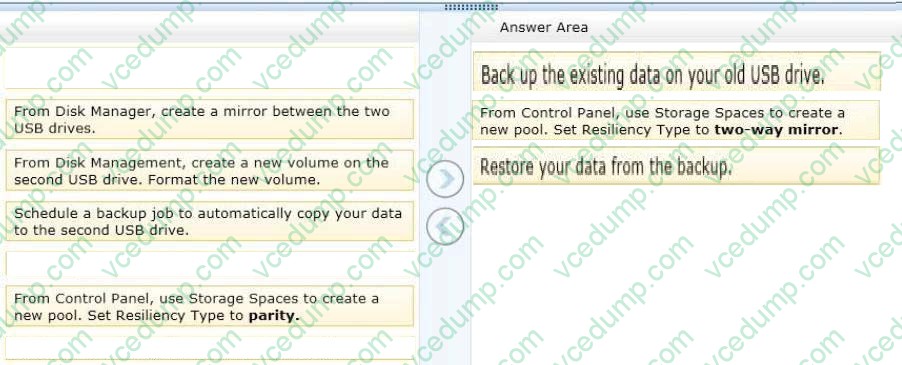
You have a computer that runs Windows 8.
You have a 1-terabyte external hard drive.
You purchase a second 1-terabyte external hard drive.
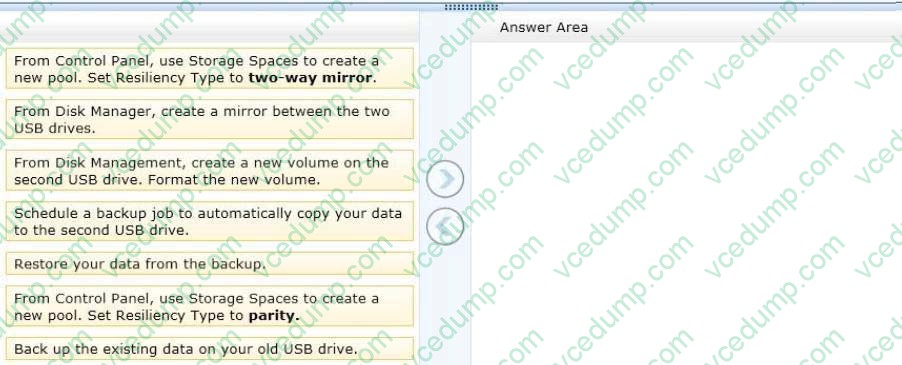
You need to create a fault-tolerant volume that includes both external hard drives.
You also need to ensure that additional external hard drives can be added to the volume.
Which three actions should you perform in sequence?
(To answer, move the appropriate actions from the list of actions to the answer area and arrange them in the correct order.)
Select and Place:
Related Exams:
-
62-193
Technology Literacy for Educators -
70-243
Administering and Deploying System Center 2012 Configuration Manager -
70-355
Universal Windows Platform – App Data, Services, and Coding Patterns -
77-420
Excel 2013 -
77-427
Excel 2013 Expert Part One -
77-725
Word 2016 Core Document Creation, Collaboration and Communication -
77-726
Word 2016 Expert Creating Documents for Effective Communication -
77-727
Excel 2016 Core Data Analysis, Manipulation, and Presentation -
77-728
Excel 2016 Expert: Interpreting Data for Insights -
77-731
Outlook 2016 Core Communication, Collaboration and Email Skills
Tips on How to Prepare for the Exams
Nowadays, the certification exams become more and more important and required by more and more enterprises when applying for a job. But how to prepare for the exam effectively? How to prepare for the exam in a short time with less efforts? How to get a ideal result and how to find the most reliable resources? Here on Vcedump.com, you will find all the answers. Vcedump.com provide not only Microsoft exam questions, answers and explanations but also complete assistance on your exam preparation and certification application. If you are confused on your 70-688 exam preparations and Microsoft certification application, do not hesitate to visit our Vcedump.com to find your solutions here.