70-688 Exam Details
-
Exam Code
:70-688 -
Exam Name
:Supporting Windows 8.1 -
Certification
:Microsoft Certifications -
Vendor
:Microsoft -
Total Questions
:224 Q&As -
Last Updated
:Apr 07, 2020
Microsoft 70-688 Online Questions & Answers
-
Question 211:
You administer computers that run Windows 8 Pro. You have secured the computers by using BitLocker.
You have distributed a new application to the computers. Users report that file associations for ZIP archives is broken and users are unable to open ZIP files.
You need to design a solution that recovers file association. You also need to ensure that BitLocker encryption settings are maintained.
What should you do?
A. Restore computer from the latest restore point.
B. Delete the HKEY_CLASSES_ROOT\exefile\shell\open\command registry key.
C. Modify setting in Change default settings for media or devices.
D. Select Reset your PC. -
Question 212:
Your network contains an Active Directory domain. All client computers run Windows 8 Enterprise.
Your company uses virtual smart cards.
A user named User1 requires a virtual smart card on a new client computer named Computer1.
Which two actions should you perform? (Each correct answer presents part of the solution.
Choose two.)
A. Enroll User1 for a certificate.
B. Run the Enable-BitLocker cmdlet.
C. Run the tpmvscmgr.exe command.
D. Enroll Computer1 for a certificate. -
Question 213:
You administer Windows 8.1 Pro laptops and tablets.
Your company wants to start using Virtual Smart Cards on these laptops.
You need to verify that the client laptops and tablets support Virtual Smart Cards before you implement any changes.
What should you do?
A. Connect a physical smart card reader to each laptop.
B. Verify that each laptop has a Trusted Platform Module (TPM) chip of version 1.2 or greater.
C. Configure BitLocker Drive Encryption on the system drive of each laptop.
D. Upgrade the laptops to Windows 8 Enterprise edition. -
Question 214:
You support Windows 8.1 Enterprise desktop computers. One computer is a member of a workgroup and is used as a guest computer in a reception area.
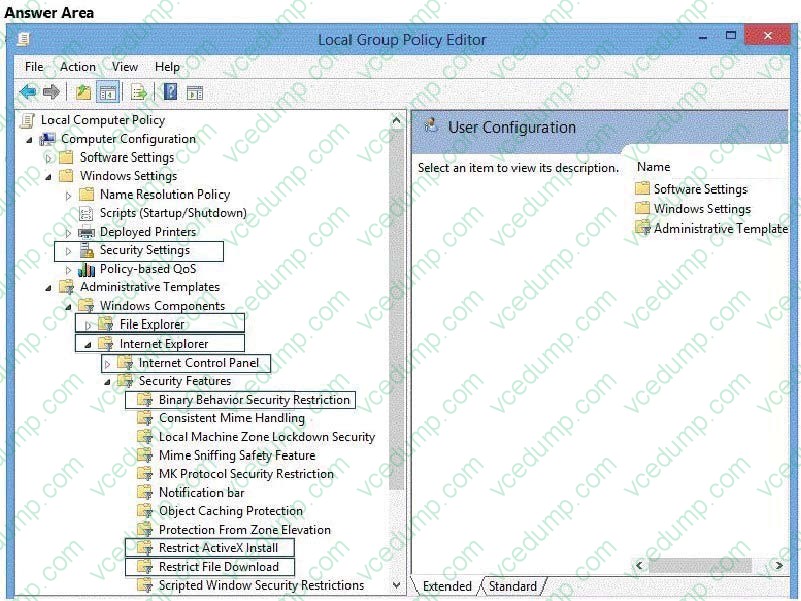
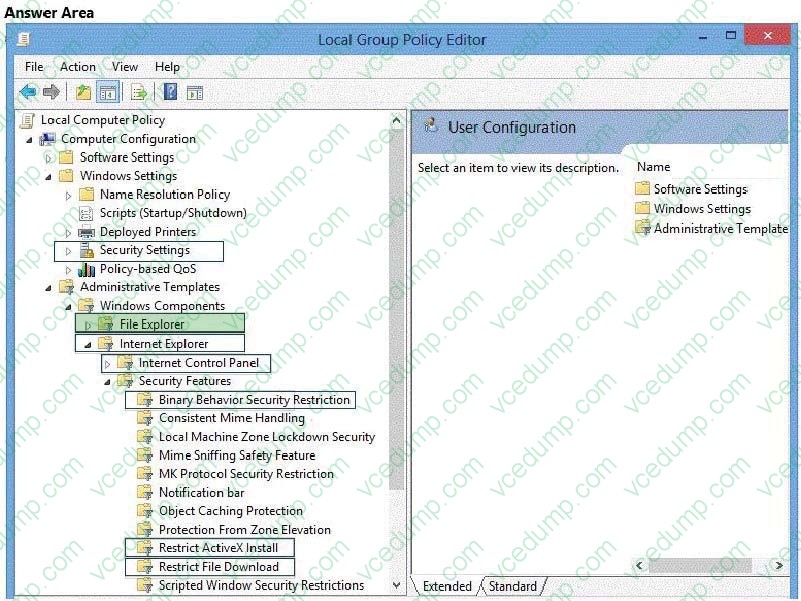
You need to configure the Windows SmartScreen setting to require administrator approval before running downloaded unknown software on the desktop computer.
Which policy setting should you use? (To answer, select the appropriate object in the answer area.)
Hot Area:
-
Question 215:
You support Windows 8.1 Enterprise computers that are members of a workgroup.
Users are able to download and install any app from Windows Store.
You need to ensure that only approved apps can be installed from Windows Store.
What should you do?
A. Configure a Software Restriction Policy Certificate rule.
B. Configure an AppLocker Publisher rule.
C. Configure an AppLocker Packaged app rule.
D. Enable Windows SmartScreen and select the Get administrator approval before running an unrecognized app from the Internet option. -
Question 216:
You support desktop computers and tablets that run Windows 8 Enterprise. All of the computers are able to connect to your company network from the Internet by using DirectAccess.
Your company wants to deploy a new application to the tablets. The deployment solution must meet the following requirements:
Users have offline access to the application only within the first seven days following their latest online session. The application uses the least amount of disk space. You need to deploy the new application to the tablets.
What should you do?
A. Deploy the application as an Application Virtualization (App-V) package. Install the App- V client on the tablets.
B. Deploy the application as a published application on the Remote Desktop server. Create a Remote Desktop connection on the tablets.
C. Install the application on a local drive on the tablets.
D. Install the application in a Windows To Go workspace.
E. Install Hyper-V on tablets. Install the application on a virtual machine.
F. Publish the application to Windows Store.
G. Install the application within a separate Windows 8 installation in a virtual hard disk (VHD) file. Configure the tablets with dual boot.
H. Install the application within a separate Windows 8 installation in a VHDX file. Configure tablets with dual boot. -
Question 217:
Your network contains an Active Directory domain named contoso.com. All client computers in the domain run Windows 8.1 Pro. All domain users have roaming user profiles.
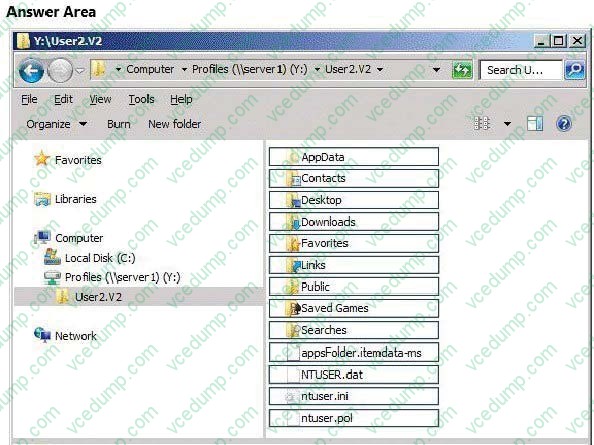
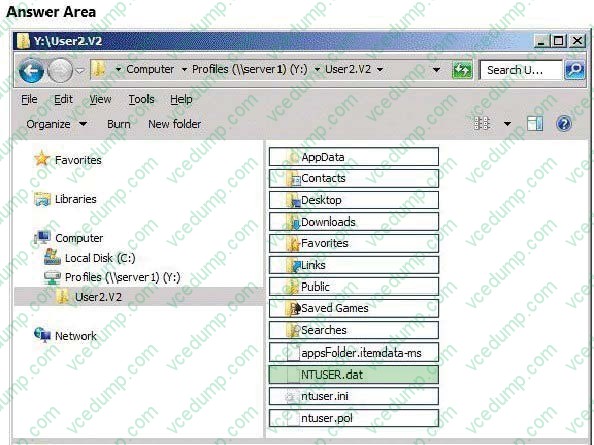
You need to prevent a user named User2 from being able to save changes to his roaming user profile.
Which file or folder should you modify? (To answer, select the appropriate file or folder in the answer area.)
Hot Area:
-
Question 218:
You are a Windows 8 user. Your organization has purchased an Office 365 subscription. You install Microsoft Lync and Microsoft Outlook on your computer. You need to connect Office 365 to Lync and Outlook. What should you do?
A. Run the Office Professional Plus setup from the Office 365 portal.
B. Run the Windows Mail application. Add a new account by using your Office 365 credentials.
C. Run the People application. Add a new account by using your Office 365 credentials.
D. Run the Office 365 desktop setup from the Office 365 portal. -
Question 219:
You have 100 client computers that run Windows 8 Pro. Each computer has a single local hard disk drive, a DVD drive, and an external USB drive.
Each computer has a different set of line-of-business (LOB) desktop applications that are installed locally. All of the applications store their configurations in the HKEY_Local_Machine\Software registry hive.
You need to design a recovery solution to ensure that you can restore the initial state of the locally installed LOB desktop applications if an application is misconfigured. The solution must preserve the existing locally stored user data.
What should you do?
A. Enable File History. Restore files by using File History.
B. Create a Microsoft Diagnostics and Recovery Toolset (DaRT) recovery image. Start the computer from the DaRT image and perform a file restore.
C. Run recimg.exe. Perform a system refresh.
D. Create a system repair disk by using Windows 7 File Recovery. Start the computer from the Windows 8 Enterprise installation media and perform an automatic repair, -
Question 220:
You administer computers that run Windows 8 Pro. The desktops have the Application Virtualization (App-V) client installed. Multiple App-V applications are published on the network.
A user reports that it is taking a long time to launch App-V applications on his computer. You discover that the user has a roaming profile on the computer.
You need to minimize the time that is required for the user to start App-V applications on the computer.
What should you do?
A. Change the user profile to Super-Mandatory.
B. Change the location of the App-V client cache file on the computer.
C. Increase the size of the App-V client cache on the computer.
D. Change the user profile to Local.
Related Exams:
-
62-193
Technology Literacy for Educators -
70-243
Administering and Deploying System Center 2012 Configuration Manager -
70-355
Universal Windows Platform – App Data, Services, and Coding Patterns -
77-420
Excel 2013 -
77-427
Excel 2013 Expert Part One -
77-725
Word 2016 Core Document Creation, Collaboration and Communication -
77-726
Word 2016 Expert Creating Documents for Effective Communication -
77-727
Excel 2016 Core Data Analysis, Manipulation, and Presentation -
77-728
Excel 2016 Expert: Interpreting Data for Insights -
77-731
Outlook 2016 Core Communication, Collaboration and Email Skills
Tips on How to Prepare for the Exams
Nowadays, the certification exams become more and more important and required by more and more enterprises when applying for a job. But how to prepare for the exam effectively? How to prepare for the exam in a short time with less efforts? How to get a ideal result and how to find the most reliable resources? Here on Vcedump.com, you will find all the answers. Vcedump.com provide not only Microsoft exam questions, answers and explanations but also complete assistance on your exam preparation and certification application. If you are confused on your 70-688 exam preparations and Microsoft certification application, do not hesitate to visit our Vcedump.com to find your solutions here.