70-688 Exam Details
-
Exam Code
:70-688 -
Exam Name
:Supporting Windows 8.1 -
Certification
:Microsoft Certifications -
Vendor
:Microsoft -
Total Questions
:224 Q&As -
Last Updated
:Apr 07, 2020
Microsoft 70-688 Online Questions & Answers
-
Question 161:
You have Windows 8.1 Pro client computers.
You need to recommend a solution to roll back the Windows Defender engine and the malware signature files on the computers. The solution must minimize administrative effort.
What should you include in the recommendation?
A. the Program and Features Control Panel item
B. Windows 7 File Recovery
C. the Mpcmdrun command
D. File History -
Question 162:
You administer laptop and desktop computers that run Windows 8 Enterprise in an Active Directory domain. Your company has purchased a subscription to Windows Intune.
You plan to install Intune Endpoint Protection on all computers. Some of the computers also have another antimalware application installed.
You need to ensure that only the Intune Endpoint Protection application is running on all computers. What should you do?
A. Configure the Enable Realtime Protection policy to Yes.
B. Configure the Enable Endpoint Protection policy to Only on computers that are unprotected when Endpoint Protection is installed.
C. Configure the Enable Endpoint Protection policy setting to Yes.
D. Configure the Enable Endpoint Protection policy setting to No. -
Question 163:
You have client Windows 8.1 Enterprise computers.
Your company purchases a subscription to Windows Intune.
You deploy the Windows Intune agent to all of the computers.
You need to uninstall a Microsoft update that was installed before the Windows Intune agent was installed. The solution must minimize administrative effort.
What should you do?
A. Create a Group Policy object (GPO) that runs wusa.exe by using a startup script.
B. From Windows Intune, create a new automatic approval rule.
C. From Windows Intune, click New updates to approve.
D. Create a Group Policy object (GPO) that runs msiexec.exe by using a startup script. -
Question 164:
You support computers that run Windows 8 Enterprise. Your company protects all laptops by using the BitLocker Network Unlock feature. Some employees work from home.
You need to ensure that employees can log on to their laptops when they work from home. What should you do?
A. Provide employees their BitLocker PINs.
B. Ensure that the Trusted Platform Module (TPM) chips in the laptops are version 1.2 or greater.
C. Enable BitLocker To Go.
D. Have users run the Manage-bde.exe -unlock command before they disconnect from the company network. -
Question 165:
You are a systems administrator for your company. The company has employees who work remotely by using a virtual private network (VPN) connection from their computers, which run Windows 8.1 Pro. These employees use an application
to access the company intranet database servers. The company recently decided to distribute the latest version of the application through using a public cloud.
Some users report that every time they try to download the application by using Internet Explorer, they receive a warning message that indicates the application could harm their computer.
You need to recommend a solution that prevents this warning message from appearing, without compromising the security protection of the computers.
What should you do?
A. Publish the application to Windows Store.
B. Publish the application through an intranet web site.
C. Change the default Software Restriction Policies on the client computers.
D. Obtain a public certificate for the web server, and then configure the web site to use SSL -
Question 166:
You have 100 client Windows 8.1 computers. Users are NOT configured as local administrators.
You need to prevent the users from running applications that they downloaded from the Internet, unless the applications are signed by a trusted publisher.
What should you configure in the Security settings from the Action Center?
A. Virus protection
B. User Account Control
C. Windows SmartScreen settings
D. Network Access Protection -
Question 167:
You have a desktop computer that runs Windows 8 Enterprise.
You add three new 3-terabyte disks.
You need to create a new 9-terabyte volume.
Which two actions should you perform? (Each correct answer presents part of the solution.
Choose two.)
A. From Disk Management, create a new spanned volume.
B. From Disk Management, convert all of the 3-terabyte disks to GPT.
C. From PowerShell, run the New-VirtualDisk cmdlet.
D. From Disk Management, bring all disks offline.
E. From Diskpart, run the Convert MBR command.
F. From PowerShell, run the Add-PhysicalDisk cmdlet. -
Question 168:
Your company has a main office and a branch office. Each office contains several servers that run Windows Server 2012.
You need to configure BranchCache for the client computers in the branch office. The solution must ensure that all of the cached content is in a central location.
What should you run on each client computer?
A. the netdom command
B. the Enable-BCHostedClient cmdlet
C. the Enable-BCDistributed cmdlet
D. the winrm command -
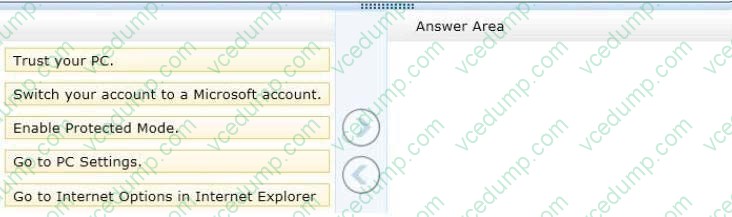
Question 169:
You use a desktop computer and a laptop, both of which run Windows 8. You use a Microsoft account to log on to the desktop computer and a local user account to log on to the laptop. The desktop computer is joined to the HomeGroup and
the laptop is a member of a workgroup.
When you access a frequently visited website from your laptop, Internet Explorer saves your password. When you visit the website from your desktop computer, you are prompted to enter your password.
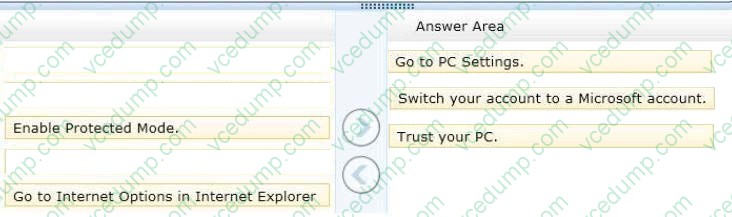
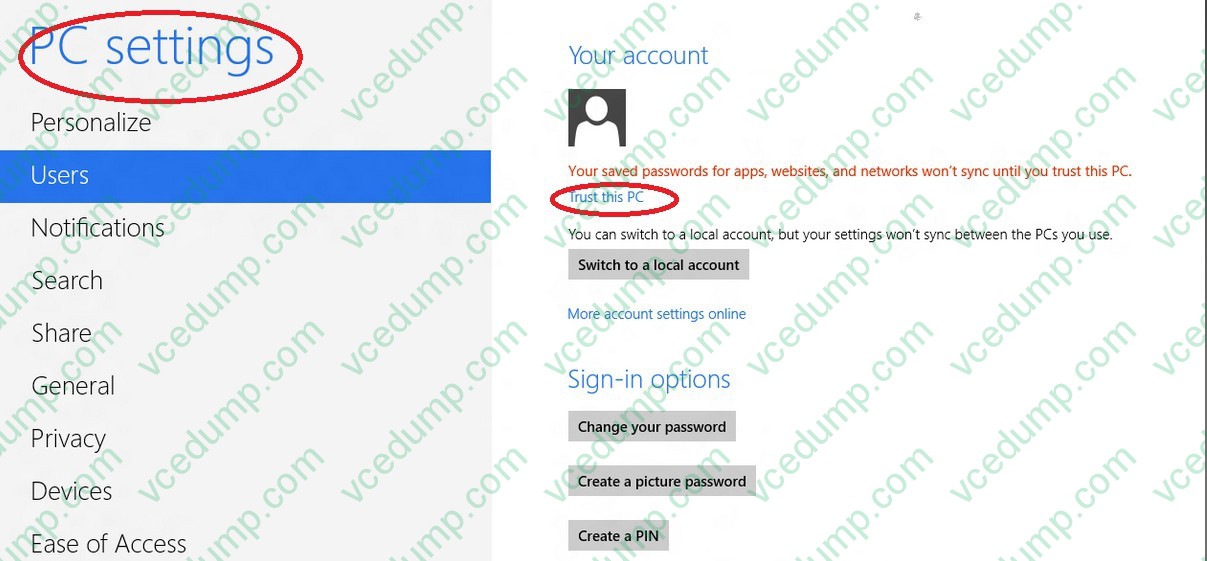
You need to sync your saved password from your laptop to your desktop computer.
Which three actions should you perform on the laptop in sequence? (To answer, move the appropriate actions from the list of actions to the answer area and arrange them in the correct order.)
Select and Place:
-
Question 170:
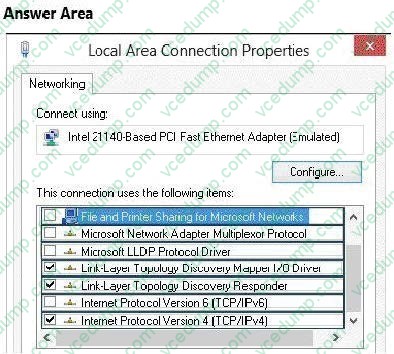
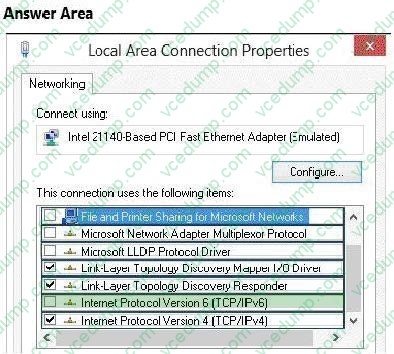
Your network contains an Active Directory domain. DirectAccess was deployed recently.
You have a Windows 8.1 Enterprise client computer named LON-CL1.
You need to ensure that LON-CL1 can establish connections to the network by using DirectAccess.
What should you configure? (To answer, select the appropriate item in the answer area.)
Hot Area:
Related Exams:
-
62-193
Technology Literacy for Educators -
70-243
Administering and Deploying System Center 2012 Configuration Manager -
70-355
Universal Windows Platform – App Data, Services, and Coding Patterns -
77-420
Excel 2013 -
77-427
Excel 2013 Expert Part One -
77-725
Word 2016 Core Document Creation, Collaboration and Communication -
77-726
Word 2016 Expert Creating Documents for Effective Communication -
77-727
Excel 2016 Core Data Analysis, Manipulation, and Presentation -
77-728
Excel 2016 Expert: Interpreting Data for Insights -
77-731
Outlook 2016 Core Communication, Collaboration and Email Skills
Tips on How to Prepare for the Exams
Nowadays, the certification exams become more and more important and required by more and more enterprises when applying for a job. But how to prepare for the exam effectively? How to prepare for the exam in a short time with less efforts? How to get a ideal result and how to find the most reliable resources? Here on Vcedump.com, you will find all the answers. Vcedump.com provide not only Microsoft exam questions, answers and explanations but also complete assistance on your exam preparation and certification application. If you are confused on your 70-688 exam preparations and Microsoft certification application, do not hesitate to visit our Vcedump.com to find your solutions here.