70-688 Exam Details
-
Exam Code
:70-688 -
Exam Name
:Supporting Windows 8.1 -
Certification
:Microsoft Certifications -
Vendor
:Microsoft -
Total Questions
:224 Q&As -
Last Updated
:Apr 07, 2020
Microsoft 70-688 Online Questions & Answers
-
Question 181:
You support tablets that run Windows 8 Pro. You are designing a remote access server (RAS) that will be placed behind a firewall. The firewall will accept incoming TCP connections to ports 80 and 443 only.
You want to connect to the RAS server from a tablet.
You need to create a virtual private network (VPN) connection to the RAS server.
Which VPN tunneling protocol should you use?
A. IPSec/L2TP
B. SSTP
C. PPTP
D. IPSec/IKEv2 -
Question 182:
You support computers that run Windows 8 Enterprise and are members of a workgroup.
Users are able to download and install any app from Windows Store.
You need to ensure that only approved apps can be installed from Windows Store.
What should you do?
A. Configure an AppLocker Packaged app rule.
B. Enable Windows SmartScreen and select the Get administrator approval before running an unrecognized app from the Internet option.
C. Configure an AppLocker Publisher rule.
D. Configure a Software Restriction Policy Certificate rule. -
Question 183:
You have Windows 8.1 client computers. The computers use the Microsoft Application Virtualization (App-V) 5.0 client.
You discover that when users sign in to their computer, the App-V client refreshes all of the published packages.
You need to prevent the App-V client from refreshing the published packages at sign-in. The solution must ensure that the users can use App-V applications.
Which Windows PowerShell cmdlet should you run?
A. Set-AppvClientConfiguration
B. Set-AppvClientMode
C. Set-AppvClientPackage
D. Set-AppvPublishingServer -
Question 184:
A company has 100 Windows 8.1 client computers.
A computer fails and reports a kernel error.
You need to analyze the kernel error to identify what caused the failure.
What should you use?
A. A USB recovery drive created by using the advanced recovery tools on another Windows 8 computer
B. A system repair disk created by using Windows 7 File Recovery on another Windows 8 computer
C. The Windows 8 Debug/Checked Build installation media
D. A recovery disk created by using the Microsoft Diagnostics and Recovery Toolset (DaRT) -
Question 185:
You administer Windows 8.1 Enterprise computers in an Active Directory domain. Your company has purchased a subscription to Windows Intune. You are assigned as a Global Administrator for Intune.
You determine that a company employee who works at the help desk requires the following permissions:
Manage support tickets
Manage subscriptions
You need to assign the appropriate administrative role to the employee.
Which role should you assign to the help desk employee?
A. User Management Administrator
B. Password Administrator
C. Billing Administrator
D. Service Administrator -
Question 186:
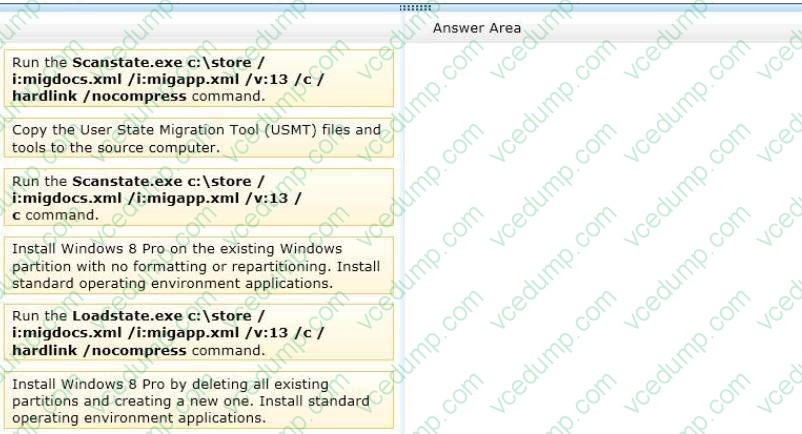
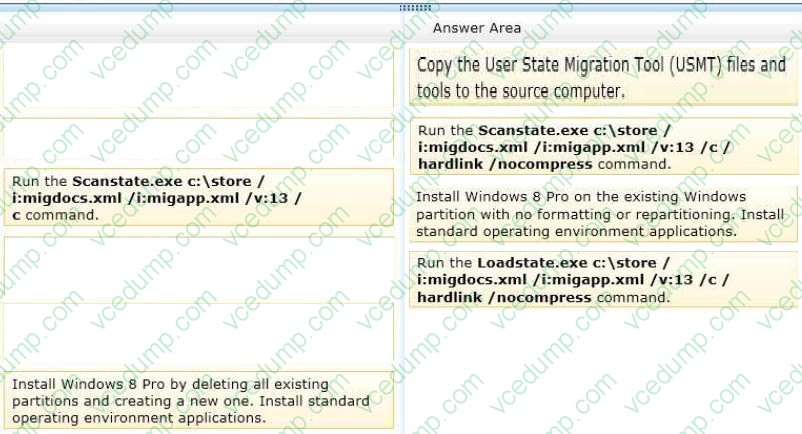
You administer 50 laptops that run Windows 7 Professional 32-bit.
You want to install Windows 8 Pro 64-bit on every laptop. Users will keep their own laptops.
You need to ensure that user application settings, Windows settings, and user files are maintained after Windows 8 Pro is installed.
Which four actions should you perform in sequence? (To answer, move the appropriate actions from the list of actions to the answer area and arrange them in the correct order.)
Select and Place:
-
Question 187:
You support Windows 8.1 Enterprise desktop computers.
Your company is deploying proprietary devices that will use a signed device driver. The driver is stored on a server share and is updated frequently by the device manufacturer.
You need to configure the desktop computers to automatically install the most recent version of the device driver from the file share when the proprietary device is plugged in to the computer.
What should you do?
A. Run the dism.exe tool and specify the /Add-Driver parameter,
B. Run the pnputil.exe and specify the -e parameter.
C. Modify the DevicePath value in the HKEY_LOCAL_MACHINE/Microsoft/Windows/CurrentVersion registry key.
D. Run the pnputil.exe tool and specify the -a parameter. -
Question 188:
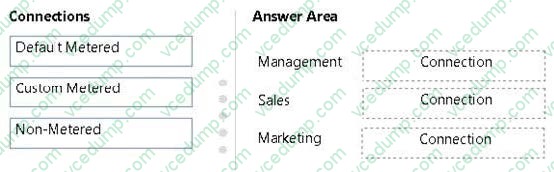
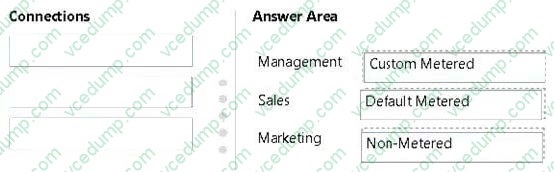
A company's Windows 8.1 tablets are joined to an Active Directory Domain Services (AD DS) domain. When employees work remotely, they use a mobile data plan to connect their tablets to the Internet. The company has the following requirements for the mobile data plan:
1. Management users must synchronize offline files.
2. Sales users must minimize data usage.
3. Marketing users must receive all Windows Updates.
You need to ensure that the tablets meet these requirements.
How should the connections be configured? (To answer, drag the appropriate connection type to the corresponding department, Each connection type may be used once, more than once, or not at all. You may need to drag the split bar between panes or scroll to view content.)
Select and Place:
-
Question 189:
You have a client Windows 8.1 Enterprise computer. The computer is joined to an Active Directory domain. The computer does not have a Trusted Platform Module (TPM) chip installed.
You need to configure BitLocker Drive Encryption (BitLocker) on the operating system drive.
Which Group Policy object (GPO) setting should you configure?
A. Configure use of hardware-based encryption for operating system drives.
B. Allow access to BitLocker-protected fixed data drives from earlier version of Windows.
C. Require additional authentication at startup.
D. Allow network unlock at startup. -
Question 190:
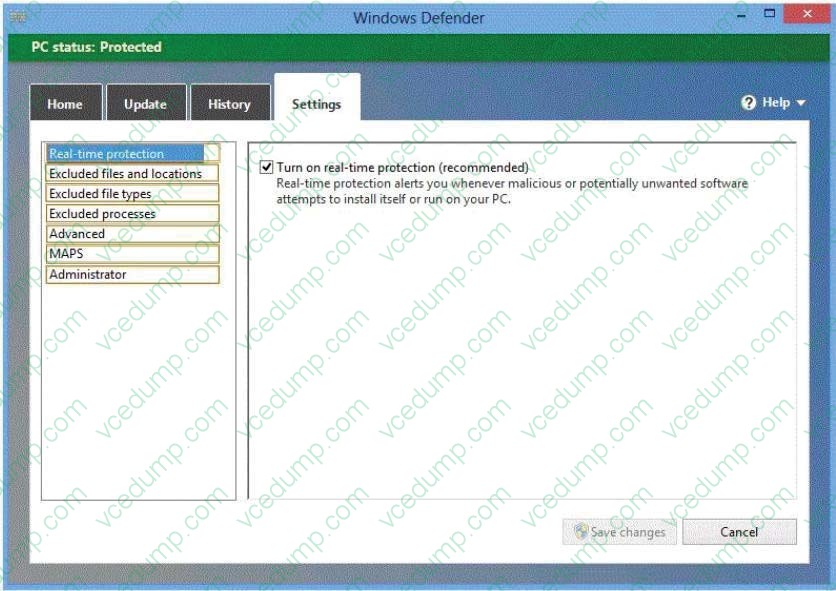
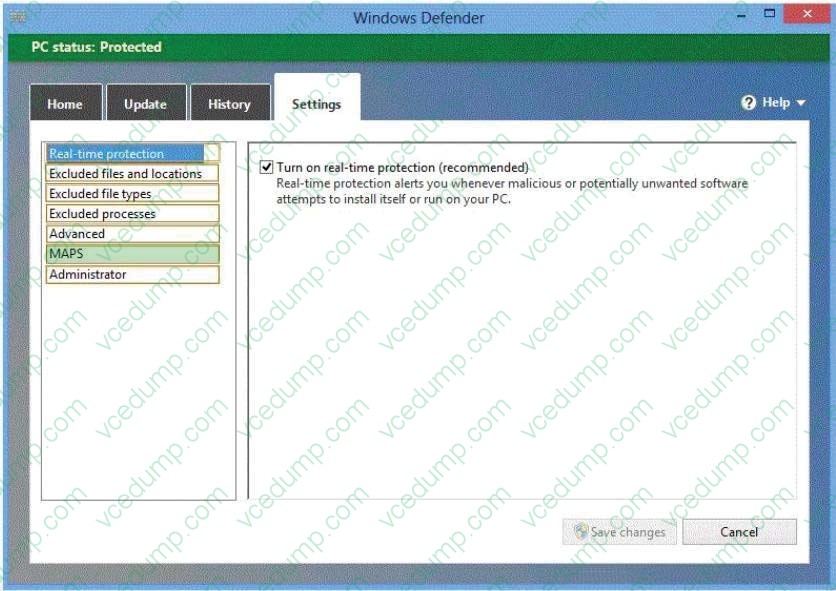
You have computers that run Windows 8 Pro and are configured as a workgroup. Each computer is scheduled to run a Windows Defender full scan every morning at 07:00.
Users report that they are unable to view previous instances of detected malware when they arrive to work.
You need to ensure that all users can see previous instances of detected malware in Windows Defender.
Which option on the Settings tab should you select? (To answer, select the appropriate option in the answer area.)
Hot Area:
Related Exams:
-
62-193
Technology Literacy for Educators -
70-243
Administering and Deploying System Center 2012 Configuration Manager -
70-355
Universal Windows Platform – App Data, Services, and Coding Patterns -
77-420
Excel 2013 -
77-427
Excel 2013 Expert Part One -
77-725
Word 2016 Core Document Creation, Collaboration and Communication -
77-726
Word 2016 Expert Creating Documents for Effective Communication -
77-727
Excel 2016 Core Data Analysis, Manipulation, and Presentation -
77-728
Excel 2016 Expert: Interpreting Data for Insights -
77-731
Outlook 2016 Core Communication, Collaboration and Email Skills
Tips on How to Prepare for the Exams
Nowadays, the certification exams become more and more important and required by more and more enterprises when applying for a job. But how to prepare for the exam effectively? How to prepare for the exam in a short time with less efforts? How to get a ideal result and how to find the most reliable resources? Here on Vcedump.com, you will find all the answers. Vcedump.com provide not only Microsoft exam questions, answers and explanations but also complete assistance on your exam preparation and certification application. If you are confused on your 70-688 exam preparations and Microsoft certification application, do not hesitate to visit our Vcedump.com to find your solutions here.