70-688 Exam Details
-
Exam Code
:70-688 -
Exam Name
:Supporting Windows 8.1 -
Certification
:Microsoft Certifications -
Vendor
:Microsoft -
Total Questions
:224 Q&As -
Last Updated
:Apr 07, 2020
Microsoft 70-688 Online Questions & Answers
-
Question 191:
You administer computers that run Windows 8.
The computers on your network are produced by various manufacturers and often require custom drivers.
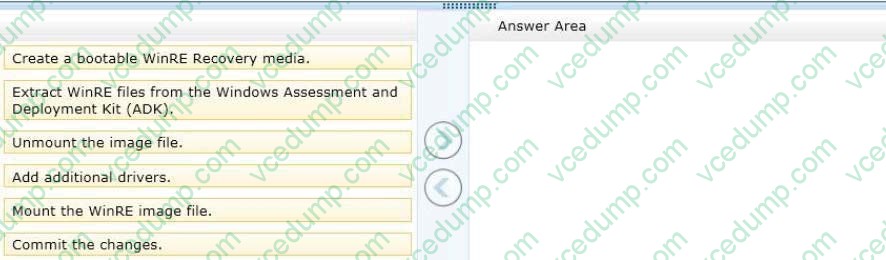
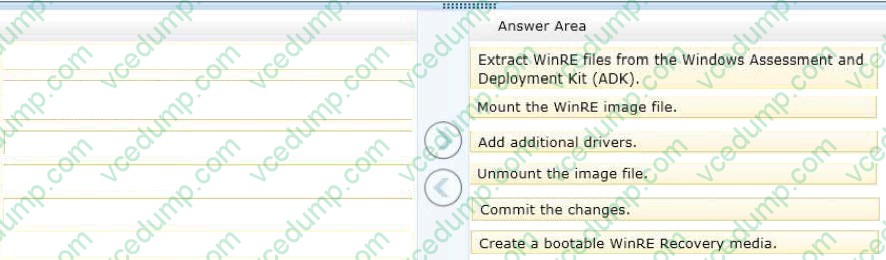
You need to design a recovery solution that allows the repair of any of the computers by using a Windows Recovery Environment (WinRE).
In which order should you perform the actions? (To answer, move all actions from the list of actions to the answer area and arrange them in the correct order.)
Select and Place:
-
Question 192:
You administer a computer that runs Windows 8 Pro.
You need to create a backup copy of the computer system drive. The backup copy must support a complete system drive restore to another computer.
What should you do?
A. Create a system restore point.
B. Run the bcdedit /export command.
C. Perfom a backup to a shared folder by using the wbadmin command with the -allcritical switch.
D. Create a system recovery drive. -
Question 193:
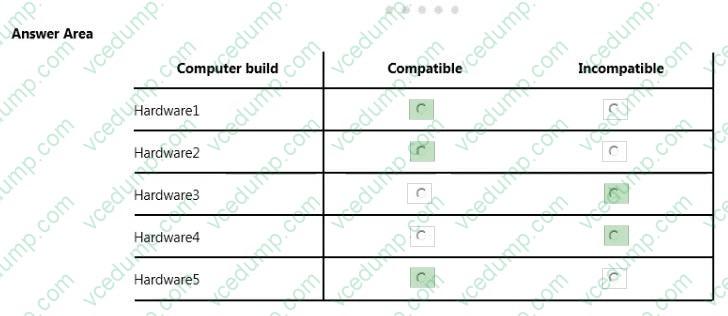
Your company has five hardware builds for client computers. The hardware builds are configured as shown in the following table.
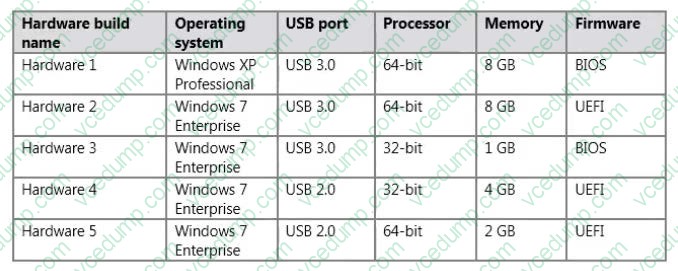
You plan to provide some users with Windows To Go disks that contain a corporate image of the 64-bit version of Windows 8.1 Enterprise and several line-of-business (LOB) applications.
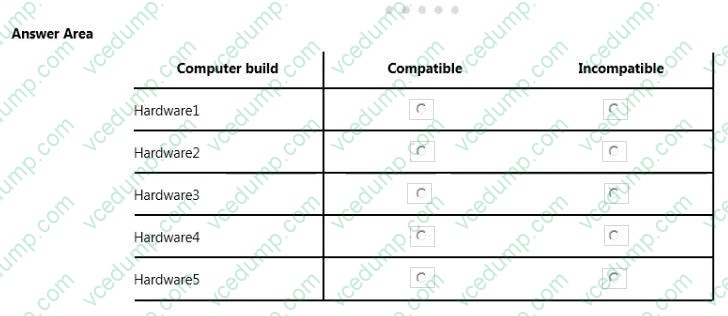
In the table below, identify whether the hardware build is compatible or incompatible with the Windows To Go disks. Make only one selection in each row. Each correct selection is worth one point.
Hot Area:
-
Question 194:
You manage a client Windows 8.1 computer named Computer1. The computer has the SkyDrive desktop application installed.
You have a SkyDrive synchronized folder that contains .pdf files.
You need to ensure that you can restore previous versions of the ,pdf files.
What should you do?
A. Enable File History.
B. Configure Computer1 as a trusted PC.
C. Enable Sync your settings on Computer1.
D. Configure System Restore. -
Question 195:
You manage client computers that run Windows 8 and are part of a workgroup.
These computers are configured to use Microsoft Update. Updates are downloaded every day at 10:00 and installed automatically.
Users report that their computers sometimes reboot without any interaction.
You need to prevent unplanned automatic reboots of the computers.
What should you do?
A. Enable the Reschedule Automatic Updates scheduled installations policy setting.
B. Disable the Re-prompt for restart with scheduled installations policy setting.
C. Enable the Automatic Updates detection frequency policy setting.
D. Enable the No auto-restart with logged on users for scheduled automatic updates installations policy setting. -
Question 196:
You have computers that run Windows 8 Enterprise. Microsoft BitLocker Administration and Monitoring (MBAM) is deployed on your network on a server named MBAM1.
Company policy requires that within 2 hours of being started, computers that have the MBAM client installed prompt users to enable BitLocker.
You need to make changes to the Configure MBAM Services Group Policy settings.
Which two actions should you perform? (Each correct answer presents part of the solution.
Choose two.)
A. Set MBAM Recovery and Hardware service endpoint to MBAM1.
B. Set Enter status reporting frequency (in minutes) to 120.
C. Set MBAM Status reporting endpoint to MBAM1.
D. Set Select Bitlocker Recovery Information to store to Recovery password and key package.
E. Set Select Bitlocker Recovery Information to store to Recovery password only.
F. Set Enter client checking status frequency (in minutes) to 120. -
Question 197:
You have client computers that run Windows 7 Enterprise. All users have roaming user profiles.
You deploy several client computers that run Windows 8 Enterprise.
Users who sign in to both the Windows 8 Enterprise computers and the Windows 7 Enterprise computers report that they no longer see their desktop background and their theme.
You suspect that the user profiles are corrupt.
You need to resolve the profile corruption issue.
What should you do?
A. Move all of the user profiles to a file server that runs Windows Server 2012, and then modify the profile path of each user account.
B. on the Windows 7 computers, configure the Download roaming profiles on primary computers only Group Policy setting.
C. on the Windows 8 computers, configure the Set roaming profile path for all users logging onto this computer Group Policy setting.
D. For each user, set the msDs-PrimaryComputer attribute to use a Windows 8 computer. -
Question 198:
You are a systems administrator for Contoso; Ltd. All client computers run Windows 8 and are members of the contoso.com Active Directory domain. Users log on to their computers by using domain user accounts.
Contoso develops an internal line of business (LOB) Windows Store app. You want to deploy the LOB app to the client computers and configure the app to access various resources in the domain.
You need to enable all users to run the LOB app and access the required resources from the LOB app.
What should you do?
A. Certify the LOB app with Windows Store. Ask users to log on to their computers by using a Microsoft Account. Install the LOB app from Windows Store. Ask users to log off, and then log back on in by using their domain accounts.
B. Restart each computer by using WinPE. From WinPE, copy all of the LOB app executable files in the Program Files folder. Restart into Windows 8 and ask users to log on by using their domain accounts.
C. Use the DISM utility to include the LOB app in a new Windows 8 image. Reimage the computers with the new image. Join the computers to a new workgroup. Ask each user to log on to the computer by using a new Microsoft Account that ends with @contoso.com.
D. Configure the Allow all trusted apps to install policy settings for all computers. Ask users to log on by using their domain accounts, and then execute a PowerShell script that includes the add-appxpackage cmdlet. -
Question 199:
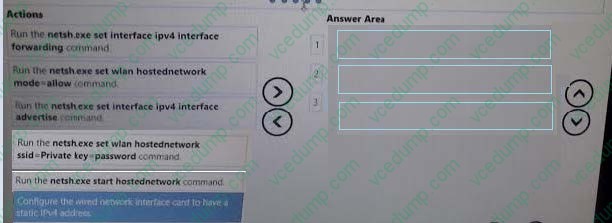
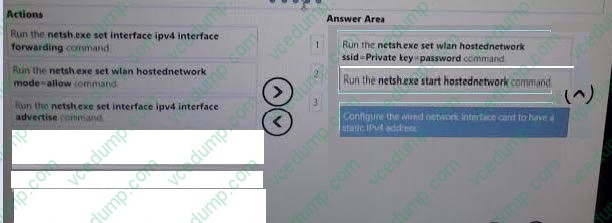
You are a system administrator for a company that has remote offices in several different cities.
You are responsible for configuring internet access in some of these offices. One remote office has a Windows 8.1 Pro desktop computer that is connected to the internet with a wired connection.
Select and Place:
-
Question 200:
You administer computers that run Windows 8 Enterprise and are members of an Active Directory domain.
Some volumes on the computers are encrypted with BitLocker. The BitLocker recovery passwords are stored in Active Directory. A user forgets the BitLocker password to local drive E: and is unable to access the protected volume.
You need to provide a BitLocker recovery key to unlock the protected volume.
Which two actions should you perform? (Each correct answer presents part of the solution.
Choose two.)
A. Ask the user to run the manage-bde -protectors -disable e: command.
B. Ask the user for a recovery key ID for the protected drive.
C. Ask the user for his or her logon name.
D. Ask the user for his or her computer name.
Related Exams:
-
62-193
Technology Literacy for Educators -
70-243
Administering and Deploying System Center 2012 Configuration Manager -
70-355
Universal Windows Platform – App Data, Services, and Coding Patterns -
77-420
Excel 2013 -
77-427
Excel 2013 Expert Part One -
77-725
Word 2016 Core Document Creation, Collaboration and Communication -
77-726
Word 2016 Expert Creating Documents for Effective Communication -
77-727
Excel 2016 Core Data Analysis, Manipulation, and Presentation -
77-728
Excel 2016 Expert: Interpreting Data for Insights -
77-731
Outlook 2016 Core Communication, Collaboration and Email Skills
Tips on How to Prepare for the Exams
Nowadays, the certification exams become more and more important and required by more and more enterprises when applying for a job. But how to prepare for the exam effectively? How to prepare for the exam in a short time with less efforts? How to get a ideal result and how to find the most reliable resources? Here on Vcedump.com, you will find all the answers. Vcedump.com provide not only Microsoft exam questions, answers and explanations but also complete assistance on your exam preparation and certification application. If you are confused on your 70-688 exam preparations and Microsoft certification application, do not hesitate to visit our Vcedump.com to find your solutions here.