70-688 Exam Details
-
Exam Code
:70-688 -
Exam Name
:Supporting Windows 8.1 -
Certification
:Microsoft Certifications -
Vendor
:Microsoft -
Total Questions
:224 Q&As -
Last Updated
:Apr 07, 2020
Microsoft 70-688 Online Questions & Answers
-
Question 1:
You have client computers that run Windows 8 Pro.
You need to recommend a solution to roll back the Windows Defender engine and the malware signature files on the computers. The solution must minimize administrative effort.
What should you include in the recommendation?
A. File History
B. the Program and Features Control Panel item
C. Windows 7 File Recovery
D. System Restore points -
Question 2:
Your company has client computers that run either Windows XP or Windows 7.
You plan to deploy Windows 8.1 Enterprise to all of the computers.
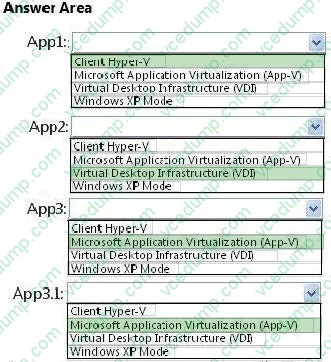
You plan to deploy the applications shown in the following table.
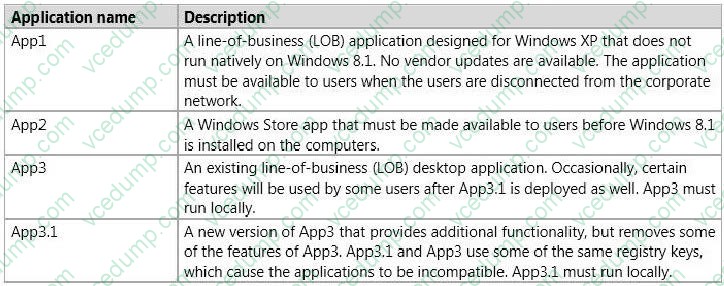
You need to recommend the appropriate technology to deploy each application. Each solution must ensure that the users can access all of the applications. The solution that uses the least
amount of system resources must be selected, whenever possible.
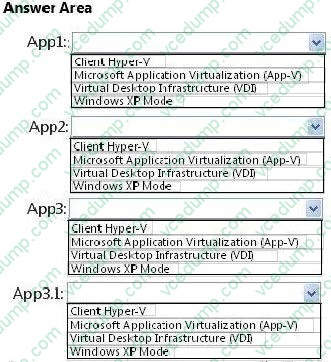
Which technology should you recommend for each application? (To answer, select the appropriate technology for each application in the answer area.)
Hot Area:
-
Question 3:
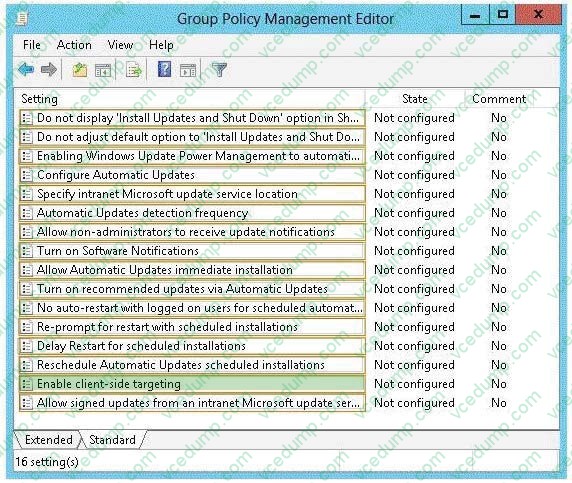
Your network contains an Active Directory domain. All client computers run Windows 8 Enterprise and are located in an organizational unit (OU) named Windows8Computers.
The network has Windows Server update Services (WSUS) installed. All of the computers are configured to receive updates from WSUS.
The network administrator creates a new computer group named Win8Computers in WSUS.
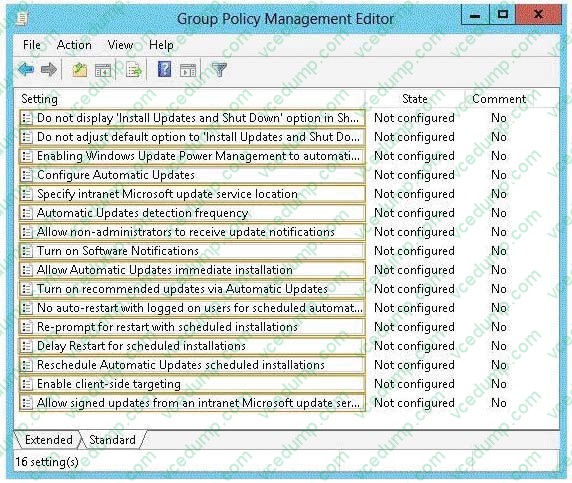
You need to ensure that the Windows 8 computers receive all of the updates that are assigned to the WinSComputers computer group.
Which Group Policy setting should you configure? (To answer, select the appropriate setting in the answer area.)
Hot Area:
-
Question 4:
You have a Windows 8.1 Pro desktop computer and a Windows RT 8.1 mobile device.
You sign in to the computer and the device by using the same Microsoft account.
You discover that the settings are not being synchronized between the Windows 8.1 computer and the Windows RT 8.1 device.
You need to ensure that the settings are synchronized.
What should you do first?
A. Enable the Trusted Hosts Group Policy setting.
B. Enable the Configure Default consent Group Policy setting.
C. From the PC settings page, click Trust this PC.
D. From the PC settings page, modify the Privacy settings. -
Question 5:
You manage Windows 8.1 client computers that are part of a workgroup. These computers are configured to use Microsoft Update. Updates are downloaded every day at 10:00 and installed automatically.
Users report that their computers sometimes reboot without any interaction,
You need to prevent unplanned automatic reboots of the computers. What should you do?
A. Disable the Re-prompt for restart with scheduled installations policy setting.
B. Disable the Delay Restart for scheduled installations policy setting.
C. Disable the No auto-restart with logged on users for scheduled automatic updates installations policy setting.
D. Set the Configure automatic updating policy to 3 - Auto download and notify for install. -
Question 6:
You administer computers that run Windows 8 Enterprise and are members of a workgroup.
Company policy requires that all computers receive the latest updates from a Windows Server Update Services (WSUS) server. Only updates that are digitally signed by Microsoft are installed.
You need to configure the computers to automatically receive and apply the updates.
What should you do first?
A. Configure the Configure Automatic Updates policy setting to Allow local admin to choose setting.
B. Configure the Configure Automatic Updates policy setting to Auto download and schedule for install.
C. Configure the Specify intranet Microsoft update service location policy setting to use the local WSUS server.
D. Enable the Allow signed updates from an intranet Microsoft update service location policy setting. -
Question 7:
Your company has a main office and a branch office.
You have client computers that run Windows 8 Enterprise.
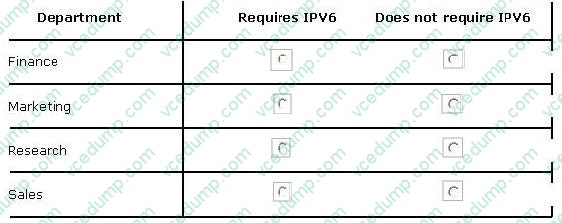
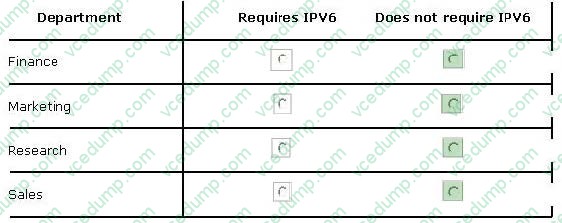
You are evaluating whether to disable IPv6 on the client computers in the sales, marketing,research, and finance departments.
Each user in the sales department has a laptop and frequently accesses the network by using a PPTP VPN connection.
Each user in the marketing department has a desktop computer located in the branch office. All of the marketing department computers are configured to use BranchCache.
Each user in the research department has a desktop computer located in the main office and uses IPSec to access research servers.
Each user in the finance department has a laptop and frequently accesses the network by using an SSTP VPN connection.
In the table below, identify which departments require IPv6 and which departments do not require IPv6. Make only one selection in each row. Each correct selection is worth one point.
Hot Area:
-
Question 8:
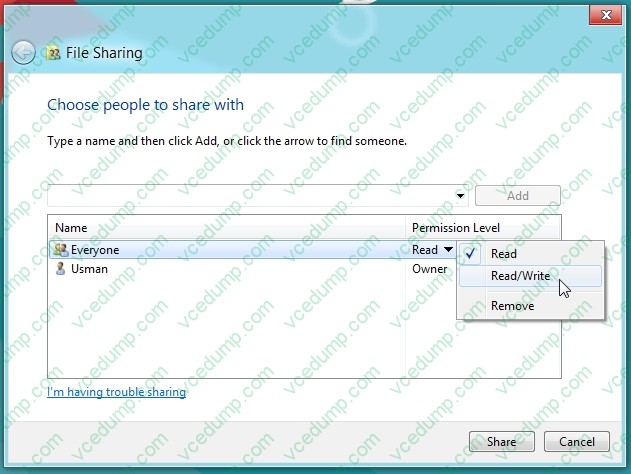
You support a desktop computer that runs Windows 8 Pro. The computer is joined to an Active Directory domain.
The computer has a folder named C:\Reports. The folder NTFS permissions are shown in Exhibit 1. (Click the Exhibit button.)
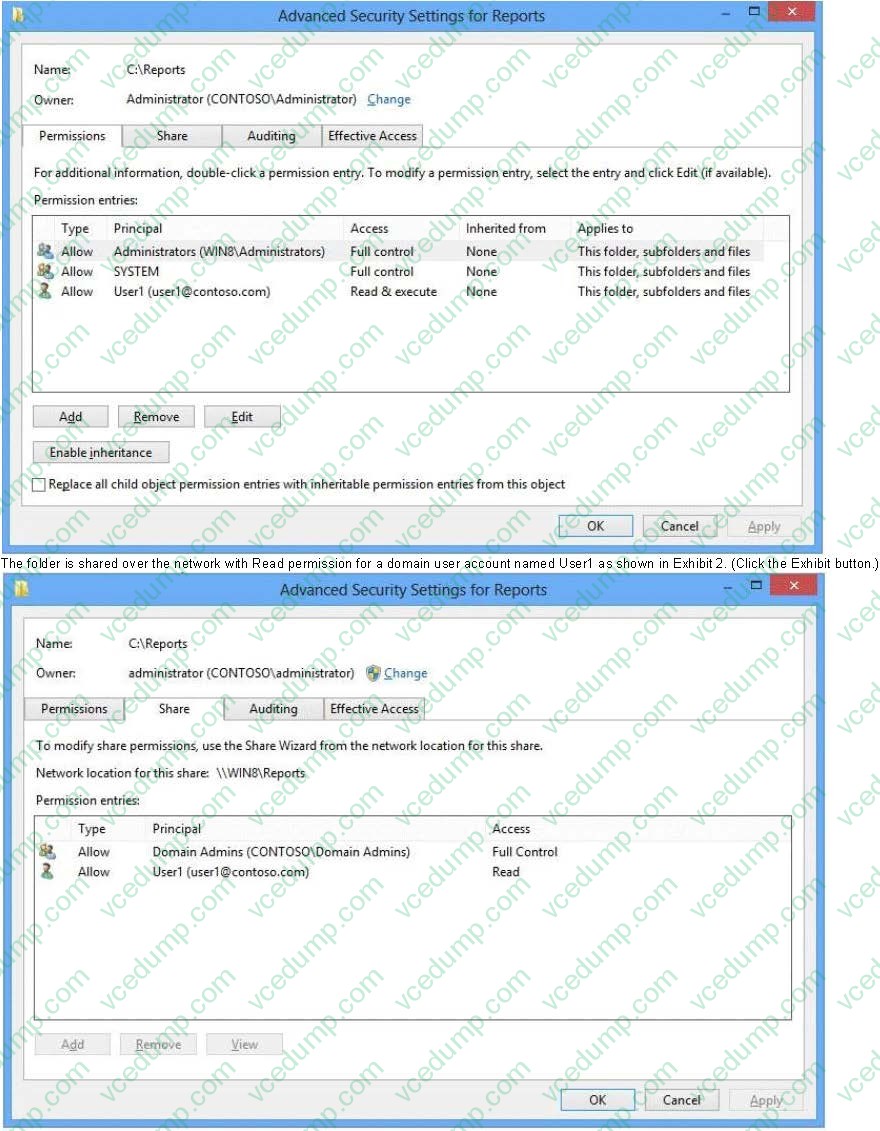
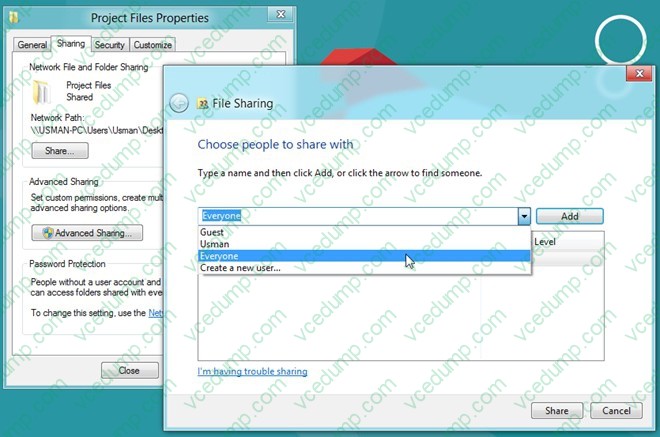
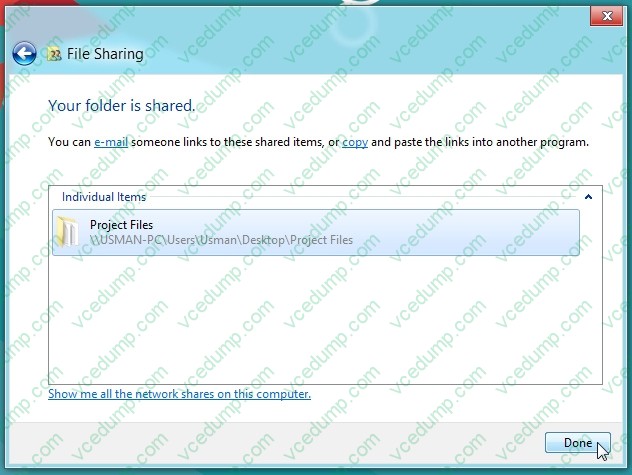
The folder is shared over the network with Read permission for a domain user account named User1 as shown in Exhibit 2. (Click the Exhibit button.)
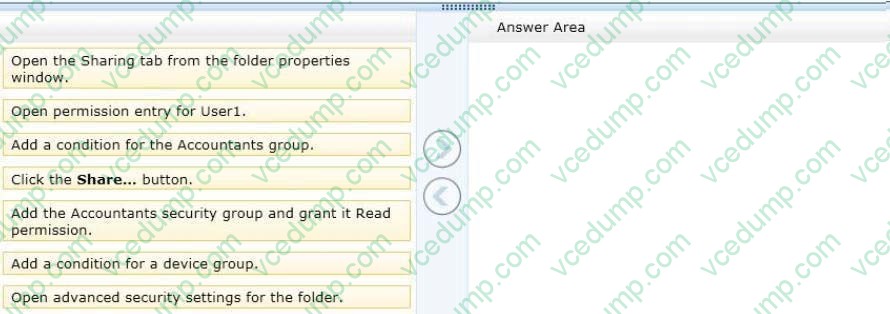
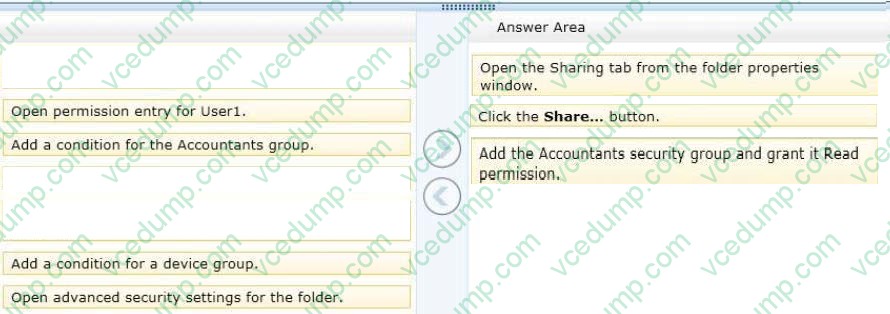
Members of the domain security group named Accountants must have access to the shared folder.
You need to assign the required permissions.
Which three actions should you perform in sequence? (To answer, move the appropriate actions from the list of actions to the answer area and arrange them in the correct order.)
Select and Place:
-
Question 9:
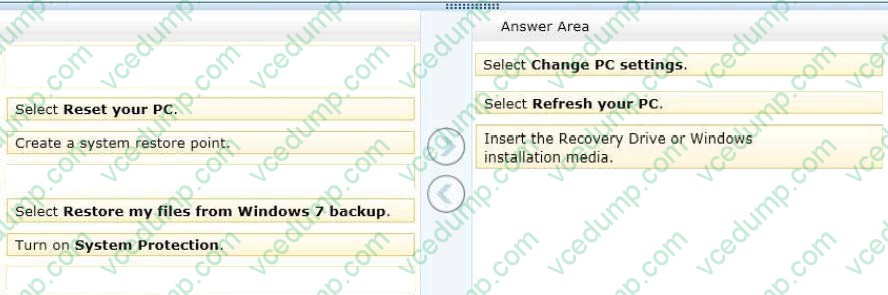
You support computers that run Windows 8.
A computer receives a STOP error.
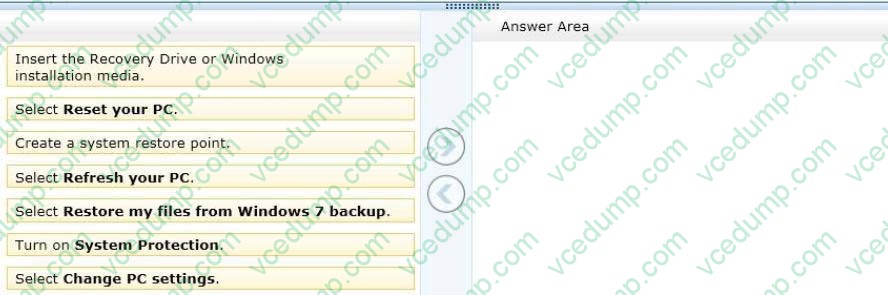
You plan to restore the operating system without losing user documents and settings.
You need to restore the operating system and user data in the least amount of time.
Which three steps should you perform in sequence? (To answer, move the appropriate actions from the list of actions to the answer area and arrange them in the correct order.)
Select and Place:
-
Question 10:
You have a Windows 8.1 Enterprise computer. The computer has an external hard drive to support transferring large files between branch offices. You need to check the external drive for malicious software by using Windows Defender What should you do?
A. From Advanced Settings, select the Scam removable drives option.
B. Detach and reattach the external hard disk. Run a Quick Scan.
C. Run a full scan and then select the History tab to review all detected malware.
D. Run a Custom scan and then select the History tab to review all detected malware.
Related Exams:
-
62-193
Technology Literacy for Educators -
70-243
Administering and Deploying System Center 2012 Configuration Manager -
70-355
Universal Windows Platform – App Data, Services, and Coding Patterns -
77-420
Excel 2013 -
77-427
Excel 2013 Expert Part One -
77-725
Word 2016 Core Document Creation, Collaboration and Communication -
77-726
Word 2016 Expert Creating Documents for Effective Communication -
77-727
Excel 2016 Core Data Analysis, Manipulation, and Presentation -
77-728
Excel 2016 Expert: Interpreting Data for Insights -
77-731
Outlook 2016 Core Communication, Collaboration and Email Skills
Tips on How to Prepare for the Exams
Nowadays, the certification exams become more and more important and required by more and more enterprises when applying for a job. But how to prepare for the exam effectively? How to prepare for the exam in a short time with less efforts? How to get a ideal result and how to find the most reliable resources? Here on Vcedump.com, you will find all the answers. Vcedump.com provide not only Microsoft exam questions, answers and explanations but also complete assistance on your exam preparation and certification application. If you are confused on your 70-688 exam preparations and Microsoft certification application, do not hesitate to visit our Vcedump.com to find your solutions here.