70-688 Exam Details
-
Exam Code
:70-688 -
Exam Name
:Supporting Windows 8.1 -
Certification
:Microsoft Certifications -
Vendor
:Microsoft -
Total Questions
:224 Q&As -
Last Updated
:Apr 07, 2020
Microsoft 70-688 Online Questions & Answers
-
Question 151:
At home, you use a Windows 8.1 desktop computer. At work, you use a Windows 8.1 laptop that is connected to a corporate network. You use the same Microsoft account to log on to both computers.
You have a folder with some personal documents on your desktop computer. The folder must be available and synced between both computers.
You need to ensure that the latest version of these files is available.
What should you do?
A. Create a folder by using SkyDrive for Windows. Move all of the personal documents to the new folder.
B. Move the folder to the Libraries folder. Go to PC Settings. Under Sync your settings, enable App settings.
C. Right-click the folder and click Properties. Under Security, provide Full Control for the Microsoft account.
D. Right-click the folder and select Share With, and then select Homegroup (view and edit). -
Question 152:
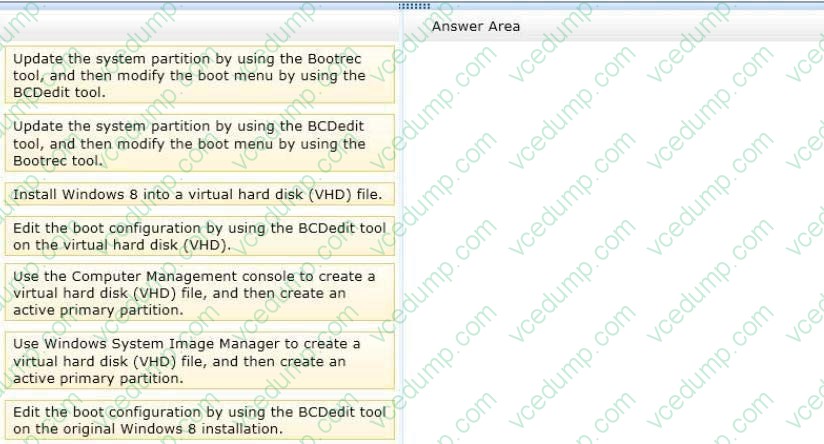
You support a computer that runs Windows 8 Enterprise.
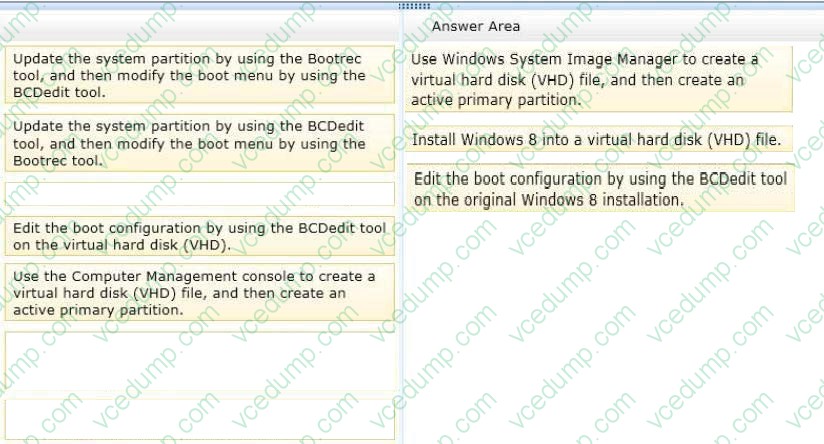
You want to create a dual-boot configuration by using the native boot virtual hard disk (VHD) method.
You need to create an alternate Windows 8 installation.
Which three actions should you perform in sequence? (To answer, move the appropriate actions from the list of actions to the answer area and arrange them in the correct order.)
Select and Place:
-
Question 153:
Your company deploys Windows To Go USB drives to users for testing. The drives contain Windows 8.1.
Users are unable to boot on a particular model of computer in the office.
The computers that do not boot have the following hardware configurations:
4 GB of RAM
USB 2.0 capability DirectX 8 video card
1.8 GHz x86 Processor
You need to upgrade each of the computers to support Windows To Go.
What should you do?
A. Upgrade the USB to 3.0.
B. Upgrade the processor to x64 2.0 GHz or higher.
C. Upgrade the RAM to more than 4 GB.
D. Upgrade the video card to support DirectX 9 or higher. -
Question 154:
Note: This question is part of a series of questions that use the same or similar answer choices. An answer choice may be correct for more than one question in the series. Each question is independent of the other questions in this series.
Information and details provided in a question apply only to that question.
You support Windows 8.1 Enterprise desktop computers and tablets. All of the computers are able to connect to your company network from the Internet by using DirectAccess.
Your company wants to deploy a new application to the tablets. The deployment solution must meet the following requirements:
The application is not accessible if a user is working offline. The application is isolated from other applications. The application uses the least amount of disk space. You need to deploy the new application to the tablets.
What should you do?
A. Deploy the application as an Application Virtualization (App-V) package. Install the App- V 4.6 client on the tablets.
B. Deploy the application as a published application on the Remote Desktop server. Create a Remote Desktop connection on the tablets.
C. Install the application on a local drive on the tablets.
D. Install the application in a Windows To Go workspace.
E. Install Hyper-V on tablets. Install the application on a virtual machine.
F. Publish the application to Windows Store.
G. Install the application within a separate Windows 8.1 installation in a virtual hard disk (VHD) file. Configure the tablets with dual boot.
H. Install the application within a separate Windows 8.1 installation in a VHDX file. Configure the tablets with dual boot. -
Question 155:
You administer a company network that includes Windows 8.1 Enterprise computers in an Active Directory domain. The company has purchased a subscription to Windows Intune.
Corporate security policy requires that computers in the accounting department have file and program activity logged. A user in the accounting department uses a computer that is managed by Windows Intune.
You need to ensure that file and program activity is always monitored on this computer.
What should you do?
A. Create a new Windows Firewall Setting policy in the Windows Intune Admin Console.
B. In the Windows Intune Admin Console, create a new Windows Intune Agent Settings policy that uses the recommended settings.
C. Create a new Windows Intune Mobile Security policy in the Windows Intune Admin Console.
D. Create and deploy a custom policy in the Windows Intune Center Settings template. -
Question 156:
You administer computers that run Windows 8 Enterprise in an Active Directory domain. Your company has purchased a subscription to Windows Intune.
Users access a Microsoft Exchange environment by using the Mail tile. The Microsoft Exchange environment is connected to Windows Intune. Company security policy defines the minimum length of passwords and required encryption
settings.
You need to create a Windows Intune policy that meets the security policy requirements.
What should you do?
A. Create a new Windows Intune Center Settings policy.
B. Create a new Windows Intune Agent Settings policy.
C. Create a new Windows Intune Mobile Security policy.
D. Create a new Windows Firewall Settings policy. -
Question 157:
Your company has client computers that run Windows 8. All of the computers have the SkyDrive desktop application installed. Windows 7 File Recovery is configured to create a local backup of Microsoft Office 2013 documents. Only one backup is retained. A user deletes a Microsoft Word document from his computer. The document was located in a SkyDrive synchronized folder. You need to recover the document, including the previous versions of the document. What should you use?
A. The Recycle Bin on the desktop
B. The SkyDrive website
C. Windows 7 File Recovery
D. The SkyDrive desktop application -
Question 158:
Your network contains an Active Directory domain. All client computers run Windows 8 Enterprise.
Microsoft System Center 2012 Endpoint Protection is deployed to all of the computers by using the default settings contained in the Default Antimalware Policy.
The users in the research department report that a folder named C:\TestApp must not be scanned by the Endpoint Protection client. You need to configure the Endpoint Protection client not to scan the C:\TestApp folder for the computers in
the research department only.
What should you do first?
A. In the Endpoint Protection client, modify the Excluded files and locations setting for each research department computer.
B. Create a new antimalware policy and modify the Threat overrides settings.
C. Create a new antimalware policy and modify the Exclusion settings.
D. In the Default Antimalware Policy, modify the Exclusion settings. -
Question 159:
You are a senior desktop administrator for Contoso, Ltd.
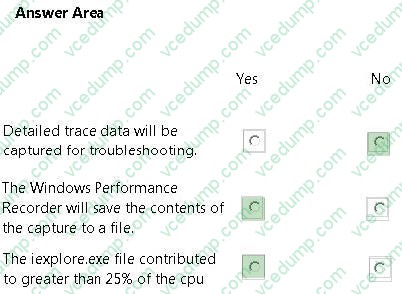
You receive a service desk ticket that requires you to resolve a computer's performance problems. The ticket included the following description of a performance problem:
"My computer slows down throughout the day. It does not occur consistently, but it does happen every day. The computer becomes slow. I have to reboot the computer before I can start working again, sometimes powering off by hand."
You verify that there are no driver issues in device manager, or unauthorized software on the computer. You also verify that there is not defragmentation on the hard drive as well.
You install the Windows Performance Toolkit (WPT) and configure Windows Performance
Recorder (WPR) as shown in the following exhibit
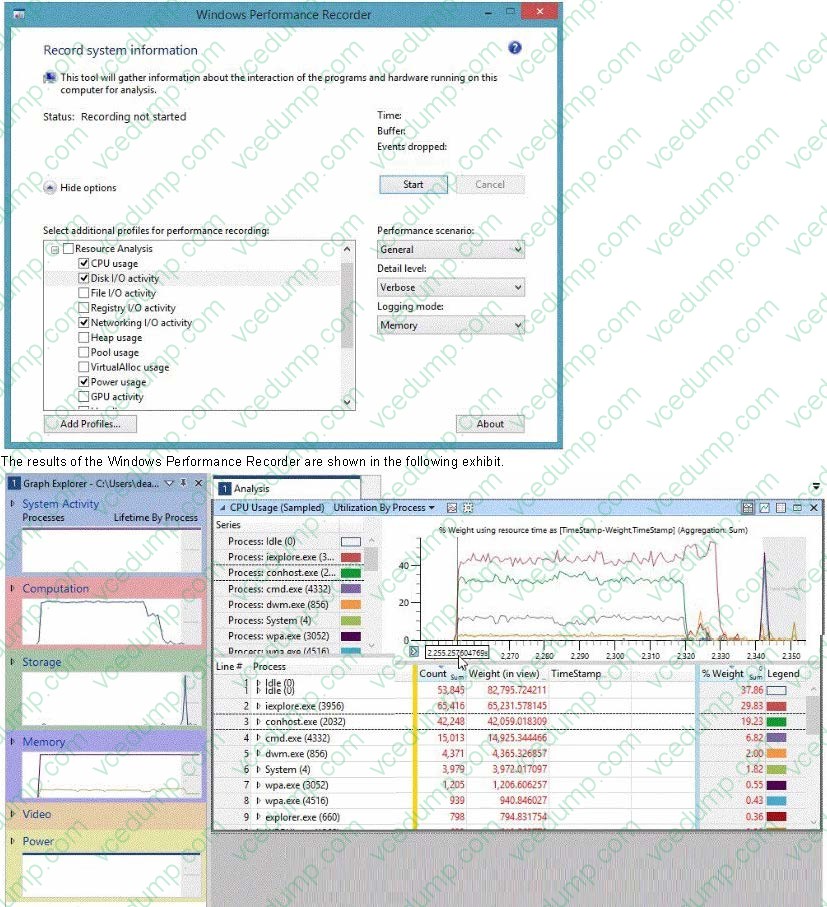
The results of the Windows Performance Recorder are shown in the following exhibit.
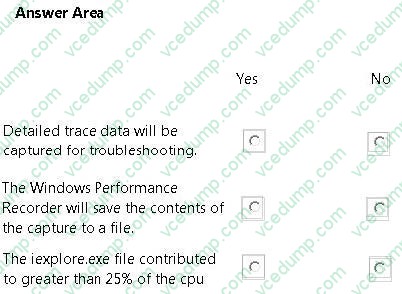
What should you conclude, based on these exhibits? (For each of the following statements, select Yes if the statement is true. Select No if the statement is not true. Each correct selection is worth one point.)
Hot Area:
-
Question 160:
You administer laptops that run Windows 8 Enterprise and are members of an Active Directory domain.
Users travel frequently and access domain resources from inside client networks or from their home network. You want to manage the laptops when they are connected to the company network from the external networks.
You need to ensure that the laptops can be managed and maintained while users are not logged on to the computers.
Which of the following should you recommend?
A. Remote Assistance
B. Windows Remote Management (WinRM)
C. DirectAccess
D. Remote Desktop
Related Exams:
-
62-193
Technology Literacy for Educators -
70-243
Administering and Deploying System Center 2012 Configuration Manager -
70-355
Universal Windows Platform – App Data, Services, and Coding Patterns -
77-420
Excel 2013 -
77-427
Excel 2013 Expert Part One -
77-725
Word 2016 Core Document Creation, Collaboration and Communication -
77-726
Word 2016 Expert Creating Documents for Effective Communication -
77-727
Excel 2016 Core Data Analysis, Manipulation, and Presentation -
77-728
Excel 2016 Expert: Interpreting Data for Insights -
77-731
Outlook 2016 Core Communication, Collaboration and Email Skills
Tips on How to Prepare for the Exams
Nowadays, the certification exams become more and more important and required by more and more enterprises when applying for a job. But how to prepare for the exam effectively? How to prepare for the exam in a short time with less efforts? How to get a ideal result and how to find the most reliable resources? Here on Vcedump.com, you will find all the answers. Vcedump.com provide not only Microsoft exam questions, answers and explanations but also complete assistance on your exam preparation and certification application. If you are confused on your 70-688 exam preparations and Microsoft certification application, do not hesitate to visit our Vcedump.com to find your solutions here.