70-688 Exam Details
-
Exam Code
:70-688 -
Exam Name
:Supporting Windows 8.1 -
Certification
:Microsoft Certifications -
Vendor
:Microsoft -
Total Questions
:224 Q&As -
Last Updated
:Apr 07, 2020
Microsoft 70-688 Online Questions & Answers
-
Question 141:
You support desktop computers and tablets that run Windows 8 Enterprise. All of the computers are able to connect to your company network from the Internet by using DirectAccess.
Your company wants to deploy a new application. The deployment solution must meet the following requirements:
The application does not utilize the company server infrastructure. The application is isolated from other applications. The application uses the least amount of disk space possible on a solid-state drive (SSD) on the tablets.
The application utilizes the least amount of network bandwidth. You need to deploy the new application to the tablets.
What should you do?
A. Deploy the application as an Application Virtualization (App-V) package. Install the App- V 4.6 client on the tablets.
B. Deploy the application as a published application on the Remote Desktop server. Create a Remote Desktop connection on the tablets.
C. Install the application on a local drive on the tablets.
D. Install the application in a Windows To Go workspace.
E. Install Hyper-V on tablets. Install the application on a virtual machine.
F. Publish the application to Windows Store.
G. Install the application within a separate Windows 8 installation in a virtual hard disk (VHD) file. Configure the tablets with dual boot.
H. Install the application within a separate Windows 8 installation in a VHDX file. Configure tablets with dual boot. -
Question 142:
You have a Windows 8.1 Pro computer. Your computer has Office 365 and Office Professional Plus. You install updates to Office 365.
When you use these applications, you are prompted to re-enter your Office 365 subscription password.
You need to ensure that you can access Office 365 services without needing to re-enter your password.
What should you do?
A. Run the Office 365 desktop setup from the Office 365 portal.
B. Configure the computer as a Trusted PC.
C. Use Microsoft Online Services Sign-In Assistant to log on to Office 365.
D. Log on to your computer by using the email address that you use for your subscription to Office 365. -
Question 143:
Your network contains a web server named testweb.contoso.com that is used for testing.
You have a Windows 8.1 Pro laptop.
After a network administrator changes the IP address of the web server, you discover that you can no longer connect to testweb.contoso.com.
You need to resolve immediately the issue that prevents you from connecting to the server.
Which command line tool should you run?
A. Clear-DnsClientCache
B. Set-DnsClientGlobalSetting
C. Set-DnsClient
D. Nbtstat -
Question 144:
Your network contains a Microsoft Exchange Server 2013 organization.
You have an Exchange ActiveSync policy that has the following settings configured:
AllowRemoteDesktop AllowInternetSharing RequireDeviceEncryption MinDevicePasswordLength AllowSimpleDevicePassword You need to identify which settings are applied to Windows RT 8.1 devices.
Which three settings should you identify? (Each correct answer presents part of the solution. Choose three.)
A. AllowInternetSharing
B. MinDevicePasswordLength
C. RequireDeviceEncryption
D. AllowRemoteDesktop
E. AllowSimpleDevicePassword -
Question 145:
You support computers that run Windows 8 Enterprise.
Your company has started testing Application Virtualization (App-V) applications on several laptops. You discover that the App-V applications are available to users even when the laptops are offline.
You need to ensure that the App-V applications are available to users only when they are connected to the company network.
What should you do?
A. Configure mandatory profiles for laptop users.
B. Reset the App-V client FileSystem cache.
C. Disable the Disconnected operation mode.
D. Change user permissions to the App-V applications. -
Question 146:
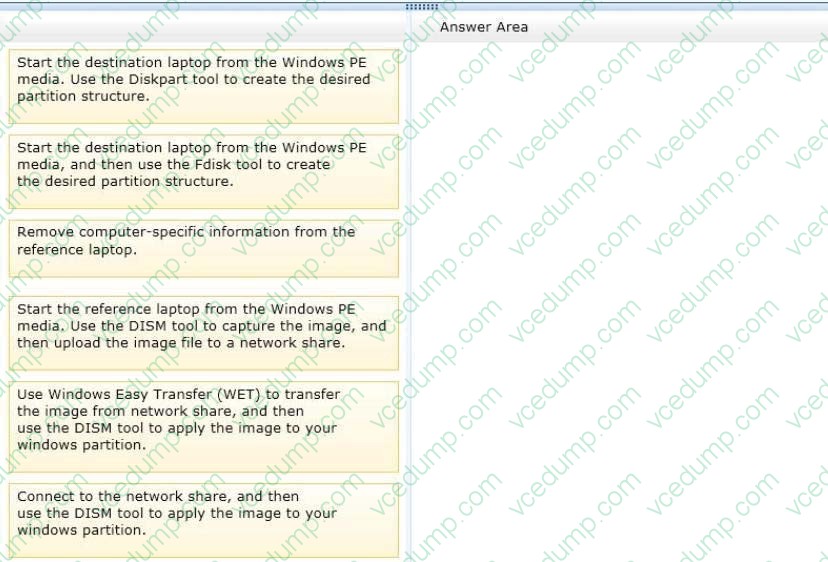
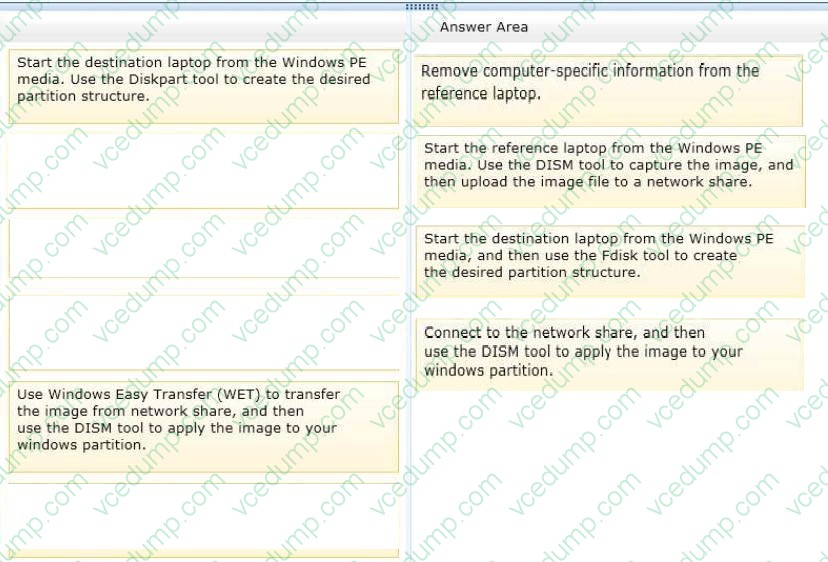
Your company recently purchased 25 new laptops. All 25 laptops have the same hardware configuration and do not have any operating system installed.
You have been asked to deploy Windows 8 on these laptops. You have installed and configured Windows 8 on a reference laptop.
You need to create an image and deploy it to the 25 new laptops.
Which four actions should you perform in sequence? (To answer, move the appropriate actions from the list of actions to the answer area and arrange them in the correct order.)
Select and Place:
-
Question 147:
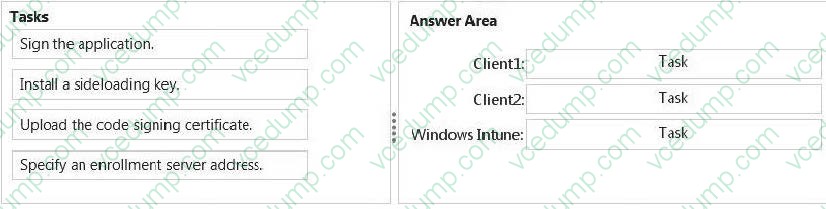
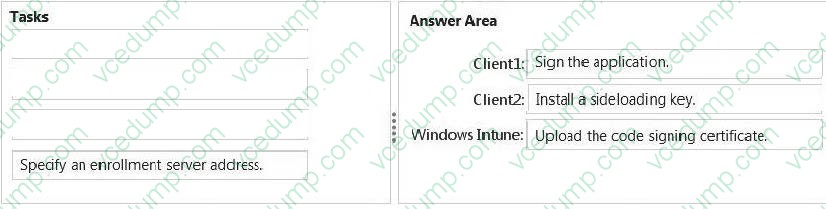
Your network contains Windows RT client computers. All certificates are issued by an internal certification authority (CA). All of the computers are managed by using Windows Intune.
You have a Windows 8.1 client computer named Clientl and a Windows RT client computer named Client2.
On Clientl, you develop a Windows Store app named Appl.
You need to recommend the tasks that must be completed to ensure that Client2 can install Appl.
What should you recommend? (To answer, drag the appropriate tasks to the correct location or locations. Each task may be used once, more than once, or not at all. You may need to drag the split bar between panes or scroll to view content.)
Select and Place:
-
Question 148:
Note: This question is part of a series of questions that use the same or similar answer choices. An answer choice may be correct for more than one question in the series. Each question is independent of the other questions in this series. Information and details provided in a question apply only to that question. You support Windows 8.1 Enterprise desktop computers and tablets. All of the computers are able to connect to your company network from the Internet by using DirectAccess.
Your company wants to deploy a new application to the tablets. The deployment solution must meet the following requirements:
The application is not accessible if a user is working offline. The application is stored on an internal solid-state drive (SSD) on the tablets. The application is isolated from other applications. The application uses the least amount of disk space. You need to deploy the new application to the tablets.
What should you do?
A. Deploy the application as an Application Virtualization (App-V) package. Install the App- V 4.6 client on the tablets.
B. Deploy the application as a published application on the Remote Desktop server. Create a Remote Desktop connection on the tablets.
C. Install the application on a local drive on the tablets.
D. Install the application in a Windows To Go workspace.
E. Install Hyper-V on tablets. Install the application on a virtual machine.
F. Publish the application to Windows Store.
G. Install the application within a separate Windows 8.1 installation in a virtual hard disk (VHD) file. Configure the tablets with dual boot.
H. Install the application within a separate Windows 8.1 installation in a VHDX file. Configure tablets with dual boot. -
Question 149:
You support laptops that run Windows 8 Enterprise. Microsoft BitLocker Administration and Monitoring (MBAM) are deployed on your network on a server named SERVER1.
Company policy requires that laptops with MBAM client installed prompt users to enable BitLocker within 2 hours of being started.
You need to make changes to the Configure MBAM Services Group Policy settings.
Which two actions should you perform? (Each correct answer presents part of the solution.
Choose two.)
A. Set Enter status reporting frequency (in minutes) to 120.
B. Set Enter client checking status frequency (in minutes) to 120.
C. Set Select Bitlocker Recovery Information to store to Recovery password and key package.
D. Set MBAM Status reporting endpoint to SERVER1
E. Set Select Bitlocker Recovery Information to store to Recovery password only.
F. Set MBAM Recovery and Hardware service endpoint to SERVER1. -
Question 150:
Your company network supports users at a main office and at a branch office. All of the computers in the branch office run Windows 8.1 Enterprise and are part of an Active Directory domain. There are no plans to deploy any servers in the
branch office.
Some branch office users report that it takes a long time to open documents from a file server that is located in the main office.
You need to enable BranchCache on all branch office computers.
What should you do?
A. In the Group Policy editor, enable BranchCache in Distributed Cache mode on the branch computers.
B. From PowerShell, run the set-BCCache cmdlet on the branch computers.
C. In the Group Policy editor, enable BranchCache in Hosted Cache mode on the branch computers.
D. From PowerShell, run the enable-BCHostedClients cmdlet on the computers.
Related Exams:
-
62-193
Technology Literacy for Educators -
70-243
Administering and Deploying System Center 2012 Configuration Manager -
70-355
Universal Windows Platform – App Data, Services, and Coding Patterns -
77-420
Excel 2013 -
77-427
Excel 2013 Expert Part One -
77-725
Word 2016 Core Document Creation, Collaboration and Communication -
77-726
Word 2016 Expert Creating Documents for Effective Communication -
77-727
Excel 2016 Core Data Analysis, Manipulation, and Presentation -
77-728
Excel 2016 Expert: Interpreting Data for Insights -
77-731
Outlook 2016 Core Communication, Collaboration and Email Skills
Tips on How to Prepare for the Exams
Nowadays, the certification exams become more and more important and required by more and more enterprises when applying for a job. But how to prepare for the exam effectively? How to prepare for the exam in a short time with less efforts? How to get a ideal result and how to find the most reliable resources? Here on Vcedump.com, you will find all the answers. Vcedump.com provide not only Microsoft exam questions, answers and explanations but also complete assistance on your exam preparation and certification application. If you are confused on your 70-688 exam preparations and Microsoft certification application, do not hesitate to visit our Vcedump.com to find your solutions here.